Black Friday: up to 50% off ZenABM 💥Get up to 50% off ZenABM with our massive BlackFriday sale! 💥 - only 24-30 November!Get the deal12 Days of ABM Christmas · Report on your 2026 LinkedIn ABM & plan 2027 · Free webinars, 26 Nov – 9 DecSave your seat


Emilia Korczynska is Head of Marketing and co-founder at ZenABM. Before that she was VP of Marketing at Userpilot for nearly 7 years, where she ran a large ABM program primarily on LinkedIn ads.

You can manage multiple LinkedIn ad accounts through Business Manager and Campaign Manager, then add an API or an agency MCP connection if you need a cross-client view.
I think access is the easy half. The harder part is comparing accounts without copying reports, or letting an AI make changes to the wrong client.
The right setup should let you give people appropriate access, review clients consistently and approve changes before they go live.
Here is how the options differ. They can work together: Business Manager handles access, while an API or MCP connection adds a reporting layer.
Way | What you get | Setup time | Cost | Built for |
|---|---|---|---|---|
Business Manager | Shared access and role management | Depends on access arrangements | Free | Organizing ownership and access |
Campaign Manager | Individual account reporting and exports | Depends on the number of accounts | No additional reporting tool | A small portfolio and manual reviews |
LinkedIn Ads API | A reporting layer your team builds | Depends on the build | Depends on development and maintenance | Teams with engineering resources |
ZenABM Agency MCP | One connection to client workspaces, with each call scoped to an organization | A few minutes to connect | MCP starts on Growth, $159/month billed annually | Agencies that want reports and reviewable changes in an AI client |
The access layer and reporting layer solve different parts of the job:

/linkedin-abm-audit reviews recent ad performance.Review Client Accounts From One Connection
See how the agency MCP connection scopes reports and changes to each client workspace.

You need an access plan and a clear idea of what you want to review across accounts. I would settle ownership first, because it affects who needs to grant access and who stays responsible when the agency relationship ends.
That checklist gives you a way to discuss access before anyone connects a client account:

Business Manager is the place to organize client account access before you think about cross-client reporting. I would treat it as the foundation, then choose a separate reporting process if switching accounts becomes a problem.
For example, an agency can agree that the client owns its account while agency staff receive the access needed to run ads. That makes the handoff clearer than building the relationship around a shared password.
Here are the steps for setting up client access in Business Manager:

You get a way to organize who can access the accounts you manage. That solves a real operational problem: the team can work under its own logins while the client and agency retain an agreed ownership arrangement.
Business Manager does not give you the cross-client review described below. Once access is sorted, you still need a way to collect and compare performance from each account.
Campaign Manager is enough when you can comfortably review each account separately. I would start there if the number of clients is small and a manual report does not take time away from managing the ads.
You get the detail from each account without building another connection. That can be a perfectly workable setup when a person can open each account, understand its goals and produce the report without a long handoff.
Each client's review starts in its own Campaign Manager account, here with one campaign's spend, reach and impressions:

The work grows with every account because someone must collect and check each report. Philip Ilic described a weekly reporting process that took 2 team members 4 hours every Friday. His connector later reduced a report to about 30 seconds.
That result makes the time cost concrete, but it does not mean every agency will save the same amount. If manual reporting is manageable for you, there is no need to build a data pipeline just because you have more than one account.
A custom API build can bring account data into a shared report, but someone has to make that data trustworthy. I would choose this route when you have engineering capacity and a reason to maintain your own reporting layer.
You get a view shaped around your agency’s reporting needs. For instance, you can decide that each client has the same spend column while keeping demo leads separate from content leads.
These are the six jobs the build has to handle before anyone can trust the report:

The useful part is that definition work. A shared report only helps if the person reading it knows which results are comparable.
The data layer can take more work than the AI interface. Philip Ilic’s account of working with LinkedIn’s APIs points to some problems a builder must handle. These are currency units, inconsistent treatment of engagement and leads, and format differences.
Those problems do not disappear when you add an AI. If the data is wrong or a metric is mislabeled, the explanation can sound convincing while leading you to the wrong decision.
An MCP connection can put client data in an AI chat without requiring your team to build the whole reporting layer. With the Agency MCP server, each call names the organization it is working on, and the response identifies the organization that served it.
Here is an example of Claude using the connection to create ads in a LinkedIn account:
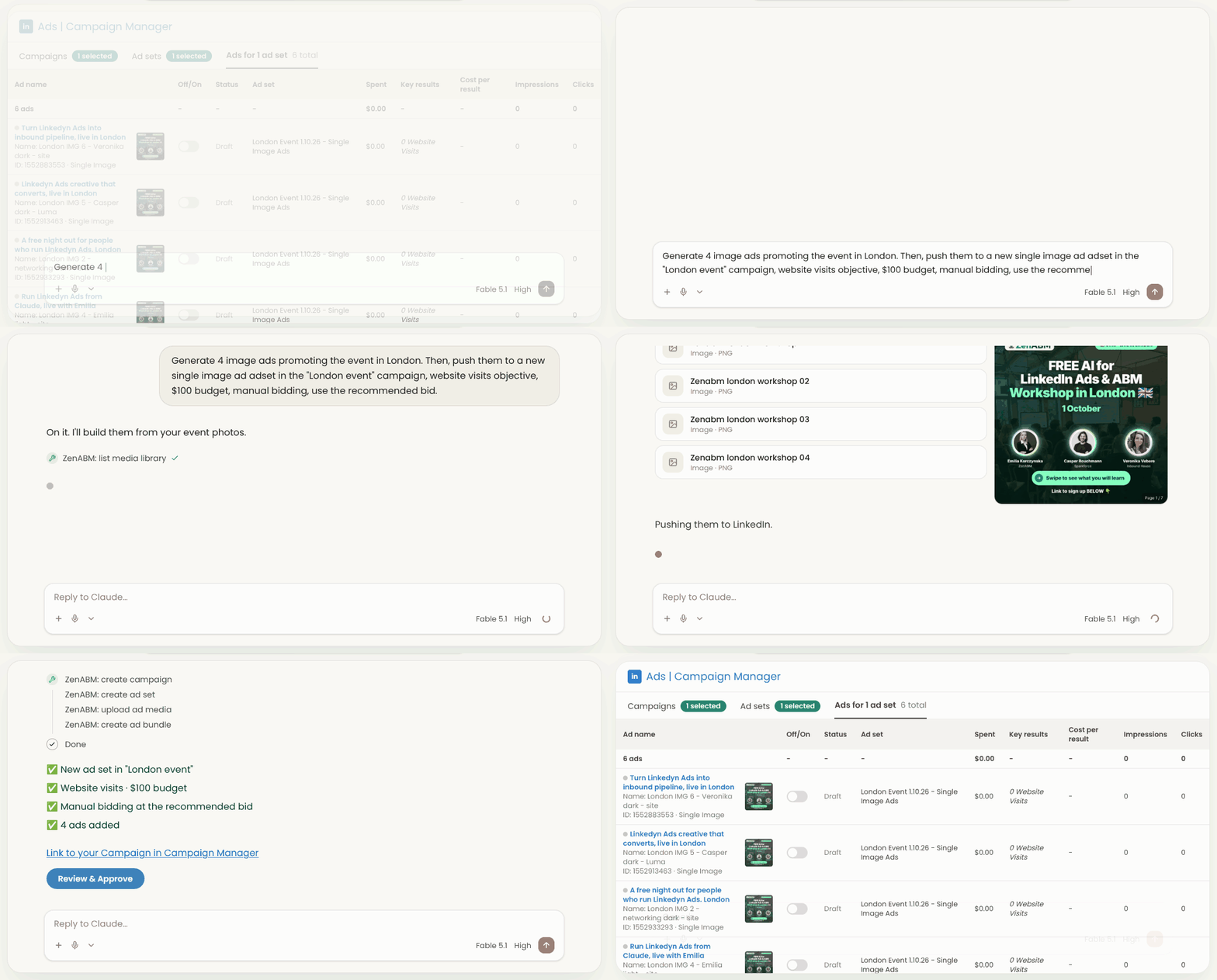
If you use another supported AI client, follow the MCP setup instructions for that client rather than assuming Claude’s menu names apply.
One connection can reach the client workspaces an agency manages. Each request is scoped to an organization, so a report for one client does not pull another client’s rows into that call. Clients can also log into their own workspace dashboards and see their own data.
The server gives you access to 129 tools and 45 expert skills. A skill is a packaged workflow: for example, an agency can run /weekly-digest for each client on Monday, /linkedin-abm-report at month end, or /linkedin-abm-audit before a quarterly review.
The connection can also make account changes. Of the 129 tools, 36 can change the ad account and are flagged so the AI client asks for confirmation first.
The connection needs the Growth plan or above, and the quality of a review depends on the data available in each workspace. If one client has no CRM connected, keep that gap visible rather than comparing its pipeline results with a client whose CRM data is available.
It also does not replace your judgment. I would check the client name and the underlying numbers before approving any recommendation, especially when the same chat has reviewed several organizations.
A useful cross-account review asks the same questions of each client, then interprets the answers against that client’s goal. I would begin with delivery and cost, then check audience fit and whether the ads are wearing out.
The first distinction is between LinkedIn’s reported CPC and the cost per landing page click. LinkedIn can count interactions that do not send someone to your site, so those figures answer different questions.
Cost per landing page click = ad spend ÷ landing page clicks
Philip Ilic found an example where LinkedIn CPC was $1.30, while the cost per landing page click was $5.40. The cheaper number would make the account look stronger if the client’s goal was to bring people to a landing page.
Here are the questions I would line up in a review. Run them for each client first, then compare the results with the client’s objectives beside them.
Metric or check | What to ask | Decision it drives | Skill that can help |
|---|---|---|---|
Spend and pacing | How much has each client spent against budget? | Investigate accounts spending ahead of or behind plan. |
|
Landing page click cost | What did each client spend per landing page click, by format? | Review the formats and ads bringing visitors at an acceptable cost. |
|
Lead type | Which results are demo leads and which are content leads? | Avoid treating different conversion goals as equivalent. | |
Audience fit | Which job titles received impressions and engaged? | Review targeting and exclusions where spend reaches the wrong roles. |
|
Ad fatigue | Which ads show falling engagement over consecutive weeks? | Review whether to pause or refresh them. |
|
Account reach | Which target companies have seen ads, and which have engaged? | Investigate accounts receiving exposure without engagement. |
A format comparison helps you avoid treating all reported clicks as the same action. This Claude view compares ad formats using landing page metrics:
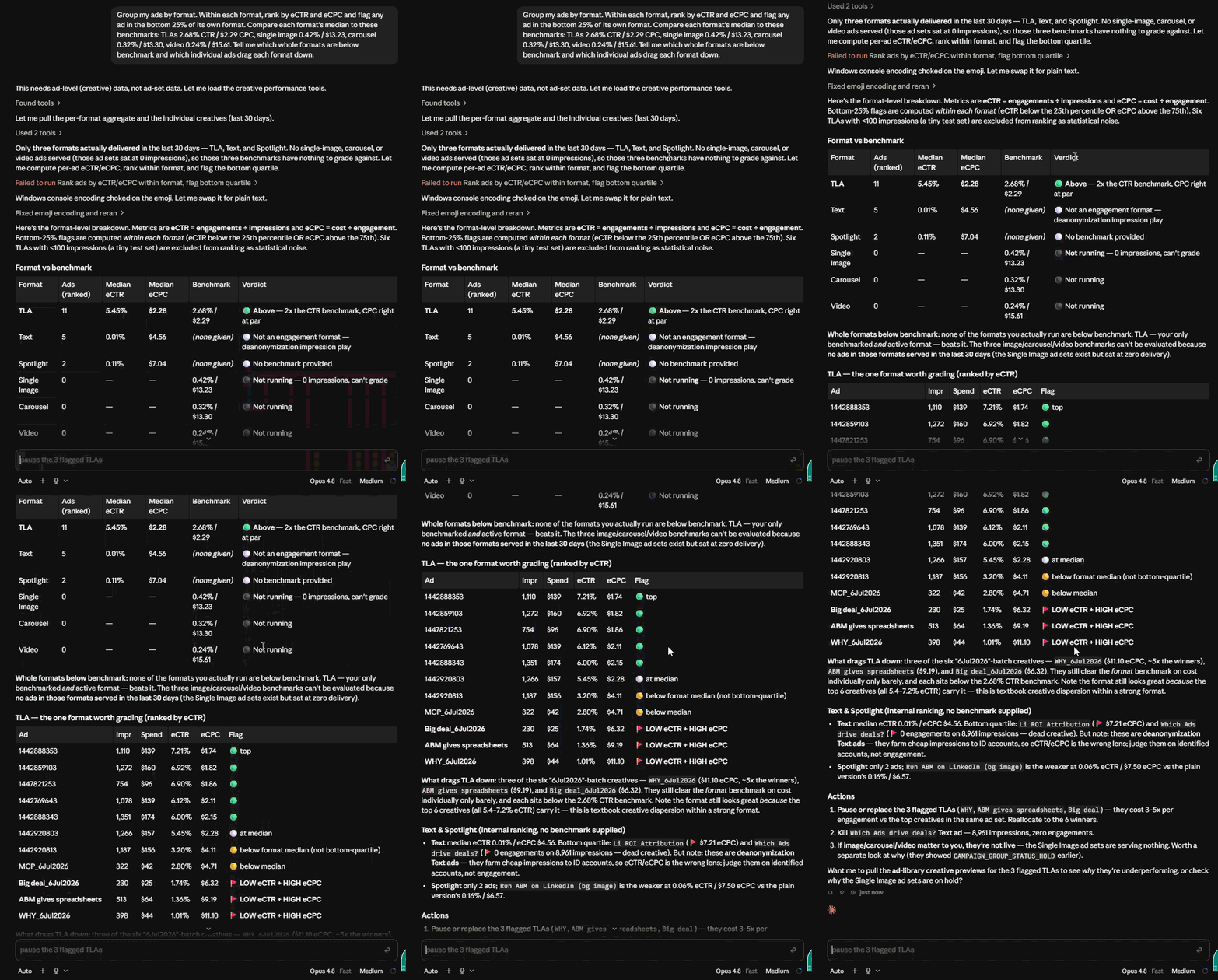
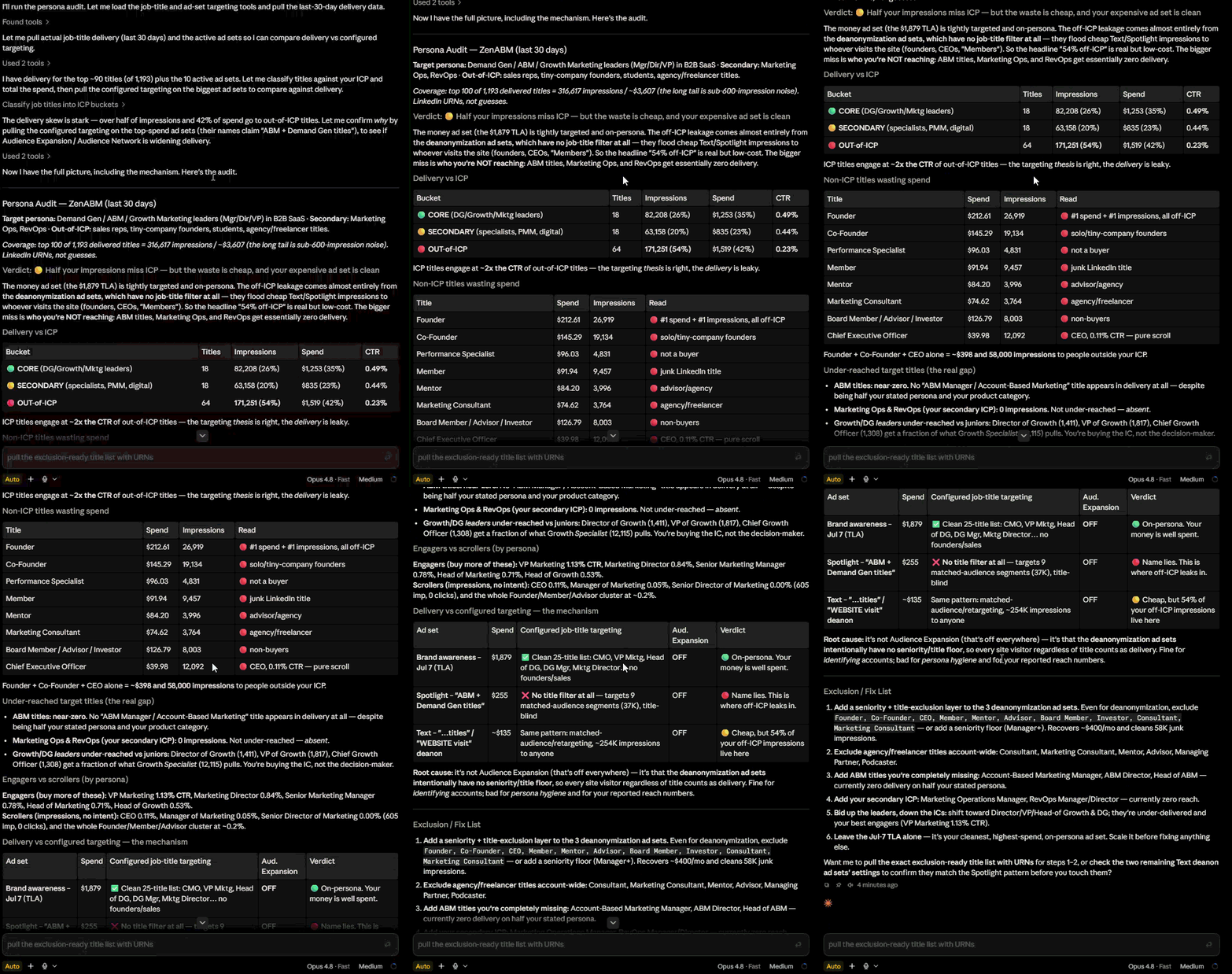
For audience fit, Philip Ilic reported 15% to 35% of budget going to demographics outside the ideal customer profile across more than 100 accounts. That is a reason to inspect job titles for each client, rather than assuming delivery followed the targeting brief.
A persona audit can group the job titles reached so you can check the fit against that brief:
Benchmarks need context too. The 2026 LinkedIn ABM Benchmarks Report studied 211 companies and reported median CTR of 0.69%, median CPC of $11.04 and median CPM of $78.30. Those are useful reference points, but a generic CTR does not tell you whether a particular format produced landing page visits or the right leads.
Pulling these checks by hand means opening each client account and comparing reports separately. ZenABM’s /linkedin-abm-audit skill grades the account and returns a fix list ordered by dollars at stake.
I would start with a prompt that asks for the organization list and a consistent table. Keep it read only until you have checked the output:
List the client organizations available to this connection. For each organization, review LinkedIn ad spend and budget pacing for the same reporting period, then check for ads with falling engagement. Return one table with the organization name, reporting period, spend, pacing, ads to review and any missing data. Do not change any account settings. Tell me which organization each result came from.
The table should have one row per organization, with missing data called out instead of guessed. If a result looks odd, ask for the underlying account or ad before deciding what to do.
Read more: How a LinkedIn Ads MCP server analyzes campaign data
Choose the setup by the work you need to remove, not by the number of connections you can add. For a small portfolio, I would keep the process simple until the reporting effort becomes a problem.
These are decision rules, not account-count limits. A small agency with complex reporting may need a shared layer earlier than a larger team with simple client reports.
Here are the four setups and the work each one removes:

Keep a person responsible for every change, and make the client and proposed setting visible before approval. I would run the review as a read-only exercise first, then approve individual changes only after checking them.
Anthony Blatner describes a recommendation-first approach with a reviewable log and attention to API limits. I agree with the principle: the person responsible for the client should be able to see the proposed change before it happens.
Here is that approval flow as five checks, from naming the organization to recording the result:

The most expensive mistakes come from treating unlike data as if it means the same thing. I would check these before sharing a cross-client report or acting on an AI recommendation.
Here are the six mistakes and what to do instead:
Mistake | Do this instead |
|---|---|
Comparing reported CPC with landing page click cost | Use cost per landing page click when the goal is site traffic, and label it |
One generic benchmark for every format | Compare the same metric within the same format |
Mixing content leads with demo requests | Report the lead types separately |
Expecting AI to fix a weak data layer | Check units, account names and definitions against the source |
Treating missing CRM data as zero pipeline | Mark the gap in that client's report |
Skipping the human check | Check the organization, goal and proposed setting before approving |
A low reported CPC can include interactions that never reached the landing page. Use the landing page click calculation above when the client’s goal is site traffic, and label the metric clearly in the report.
A Thought Leader Ad and a single image ad can produce different kinds of interactions. Compare the same metric and format where possible, then judge the result against the client’s goal rather than a generic CTR alone.
A content download and a demo request signal different actions. Keep the lead types separate in the report so a client can see what the campaign actually generated.
An AI can explain the data it receives, but it cannot make an incorrectly defined metric reliable by sounding confident. Check units, account names and definitions against the source before using the output for a decision.
An account without connected CRM data does not give you the same pipeline view as one with a connection. Mark the gap in the client’s report and avoid presenting missing information as a result.
A recommendation can be sensible for one client and wrong for another. Check the organization, goal and proposed setting before approval, particularly after a review that spans several workspaces.
Review LinkedIn Client Accounts With ZenABM
Connect your workspaces and test the reporting workflow before deciding how your team will use it.

We built ZenABM to give agencies a way to review LinkedIn data and act on it without treating each client as a separate reporting project.
/weekly-digest, /linkedin-abm-report and /linkedin-abm-audit package recurring reviews into commands. The team can still inspect the results before acting.Changes still go through a person. Here is Zena proposing a bid change, with LinkedIn's suggested bid, the current bid and the new bid you confirm:

My verdict: keep client access organized first, then add a reporting layer only when it solves work your team actually has. The best cross-client view is the one your team can trust enough to make a decision from.
Yes. Arrange access through Business Manager and have team members use their own logins. Agree with each client on who owns the ad account and who can make changes before adding your team. I would also keep a record of the people who need access so it can be reviewed when someone changes roles or a client relationship ends.
Campaign Manager lets you review accounts individually, but the process described here requires you to collect and combine each client’s results for a shared report. That can be enough for a small portfolio. If the exports take too much time, an API build or an MCP connection can provide a layer for cross-client analysis.
Yes, with a connection that gives Claude access to the relevant account data and actions. ZenABM’s Agency MCP server reaches client workspaces through one connection and scopes each call to a named organization. I would ask Claude to list the available organizations first, then review each client’s data before requesting changes.
It can be used with human approval, but the team still needs to check each proposed change. ZenABM flags tools that can change the ad account so the AI client asks for confirmation. Before approving, check the organization, the ad set and the current and proposed values. You can also use the connection for recommendations without asking it to make changes.
The MCP server is available from the Growth plan. Growth costs $159 per month when billed annually, according to ZenABM’s pricing. Check the workspace and plan arrangements for your agency and clients before setting up the connection, since the agency workflow depends on the workspaces you need to reach.
Clients log into their own ZenABM workspace dashboards and see their own data. For the Agency MCP server, each call is scoped to one organization and the response names the organization that served it. As an agency user, you should still check the named organization before sharing a report or approving a change.
About the author

