Black Friday: up to 50% off ZenABM 💥Get up to 50% off ZenABM with our massive BlackFriday sale! 💥 - only 24-30 November!Get the deal12 Days of ABM Christmas · Report on your 2026 LinkedIn ABM & plan 2027 · Free webinars, 26 Nov – 9 DecSave your seat


Emilia Korczynska is Head of Marketing and co-founder at ZenABM. Before that she was VP of Marketing at Userpilot for nearly 7 years, where she ran a large ABM program primarily on LinkedIn ads.

A competitor LinkedIn ads tracker saves you checking the free Ad Library brand by brand, but it cannot show a competitor's spend or results. Start free, and pay only when you need alerts or a saved history. ZenABM shows which companies engage with your own LinkedIn ads, from the official LinkedIn Ads API, without form fills.
I would look at my own winning ads before studying anyone else's. A company 10 times your size can afford to run ads that do very little, so its budget tells you nothing about whether its messaging works.
Once you know your own baseline, competitor research shows you which claims and offers your buyers already see, which makes it a useful part of planning ABM ads on LinkedIn.
How I ranked them. I looked at LinkedIn coverage, alerts, saved history, price and what you can do with the ads after you collect them. We build ZenABM, but it is not a competitor ad tracker, so I kept it out of the rankings and explain where it fits further down.
Here is what each option is suited to and what it costs:
Tool | Use it for | Price | Alerts | History | LinkedIn coverage |
|---|---|---|---|---|---|
LinkedIn Ad Library | Free manual checks | Free | No | No saved cross-competitor history | Public ads, one advertiser at a time |
Foreplay | Saving ads and studying longevity | $59/month ($49 billed annually) | No new-ad alerts for LinkedIn | Saved ads and live duration | Ads saved by hand with a browser extension |
Motion | Creative analytics on your own ads | $999/month Starter (up to $50k monthly ad spend) | Not published | Not published | Your own LinkedIn ads; competitor tracking listed as a feature |
Apify actors | Bulk collection of public ads | About $0.35 to $5 per 1,000 ads, depending on the actor | Depends on the actor | Depends on what you save | Public Ad Library data, by advertiser or keyword |
KeepTabz | Alerts on competitor ads and other changes | From $74.99/month | Yes, Slack, Teams, Discord or email | Not published | LinkedIn ad creative and campaign launches |
I judged every option on the same criteria rather than on the length of its feature list. The four steps for choosing a tracker run from the free library to checking your own ads:

Track the companies engaging with your own LinkedIn ads
Competitor trackers show their ads. ZenABM shows which companies engage with yours, by campaign.

A tracker can show you public ads and make them easier to collect. It cannot show you a competitor's private campaign results, and I think this is the part most roundups skip.
You can see the ad, the advertiser and the payer, and for most ads that is the whole picture. It is enough to see how a company describes a problem or presents an offer, even though you cannot tell how buyers responded.
A search by brand name returns the ad cards for that advertiser.

For ads targeted to the EU, LinkedIn's Ad Library help page confirms the library adds run dates, impression ranges and targeting details. Those give you more context than the ad alone, but an impression range still does not tell you whether an ad produced a deal.
Ads stay in the library for about a year after their last impression. A thin week from a US-only competitor can mean thin data, not a quiet competitor, so do not read silence as a pause.
You cannot see a competitor's spend, clicks, CTR or conversions in the library, and no tracker can recover them, because LinkedIn does not publish them anywhere. Seeing an ad tells you nothing about whether it made money. The easiest way to remember the split is to separate the public ad from its private performance:

Public access has another consequence. Ali Yildirim has warned that people find incentive ads in the library, click the preview and convert just to claim gift cards or AirPods. If you run incentive campaigns, keep reward mentions out of the ad copy and put them in the creative image only. Also flag Paid Social leads in HubSpot whose first-page URL contains the library preview signifier trk=ad_library_ad_preview_content_image.
Scraping the public library also sits against LinkedIn's terms of service. Check the terms and your own company policy before you set up a scraper. With those limits in mind, the free option is where I would look first.
The LinkedIn Ad Library is where I start every manual competitor check, and it is the baseline every paid tracker builds on. It is the best free source and it has an API, but it shows one advertiser at a time, with no alerts and no saved history across competitors. Use it to see the bar, not to set it.
You look up a competitor by name and see its public ads.

Search by advertiser name to see what a competitor runs, and search your own brand name in the keyword field to see ads running against you. If many advertisers show up for your own name, expect your CPCs to climb, because more competitors in the auction make clicks more expensive.
Then narrow the date range. A full-year or half-year view hides what a competitor is doing now, and a tight window can reveal a shift to one-to-few ABM or a new run of customer logos. Those logos often never appear on the competitor's website, which makes them a ready-made list of accounts for your own conquest ads.
The filter dialog is where you set country and dates.

For EU-targeted ads you can also filter by impression range. Kirill Vdov's take is blunt: "Ad library is cluttered with low-impression ads. So they likely didn't work, and you shouldn't use them for inspiration." I treat that as a way to shorten the list of ads to inspect, not as a verdict on performance. The filter only works in the EU for now.
I also start with my own ads before I study anyone else's. I exported our 2,828 image ads as a CSV, had Claude Code download them through the library detail URL pattern (linkedin.com/ad-library/detail/<Ad ID>), then sorted them by CTR band. That told me more about what works with our buyers than any competitor screenshot would have.
The Ad Library is free. You still pay in staff time, because someone has to do the searching and make sense of what they find.
Choose it if you follow a small, named set of advertisers and someone owns the review. I would run it as a quarterly sweep, then move to a paid option only when your team has a specific manual task it wants to stop repeating. Skip it as your main tool if you need alerts the moment a competitor launches something.
See which companies engage with your LinkedIn ads
See account engagement and ad themes alongside your competitor research.
Foreplay suits a marketer who wants to save examples and come back to ads that have stayed visible over time. I would use that history to decide what deserves a closer look, never to declare a winner.
Foreplay lets you save ads by hand through a browser extension and shows how long an ad has been live. Patrick Cumming recommends exactly this. Use a tool like Foreplay or Motion to see which ads have run longest. His logic is that performance marketers rarely leave ineffective ads running.

The catch is that longevity is a proxy, not proof. An ABM or retargeting ad can be small and short-lived by design, and a long run can reflect a large budget rather than a good result. Patrick adds that for 99% of B2Bs a competitor's program is probably not worth emulating, so I borrow formats, never copy, and only after I know my own winners.
Foreplay's Basic plan costs $59 per month, or $49 per month billed annually, and includes the Chrome extension, which lists the LinkedIn Ad Library among its supported platforms. The Workflow plan, from $149 per month billed annually, adds round-the-clock competitor tracking, which Foreplay runs for Meta ads. Every plan starts with a 7-day trial that needs a card.
Choose Foreplay if you already have a shortlist of ads worth saving and you want to see how long they last. Skip it if you mainly want an automatic feed of new ads and do not want a manual saving step.
Motion is creative analytics for your own ad accounts, with reports for Meta, TikTok, YouTube and LinkedIn ads, and it lists competitor ad tracking among its features. It suits a team that already analyzes its own creatives and wants competitor examples in the same place. For competitors' LinkedIn ads, I would still check the Ad Library, because it is the official record.
The useful output is not a folder of screenshots but a view of the proof, tone and offers that repeat across your category, which is the grid method Justin Rowe describes. For LinkedIn, Motion's strength is analyzing your own ads, so pair it with the library when you study competitors.

Saved examples can also feed your creative work. Tim Davidson describes using Canva's magic layers to break a competitor ad into layers and rebuild it in your own brand, copy and concept. I would rebuild the structure only, never the message.
Motion's Starter plan costs $999 per month for brands spending up to $50k a month on ads, with unlimited seats and ad accounts. The Pro and Growth plans for larger budgets are priced on request.
Choose Motion if your team already analyzes its own creatives across several channels and wants competitor examples next to them. If you only need an occasional LinkedIn check, start with the free library.
Apify actors suit a team that needs many public ads at once and has someone who can handle the setup. I would settle the terms question first, because scale does not change where the data comes from.
An actor pulls ads from the public Ad Library by advertiser or keyword, which suits list-building and bulk research. It returns what the library returns, so you get ad creative and metadata and never performance numbers.

For your own ads I prefer the export approach I described above. The detail page follows the pattern linkedin.com/ad-library/detail/<Ad ID>, so an Ad ID column in a CSV export is enough to build download links, with no scraping involved.
Apify actor prices run from about $0.35 to $5 per 1,000 ads, depending on the actor and how much detail you pull. Check the current actor price and any platform charges before you estimate a project.
Choose an actor when the advertiser set is too large to inspect by hand and you have cleared the terms question. For a short list, the setup can cost more effort than the searches it replaces.
KeepTabz tracks competitors' LinkedIn ad creative and campaign launches inside a wider competitor-intelligence tool that also follows news, reviews, pricing pages, social posts and newsletters. I would compare its alerts and archive with your manual routine before deciding whether it saves enough work.
The job to assess is whether KeepTabz surfaces new ads and keeps the examples you need. Ask the vendor how often it checks advertisers and what its history includes, because those two answers decide whether it beats a weekly sweep of the free library.

KeepTabz Lite costs $74.99 per month for 3 competitors and 1 user, with a daily digest in Slack, Teams, Discord or email. Business Pro starts at $199.99 per month for 7 competitors. Every plan has a 14-day free trial with no credit card.
Choose it if its coverage and price match the task you want to automate. Its alerts go to Slack, Teams, Discord or email. If you have not named the competitors you want to follow yet, do that before paying for any tracker.
I would give a recurring competitor sweep an owner and keep it short enough to do every week. Fifteen minutes is a good starting point for a named set, and you can adjust the time to the size of your list. This is the routine I would run with or without a paid tracker:
Justin Rowe's tone test is the one I find most useful: strip the logos off and read the first line of every ad out loud. Tone is positioning, and almost nobody audits it. He also reports that when he mapped 21 competitors, lanes his team had entered six months earlier had become 5x more crowded. That is why I would rather sweep weekly than run one big deep dive a quarter. As Justin puts it, the expensive part was never the research, it was the two years of not doing it.
Your working grid can be simple:
Message | Your ads | Competitor A | Competitor B | What to check |
|---|---|---|---|---|
Message buyers mention in calls | Mark coverage | Mark coverage | Mark coverage | Does the message address a real buying concern? |
Message based on customer proof | Mark coverage | Mark coverage | Mark coverage | What kind of proof does each advertiser use? |
Message about switching | Mark coverage | Mark coverage | Mark coverage | What do lost-deal notes say about switching? |
The grid records observations, not scores. Use the same labels for every advertiser, then investigate the gaps before you write a brief.
The grid puts category messages as rows, you and each competitor as columns, and a coverage mark in each cell:

You can also ask your LinkedIn rep for anonymized, aggregate spend and average CPC across a named set of about five competitors. Veronika uses that conversation to find out whether the space runs at $8 or $40 per click before she sets a budget. The rep's incentive is to encourage spend, so treat the numbers as context for your budget talk, never as any single competitor's results.
The subscription is only part of the decision. The hidden cost is the person hours spent reading tone and claims, so I compare the task each option automates with the time your team will still spend on the ads.
Tool | Collection method | What you can do next | Main check before choosing |
|---|---|---|---|
LinkedIn Ad Library | Manual advertiser search | Inspect public ads | Can your team sustain the checks? |
Foreplay | Save ads by hand | Revisit examples and duration | Is manual saving acceptable? |
Motion | Creative analytics plus competitor tracking | Compare examples across channels | Does the plan cover the sources you need? |
Apify actors | Bulk collection | Analyze saved public records | Is scraping acceptable under your policy? |
KeepTabz | Tracker | Review alerts and basic history | What are the current coverage limits? |
The minimum viable budget is an afternoon every quarter with free tools, plus someone who can judge what to borrow. A weekly routine earns its place when changes matter enough for the team to act on them. Start with who owns the work, then match the tool to the job:

ZenABM does not track competitors' ads. What it covers is the step after competitor research: finding out who responded when you tested an idea from it in your own LinkedIn ads.
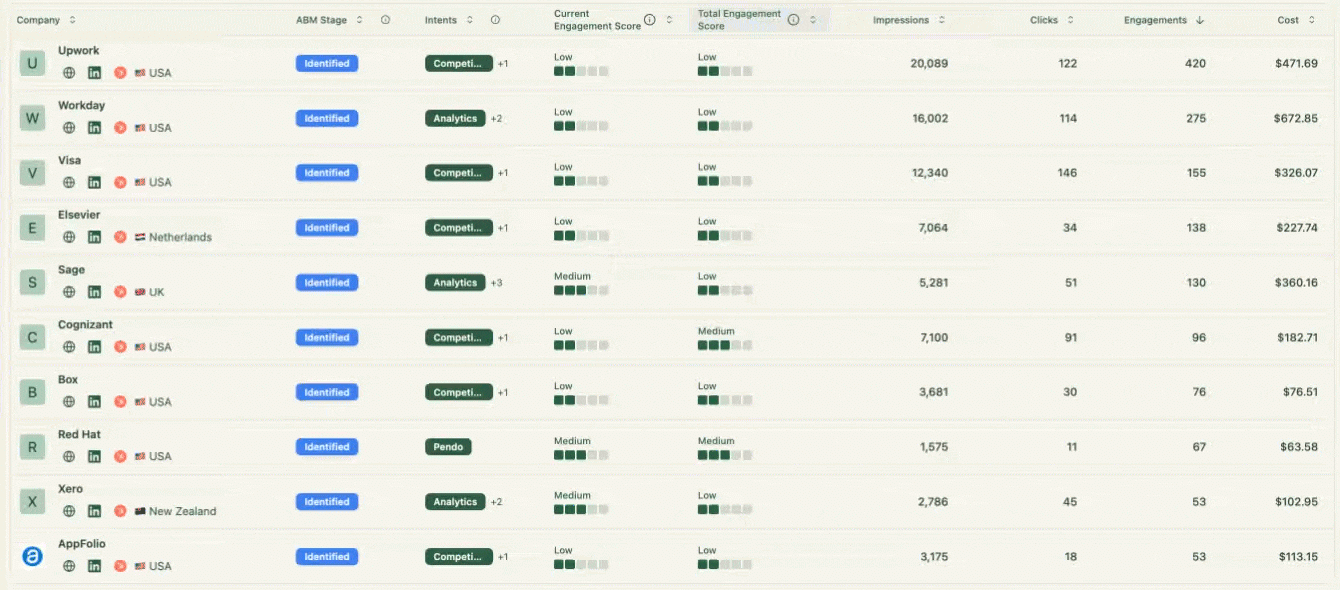
The Companies view lets you compare stages and engagement across the accounts your ads reached:
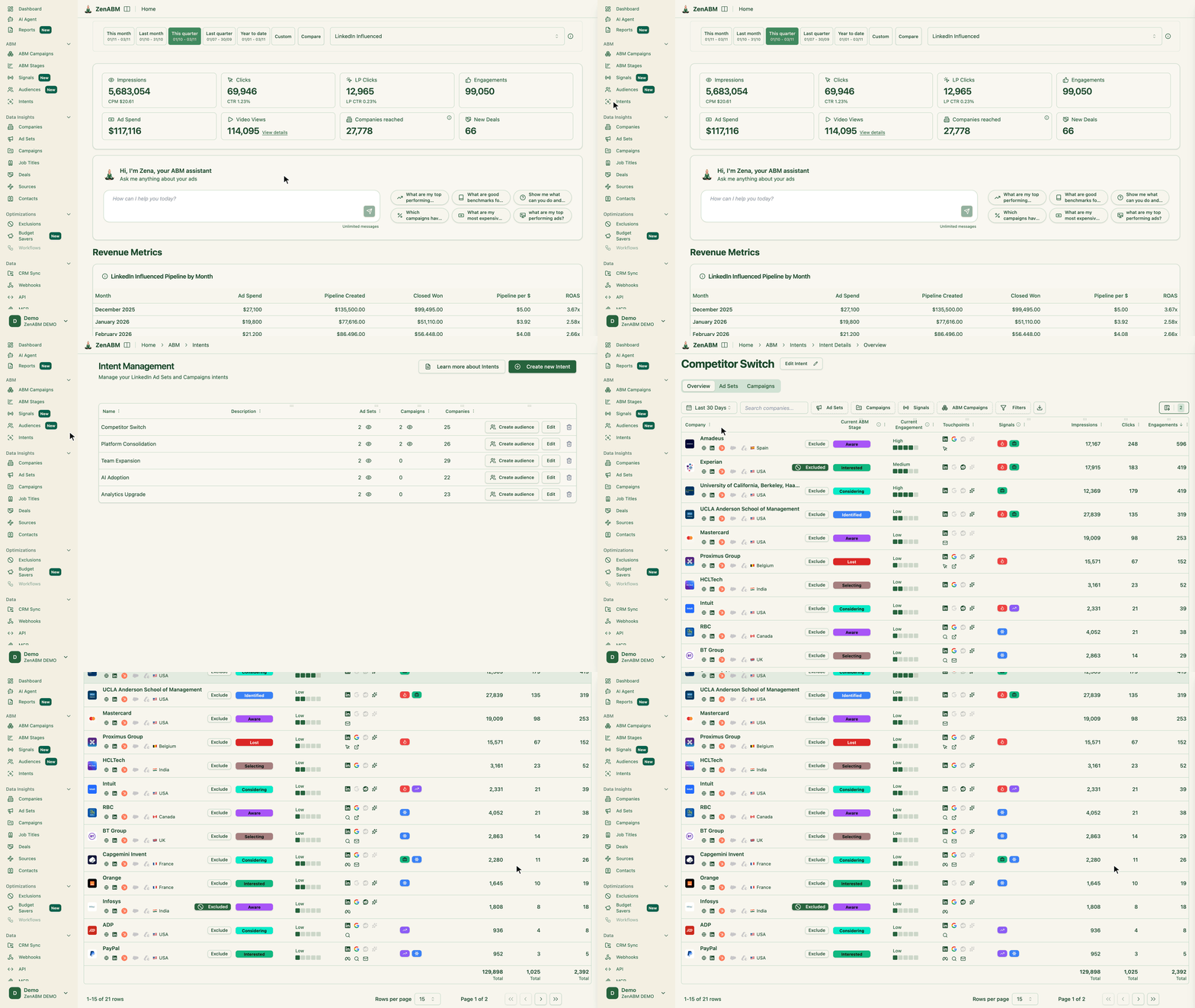
The Intents walkthrough shows how a theme attaches to companies:
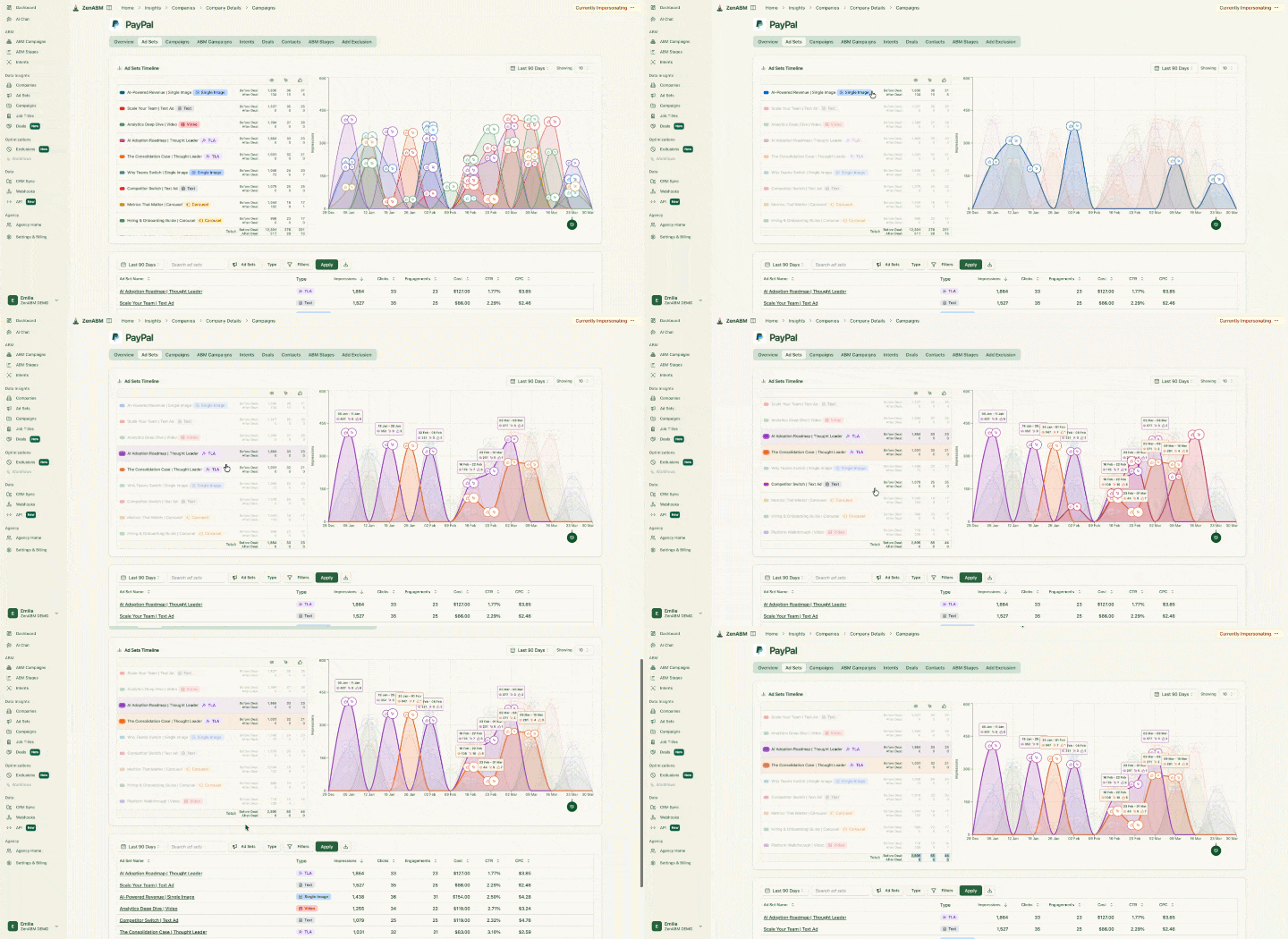
The deal view puts campaign touches on one account timeline:
See the accounts responding to your ads
Use your own company engagement data to evaluate the messages you test.

My pick depends on the work you want to stop doing, and I would not pay for a tool before I know that. Pick the tool for the job you need done, not the longest feature list, otherwise you pay for the whole gym and use the treadmill.
Your situation | My pick | Why |
|---|---|---|
Small team with a named competitor set | LinkedIn Ad Library | Free, official, and enough when paired with the weekly grid |
You want to study which formats stay live longest | Foreplay | Saved ads plus live duration, and you only study a few ads, not a weekly feed |
You want alerts when competitors launch new ads | KeepTabz | From $74.99 per month, with a daily digest of new competitor ads and other changes |
The advertiser set is too large for manual checks | Apify actors | Bulk collection, once you have cleared the terms question |
You already analyze your own creatives across channels | Motion | Creative analytics on your own ads, plus competitor ad tracking; check LinkedIn competitors in the library |
No named competitors, no owner, nobody to read tone and claims | None of them yet | The tool is not the bottleneck, so assign the work first |
Whichever you choose, pair it with the rep meeting for anonymized CPC data, then compare what you learn with buyer conversations and your own campaign data. Borrow the question an ad raises, then test your own answer.
The pick for each situation runs from the free Ad Library for a small named set to assigning the work first when nobody owns it:

Search the LinkedIn Ad Library by advertiser name to see its public ads. You can also search your own brand name to see ads running against you. The library shows the ad, the advertiser and the payer, with dates, impression ranges and targeting only for EU-targeted ads. Record the message and offer, then check what else is available for that ad.
The LinkedIn Ad Library is the best free tool, and it is the baseline every paid tracker builds on. Use tight date ranges and search by advertiser or keyword. I would pair it with a simple grid for proof, opening tone and the final ask, so you compare what buyers are seeing instead of collecting screenshots.
No, a tracker cannot show a competitor's spend, clicks or conversions, because LinkedIn does not publish them anywhere. Tools that claim performance figures for competitor ads are guessing. Your LinkedIn rep can give anonymized aggregate spend and average CPC across a named competitor set, and longevity is the only performance proxy in the public data.
A weekly check is the best fit when you want to catch shifts early and have someone ready to act. It takes about 15 minutes for a named competitor set, and you should log only meaningful changes. If your market moves slowly and nobody needs weekly updates, a quarterly review with the free library may be enough.
Yes, some cross-platform tools cover Meta and Google alongside LinkedIn, and they can save you switching between three libraries. LinkedIn's Ad Library is still the source of truth for LinkedIn ads, because it is the only official archive. If LinkedIn is your main channel, a manual library routine or a LinkedIn-focused tracker is usually more precise.
About the author

