

©2026 ZenABM - All Rights Reserved.

Account-based marketing has evolved way beyond the classic three tiers that every next LinkedIn carousel talks about.
And nope, those new advanced ABM strategy types aren’t shiny buzzwords.
They’re paying off!
So, I went all in to document all the types that elite B2B marketers are talking about and have listed them out here (along with how ZenABM can help you execute them on LinkedIn).
Let’s go!
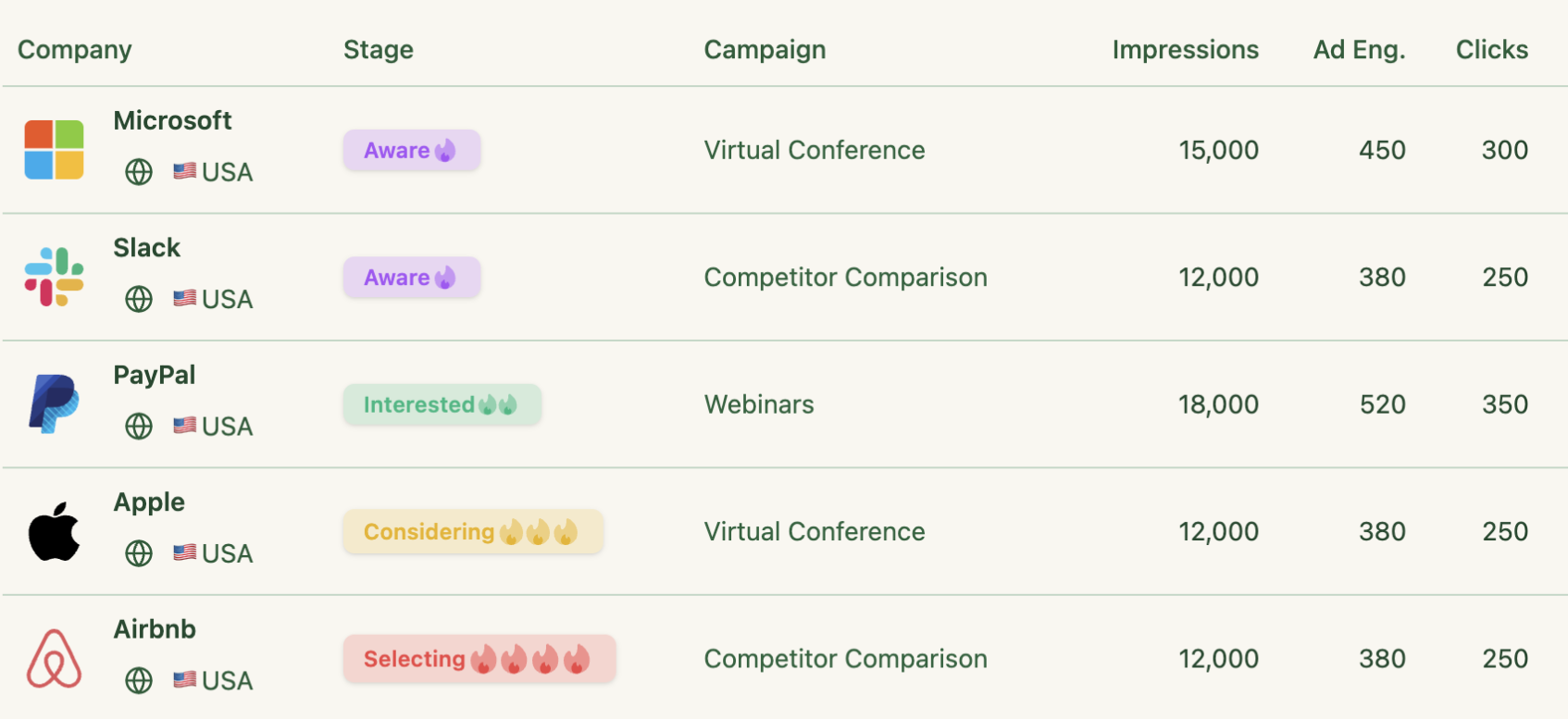
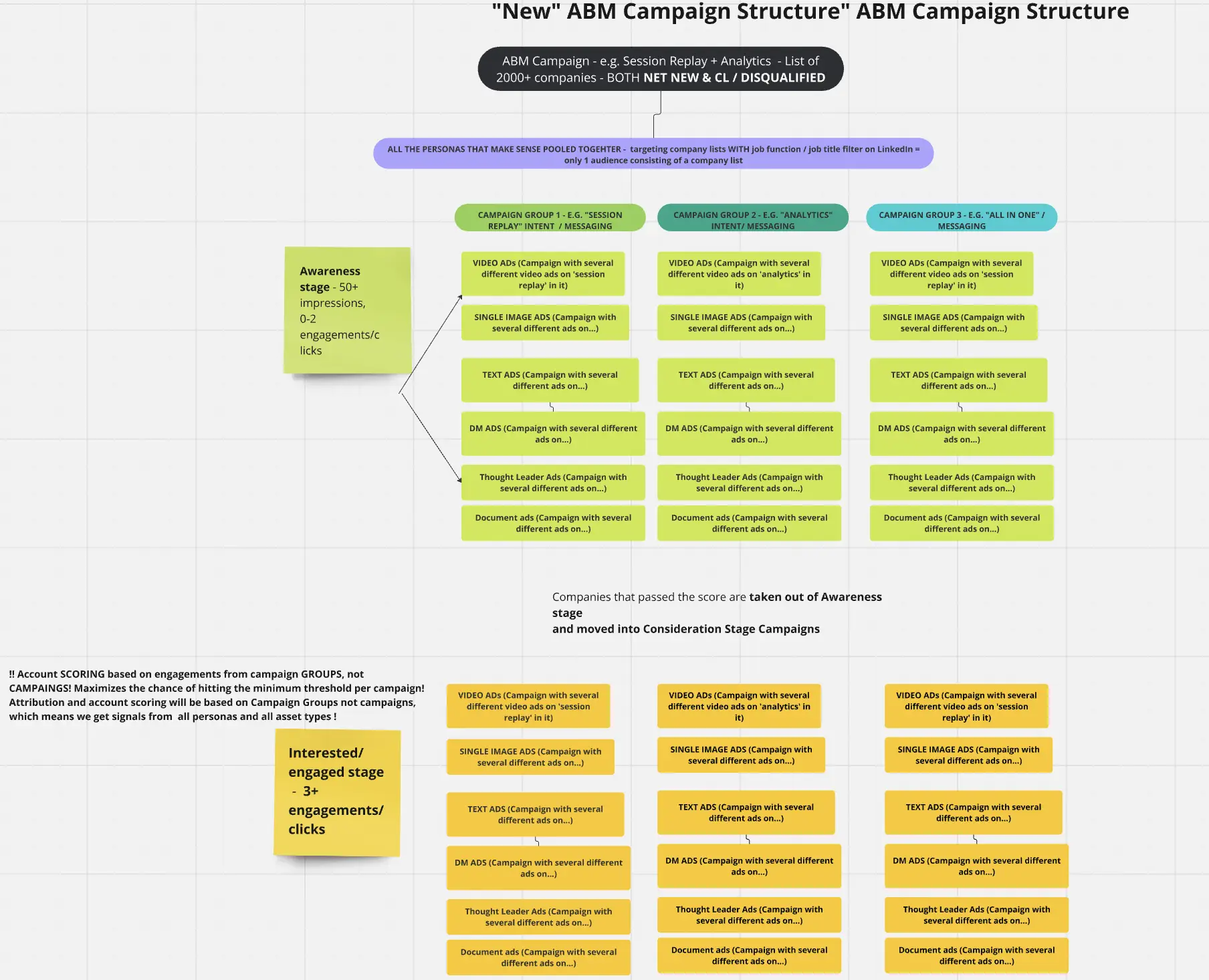
Intent-based or predictive ABM uses the power of data science and intent signals to turbo-charge your account targeting.
By analyzing mountains of data (web searches, content consumption, technographics, engagement patterns), predictive models score accounts and surface those with a high propensity to buy.
These insights inform everything: who goes on your target account list, what content you show them (based on inferred interests), and when you reach out.
Instead of the classic static TAL, your list becomes dynamic (re-prioritized continuously by intent data).
For instance, if Company XYZ surges on intent signals around “cloud security”, your ABM platform flags it and automatically moves XYZ into an active campaign with personalized cloud-security messaging.
Key ingredients of intent-based ABM are tools and data.
Tool vendors like 6sense, Demandbase, ZoomInfo, and others specialize in predictive ABM capabilities (AI-driven account selection, intent monitoring).
Tactically, you might run “always-on” intent monitoring for your ICP using such tools and trigger micro-campaigns when an account’s intent spikes (e.g. a burst of visits to your pricing page or a competitor’s site triggers an immediate outreach sequence).
Also, you must align your content to common intent topics.
E.g. have ads and emails ready for the top 5 intent themes in your space.
This approach often uses marketing automation to dynamically move accounts between one-to-many and one-to-few plays based on their behavior.
Sales gets alerted when an account hits a threshold (“hot account because they just researched pricing”), so they can strike while the iron’s hot.
This is a must-have for scaling ABM.
If you have thousands of potential target accounts and need to focus on where the likelihood to engage is highest, intent data is your friend.
It’s also powerful in saturated markets where timing is everything because catching a buying committee during their research phase can beat the competition.
ID-size and enterprise companies with a budget for ABM tech will find predictive ABM greatly increases efficiency (no more guesswork on who’s ready to talk).
Essentially, use it when you have more accounts than your SDRs or ads can chase at once.
Identity management leader Okta revved up their ABM by infusing intent data and saw staggering results.
By reprioritizing their target list based on intent signals and personalizing content to those interests, Okta achieved a 24× higher opportunity conversion rate and cut cost-per-opportunity by 2.7 times.
Their team moved beyond sales-nominated accounts to an intent-driven list, ensuring marketing and sales were spending time only on truly active buyers.
The payoff speaks for itself: predictive ABM filled Okta’s pipeline with better opportunities, faster. And they’re not alone: nearly 69% of ABM practitioners now use AI for predictive analytics and account selection in some form.
The future of ABM is part art, part science, and the science part is all about that intent data.
For intent-based ABM, most marketers rent intent signals from vendors like Bombora or 6sense (as I myself suggested earlier), hoping their cookie-based trends will hint at which accounts are “researching” their category.
The problem?
These third-party signals are often vague, delayed, and not tied to the actual buying committee that’s engaging with your campaigns.
It plugs directly into LinkedIn’s official Ads API and delivers first-party, campaign-level engagement at the company level.
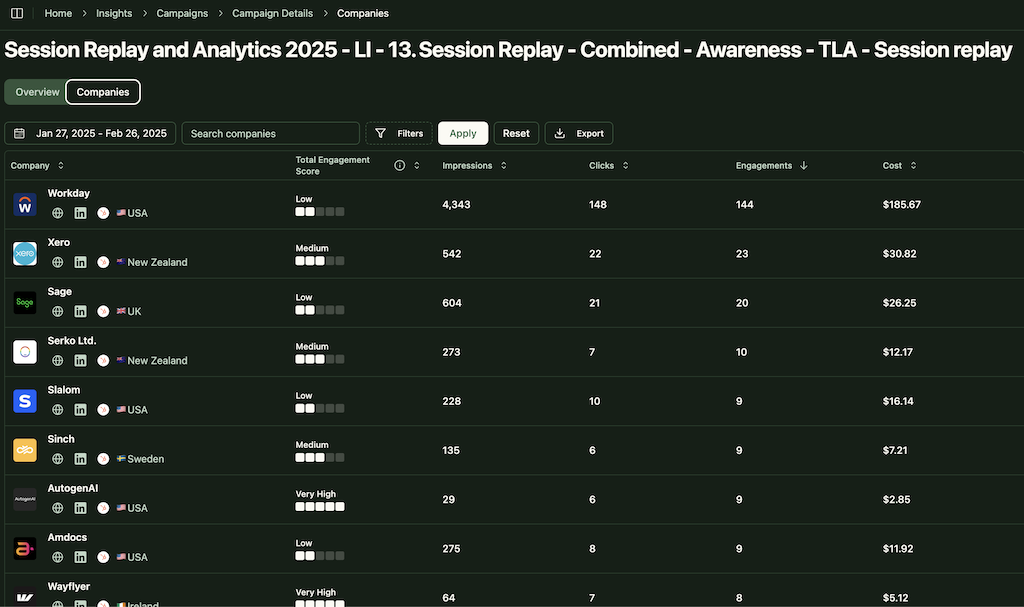
That means you don’t just know that “XYZ Corp is showing intent.”
You know exactly which campaign creative they engaged with, how often, and where they are showing traction in the funnel.
In fact, you can also tag each ad campaign with its ‘intent’ and ZenABM will then surface the intent(s) of each account:
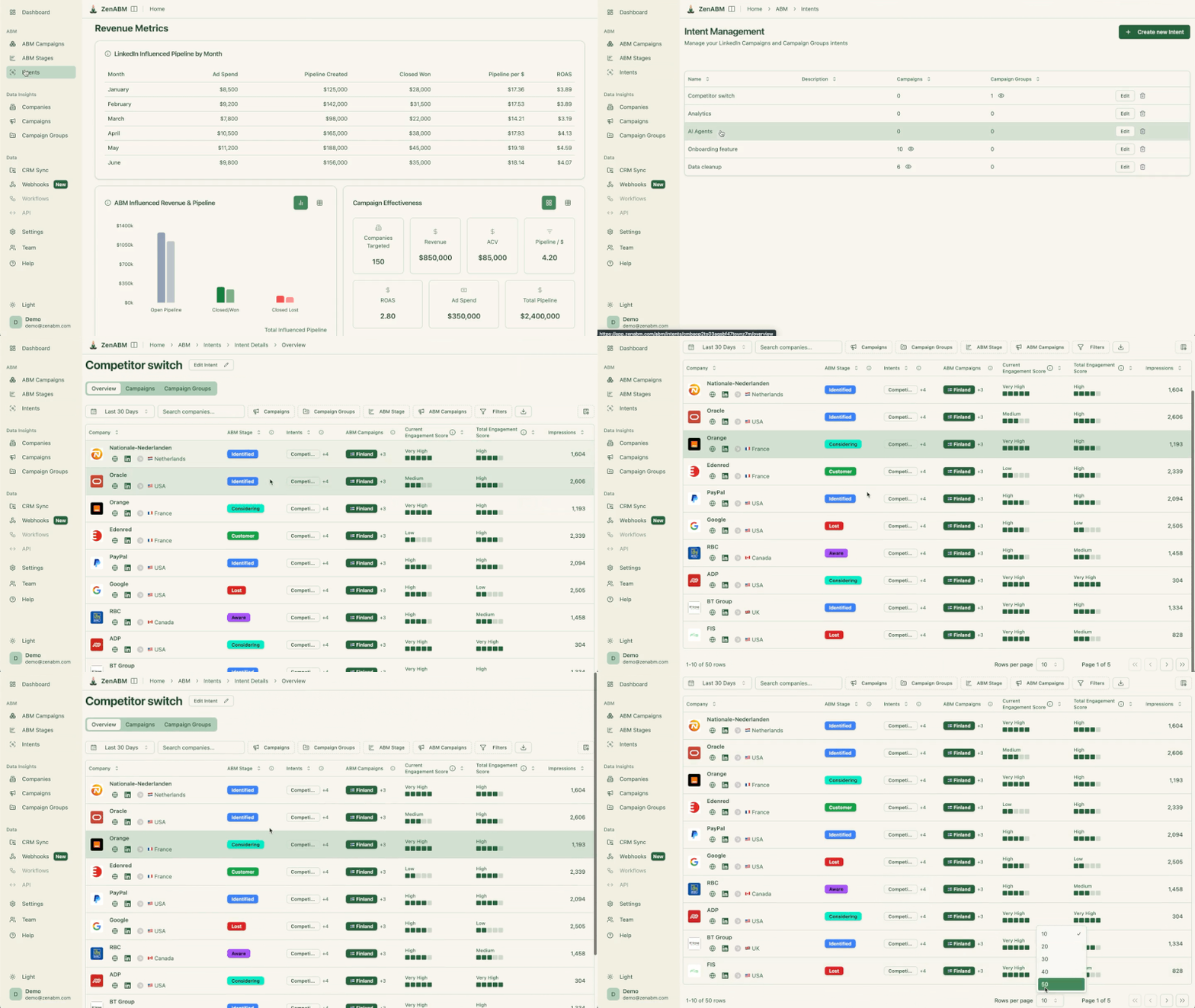

And for further convenience, ZenABM also pushes each account’s intent into your CRM as a company property.
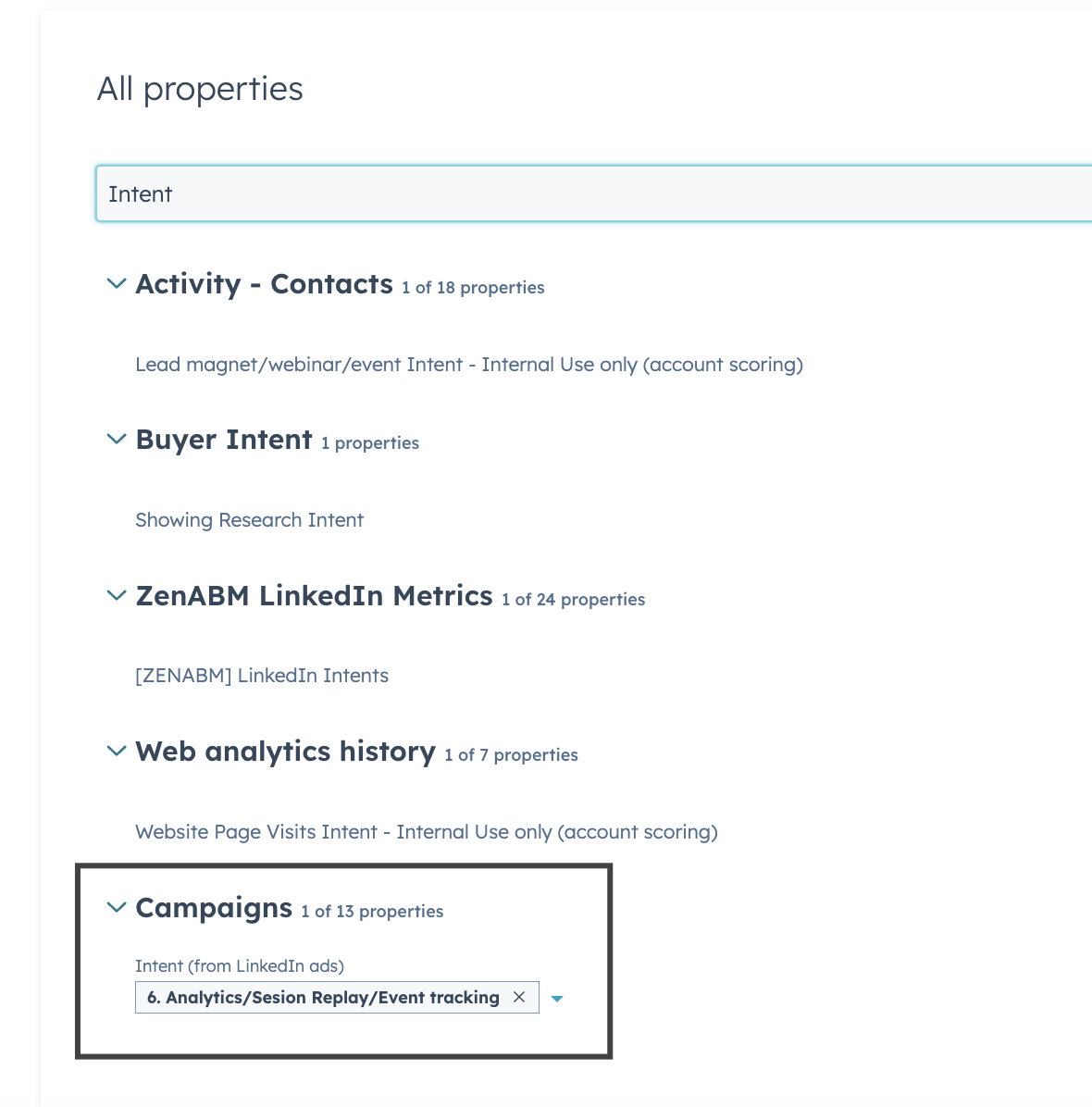
Here’s how it helps you double down with precision:
In short: ZenABM turns every campaign into an intent engine, giving you real-time, account-specific, persona-aware data. This makes third-party intent tools look like noisy proxies.
I mean, why rent intent when you can capture it directly from the source?
Opportunistic ABM, I’d say, is the simplest ABM strategy type in the list to understand, but the most labor-intensive to execute.
Because it is essentially a rapid-response approach to account-based marketing.
Unlike planned ABM campaigns with pre-selected target lists, this strategy focuses on capitalising on sudden opportunities when a high-potential account emerges unexpectedly or market events create a timely opening.
The moment an unplanned but promising account surfaces (say, an inbound from a Fortune 100 company, or a competitor’s customer showing interest), the marketing and sales teams spin up a mini-ABM campaign on the fly.
This could mean quickly researching the account, assembling a tailored pitch deck, fast-tracking custom content, and orchestrating a blitz of coordinated outreach within days.
Essentially, you treat it like a Tier-1 account overnight, even if it wasn’t on your radar yesterday.
Opportunistic ABM is a lifesaver in fast-moving markets or early-stage companies hungry for any traction.
Use it when: a big fish suddenly lands in your pipeline, when a prospect outside your ICP shows strong intent, or when external events (e.g. a rival’s product recall) create a short window to win new business.
It’s common at startups and scale-ups that can’t afford to say “no” to out-of-plan deals.
However, it’s meant to supplement a strategy, not replace focused ABM.
If you’re chasing too many random deals, your team could burn out.
To execute, have a “SWAT team” mentality in marketing.
Set internal SLAs for quick-turn deliverables (e.g. one-pagers or custom landing pages within 48 hours).
Reuse existing content templates to avoid starting from scratch.
Some companies create an “opportunity playbook”, a ready-made menu of quick ABM plays for various scenarios (rapid email cadences, short-term LinkedIn ad campaigns targeting that account, etc.), so when sales says “we have a shot at X Co.” you can respond immediately.
The key is agility and cross-team alignment under pressure.
Beware of becoming purely reactive. Opportunistic ABM should have limits.
Smart marketing leaders set boundaries on how many last-minute requests they’ll accommodate.
Also, communicate trade-offs: chasing one surprise deal might mean pausing another campaign.
Pro tip: Secure a small “opportunistic budget” and content stash so you’re prepared. When done right, this approach turns surprise leads into wins without derailing your entire plan.
Lifecycle ABM is an end-to-end, full-funnel account-based marketing approach that covers the entire customer journey.
In traditional ABM, we often fixate on landing the deal and then move on.
Lifecycle ABM says “not so fast!” and applies ABM principles from first touch through onboarding, adoption, expansion, and renewal.
It recognizes that the relationship value doesn’t stop at closed-won.
You treat current customers with the same ABM savvy as prospects.
Marketing, Sales and Customer Success align on targeting existing accounts with personalized campaigns to drive product adoption, upsells, cross-sells, and renewals.
For example, post-sale ABM might include targeted nurture streams educating users at Company X on advanced features (to boost usage), executive check-in campaigns before a renewal (to showcase ROI achieved), or cross-sell plays when a customer enters a new segment of need.
Essentially, you never stop marketing just because they became a customer. It’s a continuous cycle of relevant engagement.
All the time.
Yes!
Especially if you are in a SaaS or any recurring revenue business where customer lifetime value matters more than initial deal value.
Lifecycle ABM is critical for companies aiming to maximize net dollar retention and turn customers into long-term accounts.
It’s also important when your product line can expand within an org (multiple modules or offerings to land-and-expand).
If churn is a concern or upsell is a big revenue driver, again, you need lifecycle ABM.
Pro tip: At large enterprises with dedicated account managers, marketing can plug in with ABM tactics to support those ongoing relationships.
The holy grail of life cycle ABM execution is mapping your mundane ABM tactics to each stage.
Example:
This requires tight coordination with customer success managers and data from product usage or customer health scores.
SAP is a great example of lifecycle ABM in action.
Their Global Head of ABM, Marcelo Fernandes, built a global framework that embeds ABM into customer adoption and advocacy efforts.
By doing so, SAP strengthened ongoing relationships and identified expansion opportunities continuously, not just at renewal time.
The result?
Stronger long-term ties and more revenue from existing accounts.
Appreciative ABM focuses on celebrating and delighting your key accounts.
Instead of always pushing the next sale, this approach puts the relationship first.
Marketing and sales deliver personalized “thank you” touches: surprise gifts, VIP experiences, executive shout-outs, exclusive content that highlights the account’s success, etc.
The strategy hinges on making the account feel valued as a partner, not just a target.
Ideal for customer retention and advocacy phases.
Use appreciative ABM with long-term clients, at renewal time, post-purchase, or whenever you want to turn customers into raving fans.
It’s also powerful for accounts that just gave you business (say, after a big deal closes, time to wow them, not ignore them).
For companies with strong Customer Success teams or community programs, appreciative ABM is a natural extension.
Common plays include:
These are white-glove, relationship-nurturing moves.
Selling to existing customers is far easier than to new ones.
The probability of closing an upsell/cross-sell is up to 14X higher than winning a brand new logo.
By appreciating and solidifying relationships, you not only improve retention but also open the door to expansion and referrals.
In other words, happy customers = heavy revenue. Appreciative ABM ensures your best accounts feel the love and stick around.
Deal-based ABM (also called Pursuit ABM) is an ultra-targeted strategy where marketing and sales join forces to win a specific high-stakes deal or RFP.
First, identify the “must-win” deals, which are usually large enterprise sales in play or a competitive bake-off for an account you really want.
Marketing then builds a bespoke plan to influence that deal:
Speed and relevance are key.
The ABM campaign runs in parallel with the sales cycle.
Deploy deal-based ABM for very large opportunities or late-stage deals that justify intense resources.
For example, if you’re a B2B tech company in a shortlist with two other vendors for a Fortune 50 account.
That’s a perfect scenario.
Or if you have a key account at risk of churn, but there’s a chance to save/expand it with a personalized pitch.
It’s also common in enterprise sales where RFPs are involved; marketing will create an ABM initiative just for that RFP’s stakeholders.
Essentially, use it when the deal size is big enough or strategically important enough (e.g., marquee logo, huge ARR) that a few extra percentage points of win probability equals major revenue.
Treat the opportunity as a market of one.
Examples:
One fintech marketer described literally pairing one marketer with one sales exec to tag-team a strategic account.
That marketer did nothing but orchestrate that account’s journey for months.
Quick fact: Deal-based ABM, also called Pursuit-ABM, is a fairly new tactic discussed by Bevv Burgess (they call her the mother of ABM!) in her book called Account-Based Marketing: The Definitive Handbook for B2B Marketers.
Customer Expansion ABM is a strategy devoted to growing business within existing customer accounts through upsells, cross-sells, and increased usage.
This goes hand-in-hand with Lifecycle ABM, but deserves its own focus because the tactics can be specialized for expansion goals.
Start by segmenting your customer base to find which accounts have the most expansion potential (e.g., high-fit for another product module, or low current adoption = room to grow).
Then craft ABM campaigns targeting those accounts’ stakeholders, educating them on the additional value they could get.
This often means re-orienting your messaging: you’re not explaining who your company is (they know you); you’re showing them ROI achieved so far and new problems you can solve for them.
Tactics might include account-specific business reviews highlighting untapped opportunities, personalized training or workshops to increase adoption (paving the way for upsell), and marketing content that introduces other products or features relevant to that customer’s business – all delivered in a coordinated way.
Customer marketers, account managers, and ABM marketers work together here.
If you have a “land-and-expand” business model or multiple product lines, use expansion ABM from day one of the customer relationship.
It’s especially vital for SaaS and enterprise tech where net revenue retention is a key metric.
Companies at a more mature stage often shift heavy focus to expansion once they have a sizable customer base (why hunt solely for new logos when you can get 2× revenue from your current ones?).
Also, any time your strategy calls for preventing churn by demonstrating new value, that’s a cue for expansion ABM, too.
Common plays:
Digital ABM tactics like account-specific ads and emails work here as well, but with a focus on additional value.
Also, don’t underestimate the power of good old relationship-building: expansion ABM often uses in-person VIP events or appreciation gestures (ties back to Appreciative ABM) to keep the account engaged and open to upsell conversations.
Customer expansion is often the fastest path to revenue.
For instance, one report found that showing existing customers additional value can increase revenue by up to 43%.
Real-world example: Companies like HubSpot famously invested in expansion marketing, turning single-hub customers into multi-hub customers through targeted education campaigns, which helped drive their net revenue retention over 100%.
Vertical ABM means structuring your ABM programs around industry segments, creating highly personalized campaigns for clusters of accounts in the same sector.
You group target accounts by industry (or sub-industry) and run campaigns where everything is industry-flavored: ads, emails, landing pages, whitepapers, events.
If you’re targeting, say, manufacturing companies, you might run a campaign “New Trends in Manufacturing 4.0” featuring how your solution helps reduce factory downtime, including industry-specific case studies and references.
By doing this, you achieve a level of relevance approaching one-to-one, but you can reuse the content across multiple accounts in that vertical.
Often, organizations set up dedicated industry marketer roles or pods (e.g., a team that just focuses on Finance industry accounts).
This approach scales personalization efficiently: one good vertical eBook can engage dozens of accounts if it hits the right notes for their industry.
This is extremely useful if your product/use cases differ by industry or if you sell into a few key verticals heavily..
Also, if sales is organized by industry (common in enterprise sales), marketing should mirror that with ABM campaigns per vertical.
In fact, companies in the growth stage often adopt a vertical focus to concentrate resources (classic “bowling pin” strategy: win one industry, then expand to another).
It’s also effective for compliance-heavy industries (like Financial Services, Healthcare) where generic messaging falls flat.
Those prospects trust you more if you speak their compliance language.
Customize the value prop and content to each industry.
Tactics include:
A global communications provider executed vertical-specific personalization at scale: using AI, they dynamically personalized web content to each visitor’s industry (finance, telecom, etc.).
The result was a 60%+ increase in engagement (page views, time on site) on their ABM pages.
Another example: Quantexa (a data analytics firm) utilized AI to supercharge account research and vertical personalization, enabling their ABM to speak directly to banking vs. public sector use cases, etc., as shared at a recent ABM forum.
Companies that master vertical ABM build a reputation as “the experts” in that space, which shortens sales cycles.
Scenario ABM is a newer concept (yet another ABM strategy type coined by Bev Burgess) where you apply ABM tactics to a specific situation or use case in a time-bound way.
The team identifies a scenario where ABM could move the needle – e.g., you have a new module to sell to a specific group of top accounts, or you need to quickly penetrate a geographic region, or perhaps respond to a competitor’s move.
You then deploy a pre-defined ABM playbook suited to that scenario.
This playbook has a set timeframe and goals.
For example, a “Q4 Pipeline Boost” scenario could involve a 3-month blitz of target accounts that showed intent but didn’t convert yet, using a mix of ads, emails, and BDR outreach all geared to schedule last-minute meetings.
The idea is that you’re not reinventing the wheel each time.
You create a playbook once (maybe based on a past success) and reuse it whenever that scenario arises.
It’s like having recipes for common marketing objectives.
Use Scenario ABM whenever a repeatable strategic initiative comes up.
Common scenarios:
Try proven plays.
For instance, a SaaS company might develop a scenario ABM playbook for “Customer Win-Back”: a 6-week program to re-engage churned customers in which marketing delivers personalized “we want you back” messages, special offers, and executive calls.
That playbook can sit on the shelf until churn starts creeping up, then bam – deploy it.
Key tactics revolve around speed and focus: you assemble a cross-functional tiger team (marketing, sales, CS) for the scenario, run the coordinated plays, measure quickly, then disband or move to the next.
Bev Burgess describes scenario ABM as time-boxed and outcome-focused, using pre-built tactics that you know work for that type of goal.
So execution is often plug-and-play – the assets and steps are prepared in advance. It’s very much “rinse and repeat” ABM.
Imagine a software firm launches “Product X” aimed at healthcare companies.
They create a 3-month Scenario ABM campaign targeting 20 large healthcare accounts: personalized emails from the product team, ads with messaging about how Product X solves new healthcare compliance rules, webinars just for those accounts, and direct mail of a healthcare industry report.
The goal: get five of those accounts to pilot Product X by the end of the quarter.
Once the quarter’s over, campaign off. Next time they have a product, they’ll tweak and reuse this playbook.
By having scenario-specific ABM playbooks, companies respond faster and more effectively to business needs without having to craft everything from scratch under pressure.
It’s a way to operationalize ABM for strategic initiatives.
Partner-based ABM is a collaborative approach where you team up with a strategic partner company to execute ABM jointly towards shared accounts.
Identify a set of accounts that are high priority for both you and your partner.
Then collaborate on an ABM plan:
A common scenario is a tech company partnering with a global SI (systems integrator) – together they target Fortune 500 accounts where the tech and the SI’s services together form a compelling solution.
The ABM messaging then speaks to how the combined offering solves the account’s pain.
Critical: Both organizations need tight alignment on account selection, value prop, and success metrics.
Partner ABM works best when a partnership is key to unlocking value for the account or when selling alone isn’t as effective.
Use it if your solution is part of a larger ecosystem sale and you need a partner’s credibility or integration to win the account.
Also, if your partner has access to decision makers you struggle to reach, teaming up can open doors.
Companies moving up-market often utilize partner ABM with bigger players to gain trust with large accounts.
It’s also a way to deepen strategic partnerships by showing partners you’re willing to invest marketing dollars together on mutual targets.
Because of the overhead of coordination, it typically makes sense for big strategic accounts or segments.
For instance, a cloud provider might do ABM with a consulting firm specifically for government accounts, since the partner brings domain expertise in that sector.
Start by jointly selecting the target accounts (agree on ICP and who brings which accounts to the table).
Then create shared messaging that highlights the combined value proposition (“Together, Microsoft + Accenture deliver X outcome for retailers”).
Tactics include:
Essentially, it’s two ABM teams acting as one.
Snowflake (cloud data platform) often works with analytics partners; they have done ABM roadshows where Snowflake + Partner go together into target accounts to whiteboard solutions (a powerful one-two punch).
ABM has outgrown the basic one-to-one, one-to-few, and one-to-many tiers.
Today’s top performers are layering intent, lifecycle, vertical, and scenario-based approaches for sharper focus and stronger returns.
The common thread?
Precision and personalization at scale.
Platforms like ZenABM take this further by turning every LinkedIn campaign into a live intent engine—so you know not just who’s interested, but exactly what’s moving them.

