

©2026 ZenABM - All Rights Reserved.

AI ABM segmentation is marketed as an algorithm that finds hidden clusters in your account list, and that promise is where most programs waste their first quarter.
In reality, the segments that predict a meeting are not always the ones you can draw from a firmographic spreadsheet.
Moreover, oversegmentation is a problem too.
So the useful question is not “which AI clusters my accounts” but “which behavior actually separates a buyer from a bystander, and how do I route on it the same day?”
This post is the playbook: the two-layer model I use, the exact prompt to build the clusters from your own engagement data, the thresholds that move an account to sales, and how to run all of it at scale without over-segmenting into segments too small to serve.
A quick overview:
Strip the marketing off “AI ABM segmentation”, and there are two very different things hiding under the phrase.
The first is unsupervised clustering on firmographic and technographic data: feed a model your account list plus enrichment, run k-means or similar, get back a handful of groups.
It looks sophisticated, and it is mostly useless for ABM because the inputs are the same attributes you already used to build the ICP.
You filtered to mid-market SaaS in North America, so the algorithm hands you back “mid-market SaaS in North America” split three ways.
The clusters are real, they are just not new information, and they tell you nothing about who is close to buying.
The second thing is the one worth building: clustering accounts by behavior.
Which companies actually engaged with your ads, how often, how recently, with what depth, and around which topics.
That data is not on any enrichment provider’s file because it is yours, generated by your own program, which is exactly why it carries information gain.
The 1:1, 1:few, and 1:many tiers everyone starts with are downstream of this, not a substitute for it.
Tiering decides how much effort an account gets; clustering on behavior decides which accounts have earned the effort in the first place.
Bill Stathopoulos, a B2B growth consultant who runs LinkedIn ABM programs, frames the decision as a two-dimensional matrix rather than a single tier.
In the ABM Bootcamp session, he explained it out plainly: score every account on two axes, engagement level and ICP fit, and let the quadrant dictate the play.

High engagement plus high fit gets multi-channel outreach and becomes a core prospect, while high fit but low engagement stays in nurture until the behavior shows up.
That is the model this whole post builds on, because it forces you to hold fit and behavior as separate questions instead of collapsing them into one messy score.
The first mistake I see is clustering the entire engaged list.
You run ads, a few hundred companies interact, you group all of them, and now half your “warm” cluster is agencies, students, competitors, and people who will never buy.
Behavior without a fit gate rewards noise.
So layer one is a hard filter: an account only enters the clustering step if it passes the ICP, on the firmographics that genuinely predict fit for your product (industry, employee count, region, and any real disqualifiers).
This is where the traditional segmentation work still matters, and it is worth doing once, properly, before any AI touches it.
If you have not built the ICP and tiering foundation yet, our step-by-step guide covers it in depth.
The most important thing to note: the account list is not a static thing you set once and defend forever.
You must segment dynamically, moving accounts between tiers as their value and engagement change rather than freezing the list at kickoff.
The fit gate is the stable part; the clusters inside it are meant to move.
To keep the gate honest, check who is actually engaging against who you meant to reach.
ZenABM’s job title and persona insights show the roles behind the engagement per campaign, so you can catch a segment that is technically in-ICP but delivering to the wrong buyer.

This is the part that actually replaces the firmographic guesswork, so here is the exact input and the exact method.
The input is company-level ad engagement, which ZenABM pulls straight from the LinkedIn Ads API: impressions, engagements, and clicks per company, per campaign, per ad, in 7, 30, and 90-day windows.
Instead of “someone from a company clicked once”, you get the full interaction history for every account that has touched the program.

The variable that does the clustering is the engagement score.
ZenABM keeps two: a current score (engagements over impressions in the window you pick) and a total score (all-time).
The pairing matters because it separates two very different accounts that a single number would merge.
A high total but low current score is an account that used to be hot and has cooled, which is a re-engagement play.
A high current score on a low total is a brand-new account heating up fast, which is a route-to-sales play.
Clustering on the pair, not one number, is what stops you from treating those two identically.

You do not have to build the clustering logic by hand.
Point an AI agent at the data through the ZenABM MCP server and describe the clusters you want in plain English.

Here is the prompt I start with, run in Claude Code against a connected ZenABM account:
Pull the last 90 days of company-level LinkedIn ad engagement. Keep only accounts that match my ICP (SaaS, 200 to 2000 employees, North America and Western Europe). Cluster the rest into groups by current and total engagement score and by recency of last engagement. For each cluster give me the account count, the median engagement score, and a one-line description of what the group has in common. Flag any account with high impressions and near-zero engagements separately.
The agent runs that against your real numbers and hands back named cohorts, not a spreadsheet you still have to interpret.
This is the whole point of clustering at scale: the analysis that used to be a half-day in a pivot table becomes a paragraph.
You can generate a dozen clusters, but in practice, four do most of the work, and each one implies a different action.
This is the sorting, the ZenABM /account-engagement skill (part of the MCP server) runs automatically: it drops every account into warm, cold, budget-hog, or bad-fit, and returns an exclusion candidate list with the total spend you would save.
Cluster | What it looks like in the data | The action it earns |
|---|---|---|
Warm | In-ICP, rising current engagement score, recent interactions across more than one ad or campaign. | Route to sales, or move to a heavier tier. This is where multi-threading pays off. |
Cold | In-ICP, low or decaying engagement, no recent touches. Was reached, did not respond. | Keep nurturing with a lighter format and a different message. Do not promote yet. |
Budget-hog | High impressions, near-zero engagements. Eating delivery and frequency without responding. | Cap or exclude from delivery so the budget goes to accounts that react. |
Bad-fit | Engaging but outside the ICP: agencies, competitors, wrong size or region. | Exclude from the account list entirely. Engagement here is noise, not intent. |
The budget-hog cluster is the one teams miss, because impressions feel like progress.
They are not.
An account that has taken thousands of impressions and never once engaged is a saturation problem, and every extra impression to it is money not spent on a warm account.
ZenABM surfaces these directly, and the /budget-wasters skill orders them by the monthly dollars at stake.
Acting on the bottom two clusters is a write action, not just a report, and ZenABM keeps those behind explicit confirmation.
exclude_companies removes bad-fit and budget-hog accounts from ad delivery, and Budget Savers (via set_budget_saver) closes the leak on the worst spenders.
Reads change nothing; only the exclusions and Budget Savers write, and only after you approve.
That is the difference between a cluster analysis you look at and one you actually execute.
A cluster is a snapshot.
A stage is a cluster with a threshold and a destination, and that is what makes segmentation operational instead of decorative.
ZenABM’s ABM funnel stages let you define the stage names and the exact thresholds that move an account between them, built from any mix of ad engagement, CRM properties, form fills, webinar signups, and deal stages.
This is where you encode the routing rule in plain numbers: 5 or more engagements in 30 days from an in-ICP account move it to Interested, which fires a task for the BDR.

The routing only pays off if sales and marketing share the same account view.
A stage that lives only in your ad tool does not do that.
So push it to the CRM. ZenABM’s bi-directional HubSpot and Salesforce sync writes the ABM stage as a company property, so the account a BDR sees in HubSpot already carries “Interested” and the engagement behind it.

For teams that run enrichment and outbound in Clay, the same stage feeds a webhook, so your Interested cluster lands in Clay ready for sequencing.

Two ZenABM MCP server skills own the reporting side of this. /funnel-movement tells you who moved between stages, who stalled, and which transition is the clog, with one fix for the slowest step. /sales-handoff produces the list of accounts sales should call today, scored by stage moves, fresh intent, and engagement spikes, each row carrying a talking point pulled from that account’s real journey.
That is a segmentation output a rep will actually use, because it is a call list, not a cohort chart.

Engagement tells you an account is paying attention. Intent tells you what it is paying attention to, and that is the layer that turns a warm cluster into a targeted conversation.
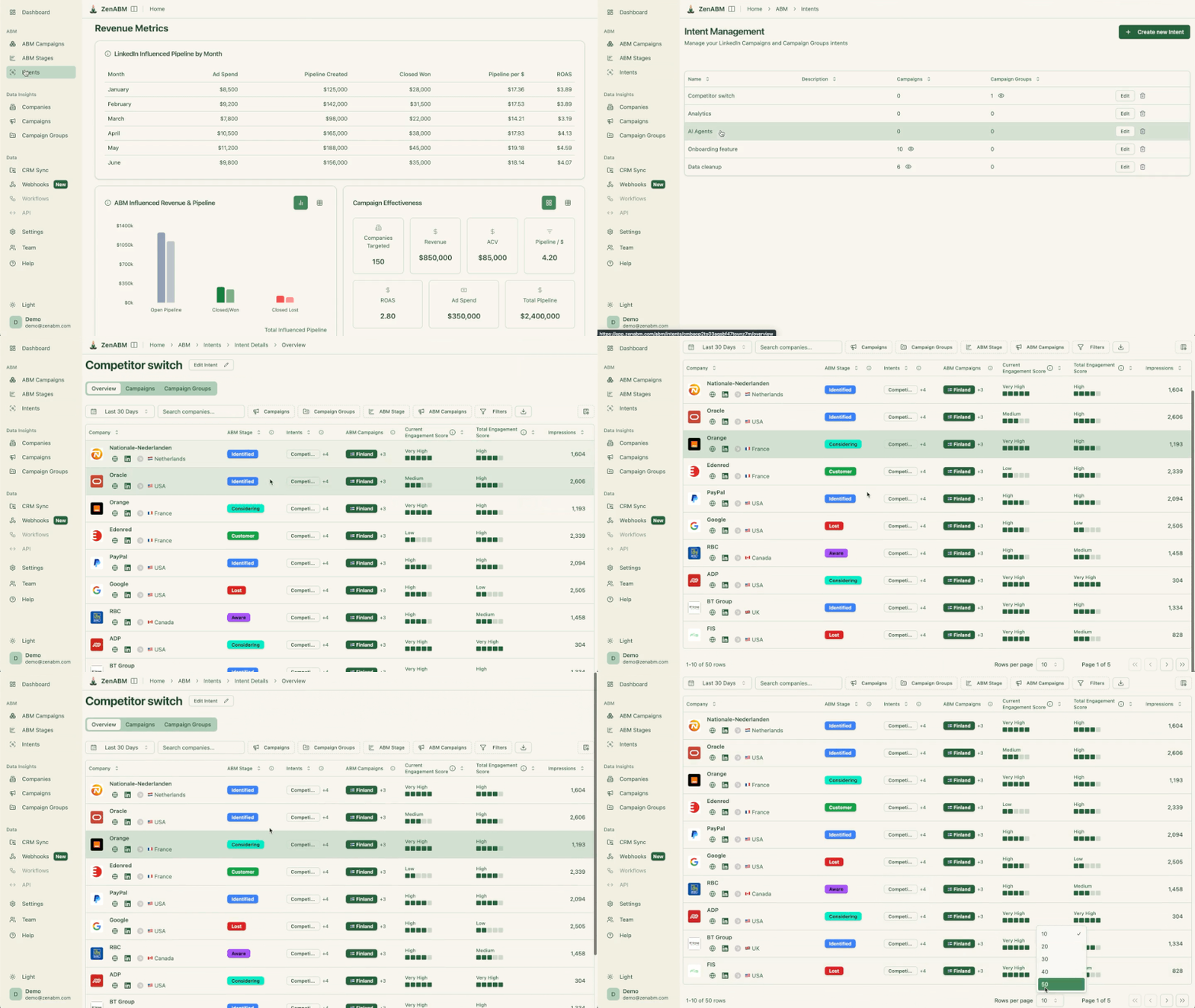
ZenABM’s first-party intent works by tagging campaigns with intent themes (Analytics, Security, AI Features, whatever your product’s real buying triggers are), so any account that engages with those campaigns inherits the intent label.
This is first-party LinkedIn engagement, not a third-party keyword score you cannot verify, which matters because an intent signal you can trace to a specific ad interaction is one a rep will trust.
Overlaying intent on the behavior clusters splits a single “warm” group into messaging-ready sub-segments: warm-on-Security gets the security proof; warm-on-AI gets the AI story.
The intent label syncs to the CRM as a property alongside the stage, and the /intent-report skill ranks which intent themes actually predict deals, so you learn which of your themes is a real buying trigger and which is just clicks.

Here is the part nobody puts in the “AI clustering” pitch: the failure mode of segmentation is almost always too many segments, not too few.
We learned this twice.
First, we split our audiences so finely that several segments fell below the roughly 300-member floor LinkedIn needs to serve a matched audience, and the smaller the audience, the higher your CPMs, so we were paying a premium to reach almost nobody.
Second, we built ABM stages so elaborate that accounts got stranded in stages with no clear next action, and the whole point of a stage, the routing, quietly stopped working.
The discipline is to segment only as finely as you can actually serve and act on.
A useful reality check is buying-committee size: the average B2B purchase now involves 11 people (Gartner), so a segment built around one persona is already an incomplete view of the account.
Cluster the account, then vary the message by persona inside it, rather than spinning up a separate micro-segment per role.
When you are not sure whether a segment is worth its own treatment, ask Zena in plain English and let the data answer before you build it.
An example of how Zena works:

Everything above is the method.
This is the machinery that makes it repeatable across hundreds of accounts without a data analyst. There are three ways in, in rising order of power.
Zena, the built-in AI chatbot, is the fastest.

Ask it to list your top engaged companies this month, compare engagement across job titles, or pull the accounts with the most clicks and no open deal, all in plain English.
It is free to try at the LinkedIn ads expert chat, and it is the right tool for ad-hoc clustering questions.
The MCP server is the one to connect if you live in Claude Code, Claude Desktop, or ChatGPT. It exposes ZenABM’s data through an endpoint (https://app.zenabm.com/api/mcp) with Bearer-token or OAuth auth, and running /init writes a CLAUDE.md so the agent knows your account.

From there, the agent has the full tool set: company intelligence, LinkedIn ads performance, live ad-set settings, weekly series for real week-over-week decay, and the safe write actions for exclusions and Budget Savers.
That is what lets the clustering prompt earlier in this post run against live numbers instead of a stale export.
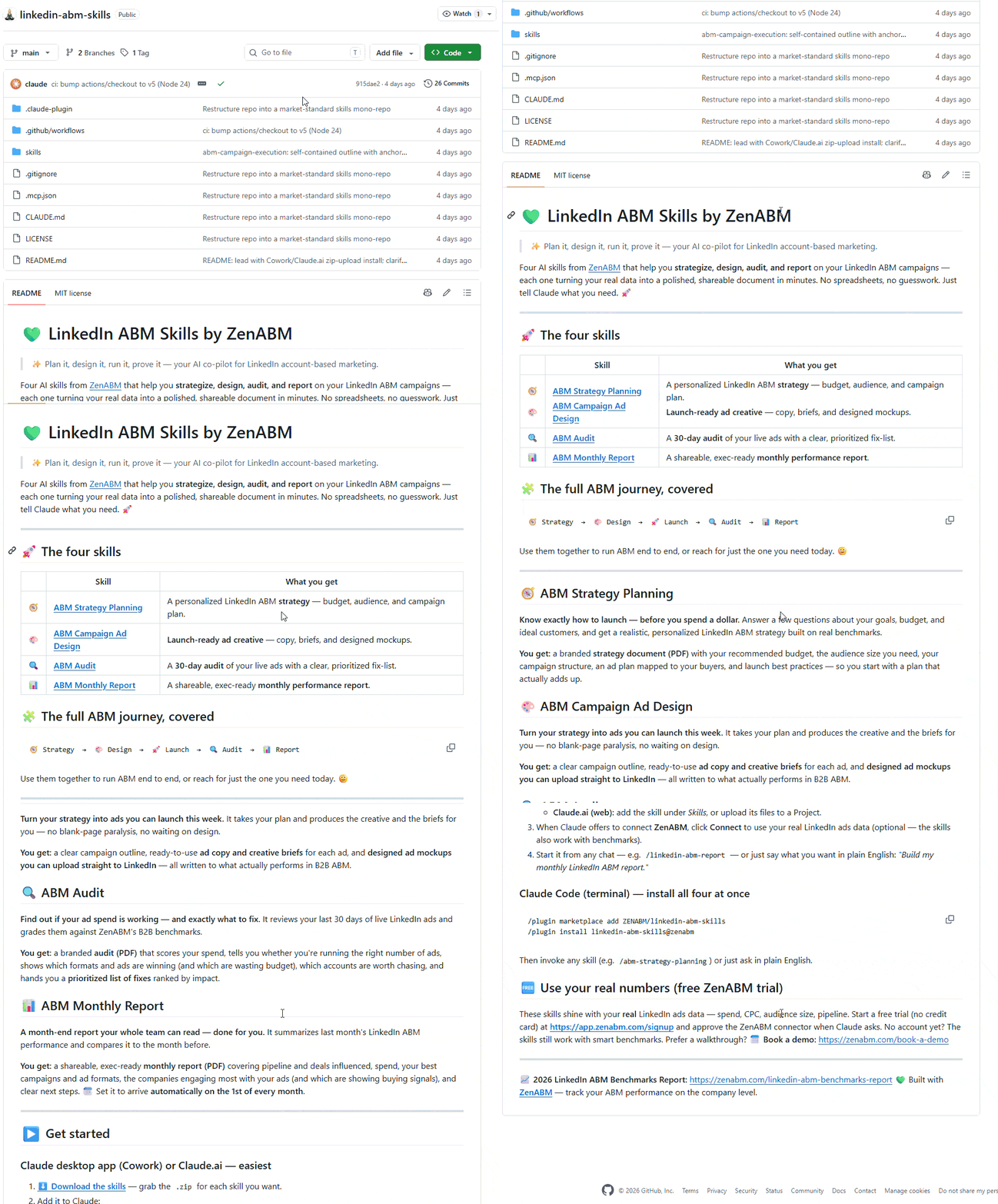
The ZenABM ABM skills are the packaged workflows, built from the founder’s LinkedIn ABM program, so you do not have to write the prompts at all. Four are open-source and installable as Claude Code plugins:
/plugin marketplace add ZENABM/linkedin-abm-skills
/plugin install linkedin-abm-skills@zenabm
That gives you /abm-strategy-planning (it stress-tests your revenue goal against budget and real ad metrics, and proposes the campaign and segment structure the budget can actually support), /abm-campaign-execution (turns the plan into launch-ready campaign outlines and ad briefs), /linkedin-abm-audit (a 30-day diagnostic with a prioritized fix list), and /linkedin-abm-report (the exec monthly recap).
Connect the MCP server, and you get 15 skills as slash commands with no install, including the segmentation-specific ones this post leans on: /account-engagement, /company-deep-dive, /intent-report, /funnel-movement, and /sales-handoff.
If you are not sure what is available, the list_skills tool or /overview gives you the full catalog.
One planning input to respect before you scale spend across segments: the ad-count model.
Your monthly budget divided by 30, divided by the cost per landing-page click, divided by roughly 4 clicks per ad per day, is the most ads you can fund at once. Split into more segments than that, and you underfund every one, lose auctions, and never learn whether a message landed.
The /scaling-planner skill runs the fuller version, using audience penetration (reach over audience size) and frequency to tell you whether more budget will reach new accounts or just show the same accounts more ads. Segmentation and budget are the same decision.
Segments decay.
The account that was warm in January is closed-lost by April, and if you never check which clusters produce revenue, you keep spending against the ones that feel productive.
ZenABM’s revenue attribution runs per ABM campaign, deduplicated, with influenced pipeline per dollar spent, ACV, and ROAS, so you can tie a cluster or a campaign to the pipeline it actually moved rather than to its engagement rate.

Anchor your read against the benchmark so you know whether a segment is good or just busy.
The median program in the 2026 dataset returned $5.21 in influenced pipeline per dollar at a 1.62x ROAS; the top performers hit $15.20.
If a cluster is well below the median, it is a candidate for a message change or a merge, not more budget.
The /revenue-attribution skill formalizes this, running the spend-to-pipeline economics per campaign plus a correlation check on deal-rate lift, and it is honest about small samples: under 10 companies in a segment, it tells you the sample is too small to trust rather than reporting a shiny number you would act on by mistake.
If you take one thing from this, the AI in AI ABM segmentation is not a clustering algorithm that discovers secret account groups.
It is the automation that lets you score, group, and route accounts on the one dataset your competitors do not have, which is how your accounts behave with your program.
Build the fit gate, cluster on engagement and intent, encode the routing as stage thresholds, and keep the segment count low enough to actually serve.
Then let Zena, the MCP server, and the ABM skills do the repetitive part every week.
Start with the /account-engagement skill on your live data and see which of your accounts are warm right now.
That list is usually shorter and more actionable than the segmentation deck you were about to build.
Try ZenABM’s 37-day free trial now or book a demo to know more!
AI ABM segmentation is using AI to group your target accounts into actionable segments and route them automatically. The version that works clusters accounts by first-party behavior (ad and content engagement plus intent), not by firmographics you already filtered on. AI’s role is the labor at scale: scoring every account, grouping them into clusters like warm, cold, and budget-hog, and pushing the resulting stage to your CRM so sales can act on it.
Firmographic segmentation groups accounts by attributes (industry, size, region, tech stack), which mostly re-describes your ICP and says nothing about buying readiness. Behavior-based clustering groups accounts by what they actually did: how much they engaged, how recently, and around which topics. Use firmographics as a fit gate to filter the list, then cluster on behavior inside it. The two answer different questions, so you need both, in that order.
Fewer than you think. Over-segmentation is the common failure: split too finely and segments fall below LinkedIn’s roughly 300-member serving floor, raising your CPMs and reaching almost nobody. Four behavior clusters (warm, cold, budget-hog, bad-fit) plus an intent overlay covers most programs. Segment only as finely as you can genuinely serve with a distinct message and act on with a distinct play.
No. If your engagement data already lives in a platform, you cluster it there. ZenABM captures company-level LinkedIn ad engagement and scores every account, and you query it in plain English through Zena, the MCP server (in Claude Code or ChatGPT), or the ZenABM ABM skills. A standalone clustering tool trained on generic firmographic data does not have your first-party engagement, which is the input that makes the clusters predictive.
Encode the rule as an ABM stage threshold. For example, 5 or more engagements in 30 days from an in-ICP account moves it to Interested, which syncs to your CRM as a company property and fires a BDR task. The /sales-handoff skill then produces a scored call list with a talking point per account, so the handoff is a specific action rather than a raw cohort export.
For routing decisions, first-party intent is more trustworthy because you can trace it to a specific action: this account engaged with this security-themed campaign. Third-party intent (keyword surges from a data vendor) can widen your net, but reps discount it when they cannot see why an account is flagged. ZenABM’s intent is first-party, tagged from your own ad engagement and synced to the CRM, which is why it survives the sales team’s skepticism.
