

©2026 ZenABM - All Rights Reserved.

Maximillian Herczeg worked at LinkedIn for two and a half years.
First in sales, then in marketing solutions. Now he runs his own LinkedIn ads consultancy, and he sees the same campaign setup mistakes hurting performance for nearly every client he works with.

We invited Max to speak at the ZenABM ABM Bootcamp (600+ B2B marketers) specifically because of his unique perspective.
As he put it:
“I know the ins of LinkedIn, but now I of course also know the outs. And those two things differ quite a lot, especially if you’ve had contact with LinkedIn account managers before.
What follows is a breakdown of the most common LinkedIn ads mistakes based on Maximillian’s session, combined with data from the ZenABM 2026 benchmark report (211 companies, $5.5M in ad spend, 161,256 ads analyzed) and insights from other ABM Bootcamp experts.
I have organized these by category so you can jump to what is most relevant for your campaigns.
In case you want a quick checklist:
| Category | Mistake | Fix |
|---|---|---|
| Targeting | Not using Audience Hub | Always preview audience before launching |
| Targeting | Not understanding super titles | Check one title at a time, exclude irrelevant bundles |
| Targeting | Missing LinkedIn URL in company lists | Always include company page URL for 90%+ match rate |
| Targeting | Excluding seniority levels | Only exclude specific job titles, never seniority |
| Targeting | Audience expansion and LAN on | Turn off both, check after every campaign edit |
| Budget | Using Maximum Delivery | Use manual bidding, start 30% below recommended |
| Budget | No impression capping | Create dynamic exclusion list for high-impression companies |
| Budget | Budget dilution | Fewer campaigns, $50-100/day each, max 4-6 ads per campaign |
| Settings | Website conversions objective | Use website visits instead (cheaper, same results) |
| Strategy | Starting campaigns before strategy | Define objectives, sales alignment, and outbound triggers first |
| Creative | Confirmation bias on messaging | Test 4+ offers, use real conversion data to validate |
| Measurement | Optimizing for CTR | Focus on pipeline per dollar and account engagement instead |
Maximillian spent the majority of his session on targeting, and for good reason.
As he explained:
“If you mess up the audience, everything else is really pointless. This is not Meta, this is LinkedIn. The algorithm is not good. The algorithm is not gonna find the right people for you.” Here are the targeting mistakes that quietly drain your budget.
This was Maximillian’s number one recommendation, and he was genuinely surprised by how many marketers skip it.
The Audience Hub is a feature in Campaign Manager that lets you preview exactly who you are targeting before you spend a single dollar.
“Use the Audience Hub. It’s the most important thing when it comes to campaign setup. It enables you to see who is part of this audience. You see what job titles they have, what skills they have, what job functions they’re part of, the percentage locations. You get a super, super great overview and you know what you’re targeting.”
To find it: go to Plan, then Audiences, then Saved, then Create Audience.
The reason this matters so much is that LinkedIn’s targeting filters often do not work the way you think they do. Without previewing your audience, you are guessing. With the Audience Hub, you see exactly who you will reach before spending anything. 
When you enter a job title in LinkedIn’s targeting, you are not targeting only that exact title.
LinkedIn creates “super titles,” groups of similar titles that it considers close enough to bundle together.
Maximilllian showed a concrete example:
“If you put in VP of Engineering, you’ll also get engineering specialists, infotech specialists, construction specialists. Lots of people don’t know that. They think they’re targeting exactly the usual job titles, but then LinkedIn’s translation is different.”
He demonstrated another case where he targeted marketing directors, VPs of marketing, and heads of marketing. The audience was 20,000 people. But the super title “marketing specialist,” which LinkedIn considers overlapping, contained over 100,000 users.
That means 100% of the people classified as “head of marketing” are also part of the much larger “marketing specialist” super title.
Fix: Plug in one title at a time in the Audience Hub and check the left side to see what LinkedIn actually classifies under that title. Then use job title exclusions to remove the irrelevant titles that got bundled in. 
When you upload a company list to Campaign Manager, LinkedIn needs to match your companies to their profiles. Max stressed that one field makes or breaks this process.
“For a list to make sense on LinkedIn, you need at least the LinkedIn URL of a company page. We’re aiming for a match rate of 90% and more. If you don’t include the LinkedIn company page URL, the match rate will be way lower, and it will probably be wrong. I’ve seen lots of mismatches.”
The LinkedIn template asks for 5-6 fields (name, website, etc.), but the company page URL is the critical one. Without it, LinkedIn guesses at matches, and guesses wrong often enough to corrupt your targeting.
Fix: Always include the LinkedIn company page URL when uploading lists. After upload, manually check that companies were matched correctly. Use tools like Clay for list building to enrich your lists with LinkedIn URLs before upload.
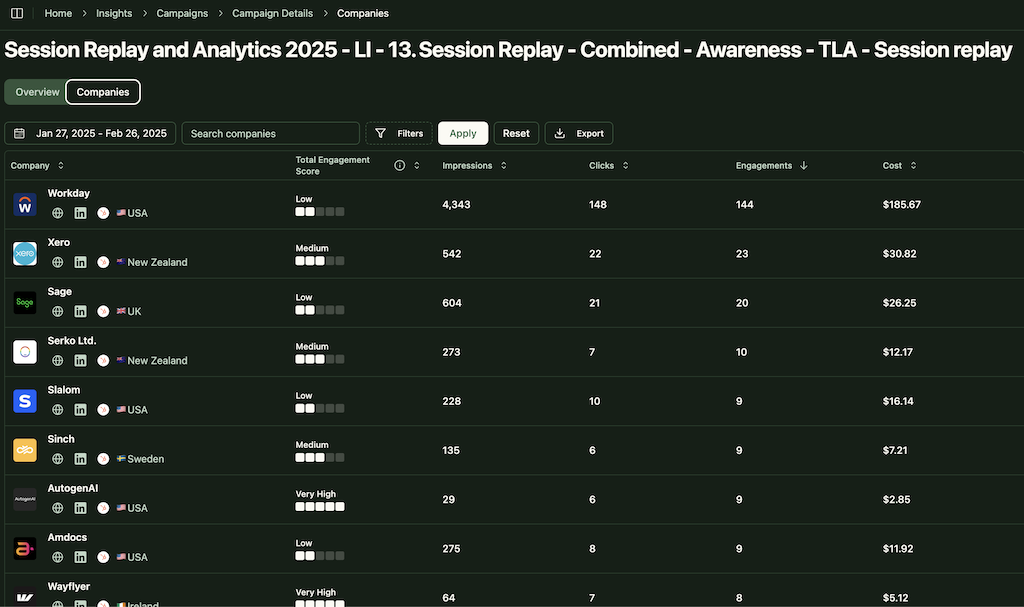
ZenABM adds a useful second layer here once the list is live.
Its company-level engagement reporting helps you verify whether the matched audience is actually producing engagement from the accounts you intended to reach, instead of leaving you with only top-line campaign metrics.

LinkedIn lets you target by industry and company size without uploading a list.
Maximillian warned against relying on this for ABM.
“Companies choose their industries themselves on their company pages, meaning Amazon could be part of different industries. You have way less accuracy than when you use lists, and you need an extra layer of optimization, because you will get lots of companies that are irrelevant, and then you have to exclude them while you go.”
Company filter targeting can work for prospecting, meaning finding new accounts you have not considered yet.
But for ABM, where you have a defined target account list, always upload your list directly.
Max explained a hierarchy rule that most LinkedIn advertisers do not know: exclusions always override inclusions.
“If you have a relevant user, and this user has two active jobs, and one job is at a company that you want to target, and one job is at a company you don’t want to target, if you exclude the company that you don’t want to target, you exclude the user altogether.”
This applies to all exclusion types. Maximillian was especially clear about seniority exclusions:
“I would not recommend excluding seniorities. Just exclude job titles. Seniority is pretty broad. If you exclude entry seniority, but you want to reach some sort of specialist or engineer, you will exclude all these people, no matter what you do with your inclusion.”
He showed an example where “entry” seniority included software engineers with 12+ years of experience. LinkedIn’s seniority classification is unreliable, and excluding it removes people you want to reach.
Fix: Only exclude specific job titles, not broad filters like seniority or job function. Never use broad filters as exclusions. Check the Audience Hub after each exclusion to see how your audience changes. 
This is a technical issue that most people overlook. Max explained why targeting the US and Europe in the same campaign is problematic.
“If the budget is gone in one time zone, then LinkedIn is not balancing it out. It could be gone in the US before Europe even wakes up.”
LinkedIn does not distribute your daily budget proportionally across time zones. Whichever region’s users are online first can consume the entire daily budget before other regions get any impressions.
Fix: Target by continent or time zone, not globally. If you must combine regions, monitor your demographics report to check if budget distribution is balanced across geographies.
LinkedIn lets you upload lists of individual people, not just companies.
Maximillian does not recommend it for most cases.
“You cannot use their LinkedIn profile URL. You have to use their email addresses, and their email addresses have to match the email they have on their LinkedIn profile. That usually results in a very low match rate. Also, people change their jobs, and those lists get outdated very quickly.”
The only exceptions are very specific, short-run campaigns like webinar follow-ups, where you know the emails are fresh and accurate.
Maximillian was unambiguous here: “Audience expansion, don’t use that. And LAN, don’t use it either.”
Audience Expansion reaches people outside your defined targeting.
For ABM, where the entire point is reaching specific accounts, this defeats the purpose.
The LinkedIn Audience Network (LAN) places your ads on third-party websites and apps, which is rarely relevant for B2B targeting.
Worse, audience expansion can reset silently after you edit a campaign.
Check it every time.


LinkedIn is expensive.
These mistakes make it more expensive while delivering less.
Maximillian revealed something surprising: LinkedIn actually tried to remove manual bidding, but users demanded it stay. And LinkedIn hides it in the interface.
“Manual bidding is so good that LinkedIn actually hides it from you. Maximum delivery, cost cap, and then manual bidding is underneath, which doesn’t make any sense.”
His manual bidding process is straightforward:
The key insight:
“What manual bidding does is it bids for a subset of your audience. If you bid too low, you get high frequency but low audience penetration. If you then increase the bid drastically, you reach a different kind of audience and get better results.”

This is the default bidding strategy, and Maximillian does not like it:
“It’s usually very inefficient. It optimizes according to LinkedIn for maximum ad delivery within your budget, but you will always be charged for impressions.
The one exception he allows:
“It can work in combination with Thought Leader Ads and the brand awareness objective. For TLAs, I tend to see higher reach and lower CPMs compared to the engagement objective. Something you might want to test.”
Maximum delivery can also work when you are short on time, like promoting a webinar in two weeks and you do not have time to optimize manual bids.
But always monitor the CPM.
Max shared specific frequency and penetration benchmarks that most LinkedIn advertisers are not hitting:
| Metric | Cold Audiences | Warm Audiences |
|---|---|---|
| Audience penetration per month | 30-50% | 70-90% |
| Frequency per person per month | 6-10 impressions total | 10+ impressions |
| Max frequency per campaign | 4 impressions | Higher allowed |
| Frequency per creative asset | 2.5-3 before returns decline | |
He also noted that only about 50% of your audience is realistically reachable in any given month:
“Lots of profiles are dead, people don’t log in all the time, people log in once a year. 50% is realistic.”
This is where the math gets uncomfortable.
From our 2026 benchmark data, monthly ad spend has the strongest correlation with pipeline (Spearman rho = 0.511, p=0.002).
Top performers spend $6,576/month, which is 144% more than the median of $2,693.
If you are running LinkedIn ABM with $1K/month, it is probably not enough for sufficient frequency and penetration.
ZenABM helps make this easier to evaluate in practice because it shows company-level engagement and account progression, not just spend and CTR.
That makes it easier to tell whether your budget is truly too small or just being distributed poorly across the wrong campaigns or accounts.

LinkedIn has no native frequency capping per company.
Bigger companies can take up far too much of your budget.
The top 5 or top 8 companies often get far more impressions than the rest of your target audience, so distribution becomes heavily imbalanced.
A workaround using LinkedIn’s native tools:
The list is dynamic, so companies automatically enter and exit based on their impression count.
You do not have to manually exclude companies every few days.
ZenABM, btw, lets you exclude companies from some or all campaigns straight from ZenABM’s interface.

Running 15 campaigns at $500/month each means none of them gets enough budget to reach your audience with sufficient frequency.
LinkedIn needs minimum spend per campaign to optimize delivery properly.
Fix: Run fewer campaigns with adequate spend ($50-100/day per campaign minimum). Maximum 4-6 ads per campaign. If budget is limited, consolidate. 
These mistakes are related to campaign settings more than targeting:
Max was clear about one objective in particular:
“Don’t use website conversions. It’s actually not working well. It’s a more expensive version of website visits. If you want people to sign up for a demo, use website visits.”
His recommended objectives by audience type:
One extra tip for lead generation campaigns:
“Try bidding for clicks instead of leads, because clicks are usually cheaper than leads since everyone bids for leads. It can enable you to get the same results with less money.”

LinkedIn defaults to “Optimize for Performance,” which favors the highest-CTR creative in each auction.
Maximillian’s take was more nuanced than most.
“I don’t think optimizing for CTR is always the best you can do. I’ve seen lead generation campaigns where the algorithm optimized for CTR, but the image with the lower CTR had a way better CPL and got way more leads.
His recommendation: use “Rotate Ads Evenly” for smaller retargeting campaigns where you want to nurture audiences with diverse content.
Use “Optimize for Performance” once you have enough data and want to scale winners.

But always check if the “winning” creative is actually winning on the metric that matters to you, not just CTR.
ZenABM helps with that distinction by connecting campaign engagement to named accounts and downstream pipeline context, so you can spot when a lower-CTR creative is actually influencing better-fit accounts.

These are the LinkedIn ads mistakes that happen before you even open Campaign Manager.
Maximillian sees this with nearly every new client:
“Most of the times, when I get with clients, they want to start with targeting and the campaigns right away. But they forget the non-negotiables and the planning. What people do a lot is they start with LinkedIn and don’t look at the overall ABM strategy.”
Before touching Campaign Manager, you need to answer:
What is your commercial objective?
What runs alongside LinkedIn (outbound sequences, content engine)?
What triggers an account moving to the next stage?
How do sales and marketing share data?
What is your retargeting system?
You want to work in tandem with sales, share data, define who follows up on which accounts, at what point, and how many touchpoints they should have before sales gets a trigger.
Maximillian emphasized that most companies sit on valuable data they never look at before launching campaigns.
“Analyze the data you already have. LinkedIn Campaign Manager history, CRM data, former pipeline, current pipeline, sales activity. Answer the question: where does your revenue come from? Where do the conversions come from? What content brings the results? Most of the times, it’s really historical data and the analysis that you need to get to an answer.”
This includes using close-lost deals and churned customers as campaign targets.

Maximillian had the same advice as Casper Rouchmann from SparkForce, who memorably told a Bootcamp attendee:
“27 segments? No way, folks. Reach the full buying group inside each target account, but don’t segment too much. Segment strategically, not excessively. Find a segmentation that works for you, that is not too complicated and fits your budget.”
Segmentation is worth it when personas need truly different messages, offers, or content formats. It is not worth it when you are just creating segments for the sake of granularity.
Every segment you add needs its own budget, creative, and management time. 
Maximillian challenged one of the most common assumptions in B2B marketing.
“Linear is out. There’s no step-by-step process of getting cold people to convert just with your campaigns. People can very much also convert in a cold audience, you know? Don’t think of it like leading them through the funnel and at some point you make them convert. That’s not how it works. You gotta keep the touchpoints high and have the right content in front of the right people. It’s actually very basic.”
This connects to his view on retargeting:
“Retargeting is not about squeezing intent, but reinforcement. It’s really to keep the touchpoints high, to deliver content, and not to lead them through a funnel.”
Some creative and messaging-related LinkedIn ads mistakes you must avoid:
Maximillian called this out directly:
“You wouldn’t believe how many people don’t know their proper messaging. They live in a bubble, they have confirmation bias of how good they think their product is, and they don’t really try to find out what actually makes the audience convert.”
“You need real clarity around what you’re selling and why the audience should care. Generic use pieces don’t cut it anymore, especially in 2026. You gotta be creative and you gotta have great messaging.”
“LinkedIn is a content delivery machine. But for that, you need great creative, great content. Don’t be shy, be creative and bold with Thought Leader Ads, conversation ads, single image ads. If you blend in too much, that’s a problem.”
From our analysis of 2,828 LinkedIn ads, stock photos appear in only 12% of top-performing ads (2%+ CTR) but in 35% of the lowest performers.
There were zero stock photos among the 17 highest-CTR ads we analyzed.
Use real people, your team, your customers, and your founders.
“Test it, react quickly, don’t just create creatives and then have them run forever. You need to be flexible so that you can react to the data that you get.”
Maximillian also recommends using different formats:
“Use different formats and don’t rely on just one.”
Our data backs this up. Thought Leader Ads get only 7-10% of the average ABM budget, but they deliver landing page clicks at $3.06 CPC, which is 77% cheaper than single-image ads.
If you are only running one format, you are leaving efficiency on the table.

Ishaant Shakunt from SpareGrowth, who also presented at the ABM Bootcamp, tested the “Book a Demo” CTA against his offer framework.
Only 2 out of 10 checks passed.
His verdict:
“This is so bad that it’s not worth tweaking it. Just don’t run it.”
Maximillian himself noted that the same applies to lead generation campaigns:
“People spend 100% of their money in lead generation. That will stagnate very quickly and lead prices will skyrocket. This is not how it works anymore in 2026. You need a good content engine and different touchpoints.”
Cold LinkedIn audiences do not know enough about you to commit 30 minutes of their time. Start with value-first offers. Test at least 4 different offers.
Some measurement and attribution-related LinkedIn ads mistakes you must avoid:
From our correlation analysis of 33 companies with complete pipeline data, CTR has a negative correlation with pipeline (Spearman rho = -0.170).
High CTR does not predict more pipeline.
The metric that actually correlates?
Ad spend (rho = 0.566, p=0.0006).
Spend more, get more pipeline. CTR is a vanity metric for ABM. Max agrees.
He showed this plays out in campaign settings too. LinkedIn’s ad rotation “optimizes for performance” by favoring the highest-CTR creative. But the highest-CTR creative is not always the best-performing creative on the metrics that matter.
Maximillian touched on this briefly but firmly:
“Multi-touch attribution. Don’t focus on last touch. Look at the whole account, the different engagement rates, everything. You need lots of touchpoints for lots of people to make them in the end talk to you.”
With a buying committee of 6-10 people and sales cycles of 60-180 days, last-touch click attribution systematically underreports LinkedIn ad influence by 3x or more. I
nfluence-based attribution, crediting every campaign that touched an account before a deal was created, gives the true picture.
Campaign Manager shows campaign-level metrics.
It cannot tell you which specific companies are engaging with your ads beyond a limited top-25 list.
Max showed that LinkedIn does offer some company-level data natively:
“You can segment by list and see engagement level per company, impressions, paid, organic, on a list basis. Even if you don’t run campaigns, you could upload a list and see the organic impressions and engagements from those companies without spending a single euro.
But for full account-level engagement tracking across all campaigns, you need a tool that connects to LinkedIn’s API.

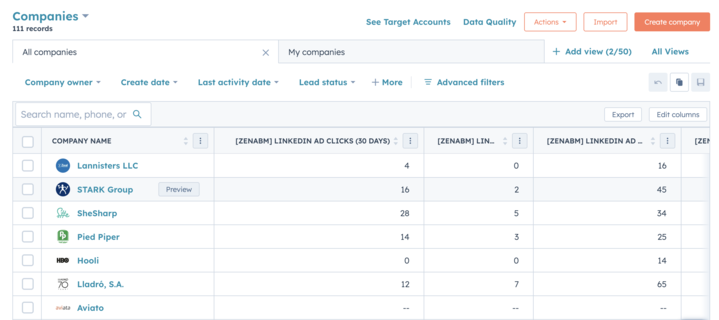
ZenABM provides this by showing every company that saw, clicked, or engaged with your ads, mapping those companies against your target account list, and pushing useful engagement context into CRM.
That makes it much easier for sales and marketing to act on real account behavior instead of relying on campaign summaries.
Most LinkedIn ads mistakes are not dramatic errors.
They are quiet setup decisions that compound over time: weak audience logic, bad exclusions, inefficient bidding, diluted budgets, poor offer strategy, and shallow measurement.
That is why so many teams see acceptable surface metrics but still struggle to generate pipeline.
The fix is not a single hack. It is better targeting, stronger planning, tighter campaign control, and much better account-level visibility into what is actually working.
That is also where ZenABM becomes especially useful.
It helps close the gap between LinkedIn campaign activity and real ABM outcomes by showing company-level engagement, syncing LinkedIn ad data into CRM, and giving sales and marketing a clearer view of which target accounts are actually warming up.
If you want to move beyond campaign-level dashboards and make your LinkedIn ads more accountable to pipeline, ZenABM is a strong layer to add.
Try ZenABM for free (37-day free trial) or book a demo now to know more!
Some common questions about LinkedIn ads mistakes and their answers:
According to Maximillian Herzeg (ex-LinkedIn, now independent consultant), the biggest mistake is messing up your targeting.
This includes not using the Audience Hub to validate your audience, not understanding how super titles bundle irrelevant job titles into your targeting, and using broad exclusions that accidentally remove your ICP. If you get targeting wrong, nothing else matters. Your budget goes to the wrong people and you will never see the pipeline.
Manual bidding in almost every case. Maximum Delivery is usually inefficient and costs more.
The one exception is Thought Leader Ads with a brand awareness objective, where Maximum Delivery can deliver lower CPMs and higher reach. For everything else, start with manual bidding at 30% below LinkedIn’s recommended range and adjust based on your daily spend ratio.
Super titles are LinkedIn’s grouping of job titles it considers similar.
When you target “VP of Engineering,” LinkedIn also includes “engineering specialist,” “infotech specialist,” and other loosely related titles in the same super title group.
This can expand your audience from 20,000 to 100,000+ without you realizing it. Always check one title at a time in the Audience Hub to see what LinkedIn actually includes, and use job title exclusions to remove irrelevant super title members.
For cold audiences, aim for 6-10 total impressions per person per month across all campaigns, with a maximum of 4 impressions per campaign. For warm and retargeting audiences, 10+ impressions per month is acceptable.
Per creative asset, returns start declining after 2.5-3 impressions. Keep audience penetration at 30-50% per month for cold audiences and 70-90% for warm audiences.
Use website visits for driving traffic and demo signups, not website conversions, which is a more expensive version of the same thing.
Use engagement for in-feed consumption and building retargeting audiences. Use lead generation for gated content.
Use brand awareness only with Thought Leader Ads when your goal is reach.
