

©2026 ZenABM - All Rights Reserved.

LinkedIn URL tracking parameters are how you connect the dots between your LinkedIn ad clicks and what happens next, like website visits, pipeline creation, and revenue.
Without them, your ABM campaigns are a black box.
You can see impressions and clicks inside LinkedIn Campaign Manager, but you have no idea which of those clicks turned into real business outcomes.
In this guide, I’ll explain exactly how to set up LinkedIn URL tracking parameters for ABM, what parameters to use, and how to avoid the common mistakes that break your attribution.


In case you want a quick overview:

LinkedIn URL tracking parameters (commonly called UTM parameters) are tags you add to the end of your destination URLs.
When someone clicks your LinkedIn ad, these parameters travel with them to your website, where your analytics tools capture them.
This lets you attribute website activity, conversions, and pipeline back to specific LinkedIn campaigns, ad formats, and creatives.
A typical URL with tracking parameters looks like this:
https://yoursite.com/landing-page?utm_source=linkedin&utm_medium=paid_social&utm_campaign=abm_awareness_q1&utm_content=spotlight_ad_v2
The standard UTM parameters are:

For ABM campaigns, tracking URL parameters is not optional, but foundational to your measurement strategy.
Here is why:
When a decision-maker at a target account clicks your LinkedIn ad and later books a demo or enters your pipeline, you need to know which ad, campaign, and format drove that action.
Without UTM parameters, your CRM has no way to attribute that deal back to LinkedIn.
Are your thought leader ads driving more pipeline than your single-image ads?
Are spotlight ads generating website visits that convert?
UTM parameters let you answer these questions with data rather than guesses.
As Tim Davidson from B2B Rizz emphasizes, tracking is essential for measuring true campaign performance:
“Add UTMs to the call to action link… look at view conversions… video view percentage.” – Tim Davidson, Founder at B2B Rizz
Without UTMs, you cannot calculate ABM revenue attribution accurately.
You might know that LinkedIn ads cost you $50K, but you cannot tell your executive team how much pipeline those ads influenced.
Done with discussing the significance, let me help you with the setup now:

LinkedIn Campaign Manager lets you set URL tracking parameters at the campaign level, so every ad in that campaign automatically appends the same parameters.
This is the most reliable method because it prevents human error from manual URL tagging.
utm_source=linkedin&utm_medium=paid_social&utm_campaign=your_campaign_name&utm_content={{CREATIVE_ID}}You can also add tracking parameters directly to each ad’s destination URL.
This gives you more granular control but requires manual management and is more error-prone.
LinkedIn offers dynamic macros that automatically populate values.
The most useful ones for ABM:
{{CAMPAIGN_ID}} – The LinkedIn campaign ID{{CAMPAIGN_GROUP_ID}} – The campaign group ID{{CREATIVE_ID}} – The specific ad creative ID{{MEMBER_ID}} – Hashed member ID (limited use for privacy reasons)I recommend using {{CAMPAIGN_ID}} and {{CREATIVE_ID}} in your utm_content parameter, so you can trace clicks back to specific campaigns and ads without manual naming.
Pro Tip: If you use LinkedIn dynamic URL macros, review them now. LinkedIn’s October 2025 naming shift from Campaign Group / Campaign / Creative to Campaign / Ad Set / Ad changes the macro names too, so outdated parameters can quietly break your tracking. More information is available in LinkedIn’s official documents.

Here is the UTM naming convention I use for ABM campaigns on LinkedIn:
| Parameter | Value | Example |
|---|---|---|
| utm_source | ||
| utm_medium | paid_social | paid_social |
| utm_campaign | [objective]_[audience]_[quarter] | abm_awareness_tier1_q1_2026 |
| utm_content | [format]_[creative_variant] | tla_benchmarks_v2 |
| utm_term | [audience_segment] (optional) | vp_marketing |
This structure lets you analyze performance at multiple levels:
Once your tracking parameters are in place, here is how to use the data for ABM decision-making:
Use the utm_content parameter to compare performance across formats.
In fact, running ABM campaigns, single-image ads and thought-leader ads tend to drive the most qualified website visits, while text ads and spotlight ads drive volume at a lower cost.
When you combine UTM data with company-level engagement tracking, you can see the full journey: which target accounts saw your awareness ads, which clicked through to your website, which visited high-intent pages, and which eventually entered your pipeline.
This is where platforms like ZenABM become especially useful, because UTMs tell you what was clicked, while account-level tracking helps you see which companies from your target list are actually moving from ad engagement to pipeline progression.

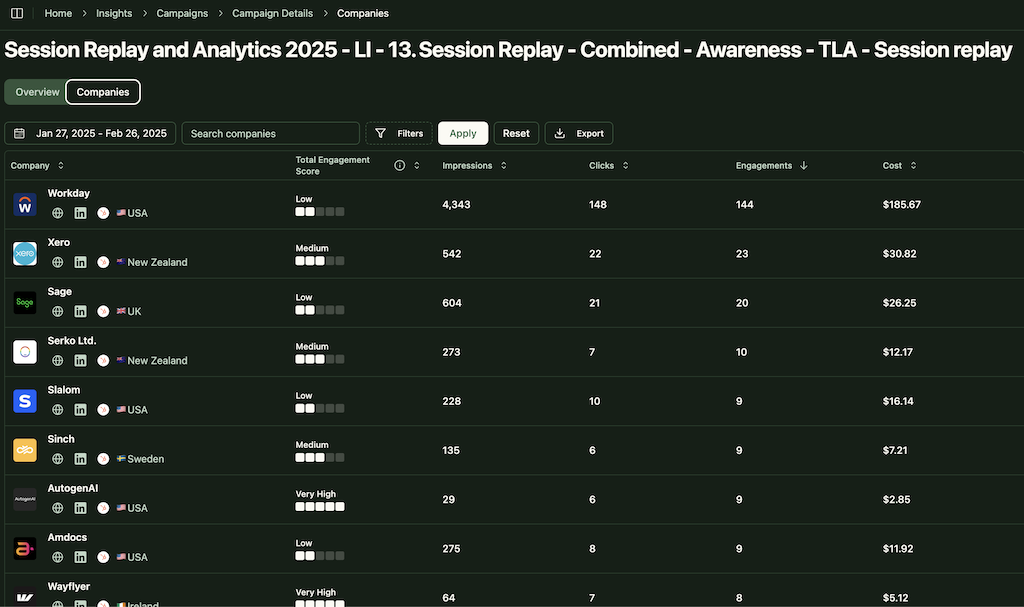
Do not just optimize for CTR. Use UTM data to identify which creatives drive the best downstream metrics, like time on site, pages visited, demo requests, and pipeline created.
A creative with a lower CTR but a higher conversion rate is more valuable for ABM.
If you are syncing campaign engagement and CRM stages into one view, it also becomes much easier to spot the creatives that influence qualified accounts, not just anonymous traffic spikes.
That is often the difference between vanity reporting and actual ABM optimization.
Some commonly made mistakes regarding URL tracking that you must avoid:
One more practical issue: many teams set up UTMs correctly but never map that data back to account records in the CRM. The result is technically clean tracking and strategically useless reporting.
Here, a tool like ZenABM can help close that gap by connecting LinkedIn engagement data with account and pipeline context, so your UTM structure actually becomes actionable.

URL tracking parameters and the LinkedIn Insight Tag serve different purposes, and you need both for comprehensive ABM measurement:
| Feature | UTM Parameters | LinkedIn Insight Tag |
|---|---|---|
| Tracks | Click-through attribution | View-through + click-through conversions |
| Where data lives | Your analytics tool (GA4, etc.) | LinkedIn Campaign Manager |
| Setup | Added to destination URLs | JavaScript tag on your website |
| Granularity | Campaign, creative, format level | Campaign and conversion action level |
| Use for ABM | Connecting ad clicks to CRM pipeline | Conversion tracking and retargeting |
For ABM, you need UTMs to connect LinkedIn ad activity to your CRM and pipeline data.
You need the Insight Tag for conversion tracking inside Campaign Manager and for building retargeting audiences.
LinkedIn URL tracking parameters are one of those unglamorous setup details that quietly determine whether your ABM reporting will be useful or useless.
They give you the basic structure needed to connect clicks to website behavior, conversions, and eventual pipeline outcomes.
But UTMs alone are not the full measurement system.
The real value comes when that click data is combined with account-level engagement, CRM stages, and campaign context, so you can see not just what was clicked, but which target accounts are actually warming up and moving forward.
That is where a platform like ZenABM can add a lot of practical value for LinkedIn-focused ABM teams.
ZenABM gives account-level LinkedIn ad engagement, pipeline dashboards, account scoring, ABM stages, CRM sync, first-party qualitative intent, automated BDR assignment, impression capping via company exclusions, custom webhooks, an AI chatbot Zena that gives deep LinkedIn ABM analytics in natural language, and job title analytics starting at $59 per month.
Try ZenABM now for free or book a demo to know more!
LinkedIn URL tracking parameters (UTM parameters) are tags appended to your ad destination URLs that let you track where website traffic comes from. They include utm_source, utm_medium, utm_campaign, utm_content, and utm_term — each providing a different level of attribution detail in your analytics tools.
The easiest method is to use LinkedIn’s campaign-level URL tracking parameter field in Campaign Manager. Enter your UTM string once, and LinkedIn automatically appends it to all destination URLs in that campaign. You can also add parameters directly to individual ad URLs.
Yes. UTM parameters send click-through attribution data to your analytics tool (like GA4). The LinkedIn Insight Tag tracks both click-through and view-through conversions inside Campaign Manager and enables retargeting. For comprehensive ABM measurement, you need both.
I recommend: utm_source=linkedin, utm_medium=paid_social, utm_campaign=[objective]_[audience]_[quarter], utm_content=[format]_[creative_variant]. Always use lowercase and underscores. Be consistent across all campaigns so your analytics data is clean and comparable.
Yes. LinkedIn supports macros like {{CAMPAIGN_ID}}, {{CAMPAIGN_GROUP_ID}}, and {{CREATIVE_ID}} that automatically populate with the relevant IDs. This is useful for granular tracking without manual naming for each creative.
ZenABM does not replace UTMs, but makes them more useful for ABM teams. UTMs tell you which LinkedIn campaign or creative drove the click, while ZenABM helps connect that engagement to account-level activity, target account visibility, and pipeline movement, so you can evaluate LinkedIn performance in a more revenue-oriented way.
