 AI for ABM & LinkedIn Ads Week28 Sep – 2 Oct · Reserve your seatAI for ABM & LinkedIn Ads Week · 28 Sep – 2 Oct · Reserve your seat
 AI for ABM & LinkedIn Ads Week28 Sep – 2 Oct · Reserve your seatAI for ABM & LinkedIn Ads Week · 28 Sep – 2 Oct · Reserve your seat
Running LinkedIn ads in isolation is leaving pipeline on the table – you want to connect LinkedIn outreach with ads and email outreach, and I’m sure a lot of you are dreaming of doing it in one, multichannel marketing tool for email and linkedin at the same time, to avoid complicated integrations.
B2B teams that combine LinkedIn ads with email sequences and other channels see up to 3x higher response rates compared to single-channel campaigns.
The challenge is connecting these channels without creating data silos or drowning in manual work.
In this guide, I have covered the best multichannel marketing tools that connect email and LinkedIn ads into a coordinated B2B strategy, including the tools we use at ZenABM to run our own campaigns.
Short on time? Here’s a table summarising which tool you should choose depending on your priorities & use case + a quick summary on the tool selection criteria:
The first decision is LinkedIn automation vs. manual tasks. Enterprise tools like Outreach, Salesloft, and Apollo create LinkedIn task reminders that SDRs execute manually (safe and compliant), while tools like Expandi or Waalaxy automate LinkedIn actions (connection requests, DMs, profile views), which scales outreach but introduces LinkedIn compliance risk – Linkedin terms and conditions explicitly forbid messaging automations.

Email deliverability infrastructure is critical for outbound scale. Look for tools that support inbox rotation, domain warm-up, spam testing, and bounce handling. Dedicated cold email platforms like Smartlead or Instantly often handle this layer better than multichannel outreach tools.
Sequence flexibility determines how smart your outreach is. The best tools support branching logic based on engagement signals, such as sending a LinkedIn connection request if an email was opened but not replied to, or switching to a DM if a connection request is accepted.
CRM integration depth matters more than most teams expect. Advanced platforms log every activity (emails, LinkedIn actions, replies) in the CRM and connect outreach sequences to pipeline and revenue attribution, which is essential for understanding which campaigns influence deals.
The strongest outbound stacks combine multiple layers. Many teams use a multichannel outreach tool for execution, a cold email infrastructure tool for deliverability, and an intelligence layer like ZenABM to identify which companies are already engaging with LinkedIn ads and deserve warmer follow-up.
| Tool | Category | Best For | LinkedIn Approach | Email Strength | CRM Integration | Personalization | Deliverability / Infrastructure | Analytics / Reporting | Compliance Risk | Starting Pricing | Main Tradeoff |
|---|---|---|---|---|---|---|---|---|---|---|---|
| Outreach.io | Enterprise sales engagement | Large SDR teams, enterprise outbound, Salesforce-heavy orgs | Manual LinkedIn tasks | Strong | Excellent | Moderate | Basic compared with cold email tools | Excellent | Low | Custom (~$100–150/user/mo) | Powerful but expensive and complex to implement |
| Salesloft | Enterprise sales engagement | Enterprise SDR teams needing coaching and structured cadences | Manual LinkedIn tasks | Strong | Excellent | Moderate | Basic compared with cold email tools | Excellent | Low | Custom | Great analytics and UX, but costly and not built for LinkedIn automation |
| Apollo.io | Sales engagement / prospecting | Startups and growth teams wanting database + outreach in one | Mostly manual LinkedIn tasks | Strong | Good | Moderate | Moderate | Good | Low | Free; paid from $49/mo | Strong value, but CRM depth is lighter than enterprise platforms |
| Reply.io | Multichannel outbound automation | Startups scaling outbound without enterprise pricing | Automated LinkedIn actions | Strong | Moderate | Moderate | Moderate | Moderate | Medium–High | From $49/mo | Affordable automation, but weaker reporting and some compliance risk |
| Groove (Clari) | Enterprise sales engagement | Salesforce-centric teams wanting native CRM workflows | Manual LinkedIn tasks | Strong | Excellent | Low–Moderate | Basic | Strong | Low | Custom | Excellent for Salesforce users, limited outside that ecosystem |
| Lemlist | Multichannel outbound automation | Teams running personalized LinkedIn + email outreach | Automated LinkedIn actions | Very strong | Moderate | Excellent | Strong | Good | Medium–High | From $69/mo | Excellent personalization and deliverability, but LinkedIn depth is not as strong as LinkedIn-first tools |
| La Growth Machine | Multichannel outbound automation | Growth teams wanting true LinkedIn + email + Twitter automation | Automated LinkedIn actions | Strong | Moderate | Moderate | Moderate | Good | Medium–High | From $60/mo | Great multichannel sequencing, but UI can feel complex and LinkedIn limits still apply |
| Expandi | LinkedIn-first automation | LinkedIn-heavy outbound and agencies | Automated LinkedIn actions | Basic–Moderate | Limited | Moderate | LinkedIn safety features rather than email infra | Moderate | Medium | $99/seat/mo | Best for LinkedIn automation, weaker if email is a major channel |
| Waalaxy | Multichannel outbound automation | SMBs and solo operators wanting simple LinkedIn + email outreach | Automated LinkedIn actions | Moderate | Limited | Basic | Basic | Basic | Medium–High | Free; paid from $56/mo | Easy and affordable, but not built for advanced analytics or scale |
| HeyReach (our choice) | LinkedIn-first automation | Agencies and teams managing multiple LinkedIn accounts | Automated LinkedIn actions | Limited | Moderate | Basic–Moderate | More LinkedIn scale than email infra | Moderate | Medium–High | From $79/mo | Excellent for multi-account LinkedIn outreach, but limited for email-heavy workflows |
| Meet Alfred (our 2nd choice for Linkedin automation) |
Multichannel outbound automation | Social selling workflows across LinkedIn, email, and Twitter | Automated LinkedIn actions | Moderate | Limited–Moderate | Basic | Basic | Basic | Medium–High | From $59/mo | Affordable and flexible, but reporting is fairly light |
| Smartlead (our choice) |
Cold email infrastructure | High-volume cold email operations | No LinkedIn layer | Very strong | Limited–Moderate | Basic | Excellent | Moderate | Low | From $39/mo | Best as the email engine underneath another outreach tool, not a full multichannel platform |
| Instantly | Cold email infrastructure | Startups and agencies running high-volume cold email | No LinkedIn layer | Very strong | Limited–Moderate | Basic | Excellent | Moderate | Low | From $30/mo | Excellent for scaling email, but needs another tool for LinkedIn workflows |
| ZenABM (our choice – obviously 😎) |
LinkedIn ads intelligence layer | Teams combining LinkedIn ads with outbound follow-up | No outreach execution; identifies engaged accounts from LinkedIn ads | No email sending | Strong HubSpot / Salesforce account-level context | Strong when paired with Clay / outreach tools | Not a deliverability tool | Strong company-level ad engagement visibility | Low | Custom / platform pricing | Not a replacement for outreach execution; best used as the warm-account intelligence layer |
LinkedIn ads build awareness and warm up target accounts.
Email delivers personalized follow-up to engaged contacts. When these channels work together, your conversion rates improve dramatically. Here is why:
The problem is that most tools only handle one channel.
You end up with LinkedIn data in Campaign Manager, email data in your ESP, and no way to connect them at the account level.
That is where multichannel marketing tools come in.
These platforms manage complete outbound workflows across multiple channels and integrate deeply with CRM systems. They are built for SDR teams running structured outbound sequences.
Typical channels supported:
A typical sequence looks like this:
The platform sends emails automatically, reminds SDRs to perform LinkedIn actions manually, logs engagement, and updates the CRM.
These tools focus on automating outreach across LinkedIn and email rather than coordinating SDR tasks.They are usually cheaper, easier to deploy, and built for growth teams, founders, and agencies.
Instead of SDR task reminders, these tools automate the entire sequence:
The tradeoff is LinkedIn compliance risk.
Automated LinkedIn actions can trigger account restrictions.
More on this in the criteria section below.
Neither category, by itself, solves the LinkedIn ads piece very well.
That is why many teams end up pairing one of these tools with ZenABM, not as a replacement for outreach execution, but as the layer that identifies which accounts are already engaging with your ads and deserve warmer follow-up.

Learn more about what is ZenABM here.
These tools are designed for large SDR teams with structured sales processes and enterprise CRM requirements.

Best for: Large SDR teams (50+ reps), enterprise outbound, Salesforce-heavy organizations.
| Dimension | Details |
|---|---|
| Key capabilities | Advanced cadence builder, AI call coaching, forecasting and pipeline analytics, deep CRM integration |
| Strengths | Powerful workflow automation, enterprise-grade reporting, large ecosystem of integrations |
| Limitations | Expensive, complex implementation, LinkedIn actions are manual tasks (not automated) |
| Pricing | Custom enterprise pricing (typically $100-150/user/month) |

Best for: Enterprise SDR teams running structured sales processes with coaching needs.
| Dimension | Details |
|---|---|
| Key capabilities | Multichannel cadences, call recording and coaching, pipeline visibility, forecasting dashboards |
| Strengths | Strong analytics, excellent UX, good SDR coaching tools |
| Limitations | LinkedIn automation limited to manual tasks, expensive enterprise contracts |
| Pricing | Custom enterprise pricing (comparable to Outreach) |

Best for: Growth teams and startups running outbound themselves who need a prospect database combined with outreach.
| Dimension | Details |
|---|---|
| Key capabilities | Prospect database, email sequences, LinkedIn tasks, analytics, contact enrichment |
| Strengths | All-in-one outbound stack, affordable, strong prospecting database |
| Limitations | LinkedIn automation limited to tasks, CRM integrations less robust than enterprise tools |
| Pricing | Free tier; $49/month (Basic); $79/month (Professional) |

Best for: Startups scaling outbound who want automation without enterprise pricing.
| Dimension | Details |
|---|---|
| Key capabilities | Email sequences, LinkedIn automation, SMS outreach, AI-generated messages |
| Strengths | Lower cost than enterprise tools, multichannel automation, AI message generation |
| Limitations | Reporting weaker than enterprise tools, LinkedIn automation carries compliance risk |
| Pricing | $49/month (Starter); $89/month (Professional) |

Best for: Salesforce-centric organizations that want native CRM integration without sync issues.
| Dimension | Details |
|---|---|
| Key capabilities | Email and call sequences, LinkedIn tasks, real-time Salesforce sync |
| Strengths | Native Salesforce UI, strong reporting, minimal sync issues |
| Limitations | Limited outside the Salesforce ecosystem, no LinkedIn automation |
| Pricing | Custom pricing |
These tools automate the entire outreach sequence across LinkedIn and email.
They are cheaper and faster to deploy, but carry LinkedIn compliance risk because they automate actions on your behalf.

Best for: Sales teams running personalized cold outreach across LinkedIn and email.
| Dimension | Details |
|---|---|
| Key capabilities | Personalized images and video outreach, multichannel sequences, deliverability tools (inbox rotation, warmup) |
| Strengths | Powerful personalization (dynamic images, custom variables), strong email deliverability infrastructure |
| Limitations | LinkedIn automation more limited than dedicated LinkedIn tools |
| Pricing | $69/month (Email Pro); $99/month (Multichannel Expert) |

Best for: Growth teams that want true multichannel automation across LinkedIn, email, and Twitter.
| Dimension | Details |
|---|---|
| Key capabilities | LinkedIn + email + Twitter automation, branching logic sequences, analytics |
| Strengths | One of the most true multichannel automation tools, easy sequence building, strong analytics |
| Limitations | UI complexity, LinkedIn daily limits still apply |
| Pricing | $60/month (Basic); $100/month (Pro); $150/month (Ultimate) |

Best for: LinkedIn-heavy outreach strategies where LinkedIn is the primary channel.
| Dimension | Details |
|---|---|
| Key capabilities | Smart LinkedIn automation, account warm-up, dedicated IP addresses, anti-detection features |
| Strengths | Strongest LinkedIn automation safety features, good for agencies managing multiple accounts |
| Limitations | Email features weaker than dedicated email tools, higher price point for LinkedIn-only |
| Pricing | $99/month per seat |

Best for: SMB teams and individual contributors who want simple LinkedIn + email outreach.
| Dimension | Details |
|---|---|
| Key capabilities | LinkedIn automation, email follow-ups, lead enrichment, simple workflow builder |
| Strengths | Easy to use, affordable entry point, quick setup |
| Limitations | Not built for large-scale outbound, limited analytics, basic email infrastructure |
| Pricing | Free tier (limited); $56/month (Advanced); $80/month (Business) |

Best for: Agencies and teams managing multiple LinkedIn accounts for scaled outbound.
| Dimension | Details |
|---|---|
| Key capabilities | Multi-account LinkedIn outreach, unified inbox, campaign analytics, CRM sync |
| Strengths | Designed for multi-sender workflows, good for agencies running outbound for clients |
| Limitations | LinkedIn-focused (email features limited), requires Sales Navigator for best results |
| Pricing | $79/month (Starter); custom pricing for agencies |

Best for: Social selling workflows combining LinkedIn, email, and Twitter engagement.
| Dimension | Details |
|---|---|
| Key capabilities | LinkedIn + email + Twitter sequences, social selling automation, multi-step workflows |
| Strengths | Good for social selling, affordable, covers three channels |
| Limitations | Limited analytics, reporting not on par with enterprise tools |
| Pricing | $59/month (Individual); $99/month (Business) |
If your outbound strategy relies heavily on email volume, you also need to evaluate dedicated cold email infrastructure tools.
These are not multichannel platforms, they focus exclusively on email deliverability and scale.
These tools handle the infrastructure that multichannel platforms often do poorly: inbox rotation across dozens of domains, warmup sequences, deliverability monitoring, and spam testing.
If you are sending more than 500 cold emails per day, you need one of these underneath your multichannel outreach tool.
| Tool | Best For | Key Features | Pricing |
|---|---|---|---|
| Smartlead | High-volume cold email at scale | Inbox rotation, unlimited mailboxes, domain warmup, spam testing | $39/month (Basic); $94/month (Pro) |
| Instantly | Startups and agencies running massive cold email | Unlimited email accounts, campaign analytics, bounce handling, and AI warmup | $30/month (Growth); $77.60/month (Hypergrowth) |
After helping dozens of B2B teams set up their outbound stack, these are the criteria that actually matter, in order of importance:
There are two fundamentally different approaches to LinkedIn actions in outreach tools, and this is the single biggest factor in your decision.
“Warm outbound is one of the best plays in B2B right now. The blasting 100k cold emails/month and hoping someone replies is dying. But outbound to people who already know you, what you do, and how you do it is working super well.”
If you have 10+ SDRs, task-based tools make sense because you have the headcount to perform manual LinkedIn actions.
If you are a small team trying to scale outbound without hiring, automation tools fill that gap, but with risk attached.
This is critical for outbound scale and the area where most multichannel tools cut corners.
Look for:
Best tools for deliverability: Smartlead, Instantly, and Lemlist. Enterprise platforms like Outreach and Salesloft assume you are sending from a corporate email with an existing domain reputation; they do not offer warmup or rotation features.
Good multichannel outreach tools allow branching logic based on engagement.
A flat “send email, wait, send LinkedIn message” sequence wastes effort. What you want:
La Growth Machine and Lemlist handle branching well. Waalaxy and Meet Alfred have more limited logic.
Every tool claims “CRM integration.”
What matters is the depth:
Enterprise tools (Outreach, Salesloft, Groove) have the deepest CRM integrations. Growth tools vary; Apollo has decent HubSpot integration, while Expandi and Waalaxy have minimal CRM connectivity.
If you are running LinkedIn ads alongside outbound, CRM integration depth matters even more.
ZenABM helps here by syncing company-level ad engagement into HubSpot or Salesforce, so outreach teams are not working blind when an account has already been warmed by paid activity.
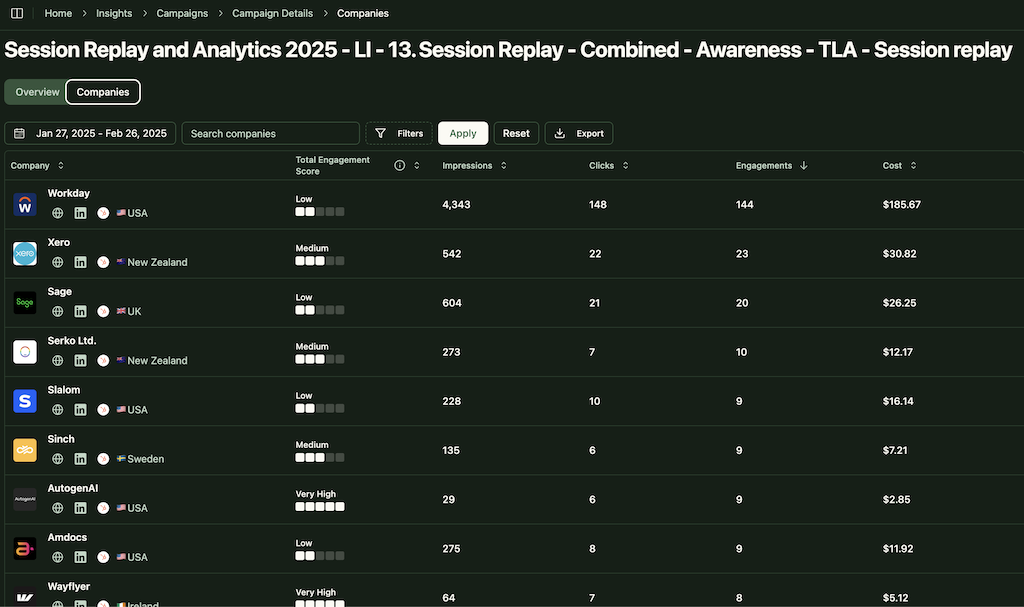
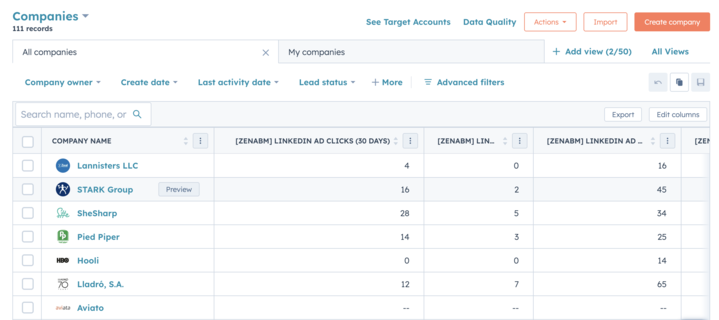
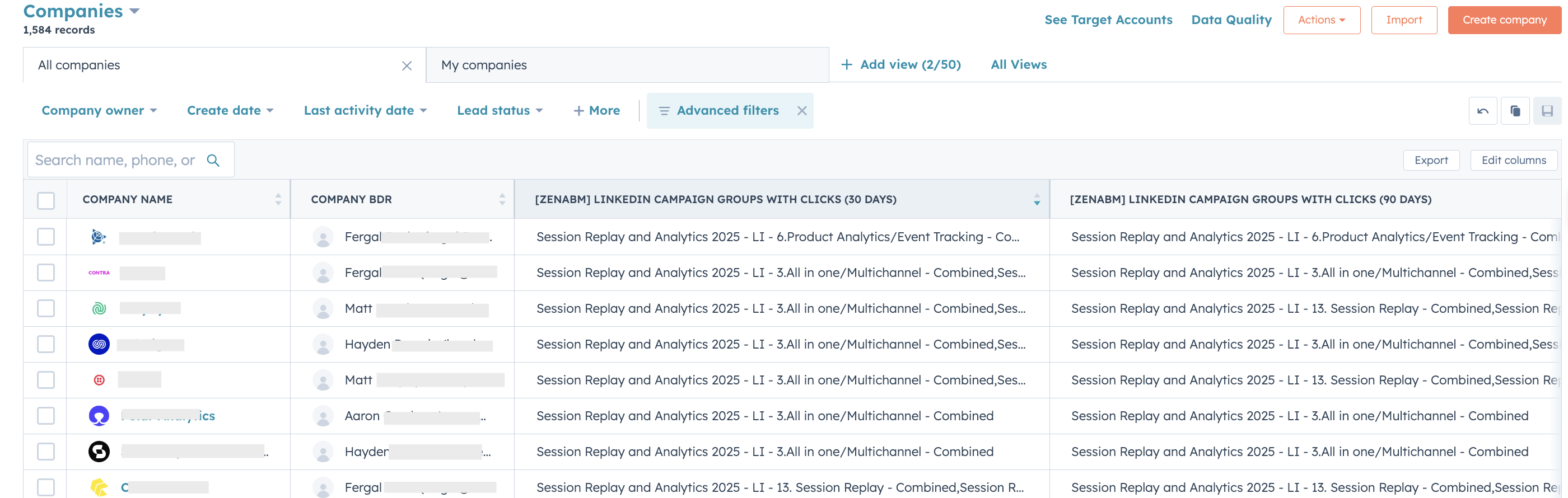
Some tools include built-in lead databases that remove the need for external prospecting tools:
| Tool | Built-in Data | Enrichment Approach |
|---|---|---|
| Apollo.io | 275M+ contacts | Integrated prospect database with email and phone |
| Lemlist | 450M+ contacts | Built-in lead finder with email verification |
| Clay | 75+ data providers | Waterfall enrichment across multiple sources for the highest coverage |
I’m generating one opportunity for every 44 people I reach out to via cold email. I’m identifying people on LinkedIn via Clay and Trigify.io that are engaging with content relevant to our space, then using multi-criteria qualification in Clay before enrichment.
The tools that produce the best reply rates offer more than just {{first_name}} tokens:
Lemlist leads on personalization (especially personalized images and video).
Clay with any outreach tool gives you the deepest personalization because Clay can enrich each prospect with dozens of data points before the sequence starts.
That gets even stronger when the trigger itself is based on real account behaviour.
For example, teams often use ZenABM to identify engaged companies first, then use Clay to enrich the right contacts inside those companies before launching LinkedIn and email follow-up. In fact, you can automate that using ZenABM webhooks!

What metrics does the tool actually track?
Enterprise tools (Outreach, Salesloft) typically offer the best reporting.
Growth tools prioritize simplicity over depth.
If attribution matters to your team, you will likely need to connect your outreach tool to your CRM and use a separate revenue attribution solution.
A quick tabulated comparison of which multichannel outreach tool is best for your team.
| Use Case | Best Tools | Why |
|---|---|---|
| Enterprise SDR team (50+ reps) | Outreach, Salesloft | Deep CRM integration, coaching, forecasting, enterprise reporting |
| Growth team / startup outbound | Lemlist, La Growth Machine, Apollo | Affordable, multichannel automation, fast to deploy |
| LinkedIn-first outreach | Expandi, HeyReach | Best LinkedIn automation safety features, multi-account support |
| High-volume cold email | Smartlead, Instantly | Best deliverability infrastructure, unlimited mailboxes |
| Salesforce-native team | Groove (Clari) | Native Salesforce integration, zero sync issues |
| Budget-conscious (free/cheap) | Apollo (free tier), Waalaxy | Lowest entry cost with functional multichannel features |
| Agency (multiple client accounts) | HeyReach, Expandi | Multi-account management, client-level reporting |
Here is what none of these tools does: integrate LinkedIn advertising signals into your outbound sequences.
Every multichannel outreach tool listed above treats LinkedIn as an outreach channel, connection requests, DMs, InMail.
None of them connects to LinkedIn advertising data.
That means your outbound sequences have no idea which accounts have already seen your brand through ads, which companies clicked on your content, or which accounts are in an active buying stage based on ad engagement patterns.
This creates the biggest opportunity in B2B outbound right now: warm outbound powered by ad engagement signals.
“Ads should never exist in a silo. It’s our duty as good advertisers to make sure every dollar, pound, euro, yen, or rupee matters. There’s a workaround we use, extract company data from ad engagers via webhooks, then reverse-lookup relevant job titles for personalized sequences.”
The most effective multichannel outbound setup I have seen combines advertising data with outreach tools.
Here is the stack I recommend for teams running ABM on LinkedIn:
| Layer | Tool | What It Does |
|---|---|---|
| LinkedIn ad tracking | ZenABM | Tracks company-level engagement, scores accounts, pushes data to CRM and Clay |
| Data enrichment + orchestration | Clay | Enriches engaged companies with contact data, job titles, emails, and personalizes messages |
| LinkedIn outbound | HeyReach | Sends personalized LinkedIn outreach to contacts at engaged accounts |
| Email outbound | Smartlead or Instantly | Sends email sequences with proper deliverability infrastructure |
| CRM + email automation | HubSpot | Triggers nurture workflows based on engagement data from ZenABM |
The key difference: instead of blasting cold outreach to your ICP list, you are reaching out to accounts that have already engaged with your LinkedIn ads.
They have seen your brand.
They recognize the name. The outbound feels warm because it is warm.

Read the full setup: ZenABM warm outbound with Clay.


Some common mistakes you must avoid while choosing your multichannel outreach stack:
Enterprise sales engagement and growth outbound automation solve different problems. Picking Outreach when you need Lemlist (or vice versa) wastes months of implementation time.
Automated LinkedIn actions can get accounts restricted. If your CEO’s LinkedIn profile is the one sending automated connection requests, the risk is not worth it. Use dedicated sender accounts or task-based tools for high-value profiles.
If your LinkedIn ads team and outbound team do not share data, you are sending cold outreach to accounts your ads already warmed up, and missing the signal that could make that outreach convert.
That is exactly why teams often bring in ZenABM. It creates the connective tissue between paid LinkedIn engagement and outbound execution, whether that means CRM sync, webhooks into orchestration tools, or simply giving reps visibility into which accounts are already showing intent.
Most multichannel tools have mediocre email infrastructure. If you are sending 500+ emails per day, layer Smartlead or Instantly underneath for inbox rotation and warmup.
LinkedIn connection acceptance rate and cold email reply rate are not comparable. Each channel has its own benchmarks. Evaluate channels by their contribution to the pipeline, not by matching vanity metrics.
“ABM on LinkedIn alone is insufficient, layer multiple channels on top of LinkedIn to maximize effectiveness. Use Clay automation templates to manage engagement at scale.
The best multichannel setup is not the one with the most channels. It is the one where channels actually inform each other.
That is the core problem with most email plus LinkedIn stacks today. They can execute sequences, but they still struggle to tell you which accounts are warming up through ads, which ones deserve outreach now, and which ones are still too cold.
That is why ZenABM fits naturally into this stack. It is not another generic outreach layer. It gives you company-level LinkedIn ad engagement, account scoring, CRM sync, and automation-ready signals that help email, SDR, and LinkedIn outreach teams act on the same account context.
Try ZenABM for free (37-day free trial) or book a demo now to know more!
For teams under 5 people, Apollo.io (free tier for prospecting + email sequences) combined with Waalaxy ($56/month for LinkedIn automation) gives you functional multichannel outreach at the lowest cost. If you can spend $99/month on one tool, Lemlist’s Multichannel Expert plan combines both channels with strong deliverability. Add ZenABM ($59/month) if you are running LinkedIn ads and want to trigger outbound based on ad engagement.
LinkedIn’s terms of service prohibit automation tools. In practice, cloud-based tools with dedicated IP addresses (like Expandi) are safer than browser extensions. The key limits: stay under 80-100 connection requests per week, 150 profile views per day, and 50-70 messages per day. Use warm-up periods for new accounts. Never automate on your CEO or founder’s primary LinkedIn profile, use dedicated sender accounts.
Outreach is an enterprise sales engagement platform ($100-150/user/month) built for large SDR teams with Salesforce integration, call coaching, and pipeline forecasting. LinkedIn actions are manual tasks. Lemlist is a multichannel outbound automation tool ($99/month) built for growth teams with automated LinkedIn sequences, personalized images, and email deliverability features. Choose Outreach for enterprise SDR operations, Lemlist for startup and growth team outbound.
Use ZenABM to track which companies engage with your LinkedIn ads at the account level. ZenABM pushes engagement data to your CRM (HubSpot or Salesforce) and to Clay via API. In Clay, enrich engaged companies with contact data, then push qualified contacts to HeyReach for LinkedIn outbound or Smartlead for email sequences. This turns cold outbound into warm outbound – you are reaching accounts that already recognize your brand from ads.
If you are sending fewer than 200 cold emails per day, most multichannel tools (Lemlist, Apollo, Reply.io) handle email adequately. Above that volume, you need dedicated cold email infrastructure (Smartlead or Instantly) for inbox rotation, domain warmup, and deliverability monitoring. The multichannel tool handles the sequence logic and LinkedIn actions; the cold email tool handles the email infrastructure underneath it.
