


![LinkedIn Ads Audit: How to Do It to Stop Bleeding Your Ad Budget [+FREE Claude Skill]](/_next/image?url=https%3A%2F%2Fwp.zenabm.com%2Fwp-content%2Fuploads%2F2026%2F04%2FGemini_Generated_Image_z9v60kz9v60kz9v6-1-scaled-e1777281462447.png&w=1920&q=75)
A LinkedIn ads audit is something every company running LinkedIn ads should be doing quarterly, but let’s face it: most of us treat it as ‘set it and forget it’.
LinkedIn is full of stories of large spender accounts with critical problems hiding in plain sight, like broken tracking, inverted budget allocation, or campaigns judged against the wrong success criteria:


So we decided to collect some materials and produce a step-by-step LinkedIn ads audit playbook for you to implement + share a skill.
This audit recipe is based on our consulting session with Tim Davidson (a LinkedIn ads expert) and his sample audit template he shared with us, a Claude Skill (Claude Ads) created by Daniel Agrici, and our experience + other materials and LinkedIn posts.

In this post, you will learn:
Short on time?
Here’s a quick rundown:

A proper LinkedIn ads audit should assess the account in the context of its actual strategy.
It should compare like with like.
It should separate awareness performance from lead gen performance, and distinguish Thought Leader Ads from standard Sponsored Content.
A bad audit does the opposite:
Here is the exact process to use.
It works for any B2B LinkedIn account, whether you are running ABM, demand gen, or a mix of both.

Before looking at a single metric, define what the account is trying to do.
This step matters because otherwise, the LinkedIn ads audit will judge the account against the wrong success criteria.
Ask:
Write a short audit brief before you start.
Something like this:
| Field | Example |
|---|---|
| Primary goal | ABM awareness + pipeline influence |
| Secondary goal | Demo generation from warm traffic |
| Main formats | Thought Leader Ads, image ads, video ads |
| Attribution source of truth | CRM + account-level influence, not LinkedIn lead counts |
| Excluded tactics | Native Lead Gen Forms unless being tested |
Export the raw data you need for the last 30, 60, and 90 days.
From LinkedIn Campaign Manager, export:
From outside LinkedIn, collect:
Remember that LinkedIn alone rarely tells the full story.
A campaign can look weak on clicks but still influence the target account pipeline.
Or it can look strong on CTR but produce low-quality traffic.
“The best marketing that actually drives business results can’t be tracked. Yet the hardest things to get approved are the things you can’t track.” – Tim Davidson, Founder @ B2B Rizz in his post
This is always near the top because if tracking is broken, most of the rest of the LinkedIn ads audit becomes directional only.
Review:
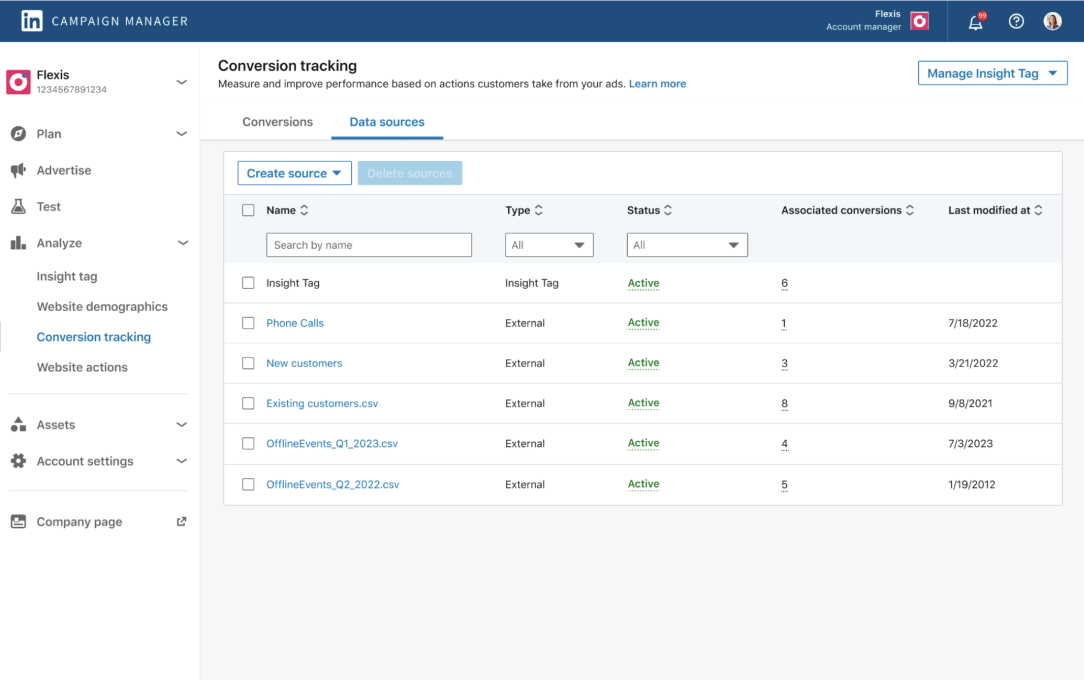
Red flags:
Use three scoring buckets:
Do not jump straight from “zero LinkedIn leads” to “tracking is broken” if the team intentionally measures success in CRM or account-level attribution.
Verify first.
In fact, we have seen accounts where zero LinkedIn-native conversions was by design – the team used CRM-based revenue attribution instead.
“Ooohlala, LinkedIn sneaking in a couple two tree new columns to the companies tab. Paid conversions and paid qualified leads. Which is pretty awesome as it gives us more insights.”– Tim Davidson, Founder @ B2B Rizz, in his post

This is where most bad LinkedIn ads audits fail.
Do not lump everything together.
Split the account into categories:
The rule: only compare within the same format and objective family. TLA vs TLA. Image vs image. Video vs video. Retargeting vs retargeting. Do not compare TLA CTR vs standard image CTR as if one being higher automatically means all budget should move there. A Thought Leader Ad running at 4.8% CTR is doing a different job than a single image ad running at 0.42% CTR. The TLA builds trust and warms accounts. The image ad may be doing direct-response retargeting.

Now review how the account is organized.
Good signs:
Bad signs:
“Plan your entire ABM strategy before launching LinkedIn campaigns – don’t start with LinkedIn in isolation. Define your commercial objectives and map out how LinkedIn fits within your broader multi-channel approach. – Maximilian Herczeg, LinkedIn Ads Consultant (ex-LinkedIn), in his post

Review targeting quality, not just setup.
Check:
“The audience size decreased 28% when I added the Job seekers exclusions to the LinkedIn ads campaign. I ran an audit recently where a company had a full ABM approach targeting 351 accounts but instead of uploading an account list and then adding in job titles or seniority/function, they just went full broad. – Tim Davidson, Founder @ B2B Rizz, in his post

This is where you assess audience quality, not by just saying, “job title targeting exists, pass.”
You want to know whether the setup is likely to hit the right people at the right accounts with enough precision.
For a deeper look at our dedicated guide on how to structure LinkedIn ABM campaigns.
Review creative performance separately by format.
Here is what to look for in each:
Look for these concerning TLAs:
In the ZenABM benchmarks data, the best-performing TLAs use first-person “I” voice (65% of top performers) and place links in the bottom 25% of text (75% of top performers). TLAs are 77% cheaper per landing page click than standard formats.
Look for these regarding image and carousel ads:
Look for these regarding video ads:
A format can be successful in one job and bad in another.
TLAs can be excellent for cheap engagement and ABM air cover.
Image ads can still be useful for retargeting.
Video can help build audiences even if direct click performance is mediocre.
Do not kill a format just because it is worse than TLAs on CTR.
This is another place where LinkedIn ads audits get sloppy.
There are two layers:
| Layer 1: Delivery / Efficiency | Layer 2: Business Outcomes |
|---|---|
| Impressions, reach, frequency | Demo requests, trials |
| Clicks, CTR, CPC | MQLs, SQLs |
| Engagement rate | Opportunities, pipeline |
| Video views | Revenue, influenced pipeline |
| CPM | Account penetration |
A campaign can be efficient but low intent.
Or expensive but strategically valuable. Or weak on CTR but strong on pipeline influence.
Your audit must show both layers.
Once performance is segmented properly, evaluate how the budget is distributed.
Check:
In one account we audited, 65% of spend went to standard image/carousel/video ads at $15.12 CPC, while TLAs received only 35% at $1.06 CPC.
The budget allocation was inverted.
But the right fix is not just “move 80% to TLA.”

The right fix is: scale TLA within the awareness/engagement layer, keep or reduce standard formats depending on their role in retargeting and conversion, and reallocate based on campaign job, not just the cheapest CPC.

Check whether the chosen campaign objectives make sense for what the team is trying to achieve.
Ask:
Do not automatically recommend Lead Gen Forms.
Only recommend them if the business wants native form capture, lead quality can be managed, CRM routing is ready, and the audience and offer fit that motion.
As Philip Ilic pointed out in his post, lead gen form underperformance is rarely about the ad format itself.
It is almost always a follow-up execution problem.
If you are not routing leads to SDRs in real-time via Slack, Lead Gen Forms will underperform regardless.

For B2B SaaS and ABM, LinkedIn lead counts are often not the source of truth.
Check:
Instead of saying “0 LinkedIn leads means the account failed,” a smart audit says: “LinkedIn-native conversion reporting is absent or incomplete, so platform-level optimization is limited.
Final business impact should be verified in CRM and account-level attribution before judging campaign effectiveness.”
That is much more accurate.
And with tools like ZenABM, you can see which companies engaged with your specific LinkedIn ad campaigns and map that engagement back to CRM deals, giving you the attribution layer that Campaign Manager alone cannot provide.
This will give you clear insights into which campaigns are really influencing deals, and which are only burning budget.




Now look for patterns, not isolated campaign metrics.
Look for patterns across:
Example pattern findings from the audit we ran:
Note that pattern recognition is more useful than listing isolated campaign metrics.
Use a scorecard, but make it nuanced.
| Category | What to Assess | Score Options |
|---|---|---|
| Tracking and measurement | Insight Tag, conversions, CAPI, UTMs | Strong / Mixed / Weak |
| Account structure | Naming, segmentation, testing logic | Strong / Mixed / Weak |
| Audience strategy | Personas, ABM lists, exclusions, overlap | Strong / Mixed / Weak |
| Creative performance | By format: TLA, image, video, carousel, text | Strong / Mixed / Weak |
| Spend allocation | Budget vs performance alignment | Strong / Mixed / Weak |
| Objective fit | Campaign objectives match strategy | Strong / Mixed / Weak |
| Attribution readiness | CRM connection, pipeline tracking | Strong / Mixed / Weak |
| Testing cadence | Creative refresh, A/B testing | Strong / Mixed / Weak |
| Funnel coverage | Retargeting, mid-funnel, conversion layer | Strong / Mixed / Weak |
Also, avoid fake precision like “42/100” unless your scoring logic is actually robust.
A three-tier rating per category is more honest and more useful.
A strong audit conclusion has three sections:
Example: “TLAs are clearly the strongest awareness and engagement format. Persona segmentation is strong. ABM structure is well thought through.”
Example: “Conversion tracking inside LinkedIn is incomplete.
Downstream measurement is not visible enough in-platform. Standard sponsored content is absorbing too much spend without clear justification.”
This should be a prioritized action plan, not a random list. Ranked by impact.
Keep these on hand as a quick sanity check:
These are the most common audit mistakes I see:
If you want to run this entire audit process in minutes instead of hours, there is a free Claude skill that does it.
Claude Ads is an open-source skill for Claude Code that runs a 25-check LinkedIn ads audit automatically.
It covers technical setup, audience targeting, creative quality, lead gen, and budget/bidding with weighted scoring across all categories.
What the skill does:
How to use it:

/ads-linkedin in Claude CodeThe skill handles the mechanical part of the audit, like data crunching, benchmark comparisons, and pattern detection.
You still need to apply the strategic thinking from Steps 1-3 (defining goals, pulling external data, and verifying tracking) because no tool can assess your account’s intent and strategy context for you.
We used this skill on the $213K account, and it correctly identified the zero-conversion tracking issue as the top priority, flagged the inverted budget allocation, and highlighted TLAs as the clear performance winner (all in about 2 minutes).
Here is the exact structure to use for every LinkedIn ads audit:
A strong LinkedIn ads audit separates signal from noise.
It tells you which formats are working for which jobs, where budget is being wasted, whether tracking is reliable enough to optimize on, and what the account is actually supposed to achieve.
Most audits skip this and just recommend moving all the budget to the cheapest CPC or the largest audience size.
That is not an audit; that is a shortcut.
The real value comes from understanding the funnel: what awareness campaigns should do, what retargeting should do, and what bottom-funnel conversion capture should do.
Then, check whether your creative, audiences, and objectives are aligned with those jobs.
Then, verifying that your business outcomes (pipeline, deals) are connected to your campaign spend, not just your LinkedIn lead counts.
If you are running an ABM program on LinkedIn, this gets more tactical.
You need to know which target accounts engaged with your campaigns, how many contacts within each account you reached, and whether that engagement moved the deal forward. LinkedIn Campaign Manager does not show you this by default.
ZenABM does.
It connects your LinkedIn ad performance to your CRM deals, giving you account-level attribution that tells you exactly which campaigns are influencing pipeline and which are just burning budget.
That is the difference between an audit that looks good in a deck and an audit that actually changes how you spend money.
Try ZenABM free for 37 days (starting at $59/month) and run your first account-level LinkedIn ads audit.
Some common questions about LinkedIn ads audit:
Run a full audit quarterly, or after any major campaign change (new audience, new format, budget shift of 20%+). In between, do a lightweight weekly check of tracking health, top-line spend, and winner/loser patterns. If you are using the Claude Ads skill, you can run the automated 25-check audit monthly with minimal time investment.
Use format-specific benchmarks, not generic averages. From the ZenABM Benchmarks Report: TLAs median 2.68% CTR / $2.29 CPC, single image 0.42% CTR / $13.23 CPC, video 0.24% CTR / $15.61 CPC, carousel 0.32% CTR / $13.30 CPC. Compare your campaigns against the benchmark for their specific format, not against TLAs.
You can audit delivery metrics (impressions, CTR, CPC, engagement) and account structure. But without tracking, you cannot assess business impact – which means any budget or optimization recommendations are based on assumptions, not data. Fixing tracking is always priority one.
Comparing incompatible metrics across formats. A TLA at 4.8% CTR and a single image at 0.42% CTR are not competing – they are doing different jobs. The second biggest mistake is assuming zero LinkedIn-native leads means the account is failing, when the team may be tracking conversions in their CRM or ABM platform instead.
For ABM accounts, add these checks to your audit: account penetration rate (how many contacts reached per target account), account-level engagement scores, pipeline influence by company, and whether sequential messaging is in place across funnel stages. Tools like ZenABM can show company-level engagement data that Campaign Manager alone does not provide.
