



Dreamdata positions itself as a B2B “Activation & Attribution Platform” built to connect buyer journeys across channels and tie revenue back to the touchpoints that influenced it.
In this deep dive, I’ll break down what is Dreamdata, what it actually does, the capabilities that matter for ABM teams, where it shines, where it feels like overkill, and how the pricing story typically plays out in the real world.
I’ll also cover where ZenABM (a first-party, LinkedIn-focused ABM platform) can be a stronger fit for LinkedIn-first teams, or a practical complementary layer alongside Dreamdata (or any enterprise attribution suite) because of ZenABM’s unique LinkedIn account-level capabilities.


In case you want it short:

Dreamdata’s feature set is built around one core promise: connect spend, touchpoints, accounts, and revenue in one place.
Here are the functions that typically matter most (especially for ABM and revenue teams):

Dreamdata supports multiple attribution models so you can distribute credit across the touchpoints that influenced revenue.
In its documentation, Dreamdata outlines six default attribution models (including first-touch, last-touch, linear, U-shaped, W-shaped, and data-driven), and teams can also configure weighting logic to reflect how their motion actually works.
This is the whole point: move beyond “last click wins,” and get a more realistic view of which channels and sequences contribute to pipeline.
The tradeoff is obvious: the more models you have, the more internal debate you invite.
If your tracking and CRM data are messy, model variety will not save you. It will just produce more confidently wrong charts.
Dreamdata also consolidates your touches (CRM activity, website sessions, ad engagement, content downloads, events, etc.) into one journey timeline so you can see how multiple interactions add up to a deal, even when they happened across different systems.


Attribution is only one layer.
Dreamdata also rolls data into revenue analytics dashboards that show pipeline, revenue, CAC/ROI style metrics, and performance breakdowns by channel, campaign, and content.
Common ABM-friendly angles include:
In practice, users often say the pre-built reports are powerful, but not always instantly intuitive.
It usually takes time to learn which reports matter for your specific GTM motion, and which ones are interesting but not operational.

By the way, ZenABM also provides detailed plug-and-play account-based LinkedIn ad revenue attribution dashboards for a starting price of just $59/month.


Dreamdata is frequently used in ABM contexts because it can group touchpoints into account-level journeys, not just lead-level activity.
Instead of seeing one person’s clicks, you see how a buying group from an account engaged over time, and which touches preceded pipeline creation or a closed-won outcome.
That is useful for ABM reporting and for internal alignment, especially when sales and marketing disagree about “who sourced the deal.”

Dreamdata also includes account identification and engagement scoring features (often surfaced through its “Reveal” concept) so teams can filter for ICP accounts, engagement levels, and key intent-like behaviors such as repeat visits or high-value page activity.

Dreamdata goes beyond reporting into “activation” by letting you build audiences using flexible filters across your connected data and then sync those audiences to ad platforms.
Example: You could create a segment of all accounts that visited your pricing page twice in the last week and push that list to LinkedIn for a focused retargeting campaign.
Dreamdata’s Audience Hub is built for this kind of workflow without requiring a data engineer to stitch lists together manually.

It also supports conversion syncing to ad platforms, so downstream CRM events (like SQL creation or closed-won) can be sent back to ad networks to help optimization algorithms learn what “real value” looks like.

Dreamdata integrates across the usual B2B data stack: CRMs, marketing automation, ad platforms, web analytics, intent sources, and warehouses.
Common connectors teams care about:
Dreamdata does not present a simple, self-serve pricing ladder for all tiers on the homepage, which usually signals “talk to sales” once you scale beyond basics.
Here’s the cleanest way to understand the Dreamdata pricing reality:
If you are looking for a leaner yet effective tool (especially for LinkedIn-first ABM), I present ZenABM, starting at just $59/month.
ZenABM offers account-level LinkedIn ad engagement tracking, ad engagement-to-pipeline analytics with plug-and-play dashboards, account scoring, ABM stage tracking, CRM sync, first-party qualitative intent, automated assignment of BDRs to hot accounts, custom webhooks, and ad engagement tracking at the job-title level.


No attribution tool is universally adored, because attribution is where expectations go to fight reality.
After reviewing common feedback themes, here is what tends to show up repeatedly:
One alternative to Dreamdata is ZenABM.
It is specifically designed for LinkedIn ABM, so it can either be a complete, lean and affordable alternative to Dreamdata for teams that mainly advertise on LinkedIn.
Even for teams running multi-channel ABM, ZenABM can be a complementary layer to Dreamdata or whichever bigger ABM suite they are using because of ZenABM’s unique features.
Let’s look at those features:

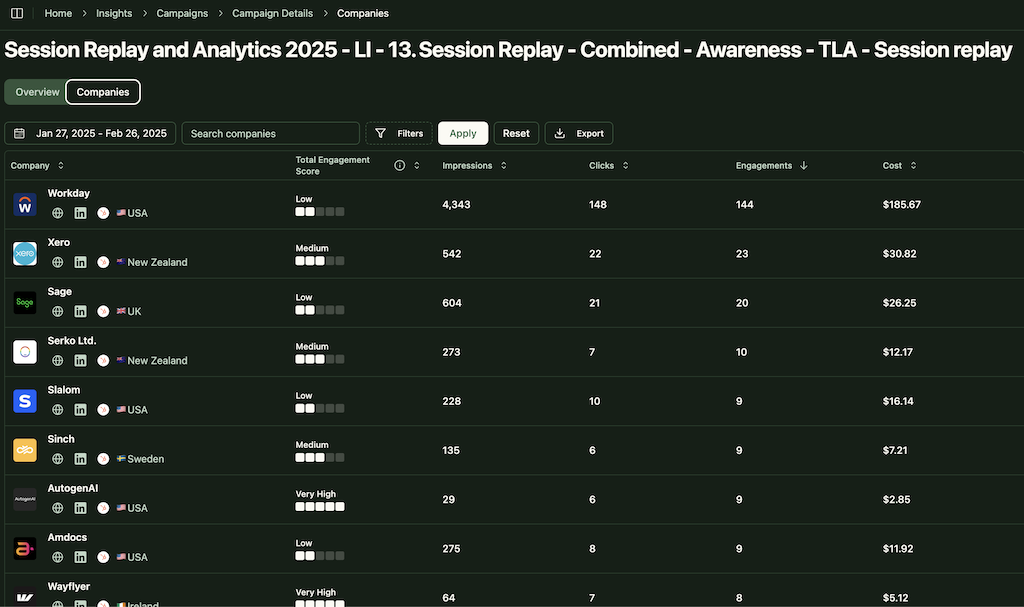
ZenABM connects to the official LinkedIn Ads API and captures account-level data for all campaigns so you can see which companies see, click, and engage with your ads.
Because this is first-party data from LinkedIn’s environment, it is more reliable than IP or cookie-based visitor ID.
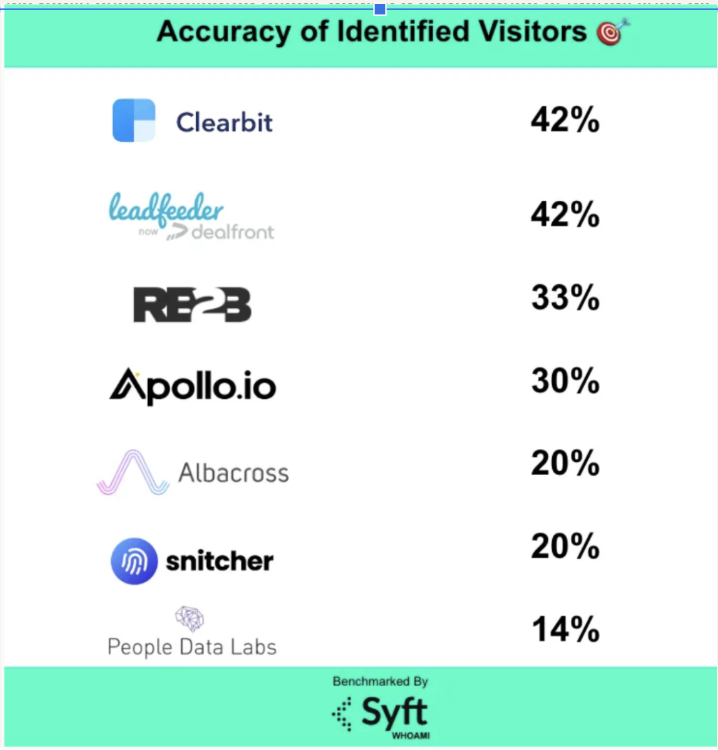
A Syft study puts IP-based identification at around 42 percent accuracy.
ZenABM treats LinkedIn ad engagement itself as first-party intent. When several people in one company keep engaging with your ads, that is a strong buying signal without rented intent feeds.
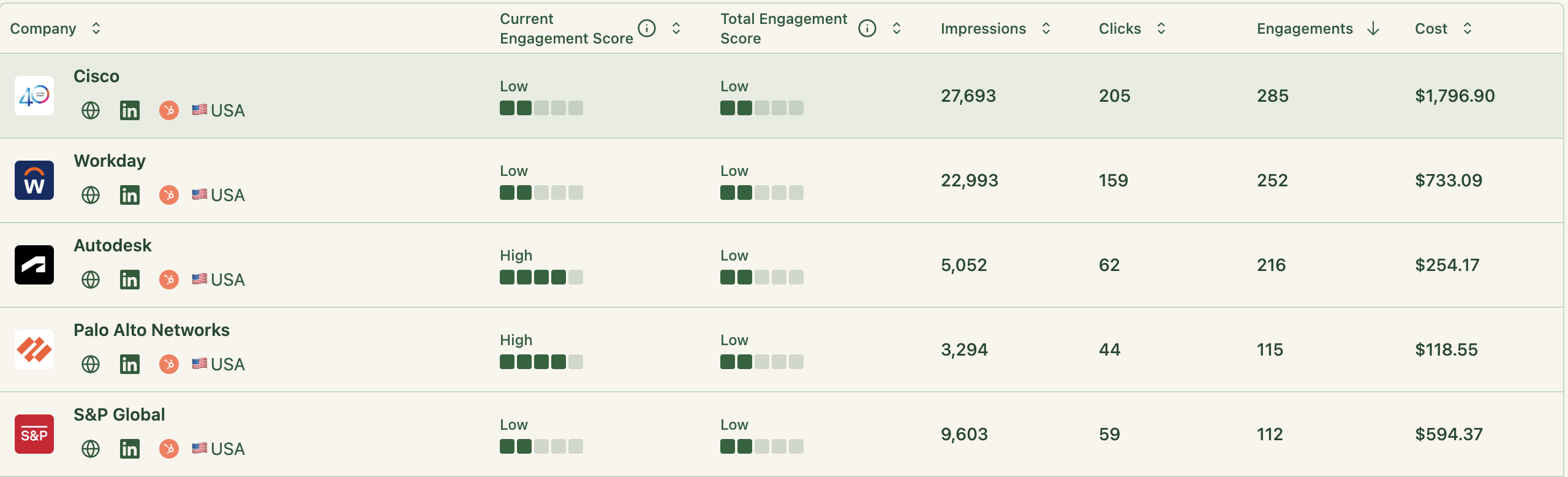
ZenABM updates engagement scores as accounts interact with your ads across campaigns, so you can see who is heating up over short or long windows and let marketing and sales prioritize accounts that show real intent.
ZenABM also shows the full touchpoint timeline for each company:
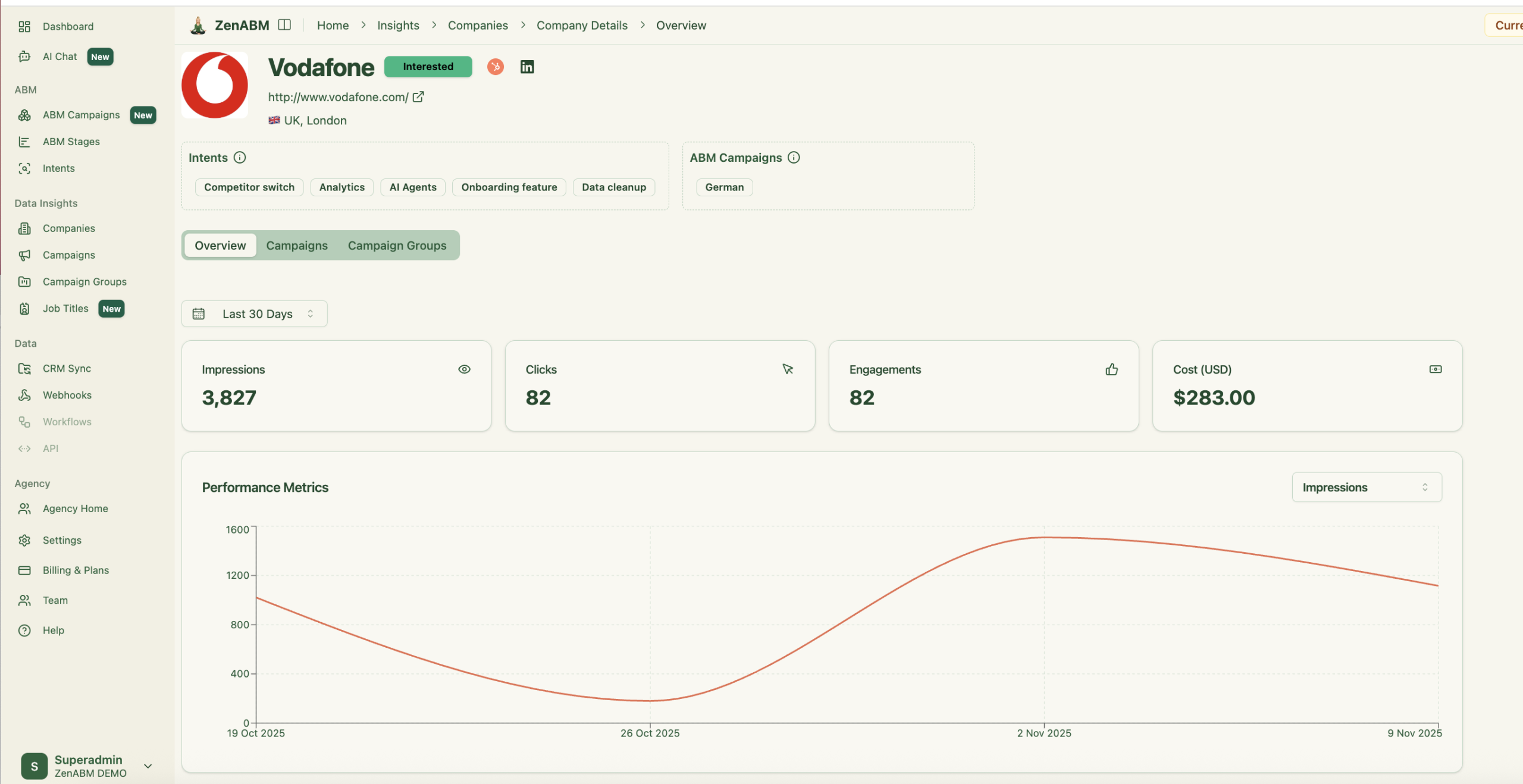
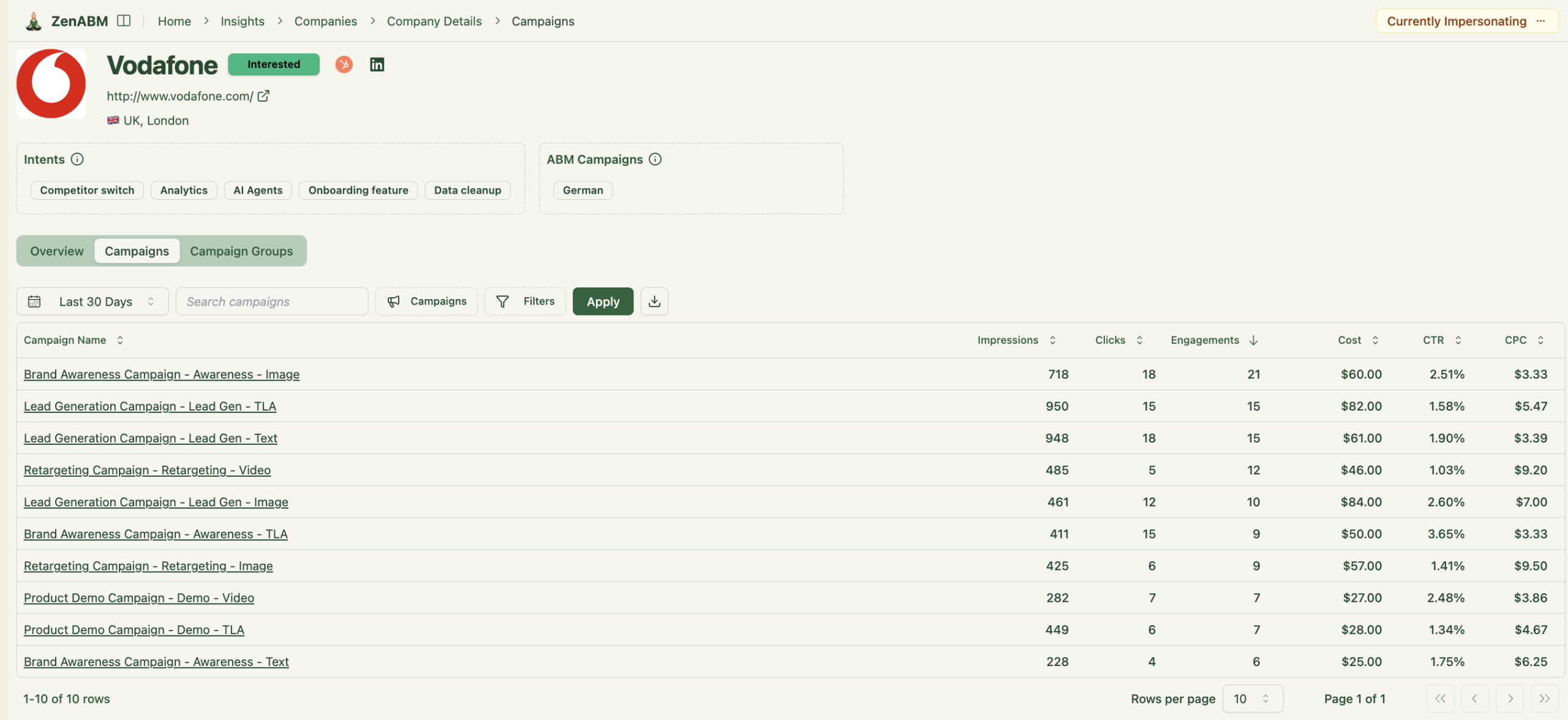
ZenABM lets you define stages such as Identified, Aware, Engaged, Interested, and Opportunity and automatically places accounts in the right stage using scores and CRM data.
You control thresholds, and ZenABM tracks movement over time.

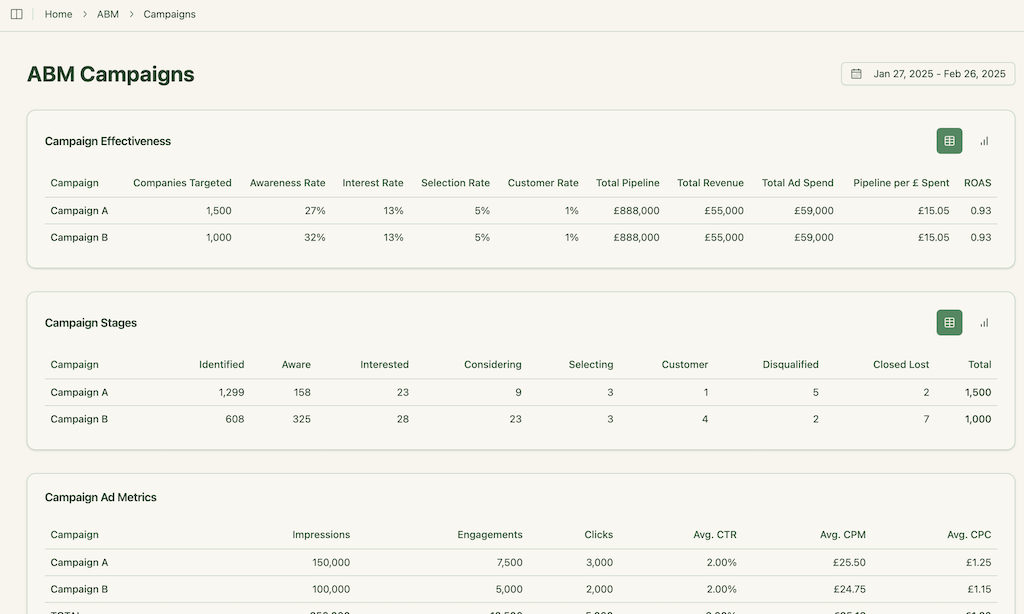
This gives you funnel visibility similar to larger suites, but powered by LinkedIn data.
ZenABM integrates bi-directionally with CRMs like HubSpot and adds Salesforce sync on higher tiers.
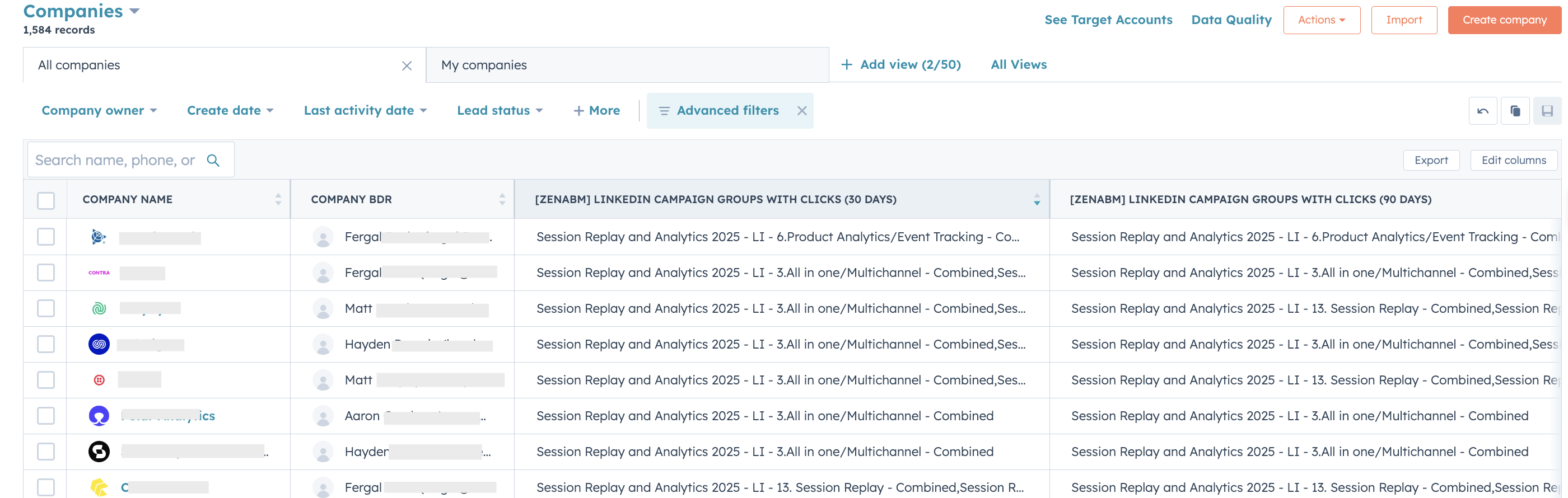
LinkedIn engagement data flows into the CRM as company-level properties:
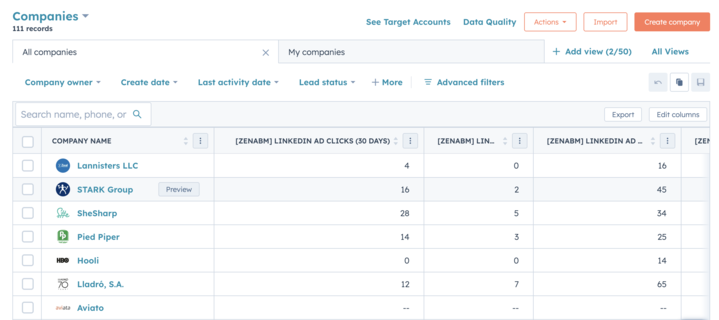
Once an account crosses your score threshold, ZenABM updates the stage to Interested and automatically assigns a BDR.
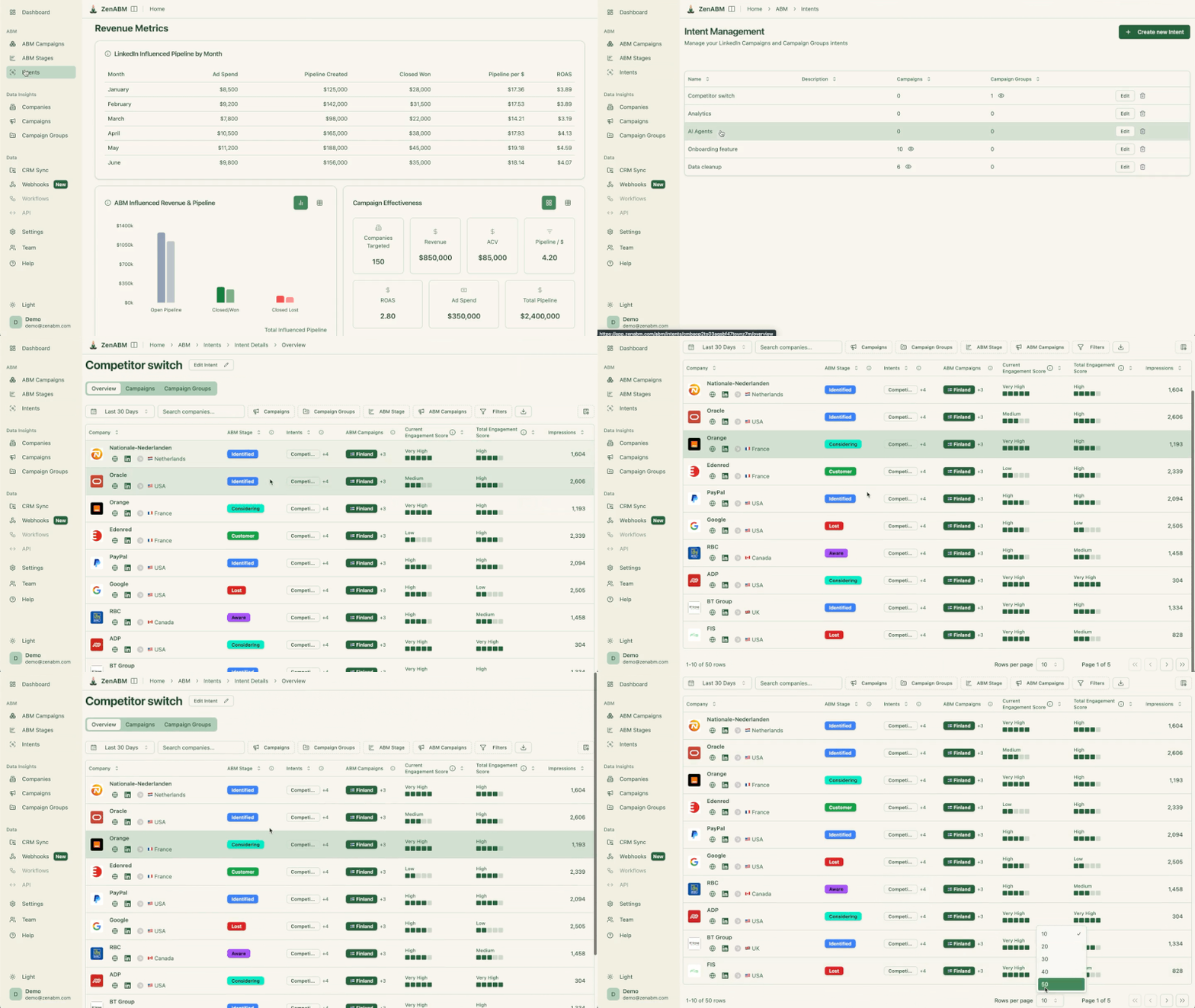
ZenABM lets you derive intent topics from LinkedIn campaigns by tagging campaigns by feature, use case, or offer.
ZenABM then shows which accounts engage with which themes.
This is clean, first-party intent from owned interactions.
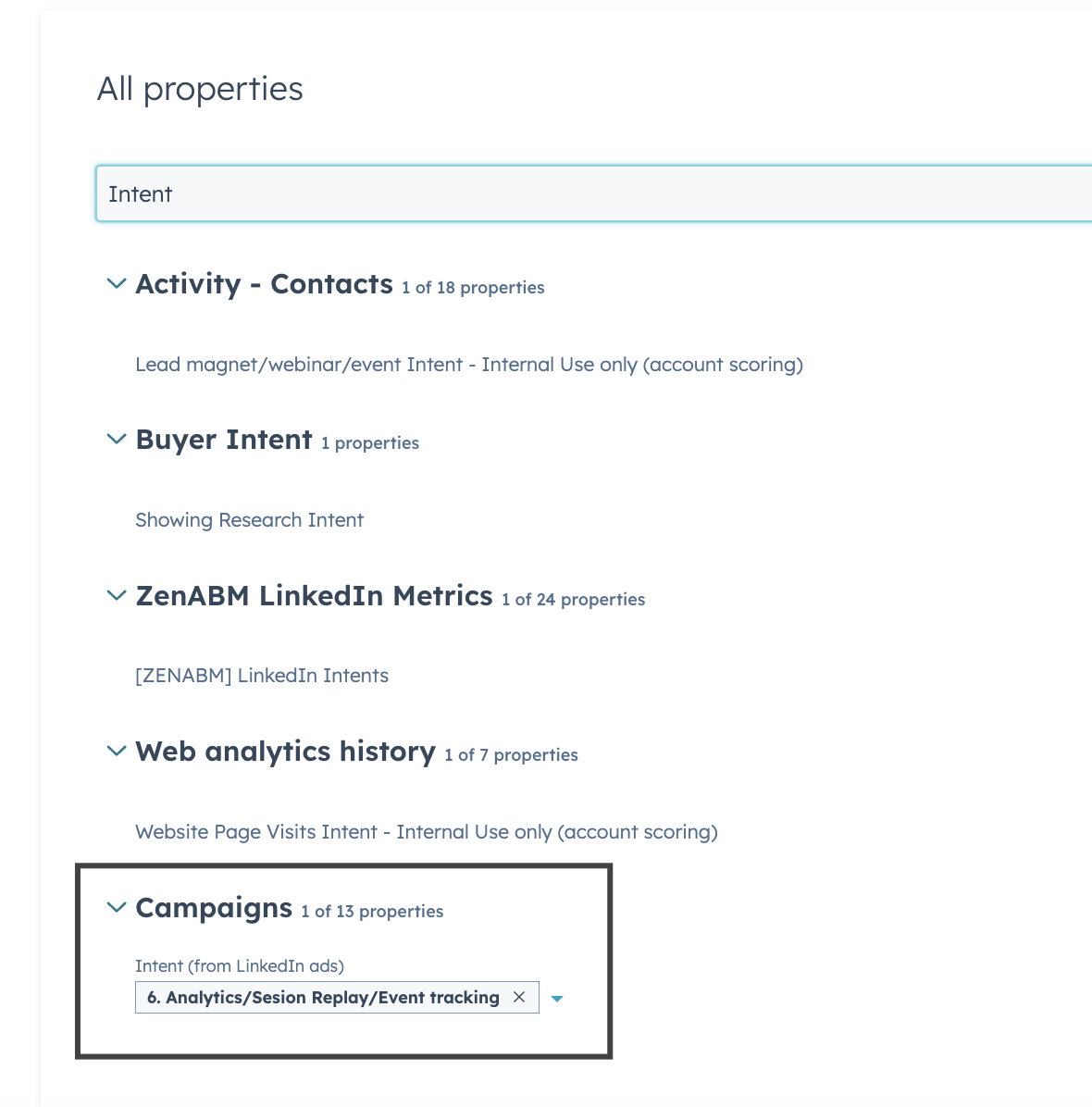
You can push these topics into your CRM, so sales and marketing can tailor outreach to what each company has actually explored.
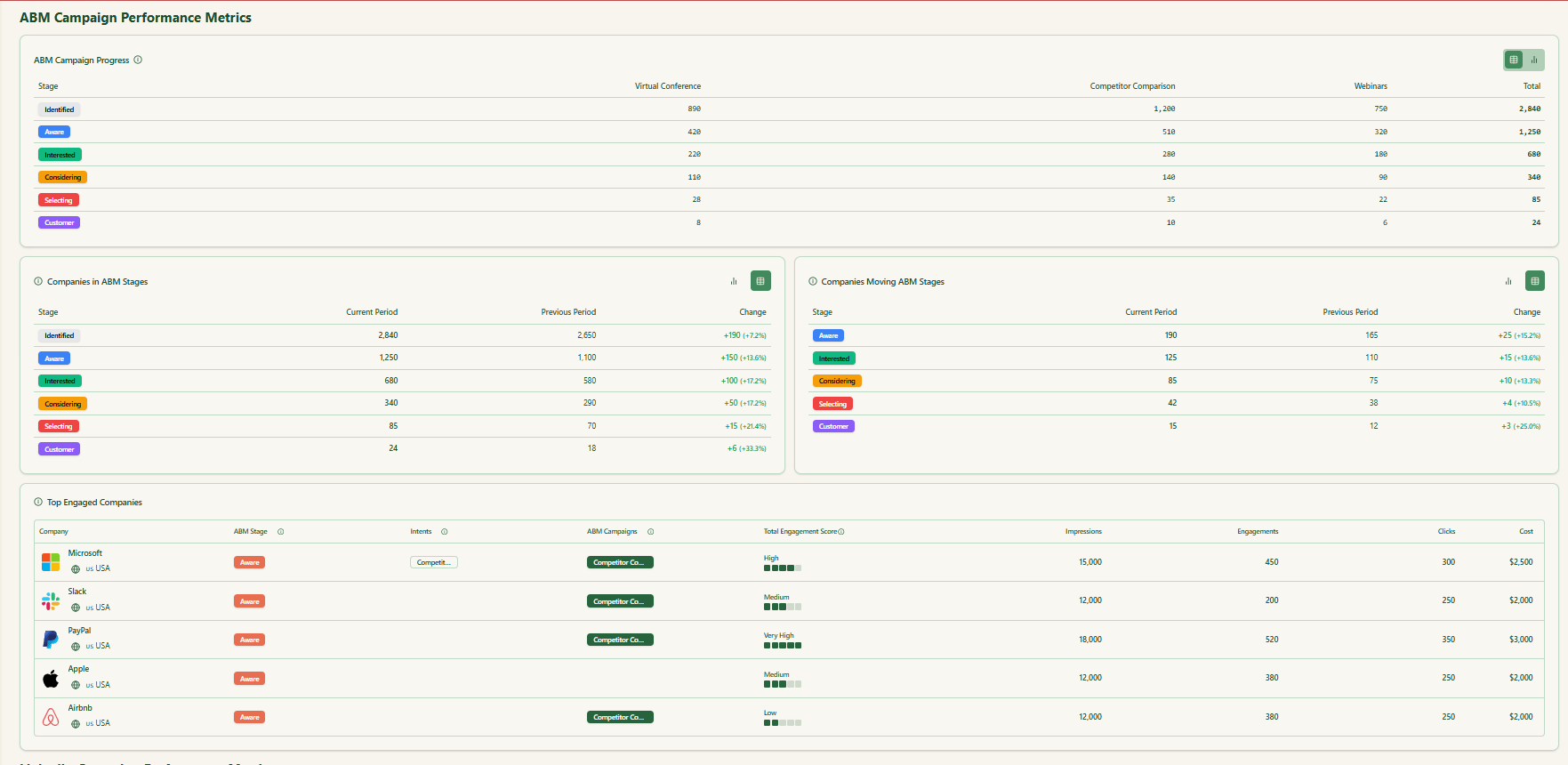
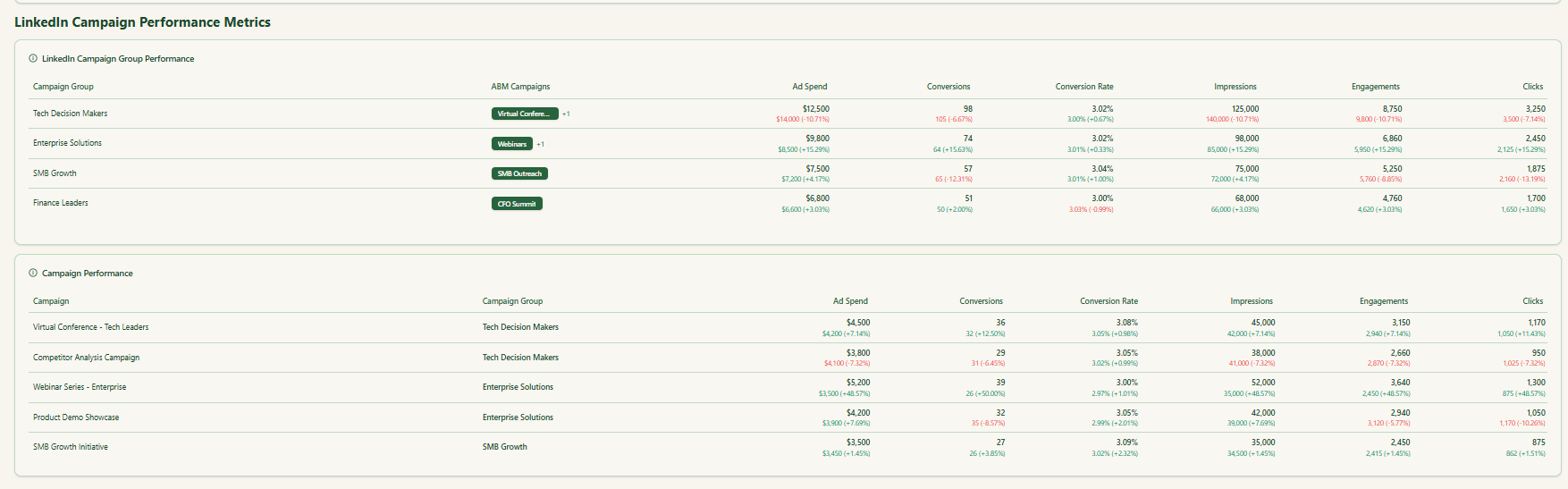
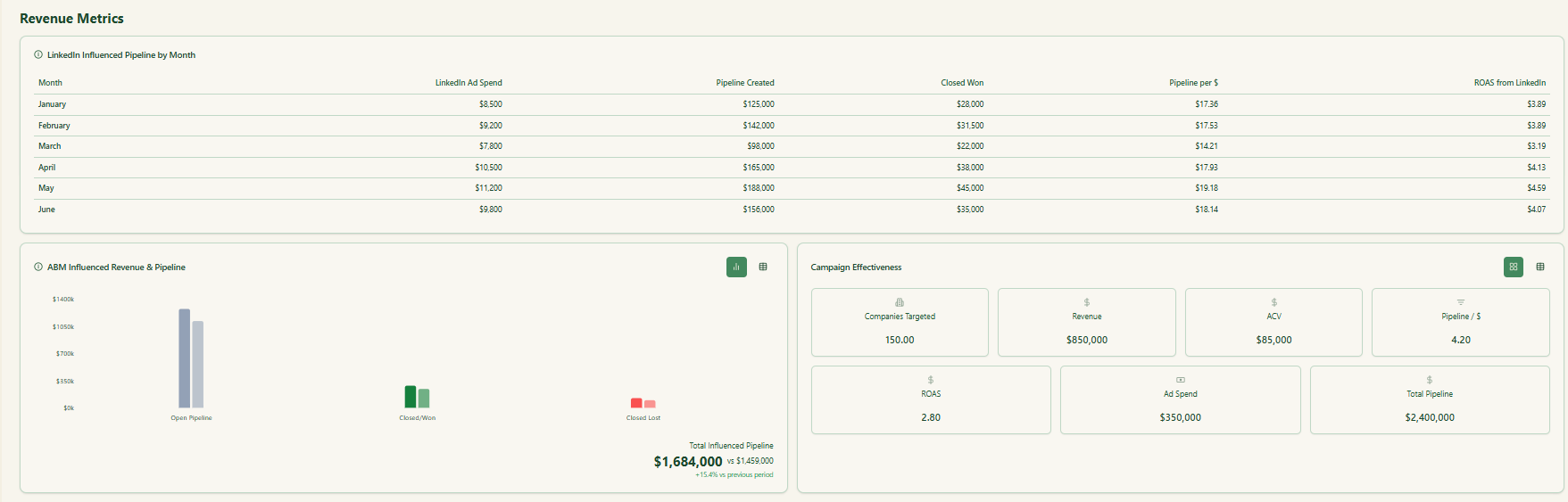
ZenABM ships with dashboards that connect LinkedIn ads to account engagement, stage movement, and revenue.
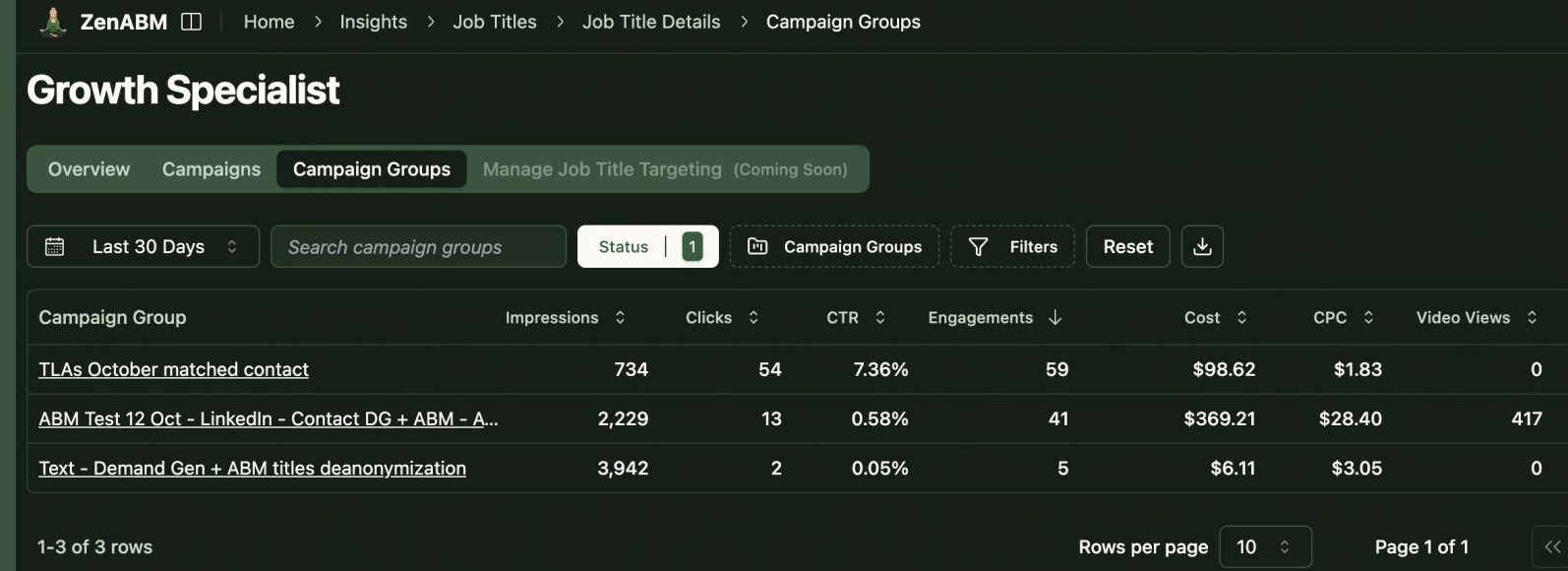
ZenABM shows which job titles engage with your creatives and gives dwell time and video funnel analytics.
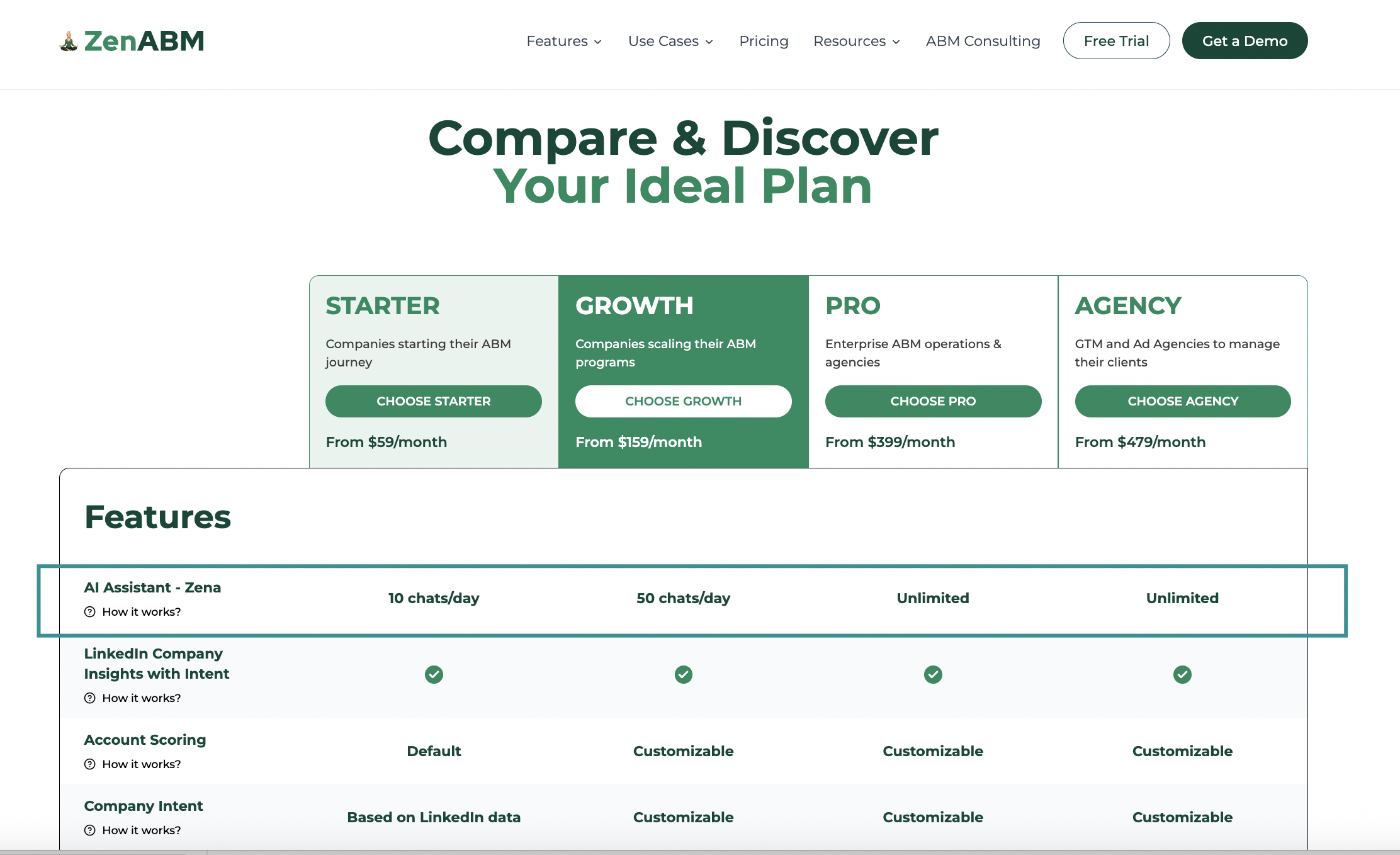
ZenABM provides its AI chatbot called Zena that basically answers all you want from ZenABM in natural language.
You can ask Zena open-ended questions like you would a smart analyst and get company-level answers about:
Under the hood, Zena combines OpenAI with a library of carefully designed prompts and endpoints to join ad engagement, spend and CRM deals so it can explain which campaigns drove pipeline, which accounts turned into opportunities, which formats perform best and which companies are high intent but untouched by sales.
Instead of exporting spreadsheets and stitching pivot tables, you get plain language insights, ready to drop into strategy reviews, weekly sales standups or executive updates.
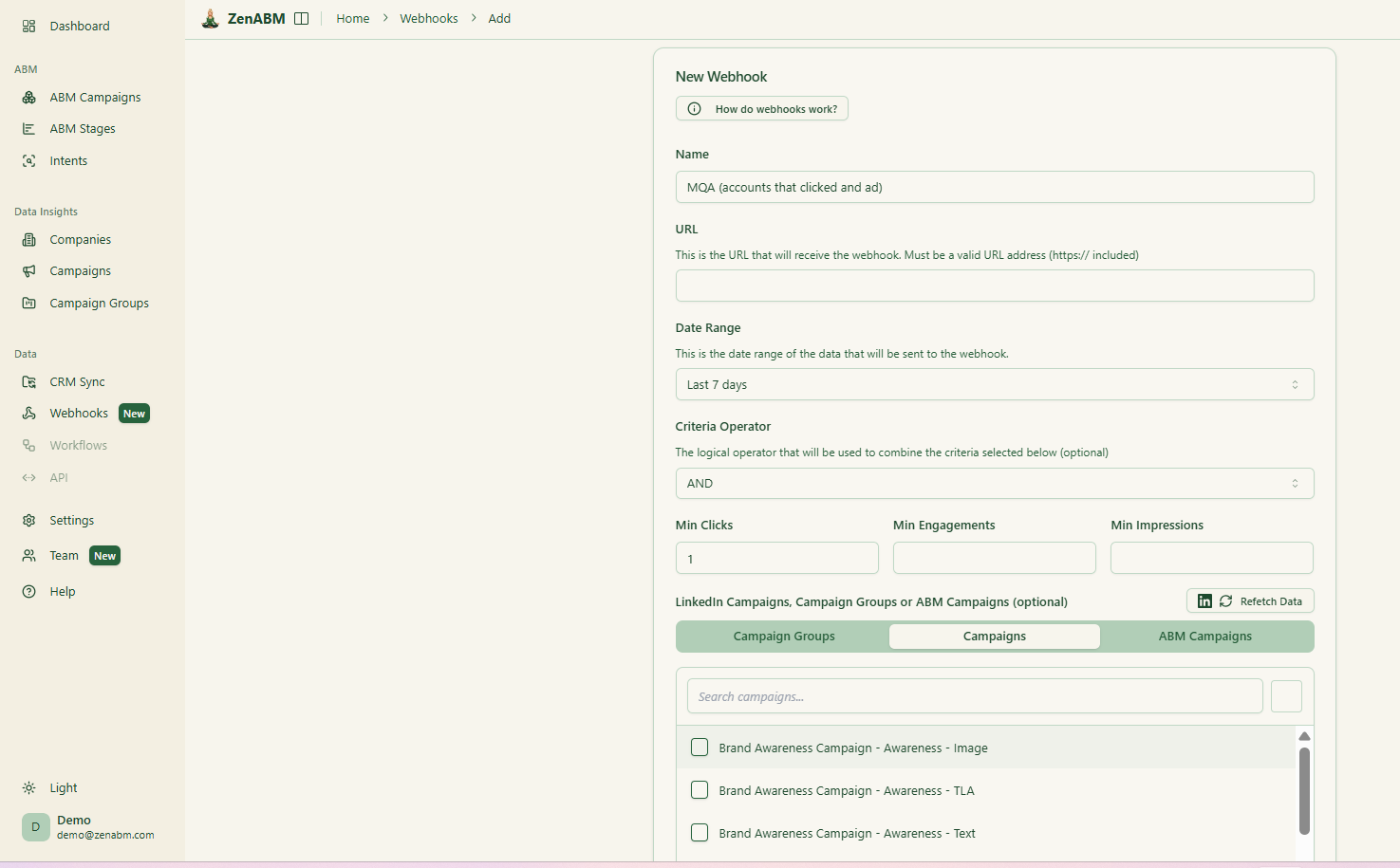
ZenABM’s custom webhooks let you push events into your stack, for example, Slack alerts, enrichment flows, or other ops automations.

Most tools treat each LinkedIn campaign separately. ZenABM lets you group several into one ABM campaign object so you can see performance across regions, personas, or creative clusters.
Instead of juggling fragmented reports in Campaign Manager, you see spend, pipeline, account movement, and ROAS for the entire initiative.
For agencies, ZenABM offers a multi-client workspace.
You can manage multiple ad accounts and clients in one environment, each with its own ABM strategy, dashboards, and reporting, instead of constantly switching accounts in Campaign Manager.
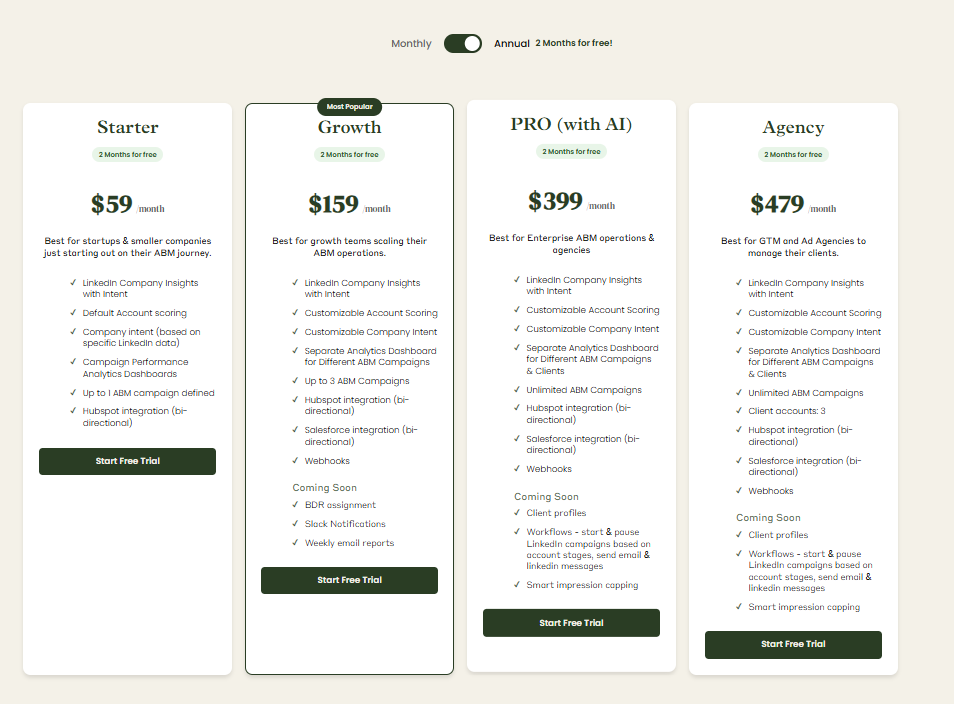
Plans start at $59/month for Starter, $159/month for Growth, $399/month for the Pro (AI) tier, and $479/month for the agency tier.
Even the highest tier costs under $6,000/year, far less than Dreamdata.
All plans cover essential LinkedIn ABM functions, with higher tiers mostly expanding limits or adding Salesforce integration.
Pricing is flexible (monthly or annual with two months free), and a 37-day free trial allows teams to try before buying.
Dreamdata is built for teams that want unified attribution plus activation workflows across a broad GTM stack, and who can commit to implementation and ongoing data quality.
If you truly need multi-touch attribution across multiple channels, long cycles, and complex buyer journeys, Dreamdata can deliver value, assuming your tracking is solid and your team operationalizes the platform.
But if your ABM motion leans heavily on LinkedIn and your immediate need is seeing which accounts are engaging, which themes they respond to, how they move stages, and what pipeline is being influenced right now, a leaner LinkedIn-first layer often wins.
ZenABM gives you that focus with first-party account-level LinkedIn insights, faster setup, predictable pricing, and practical ABM workflows that connect engagement to action.
For many teams, it is the more operational choice, and for others, it is the ideal complement.
The 37-day free trial makes the decision pretty painless.
