

©2026 ZenABM - All Rights Reserved.

If you’re planning to break into account-based marketing (ABM) with a free or low-cost tool, there are solid options available right now.
Some are completely free, others offer free tiers with real utility, and a few give you a long enough trial to run an actual pilot and prove ROI before you pay a cent.
Below are the top 12 free and freemium ABM tools for SMBs in 2026, with a deep dive into their current features, updated pricing, integrations, and the ABM use case each one actually serves.
Short on time?
Here’s a quick rundown:
Tool | Free-Tier Highlights | Paid Upgrade Unlocks | Ideal SMB Use Case |
|---|---|---|---|
Free forever for 3 folios (strategy docs) with basic templates & real-time collaboration. | From ~$12/user/mo: unlimited folios, full branding removal, team workspaces, and advanced analytics. | Visual ICP & account-plan creation. | |
37-day free trial on Starter: LinkedIn, Google, Reddit, and organic traffic intent data, account scoring, 1 campaign, HubSpot sync. | Starter $59/mo; Growth $159 adds multi-campaign dashboards, custom scoring, Salesforce sync; Pro $399 enables unlimited campaigns, AI workflows, API & MCP server access. | Plug-and-play multi-channel ABM analytics & attribution for LinkedIn-heavy programs. | |
30-day free trial; identify up to 1,500 companies visiting your website. | From $199/mo: account intelligence with waterfall enrichment, buyer journey tracking, and Slack/MS Teams alerts. | Run multi-channel ABM & attribution. | |
30-day trial of Core: advanced account/lead filters, Relationship Map, Account IQ summaries, lead alerts. | Core ~$99.99/mo; Advanced ~$149.99/mo adds TeamLink, Smart Links, CRM sync; Advanced Plus adds deep Salesforce/Dynamics integration at custom pricing. | Building & researching target-account lists. | |
Free Gmail/Outlook sidebar; look up verified emails & basic firmographics with a daily credit cap. | Full Clearbit/Breeze platform (paid) gives bulk enrichment APIs, website-visitor deanonymization. | On-the-fly contact discovery inside email. | |
25 searches & 50 verifications/month; domain-wide email discovery, Chrome extension. | From ~$49/mo: larger credit pools, bulk CSV finder, API access, and Campaigns outreach module. | Bulk contact harvesting for outbound plays. | |
Always-free CRM plus limited monthly credits for email search, verification & drip campaigns. | From ~$39/mo: more credits, multistep automations, native integrations, and technology checker. | All-in-one prospecting & outreach hub. | |
Free: 100 contact credits, unlimited email credits (~250/day), 2 active sequences, 210M+ contact database access. | Basic $49/user/mo annual & up: thousands of credits, unlimited sequences, AI research, CRM sync, dialer. | Scaling multi-channel outbound ABM. | |
Starter: 5 credits/month for direct emails & phone numbers via Chrome extension on LinkedIn. | From ~$29/mo: larger credit bundles, team sharing, Salesforce/HubSpot push, API. | Quick enrichment of LinkedIn prospects. | |
Free for 250 contacts & 500 emails/month (cut Jan 2026); basic templates, landing pages. | Essentials ~$13/mo raises contact limits, unlocks templates & basic automation; Standard adds multi-step journeys, A/B testing, and behavioral segmentation. | Email nurture & newsletter to target accounts. | |
Free Mapping tool: unlimited drag-and-drop funnel maps, shareable links. | Pro ~$750/year: overlay analytics, templates, multi-user collaboration. | Visual ABM campaign blueprinting. | |
Lite: last 7 days of company-level visitor firmographics, up to 100 companies identified, basic CRM connection. | Paid from €99/mo (annual): real-time data, full history, CRM push, AI-assisted lead scoring, contact suggestions from 400M database. | Identifying in-market target accounts on site. |

Xtensio is a collaborative business content creator tool that earns its place in an ABM stack during the strategy phase, before you’ve touched a single ad or sent a single email.
Think of it as a lightweight hybrid of PowerPoint and Google Docs, with templates built specifically for marketing strategy deliverables rather than generic presentations.
On the free plan, you can create up to three living documents called “folios,” which is enough to draft an Ideal Account Profile, a Value Proposition canvas, and a Target Account Plan to align your sales and marketing team before the campaign begins.
The platform supports real-time collaborative editing and basic branding even at the free tier, so you are not just working in a silo.

Xtensio gives free users dozens of templates covering buyer personas, one-pagers, battle cards, and account plans, alongside a drag-and-drop editor, shareable links with your branding, and an activity dashboard that shows document updates.
You can also invite unlimited colleagues as collaborators on a folio at no cost, which makes it practical even for teams with more than one person involved in the ICP definition process.

Paid plans start at roughly $12 per seat per month for Plus and unlock unlimited folios, advanced style customization including full branding removal, and multiple workspaces for different projects or clients.
Higher tiers add access control, permissions management, and an API for integrating Xtensio with external tools such as a knowledge base or content management system.
Xtensio functions primarily as a self-contained content hub rather than a connected platform.
You can embed folios on your website or intranet and export to PDF or PNG for sharing across channels, but there are no native CRM or ad platform integrations at the free tier.
The highest-leverage use is creating one folio per target account that captures firmographics, key stakeholders, pain points, and the personalized messaging approach for that account.
This format keeps sales and marketing literally on the same page when pursuing a named account, which is the foundational alignment step that most small teams skip in their rush to launch ads.
Xtensio’s free version is often sufficient for teams managing a handful of strategic accounts.
As your ABM program grows and the number of accounts increases, the low-cost upgrade path scales documentation without requiring a jump to a full-blown ABM platform.
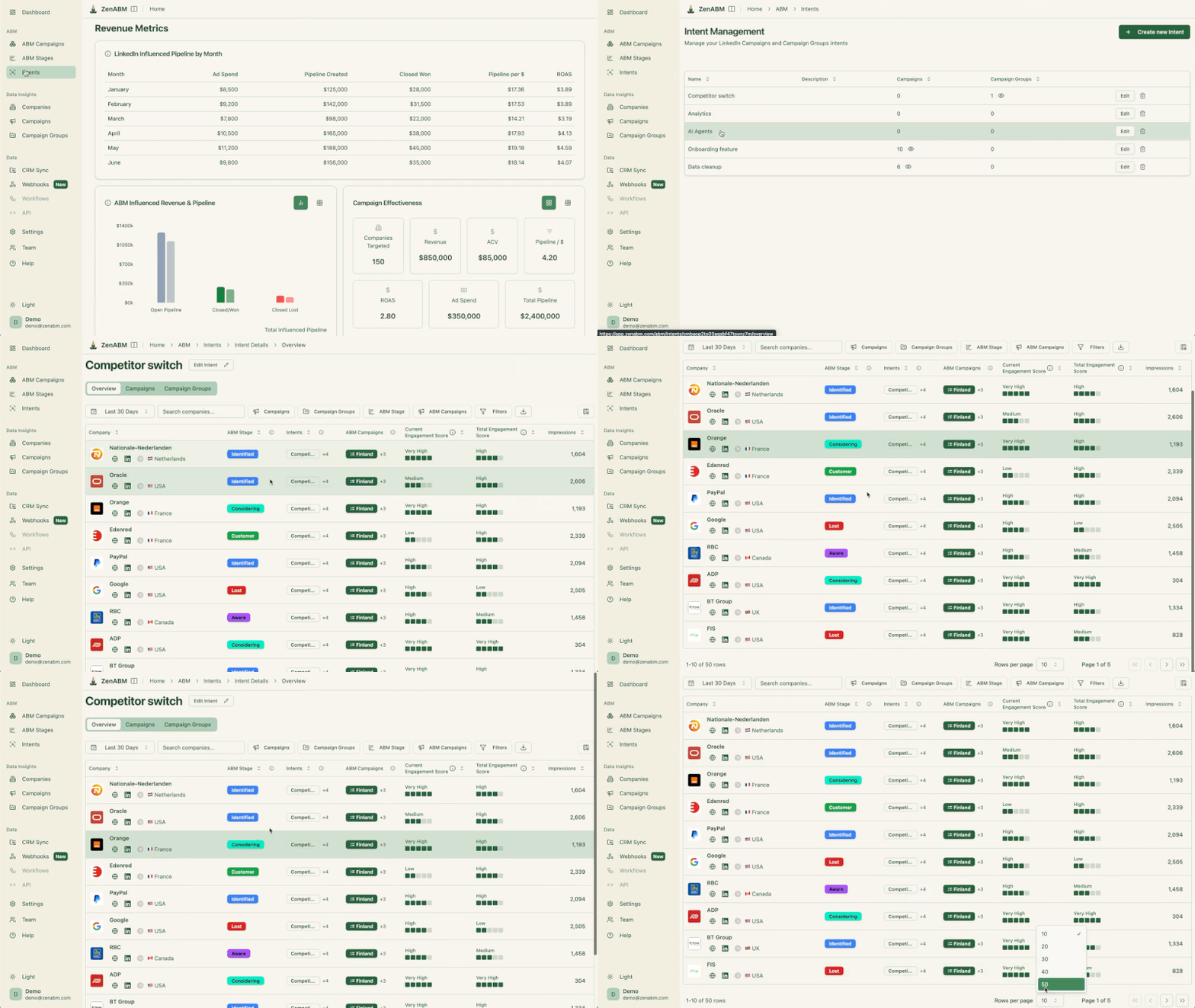
ZenABM turns engagement data from LinkedIn Campaign Manager, Google Ads, Reddit Ads, organic traffic, and AI chatbot referrals, combined with your CRM, into ready-made ABM dashboards.
Connect your LinkedIn Ad account and HubSpot or Salesforce, and you immediately see buyer-intent signals, account-level engagement across every channel, and pipeline influence, without building a custom BI layer.
As of April 2026, ZenABM has moved well beyond its original LinkedIn-only positioning to become a full multi-channel ABM platform, tracking which target accounts are engaging with you across paid, organic, and AI-referral channels simultaneously.
These are the features available in the 37-day free trial:




Plan | Post-Trial Price | Key Adds |
|---|---|---|
Starter | $59/mo | Everything in the trial; best for single-campaign pilots on LinkedIn with HubSpot sync. |
Growth | $159/mo | Up to 3 campaigns, customizable scoring & intent logic, Salesforce sync, Slack alerts, weekly email reports. |
Pro + AI | $399/mo | Unlimited campaigns/clients, advanced AI workflows (pause LinkedIn ads when an account hits “Closed-Won,” auto-trigger BDR emails), impression capping, REST API and MCP server access for building custom analytics with tools like Claude Code, and client workspaces for agencies. |
There’s an agency plan also that starts at $479/month.
These are the integrations currently available in ZenABM:

Factors.ai answers the question every SMB running ads eventually asks: which companies are actually visiting our website, and what do we do about it?
The platform identifies companies visiting your site, scores them by engagement, and layers on intent signals from G2, LinkedIn Ads, Google Ads, and third-party sources.
What makes it different from a plain visitor-ID tool is Scout, an AI ABM coworker built into the platform. Ask it, “Why did the pipeline increase last month?” in plain English, and it traces the answer back to the exact campaign change that caused it.
It has a free trial, so you can see real value before you commit. And unlike most tools in this category, entry pricing is published right on their website.
The Lite plan at $199 per month is the self-serve starting point, and it covers the essentials:
One limit to know upfront: Lite retains data for 1 month, while paid plans retain data for the duration of your subscription. Treat Lite as a proof-of-signal tool, not your system of record.
Plan | Price | Key Adds |
|---|---|---|
Basic | $6K/year | Unmask over 75% of companies visiting your website, firmographic and behavioral segmentation, LinkedIn Ads influence tracking, rule-based alerts and workflows, up to 50 reports, and CRM sync. |
Growth | $20K/year | Complete buyer journey visibility, custom account scoring, G2 intent signals, custom agentic alerts and workflows, and advanced ABM analytics. |
Enterprise | $30K onwards/year | Predictive account scoring, LinkedIn impression control and conversion feedback, dynamic audience syncing to Google and LinkedIn Ads, enhanced conversions from Google Ads, and combined 1st, 2nd, and 3rd party intent. |
Contracts are typically billed annually, though quarterly plans are available on request for early-stage startups. Startup discounts are available; share your stage and funding, and they’ll tailor a plan. Add-ons cover advanced attribution, Adpilots, and additional integrations, so include them in your budget conversation.
Start with the free trial and just watch. If your named target accounts show up in the identified-visitor list within two weeks, you have signals worth paying for.
On Lite or Basic, the highest-leverage move is connecting Slack and your CRM, then setting alerts on your target account list, so sales know the same day a Tier 1 account hits your pricing page. On Growth, the agentic workflows handle the coordination for you: a new form fill can identify the account, enrich it with funding and firmographic data, trigger a personalized email, and add the account to a LinkedIn campaign in a single automated flow.
One structural limit to plan around: Factors.ai identifies companies visiting you and also identifies the exact person visiting your website (US audience only). You’ll know Acme Corp visited your pricing page, and who at Acme was looking.

When it comes to discovering and tracking target companies, LinkedIn Sales Navigator remains one of the strongest tools available for SMBs, and the 30-day free trial of the Core plan gives you enough time to build and qualify a real target account list. The product has been restructured since 2024 into three tiers: Core (formerly Professional), Advanced (formerly Team), and Advanced Plus (formerly Enterprise), with meaningfully different capabilities at each level.
During the trial, you get advanced search filters including company size, industry, headcount growth, and technologies used, as well as the “Similar Accounts” feature for finding companies that match your best existing customers. Core also now includes the Relationship Map feature, which builds an org chart of a target account’s decision-making structure and highlights buying committee gaps.
LinkedIn Sales Navigator Core gives trial users:
Core runs $99.99 per month on a monthly plan or approximately $79.99 per month when billed annually. Advanced is $149.99 per month monthly or approximately $139.99 per month on an annual plan, and adds TeamLink, Smart Links for tracking content engagement, and CRM sync. Advanced Plus is enterprise-only with custom pricing starting around $1,600 per user per year and is built for organizations running Salesforce or Microsoft Dynamics who need deep bidirectional CRM integration with automatic data validation.
For an SMB with one or two salespeople, Core is usually sufficient. The trial eligibility rule to know is that LinkedIn only allows one free trial per LinkedIn account per 365 days, so plan when you start.
Sales Navigator Core includes basic CRM sync. Advanced Plus offers deep integration with Salesforce and Microsoft Dynamics, including bi-directional lead and account syncing, automatic field updates, and LinkedIn data embedded directly inside your CRM interface. HubSpot also has a native Sales Navigator integration (requires a paid HubSpot account) that allows you to import target account intelligence and create LinkedIn ad audiences from your CRM lists.

Use Sales Navigator’s Lead Filters to zero in on the exact decision-makers at each target account (for example, Marketing Director at 50 to 200 employee healthcare companies). Save those leads to receive an alert when one of them posts on LinkedIn or changes jobs, both of which are high-context moments to engage with a comment or a relevant piece of content before making any direct ask.
The “Similar Accounts” feature is underused. After identifying one ideal customer, running a Similar Accounts search can expand your target list with lookalike companies in seconds, which is essentially programmatic TAL building at no extra cost. For SMBs on a tight budget, using Sales Navigator for one or two months to build the initial list and gather intel is a legitimate strategy, even if you do not maintain the subscription year-round.

Identifying target accounts is half the battle. The other half is finding the right person to contact, and Clearbit Connect solves that without ever leaving your email client.
Clearbit Connect is a browser extension for Gmail and an add-in for Outlook that lives in your inbox sidebar. Enter a company domain or a person’s name, and Connect searches its database to return verified email addresses alongside basic firmographic data like employee count and industry, which helps confirm you have the right entity before you send.
Clearbit Connect is intentionally simple, because the job it does is narrow. A single search field lets you look up people by name or company, and results include all known email addresses tied to that domain with confidence scores for deliverability. The firmographic overlay on company records helps you confirm company size and industry as a quick ICP check while you are already in your inbox composing a message.
Clearbit Connect is free and enforces a daily search limit of roughly 100 lookups per month for Gmail users. The paid Clearbit platform (now branded as Clearbit Breeze inside HubSpot, following its acquisition) adds bulk enrichment APIs, website visitor deanonymization, and automated CRM enrichment. For most SMBs, the free Connect extension is sufficient for ad-hoc contact sourcing across a focused target account list.
Since Connect runs inside your email client, it does not integrate directly with CRMs or outreach tools. Results need to be manually copied into your system of record. The paid Clearbit/Breeze platform does integrate natively with Salesforce and HubSpot for automated enrichment, but that is a separate product at a separate price point. One practical workaround is to pair Clearbit Connect with a Google Sheet to build a prospect list quickly without investing in a full sales intelligence subscription.
If you have 10 to 20 target accounts and know the two or three job titles you need to reach (CIO, VP of Finance, Head of Operations), Clearbit Connect lets you find those individuals and their email addresses without leaving Gmail. For a small team that does not yet have budget for Apollo or ZoomInfo, Connect fills the “how do I actually reach John Doe at Target Corp?” gap at no cost, which is often the most immediate practical blocker when starting an ABM program.

Hunter.io takes a different approach from Clearbit Connect by focusing on bulk domain searches rather than individual inbox lookups, which makes it more useful once your ABM outreach starts to scale. The free plan allows 25 email searches and 50 email verifications per month, which is enough to test the tool and qualify a handful of domains. Hunter’s index covers over 200 million email addresses, and a domain search typically returns multiple contacts at a company with names, job titles, and confidence scores in a single result set.
Hunter’s Domain Search is the core feature for ABM use. Enter a company’s website and you get back every email address Hunter has indexed for that domain, with seniority and role data alongside, so you can see the CEO, CMO, and CTO in one view rather than hunting for each individually.
The Email Verifier validates deliverability before you send, which protects your domain’s sender reputation. Hunter’s Chrome extension works on LinkedIn company pages, meaning you can click the Hunter icon while browsing a target account’s LinkedIn profile and pull associated email addresses without leaving the tab. There is also a Campaigns module on paid plans that functions as a lightweight drip outreach tool for sending simple email sequences directly from Hunter.

Paid plans start at approximately $49 per month for 500 searches/2,000 credits, and scale up to thousands of searches and verifications per month with team sharing and API access. The API is particularly useful for automating email discovery as part of a broader GTM workflow, for example, triggering a Hunter lookup whenever a new company record is created in your CRM.
Hunter integrates natively with Google Sheets via an add-on, allowing bulk email lookups directly inside a spreadsheet without any code. It also connects with Zapier, which opens up workflow automations such as finding an email automatically when a new row is added to a sheet or a new lead appears in your CRM. This makes Hunter a low-friction enrichment layer that plugs into an existing workflow without requiring engineering resources.
The best tactical pattern is to use LinkedIn to identify names and titles at a target account, then run a Hunter domain search to retrieve their emails in bulk rather than one at a time. For a team targeting 50 specific companies, Hunter can populate a full buying committee contact list in a fraction of the time it would take to look up each person individually. The free tier is sufficient for a test round, and a single month on a paid plan can cover the contact harvesting phase of an ABM pilot without committing to an annual subscription.


Snov.io stands out by combining lead generation tools and a CRM inside a single platform, which removes the need for a separate CRM subscription at the early stages of an ABM program. The free tier includes Snov.io’s CRM features at no cost, with limited monthly credits for email finding, verification, and drip campaign sending. Every module in Snov.io is available on the free plan, just with usage caps, and the CRM remains free across all tiers, meaning your contact and deal data does not disappear when you hit your email search quota for the month.
These are the ABM features offered by Snov.io:


Paid plans start at approximately $39 per month and scale based on monthly credit volume.
The CRM remains free at all tiers, so even if you exhaust your email-finding credits for the month, your contact and deal data stays intact and accessible without any interruption to your sales workflow.
Snov.io connects natively with HubSpot to push leads into your existing CRM if you prefer not to use Snov.io’s built-in CRM, and with Slack for deal notifications. Its email sender can use your Gmail or Outlook SMTP to send outreach, which improves deliverability by sending through your own domain rather than a shared sending infrastructure. CSV import and export are available on all plans, and Zapier connectivity opens up custom automations with the rest of your stack.
Snov.io is the strongest option for a small team that wants one tool to handle contact discovery, outreach sequencing, and deal tracking without stitching together three separate subscriptions. A practical ABM workflow is to identify the buying committee at a target account (CEO, CTO, CFO), load them into a Snov.io campaign with conditional branching, and track their progress toward “demo scheduled” inside the built-in CRM. The free plan covers enough accounts for an early ABM pilot, and because the CRM is free forever, you do not lose your contact history if you pause your paid subscription.

For SMBs ready to scale ABM outreach with a richer feature set, Apollo.io is among the most capable all-in-one options at the price. Apollo combines a 210 million-plus contact database with email sequencing, a power dialer, AI-driven research, and CRM-like account management in one platform. The free plan gives 100 contact credits per month (each credit reveals a verified email or phone number), unlimited email credits subject to a 250 per day sending cap, and 2 active sequences. That is enough for a small team to run a focused pilot before committing to a paid tier.
The key thing to understand about Apollo’s pricing before you start is that the credit system drives actual costs more than the subscription price. Credits expire at the end of each billing cycle, and phone number lookups consume 8 credits each compared to 1 for an email, so teams doing heavy phone outreach will burn through credits significantly faster than their subscription tier suggests.
Here are the notable features of Apollo.io:


After the free plan, Basic is $49 per user per month billed annually ($59 monthly) and includes 5,000 credits per month and unlimited sequences. Professional is $79 per user per month annually and adds the US dialer, A/B testing, and advanced reporting. Organization is $119 per user per month annually (minimum 3 users) and includes an international dialer, fully customizable reports, granular permissions, and SSO.
The practical risk with Apollo at higher volumes is credit overage. Once you exhaust your monthly allocation, additional credits cost $0.20 each with a 250-credit minimum purchase, and all credits expire at billing cycle end without refund. Teams doing serious outbound ABM should model their expected credit burn before selecting a tier to avoid budget surprises.
Apollo integrates natively with Salesforce, HubSpot, and Pipedrive, with bidirectional sync that enriches lead records in your CRM automatically. The Chrome extension overlays on LinkedIn, allowing you to add a profile to Apollo and unlock their contact details with a single click. Apollo also connects with calendar tools for direct meeting booking, and API access on higher tiers enables custom workflow integrations.
Apollo is best suited to the phase where you are moving from a small experiment to scaling an ABM program. A growth-stage B2B team might use Apollo to identify all companies fitting their ICP across a 500-account universe, filter down to the 50 highest-priority accounts based on company attributes, generate the full buying committee contact list for those accounts, and run personalized sequences with LinkedIn outreach steps and call tasks woven in. The free plan handles the first few accounts; Basic covers a full ABM motion for a single rep without breaking the budget.
Use Apollo’s engagement analytics as your ABM signal layer: accounts with above-average open and click rates are your hand-raise list, and those are the ones worth escalating to a human sales conversation rather than staying in a sequence.

If your ABM strategy involves LinkedIn-heavy prospecting, Lusha gives you a fast way to pull direct contact details without switching to a separate tool. The Chrome extension overlays on LinkedIn profiles and company pages, showing verified email addresses and direct phone numbers using a credit from your monthly allowance. The Starter plan is free and includes 5 credits per month, which is enough to test data quality and get the most critical contacts at a few high-priority accounts.
Lusha’s differentiation from Hunter and Clearbit Connect is its emphasis on direct phone numbers alongside emails, which matters for ABM programs where phone is part of the outreach mix, since a direct dial cuts through much faster than an email to a shared inbox.
Lusha specializes in direct dials and verified work emails, with a Chrome extension that works across LinkedIn, Salesforce, and Gmail. It also provides a searchable dashboard where you can look up contacts by company name, industry, job title, or other filters without needing to browse LinkedIn first. The bulk enrichment capability on paid plans allows you to upload a list of companies and have Lusha append contact data at the account level, which is useful for enriching a target account list before launching a campaign sequence.

Paid plans start at approximately $29 per month for 50 credits and scale based on credit volume. Team plans add credit pooling and centralized management so credits are not siloed by individual user. Higher tiers include API access and bulk enrichment, allowing you to enrich an entire target account list at once rather than doing it profile by profile.
Lusha integrates natively with Salesforce for one-click contact import directly into SFDC records, and with HubSpot, Pipedrive, Outreach, and several other sales and marketing platforms. This means that when a rep finds a contact in Lusha, the data flows into the CRM without a manual copy-paste step, which is important for maintaining data hygiene at scale. Zapier connectivity is also available for custom workflow automations.
Lusha fits best as a point-of-need enrichment tool. When a rep is on LinkedIn and identifies the right buyer at a target account but cannot find their contact details through a standard search, the Lusha extension provides the email and direct dial in one click. For high-value accounts where phone is part of the play, that direct dial is often the difference between getting a callback and disappearing into a voicemail black hole. The free tier is sufficient for enriching the two or three most critical contacts at each of your top target accounts.
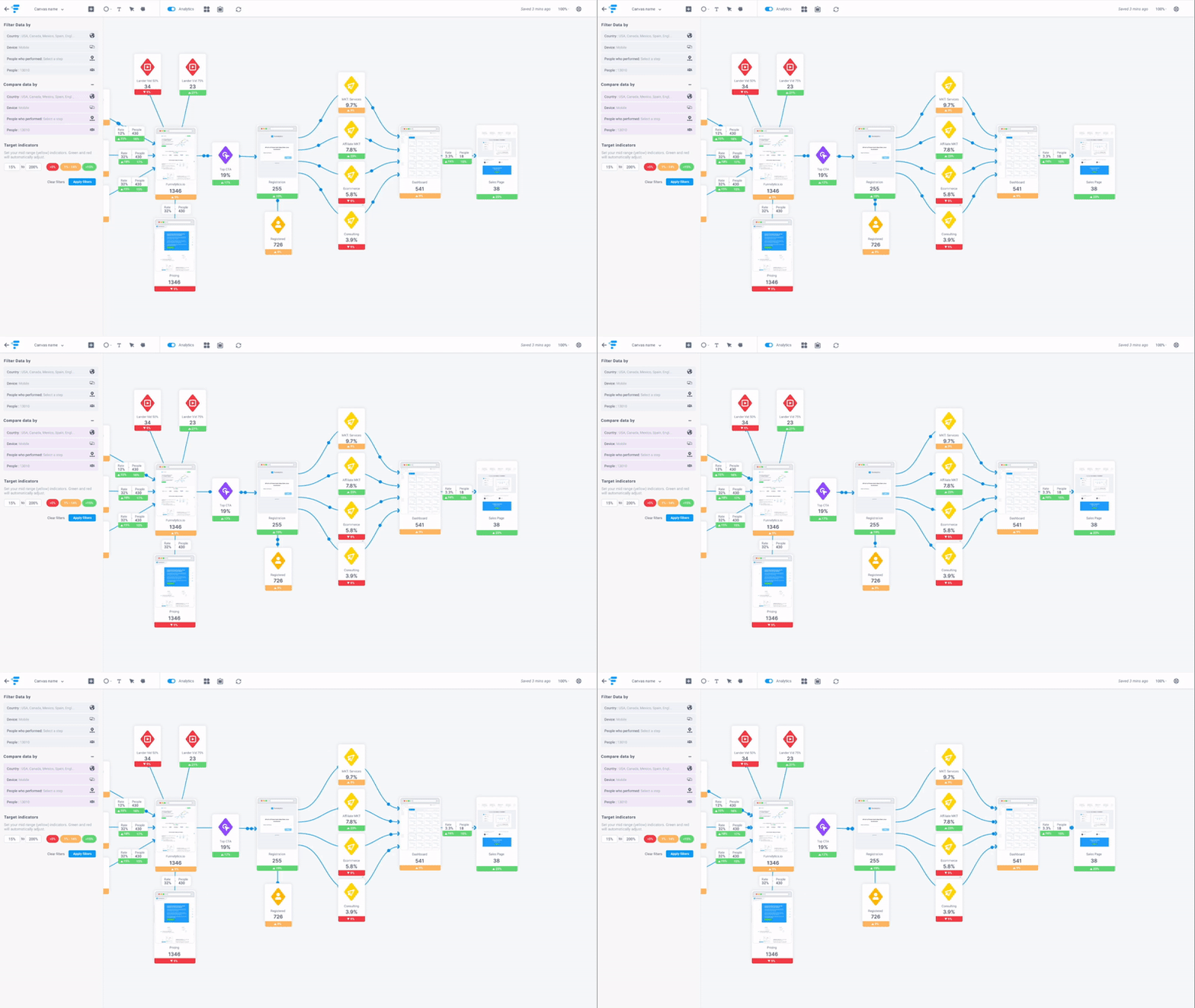
Funnelytics is a visual campaign planning tool that solves one specific problem ABM teams hit constantly: the campaign plan exists in someone’s head or a poorly organized deck, and nobody can see how all the moving parts connect. With the free Funnelytics canvas, you drag and drop icons representing traffic sources, landing pages, emails, ads, and actions, then draw flow lines between them to map every touchpoint in your ABM campaign in one visual.
This is particularly valuable for ABM because multi-touch, multi-channel campaigns targeting named accounts can involve a dozen distinct assets and steps, and a visual map makes it much easier to spot gaps, coordinate handoffs between marketing and sales, and get alignment from stakeholders who do not live inside the campaign tools.
The free plan includes unlimited funnel maps with the full icon library covering pages, traffic sources, emails, and actions. You can share maps as read-only links so your sales team or leadership can see the game plan without needing a Funnelytics account. The interface is intuitive enough that mapping a 10-touchpoint ABM campaign takes less than 30 minutes for someone who has never used the tool before.


Upgrading to Pro (approximately $750 per year) unlocks analytics overlays, where real conversion and drop-off data from your website and ad platforms appear directly on top of your funnel map. This turns the visual from a planning artifact into a live performance dashboard. Pro also includes pre-built funnel templates and multi-user collaborative editing, which is useful for teams with more than one person managing the campaign.
The free version functions as an offline planning canvas without live data connections. On Pro, Funnelytics ingests data from your website analytics and ad platforms. For most SMBs, the most practical approach is to export the funnel map as an image or PDF and include it in your campaign brief or strategy deck, then use separate analytics tools to track performance.
Before launching any ABM campaign, map it. A campaign targeting 10 to 15 named accounts that combines LinkedIn ads, a direct mail gift, a custom landing page, and a sales call sequence has a lot of dependencies, and missing one touchpoint can break the handoff between marketing and sales at exactly the wrong moment. Mapping it first in Funnelytics surfaces those gaps before you spend money on assets, and the shareable link makes it easy to get alignment from a CEO or department head who needs to approve the approach without reading a five-page brief.

Mailchimp has historically been a go-to for SMBs starting with email marketing, but the free plan has been cut significantly since Intuit’s 2021 acquisition. As of January 2026, the free tier is now capped at 250 contacts and 500 emails per month, down from 500 contacts and 1,000 sends, and multi-step automation is no longer available at the free tier. Despite these restrictions, Mailchimp still earns a place in an ABM toolkit as a nurture channel for keeping target accounts warm between direct sales touches, provided your active contact list is small enough to stay within the limits.
These are the core features of Mailchimp:


Essentials starts at approximately $13 per month for 500 contacts and unlocks email and chat support, A/B testing, and basic scheduling. Standard unlocks multi-step automation journeys (the Classic Automation Builder was removed from the free plan in June 2025), behavioral targeting, send-time optimization, and predictive segmentation. For most ABM nurture use cases, Standard is the minimum tier where Mailchimp becomes genuinely powerful, at roughly $20 per month for 500 contacts.
One important billing caveat: Mailchimp counts unsubscribed contacts toward your plan limit, which means your effective usable capacity is lower than the tier number suggests unless you actively archive inactive contacts.
Mailchimp integrates with Salesforce, HubSpot, Shopify, and hundreds of other platforms, and Zapier connectivity handles anything not covered natively. For ABM purposes, one useful integration pattern is connecting Mailchimp with your CRM so that target account contacts automatically populate a Mailchimp segment, and email engagement data flows back into the CRM as activity records, giving sales context on which prospects have been reading your content before they make contact.
Create a dedicated segment for your target account contacts and send a monthly industry insights newsletter to that segment. Even light personalization at the industry level, handled by sending slightly different versions to sub-segments, keeps your brand visible to buying committee members between direct sales touches. Track who opens consistently from a target account, and use that engagement pattern as a signal to trigger a personalized follow-up from sales. For account-specific plays like executive briefing invitations, Mailchimp’s landing page feature handles the campaign asset at no extra cost.

Leadfeeder (now integrated into the Dealfront platform after a 2023 acquisition) reveals which companies are visiting your website, even when those visitors never fill out a form. It works by combining IP-address-to-company matching with behavioral tracking, giving you a daily feed of businesses that visited, how they found you, and which pages they browsed, including high-intent signals like time spent on a pricing page or repeated visits to a case study.
For ABM programs, this is a critical signal layer because it tells you which target accounts are self-educating about your product, which you can then use to time outreach to land when intent is highest.

The free Lite plan identifies up to 100 companies per month using the last 7 days of data, which is enough to confirm whether your target accounts are showing up and get a feel for the data quality. The paid plan starts at €99 per month billed annually and is priced per website, per number of identified companies, scaling up based on your monthly visitor volume. Paid unlocks real-time identification, full visit history, CRM push, AI-assisted lead scoring, and contact suggestions pulled from Dealfront’s 400 million-plus contact database.
One billing note for 2026: some legacy users reported price increases of 20 to 40 percent at renewal following the Dealfront merger, so factor that in when planning your budget if you are moving from a grandfathered plan.
For each identified company, Leadfeeder shows firmographic data (size, industry, location) and behavioral data (pages visited, visit sequence, traffic source), which tells you not just that a company is interested but what they are interested in. Leadfeeder recently added AI features that surface additional insights and prioritization signals on top of the raw visit data. The platform also suggests contacts at identified companies, pulled from Dealfront’s database, so you can move from “a company visited” to “here is who to call” without leaving the tool.
Leadfeeder connects natively with HubSpot, Salesforce, Pipedrive, Zoho, and several other CRMs, with the ability to automatically create tasks or lead records in your CRM when a high-value account visits. Slack and email alerting are also available so your sales team gets notified in real time when a target account hits a key page, rather than having to log into the dashboard to find it.
The highest-value use case is combining Leadfeeder with your outbound sequence timing. When you have already sent a personalized email to a target account and Leadfeeder shows someone from that company browsing your case studies the next day, that is the signal to follow up while your brand is fresh. Without Leadfeeder, you would have no idea that sequence email landed and triggered a research visit. The free Lite plan gives you enough visibility to confirm whether this pattern is happening, and the paid plan makes it actionable at scale.
ABM no longer requires an enterprise budget. These 12 tools give every SMB a low-risk entry point covering the full ABM workflow: defining your ICP (Xtensio, Funnelytics), building your target account list (LinkedIn Sales Navigator), finding contacts (Apollo, Hunter.io, Snov.io, Clearbit, Lusha), running multi-channel ads and attribution (ZenABM, Factors.ai), nurturing accounts (Mailchimp), and capturing intent signals from your website at the company level (Leadfeeder).
Start with the tool that plugs your single biggest gap right now. Prove results during the free trial. Then scale on paid tiers as the revenue follows. Pick one, run a pilot, and move your best-fit accounts another step closer to closed-won.
And if you run a LinkedIn-heavy ABM program, try ZenABM’s 37-day free trial now or book a demo.
