



Influ2 positions itself as a person-based (contact-level) account-based marketing platform built to run ads to specific people inside target accounts, and report engagement at the contact level.
This guide focuses on Influ2 features that matter in practice: contact-level targeting, engagement and intent signals, buyer journeys, sales activation, integrations, attribution, and security.
It also covers pricing patterns reported on third-party marketplaces, common feedback from users, and where Influ2 fits in the wider ABM stack.
We’ll also see how ZenABM (a first-party LinkedIn-focused ABM platform) can be a simpler alternative or a complementary layer if your ABM motion is LinkedIn-heavy and you want reliable account-level engagement and pipeline visibility.


In case you want it short:
Influ2 is designed around contact-level ABM advertising and sales activation. Below are the major Influ2 features most teams evaluate.
Influ2’s defining feature is contact-level ad delivery. You can build audiences from known contacts (for example, buying groups or role-based lists) and aim ads specifically at those individuals rather than broad account-level segments.
Influ2 supports running contact-level campaigns across multiple ad channels (the exact channel mix depends on your plan and setup). The goal is consistent: reduce wasted impressions and increase relevance by focusing spend on people who are actually part of the buying decision.
How reliable is matching?
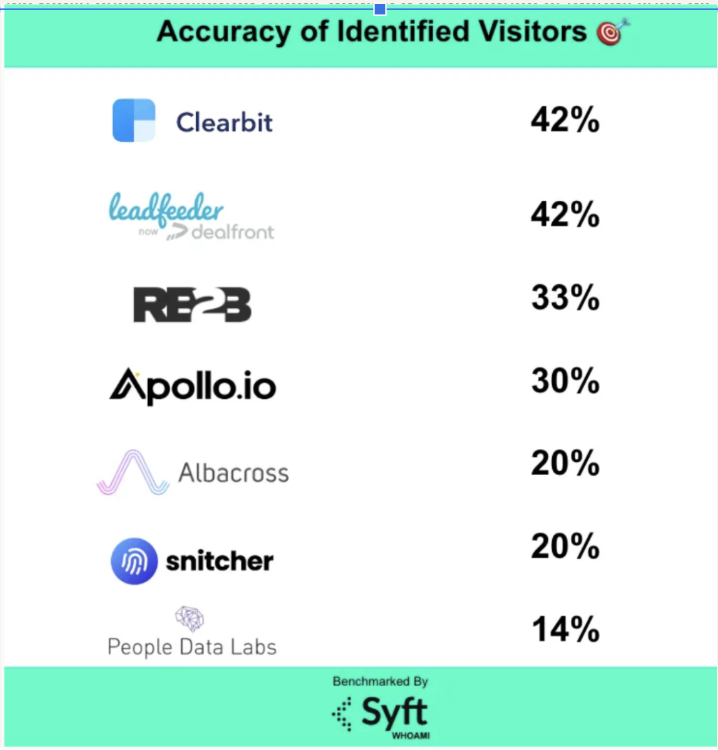
A study by Syft found that IP-matching accuracy for website visitor identification is a mere 42%.


Influ2 is built to show engagement by person. In practical terms, this means sales and marketing can see which contacts were served ads, which contacts engaged, and how engagement clustered inside buying groups.
Teams typically use these signals to time outreach and personalize follow-ups (for example, prioritizing contacts who repeatedly engaged with high-intent assets).

Influ2’s “intent” is primarily grounded in first-party engagement with your ads and content, reported at the contact level. The platform also positions its signals as usable for sales prioritization (who is engaged, where, and how strongly), rather than only for marketing reporting.
Pro Tip: Contact-level engagement data is actionable because it is tied to named buyers. The trade-off is that it does not automatically explain the full buying context across the entire account unless you operationalize buying-group coverage and align sales follow-up. ZenABM takes a simpler approach for LinkedIn-heavy ABM by giving you first-party company-level intent derived directly from LinkedIn ad engagement, so you can see which messages and themes resonated at the company level.

Influ2 supports journey-style orchestration, where messaging can change based on engagement and stage. This is typically used to sequence ads for a contact or buying group (for example, moving from awareness creative to proof points, then to a conversion offer).
In practice, journey performance depends on having enough creative depth, clear stage definitions, and rules that reflect how your buying cycle actually works.
As a sales-aligned ABM product, Influ2 emphasizes integration with core revenue systems.
It integrates with common CRMs and marketing automation platforms, and it is designed to push contact-level engagement insights into systems sales teams already use, so signals translate into follow-up actions rather than staying trapped in dashboards.
Implementation and workflow fit vary by stack. Teams usually see the best results when they align:
Similarly, ZenABM also integrates bidirectionally with CRMs such as HubSpot (Salesforce available on higher plans).
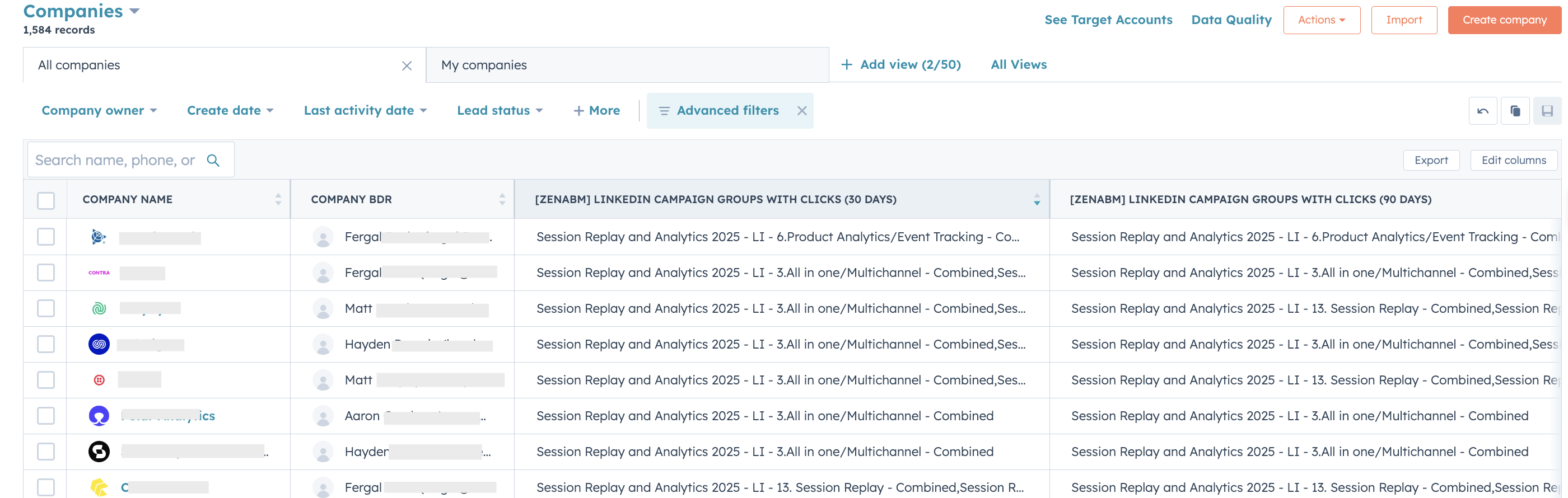
LinkedIn engagement data feeds directly into your CRM as company-level properties, keeping sales teams informed:

ZenABM can auto-update account stages to “Interested” when engagement passes a set threshold and assign accounts to specific BDRs for follow-up.
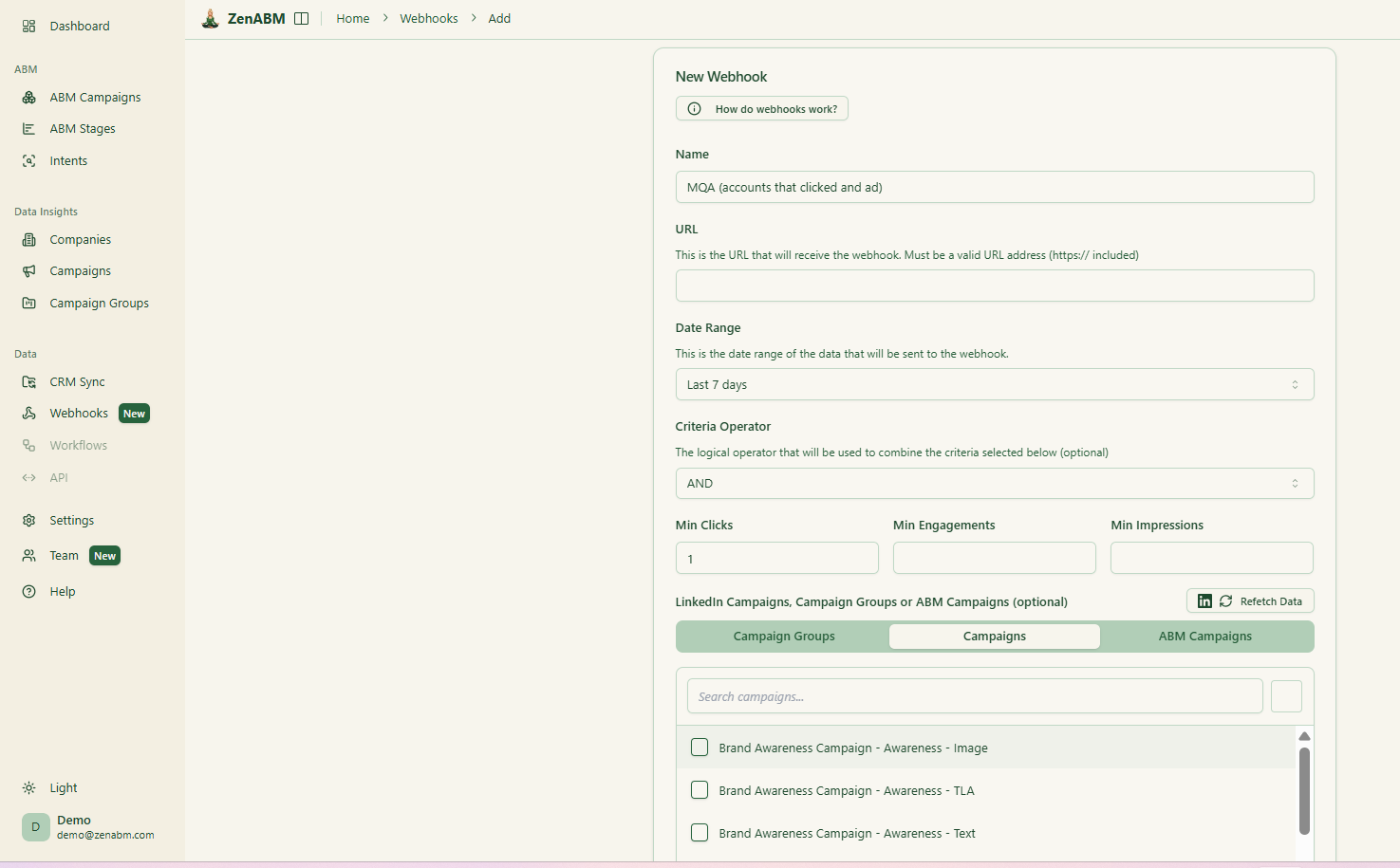
Moreover, ZenABM can fit anywhere in your tech stack – thanks to its custom webhooks:

Influ2 includes reporting intended to connect contact-level engagement to pipeline movement and revenue outcomes. Depending on your CRM integration and opportunity tracking discipline, this can include influenced opportunities, progressed deals, and won revenue tied back to engaged contacts and buying groups.
ZenABM, too, includes pre-built ABM dashboards linking ad exposure, engagement, funnel stages, and pipeline metrics.
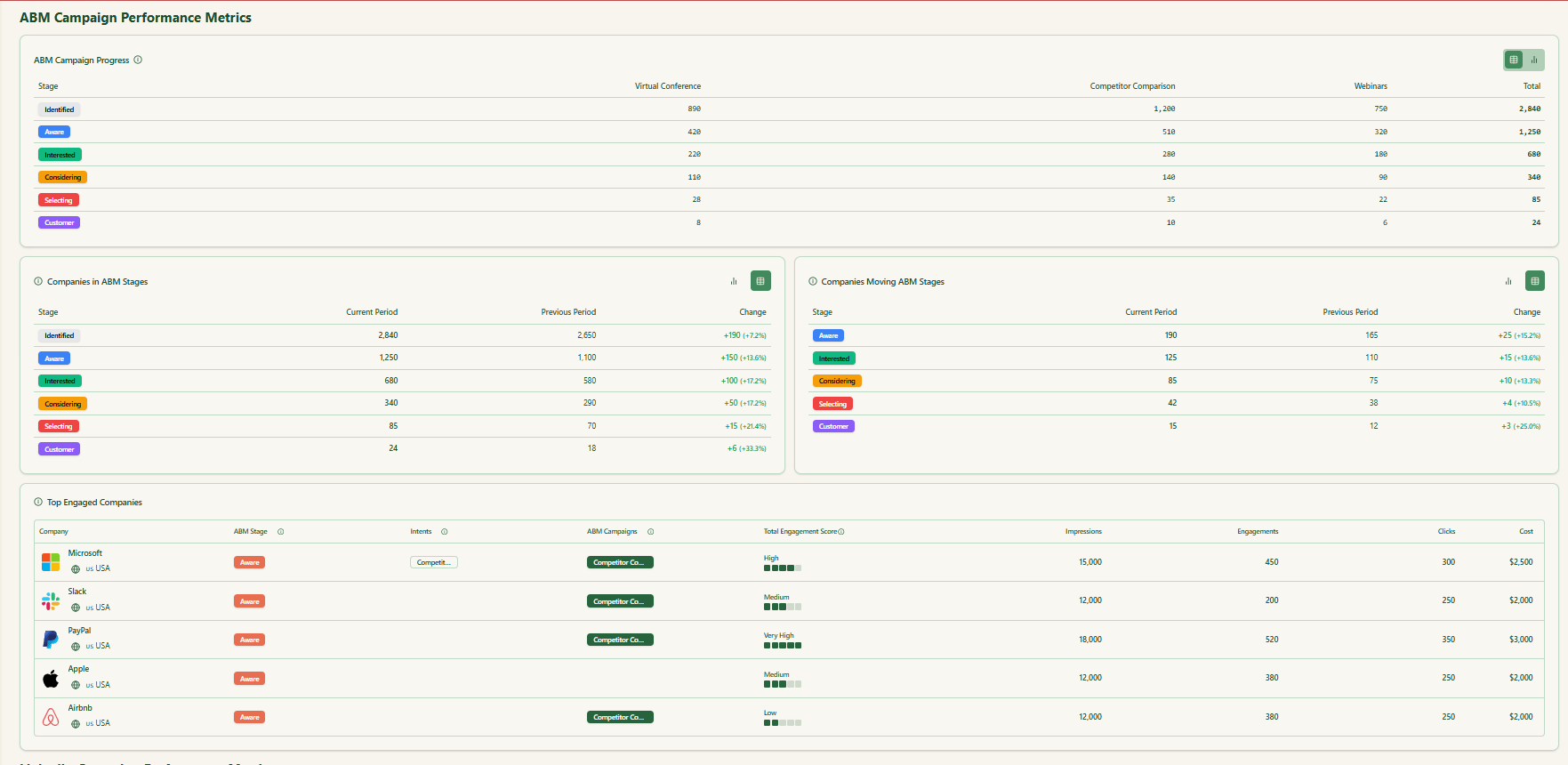
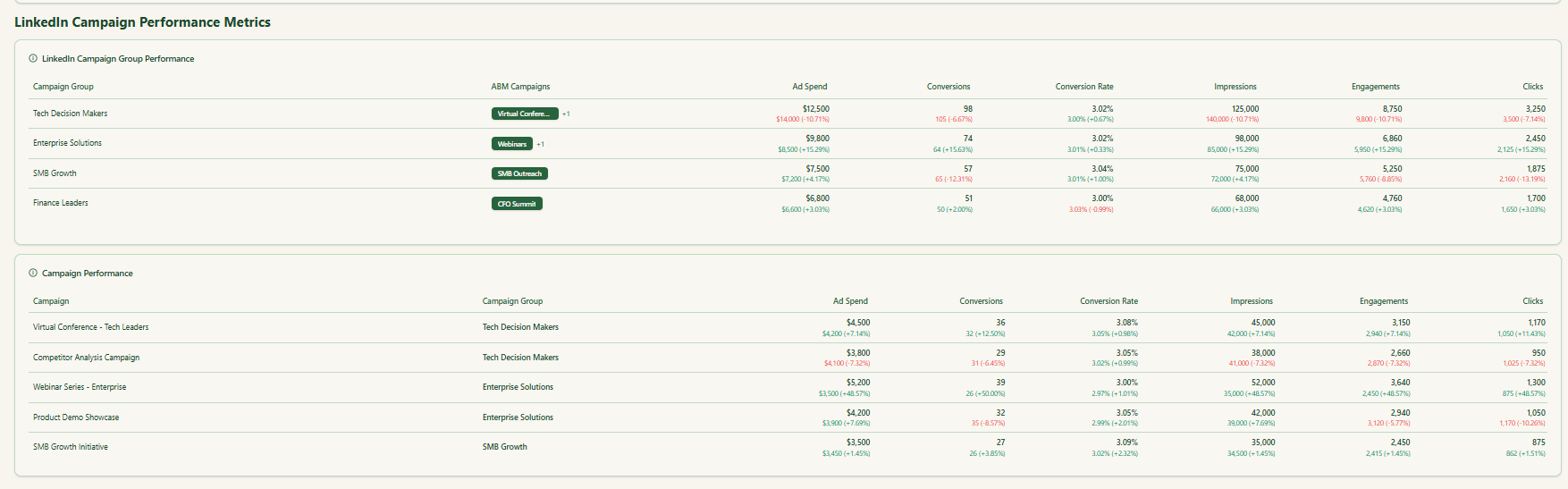
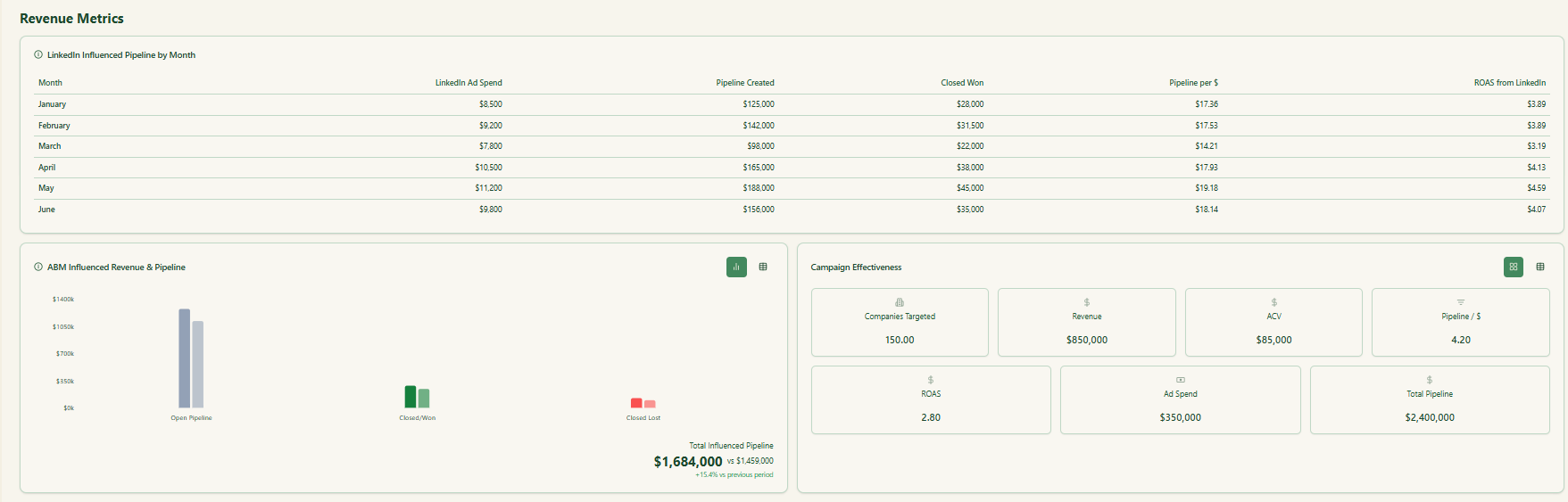
Given the person-specific nature, security and compliance are a key part of Influ2’s positioning.
Influ2 publicly states compliance and certification posture (including GDPR/CCPA language and security attestations), and it positions its contact-level insights as achievable without relying on web forms or IP targeting.
Plus, the tool has built-in ad creative storage too:


Influ2 also provides sales-facing prioritization views, highlighting which accounts are active and which specific contacts inside those accounts are showing engagement. This is meant to support rep workflows, not just marketing reporting.
Influ2 does not publish self-serve pricing tiers on its website.
Third-party marketplaces describe pricing as custom and commonly structured around the number of targeted or reached contacts, with platform and media costs bundled into a single flat price.

Influ2 is rated highly on review sites. On G2, Influ2 is listed at roughly 4.6/5 based on 150+ reviews (the exact count changes over time).
What users praise most often:
Where users commonly report limitations:
One alternative to Influ2 is ZenABM.
It is specifically designed for LinkedIn ABM, so it can either be a complete, lean and affordable alternative to Influ2 for teams that mainly advertise on LinkedIn.
Even for teams running multi-channel ABM, ZenABM can be a complementary layer to Influ2 or whichever bigger ABM suite they are using because of ZenABM’s unique features.
Let’s look at those features:

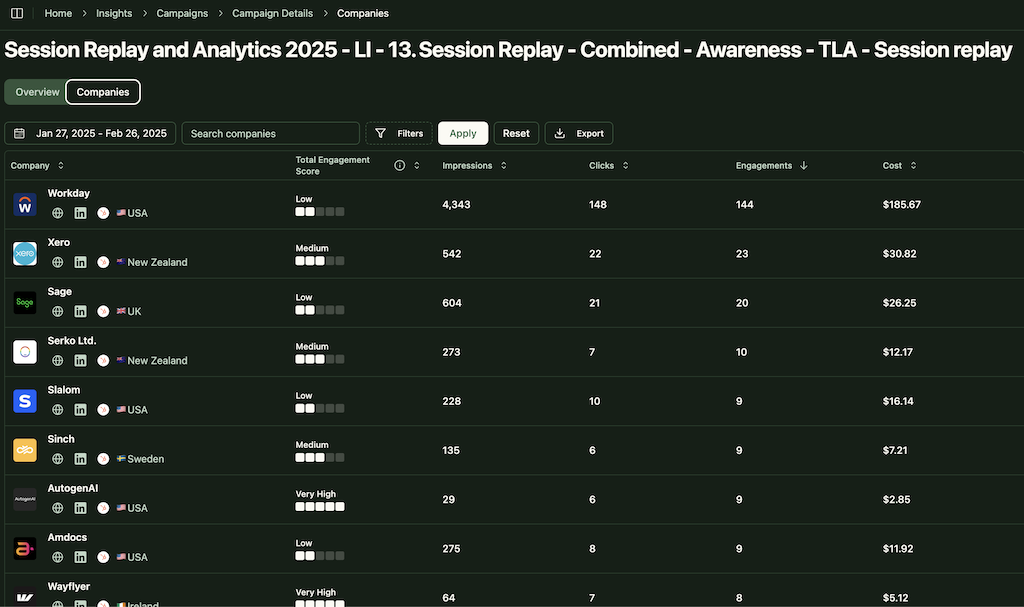
ZenABM integrates directly with the LinkedIn Ads API to pull account-specific data from all campaigns.
This allows you to identify precisely which target accounts are interacting with your LinkedIn ads (impressions, clicks, etc.), all mapped to individual companies.
Pro Tip: ZenABM can also reveal anonymous website visitors for free. Retarget them with inexpensive LinkedIn text ads, and ZenABM will identify the companies that saw your impressions.
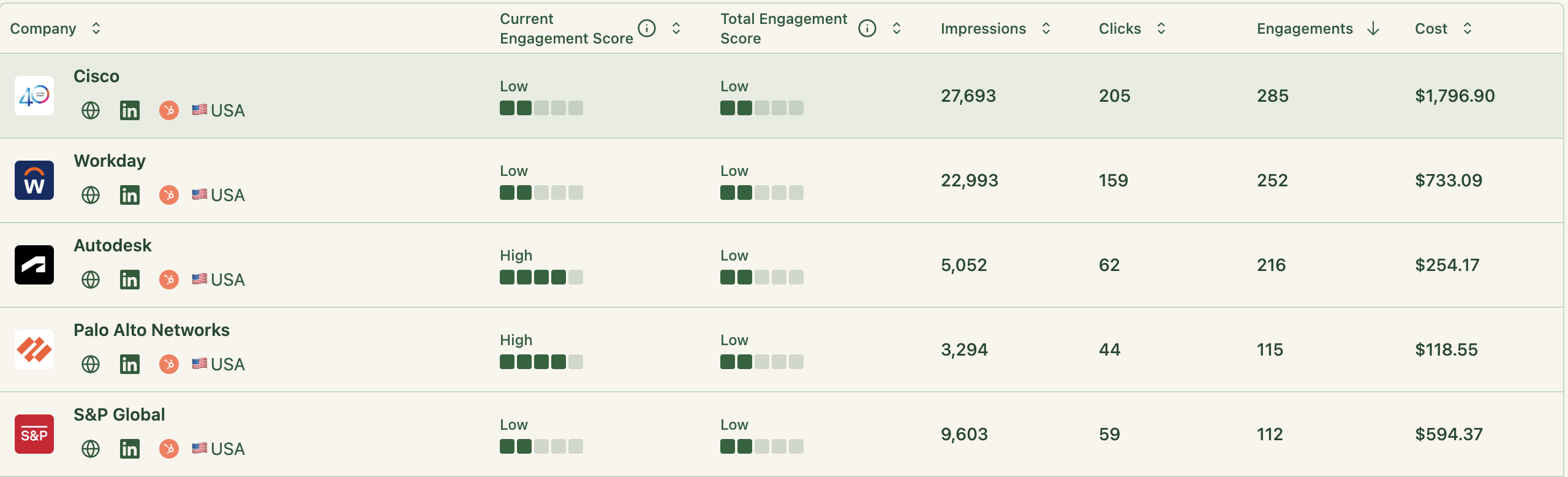
ZenABM continuously updates engagement scores from ad interactions. You can monitor recent trends (like the past week) or historical patterns to identify accounts heating up.
These scores help marketing and sales prioritize high-value accounts for follow-up.
ZenABM enables you to define your ABM funnel stages (e.g., Identified → Aware → Engaged → Interested → Opportunity) and automatically classifies accounts using engagement and CRM information.
You can set your own thresholds for “Engaged” or “Interested,” and ZenABM will track stage transitions automatically.

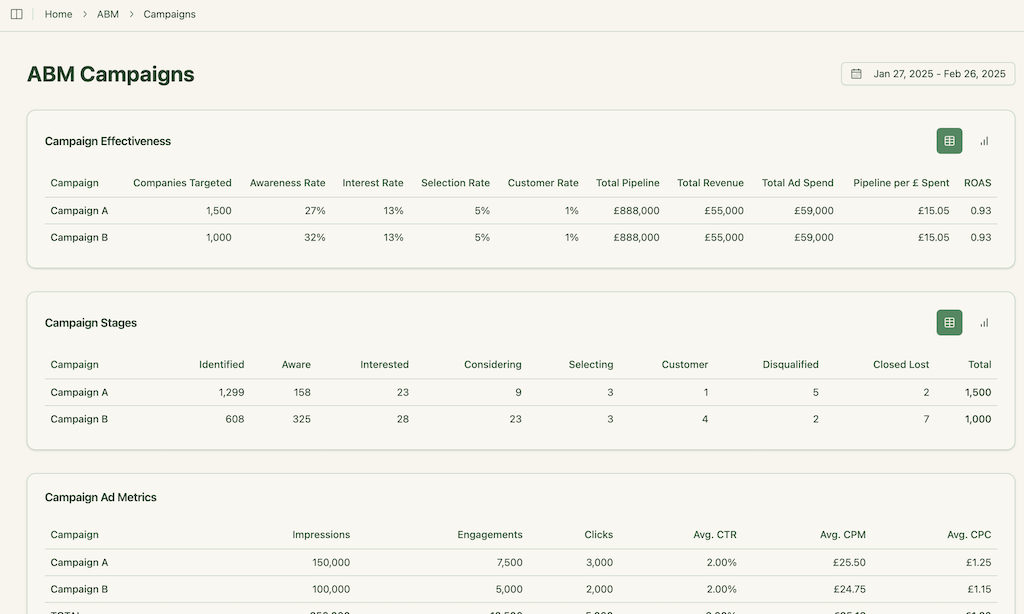
This delivers full-funnel visibility like enterprise ABM platforms, highlighting where accounts stall and where progress accelerates.
ZenABM integrates bidirectionally with CRMs such as HubSpot (Salesforce available on higher plans).
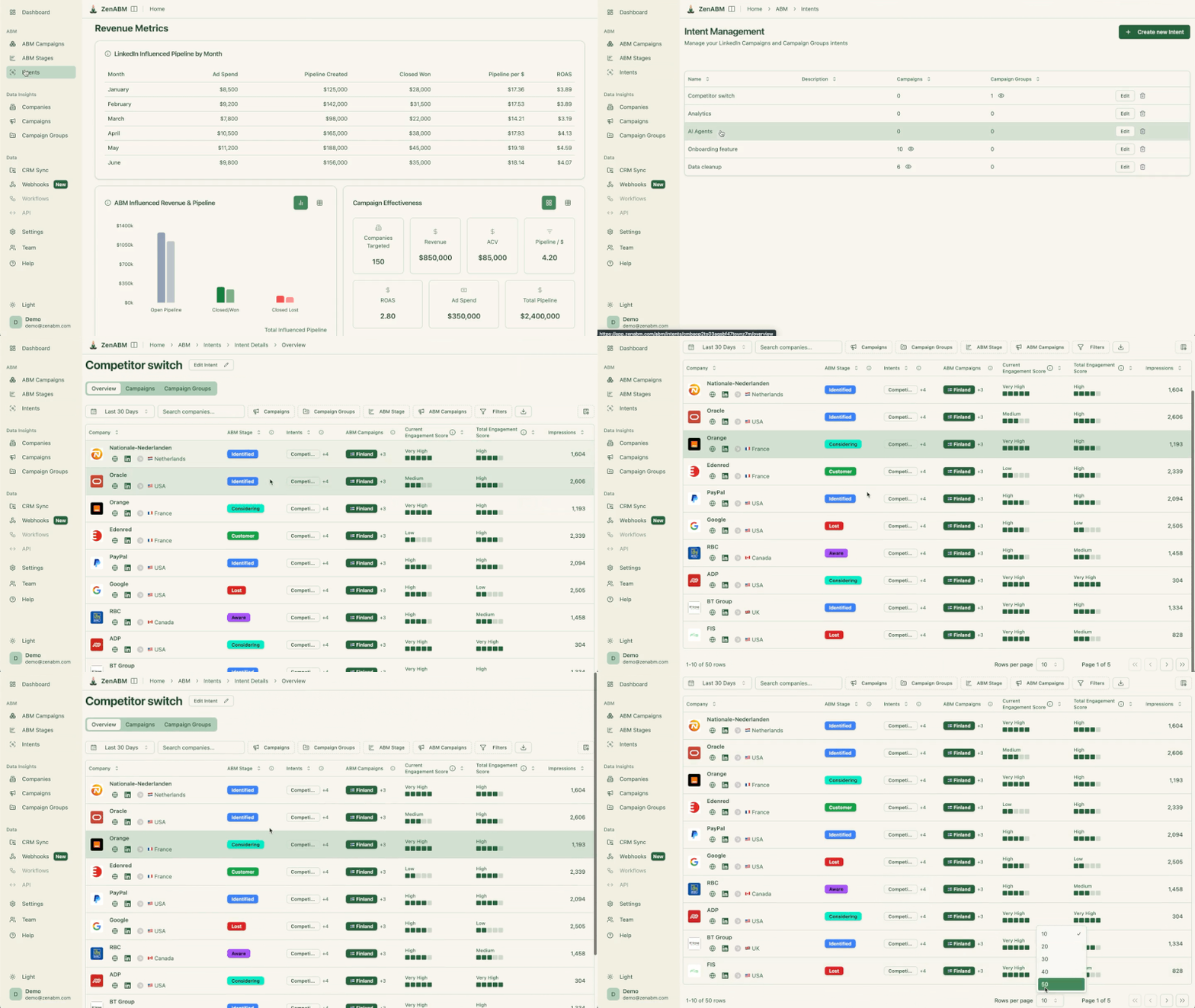
LinkedIn engagement data feeds directly into your CRM as company-level properties, keeping sales teams informed:
ZenABM can auto-update account stages to “Interested” when engagement passes a set threshold and assign accounts to specific BDRs for follow-up.
ZenABM allows you to tag campaigns by theme (like “Feature A” vs. “Feature B”) and shows which accounts engage with which themes, revealing their priorities.
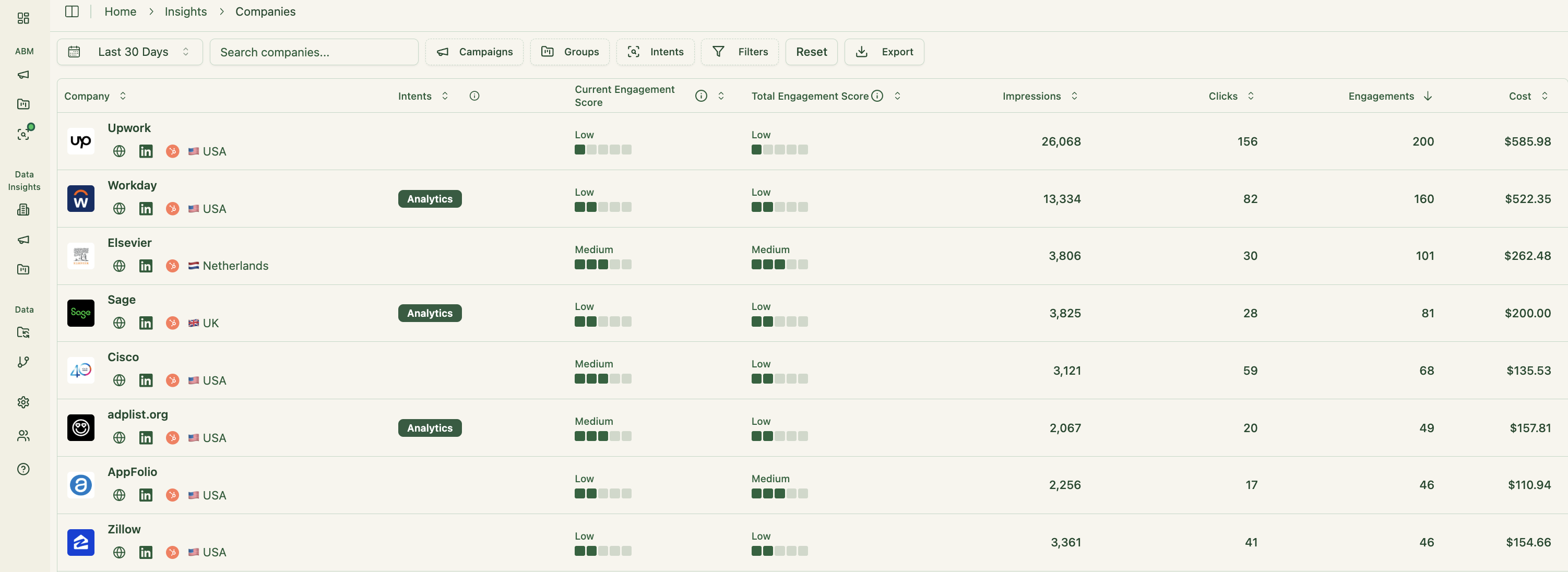
This is genuine first-party intent. Instead of paying for inferred keyword interest, you get direct proof like Account Z clicking “Feature A” ads, demonstrating actual buying interest.
These insights also sync to your CRM, supporting highly targeted outreach and relevant messaging.
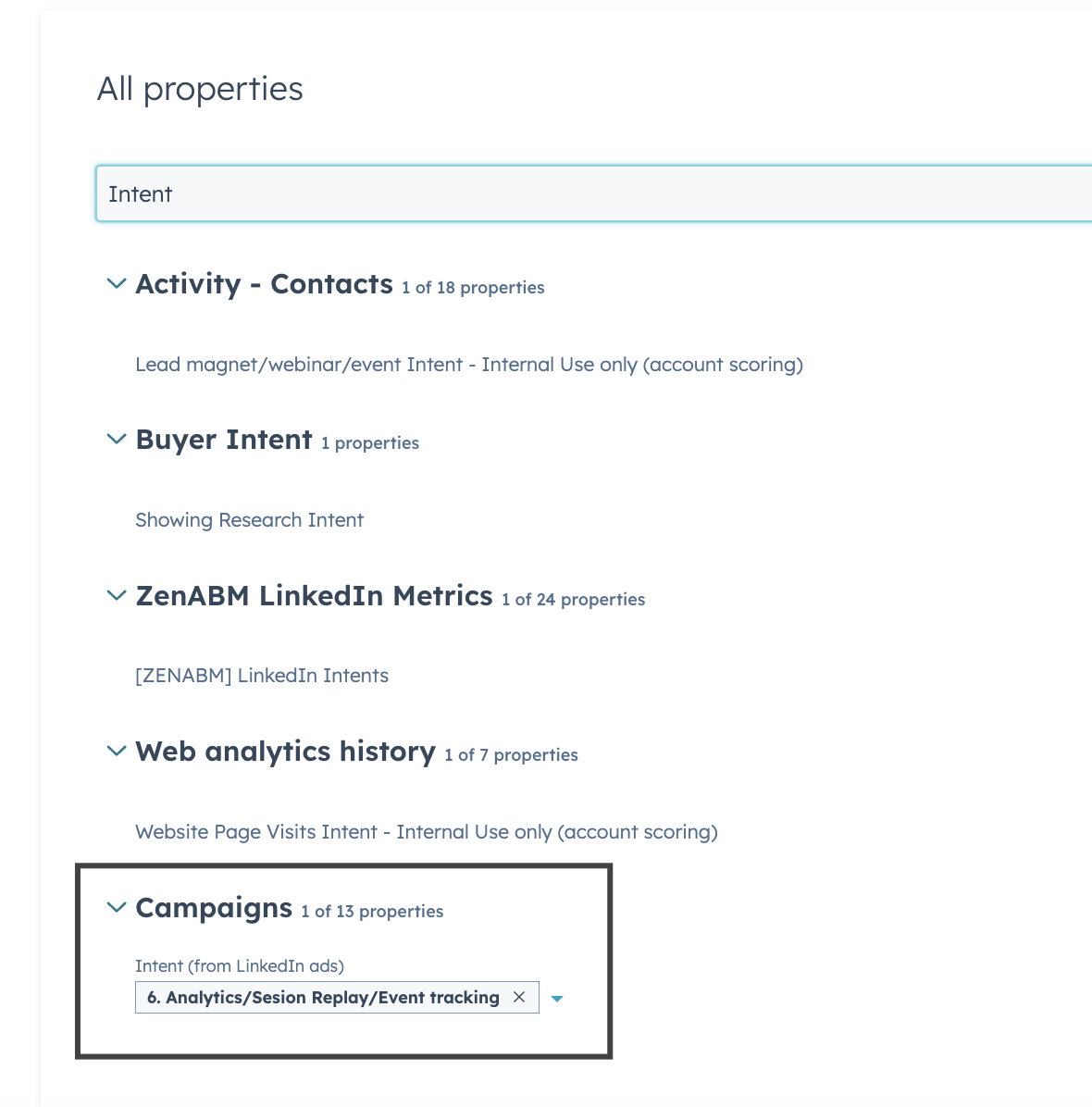
Your sales reps can instantly see which topics or pain points each account reacts to most.
This feature is fairly unique to ZenABM, making it a worthwhile add-on even if you already have an existing subscription to some other ABM tool.
ZenABM also gives a breakdown of the specific job titles that interact with your ads.
Raw metrics, dwell time, full video funnel – all available out of the box.
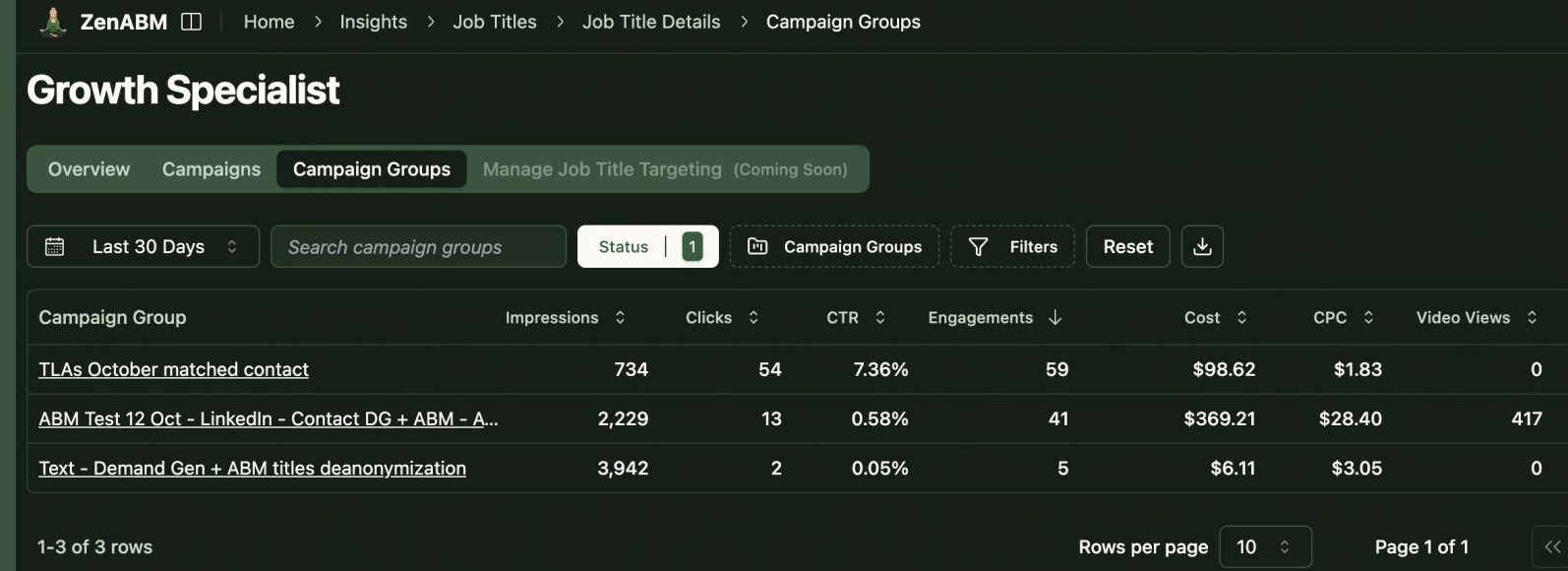
ZenABM includes pre-built ABM dashboards linking ad exposure, engagement, funnel stages, and pipeline metrics.
With the newly rolled out custom webhooks, ZenABM can fit into any of your workflows as needed.
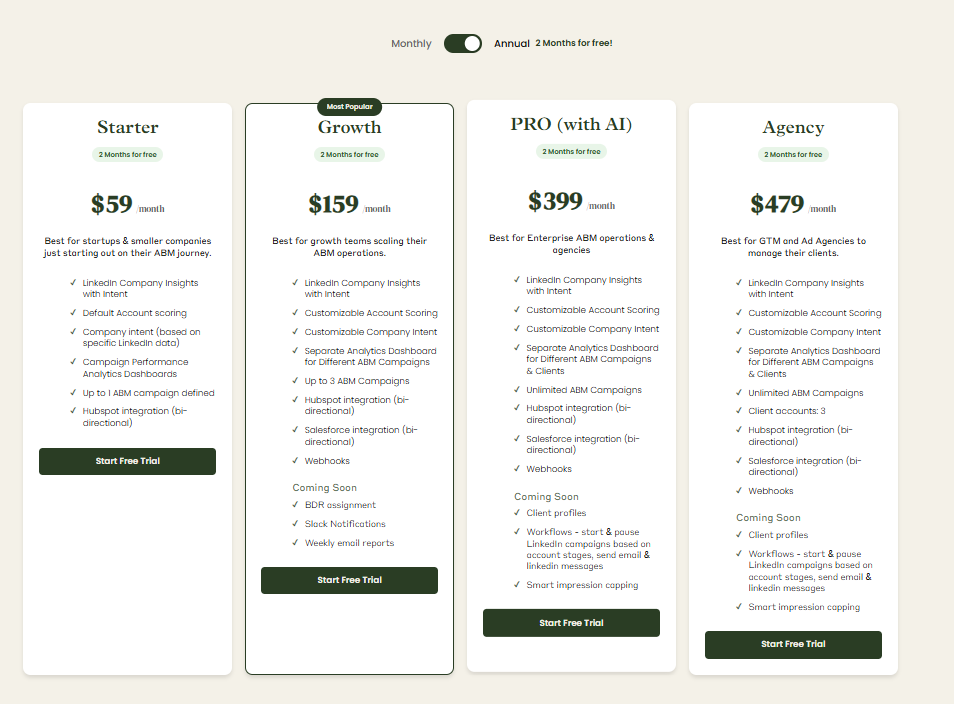
Plans start at $59/month for Starter, $159/month for Growth, $399/month for the Pro (AI) tier, and $479/month for the agency tier.
Even the highest tier costs under $6,000/year, far less than what Influ2 typically costs for contact-level reach.
All plans cover essential LinkedIn ABM functions, with higher tiers mostly expanding limits or adding Salesforce integration.
Pricing is flexible (monthly or annual with two months free), and a 37-day free trial allows teams to try before buying.
Influ2 is built for teams that want contact-level ABM, where ads are targeted to specific people inside target accounts and engagement data is available in a form sales teams can act on.
If your ABM strategy depends on consistently reaching decision-makers, coordinating ads with outreach, and reporting engagement at the contact level, Influ2’s feature set aligns with that goal.
If your ABM motion is primarily LinkedIn and you want first-party engagement insight and pipeline reporting at the company level with simpler setup and clearer pricing, ZenABM is often the more practical fit.
