



Dreamdata bills itself as a B2B “Activation & Attribution Platform” that can map every buyer touchpoint and tie it to revenue.
But it is a pricey and feature-heavy enterprise suite.
In this deep dive, I’ll dissect Dreamdata’s key features, pricing, and user feedback, and help you decide if Dreamdata is your ABM fit (or an overkill?).
I’ll also discuss how ZenABM (a first-party LinkedIn-focused ABM platform) might be a better alternative or even serve as a complementary layer to Dreamdata (or whichever ABM suite you may have) due to its unique features.


In case you want it short:
Dreamdata’s feature set is extensive.
It aims to be your one-stop shop for connecting marketing spend to revenue outcomes.
Here are the highlights:

Dreamdata provides a buffet of attribution models: first-touch, last-touch, W-shaped, time decay, and even fancy “data-driven” models.
In fact, it offers seven out-of-the-box multi-touch models, so you can slice and dice credit for a sale across all the touches that led up to it.
Marketers can finally move beyond the simplistic “last click wins” approach.
Of course, with great flexibility comes great complexity.
More models mean more chances to argue with your colleagues over which model is “right” for your business. (Spoiler: none are perfect.)
Plus, by aggregating data from your CRM, website, ads, etc., into a single timeline, Dreamdata helps expose how that whitepaper download, webinar, and six LinkedIn ad clicks all contributed to a deal.


The platform doesn’t stop at attribution models.
It rolls up data into slick revenue analytics dashboards, showing pipeline and ROI by channel, campaign, and content piece. etc.
You can track metrics like Time to Revenue (the time from first touch to closed deal) and view pipeline velocity by stage.
Dreamdata basically builds a complete B2B customer journey map for each account, then lets you report on it from multiple angles.
In practice, some users on G2 mention that not all pre-built reports are equally useful, and it can take a while to figure out which ones actually matter for your business. The learning curve is real (more on that shortly).

By the way, ZenABM also provides detailed plug-and-play account-based LinkedIn ad revenue attribution dashboards for a starting price of just $59/month.


Dreamdata is keen to position itself as an ABM ally.
It automatically organizes all those individual touchpoints into account-level journeys, so you see how an entire buying committee moved from initial engagement to close.
There’s an “ABM view” that marketers love to whip out to prove their influence.
One marketing director joked that whenever Sales brags about a “sales-generated” deal, her team flashes the Dreamdata ABM view showing how Marketing “surrounded that account across multiple channels for months.”

In other words, Dreamdata helps marketers claim credit (and rightfully so) for warming up target accounts.
It also tracks account-level engagement.
The “Reveal” module identifies which companies are engaging with your brand most, scores their activity, and even flags when an account that fits your ICP visits your site or interacts with your content.

Beyond analytics, Dreamdata ventures into light Customer Data Platform (CDP) territory.
It lets you build precise audiences using “unlimited filtering” across all your data, and then sync those audiences to major ad platforms.
Example: You could create a segment of all accounts that visited your pricing page twice in the last week and push that list to LinkedIn for a retargeting campaign.
Dreamdata’s Audience Hub makes this possible without a data engineer on staff.

It also recently launched one-click conversion syncing to ad platforms.
This means if a lead becomes an SQL or a deal closes in your CRM, Dreamdata can auto-feed that event back into Google, Facebook, LinkedIn, etc., helping their algorithms optimize for actual revenue, not just form fills.

Dreamdata boasts 40+ integrations spanning CRMs, marketing automation, ads, analytics, and more.
Big ones:
Dreamdata isn’t the most transparent about pricing on its homepage.
Here’s what we know:

If you are looking for a leaner yet effective tool, I present ZenABM, starting at just $59/month.
ZenABM offers account-level LinkedIn ad engagement tracking, ad engagement-to-pipeline analytics with plug-and-play dashboards, account scoring, ABM stage tracking, CRM sync, first-party qualitative intent, automated assignment of BDRs to hot accounts, custom webhooks, and ad engagement tracking at the job-title level.


No marketing tool is loved by everyone, and Dreamdata is no exception.
I scoured review sites for the common themes in user feedback.
Here’s the consensus from the trenches:
One alternative to Dreamdata is ZenABM.
It is specifically designed for LinkedIn ABM, so it can either be a complete, lean and affordable alternative to Dreamdata for teams that mainly advertise on LinkedIn.
Even for teams running multi-channel ABM, ZenABM can be a complementary layer to Dreamdata or whichever bigger ABM suite they are using because of ZenABM’s unique features.
Let’s look at those features:

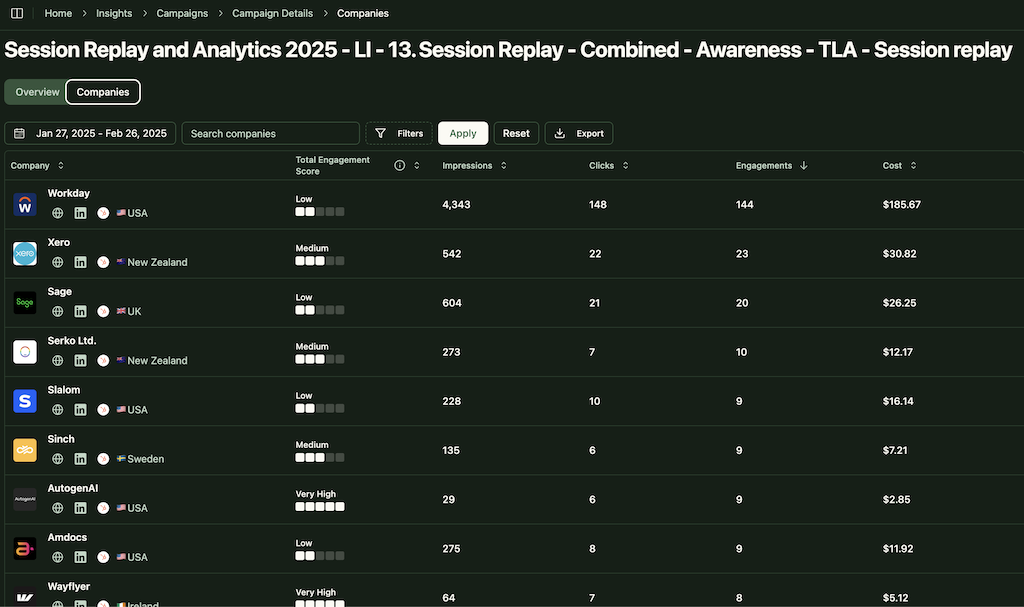
ZenABM integrates directly with the LinkedIn Ads API to pull account-specific data from all campaigns.
This allows you to identify precisely which target accounts are interacting with your LinkedIn ads (impressions, clicks, etc.), all mapped to individual companies.
Pro Tip: ZenABM can also reveal anonymous website visitors for free. Retarget them with inexpensive LinkedIn text ads, and ZenABM will identify the companies that saw your impressions.
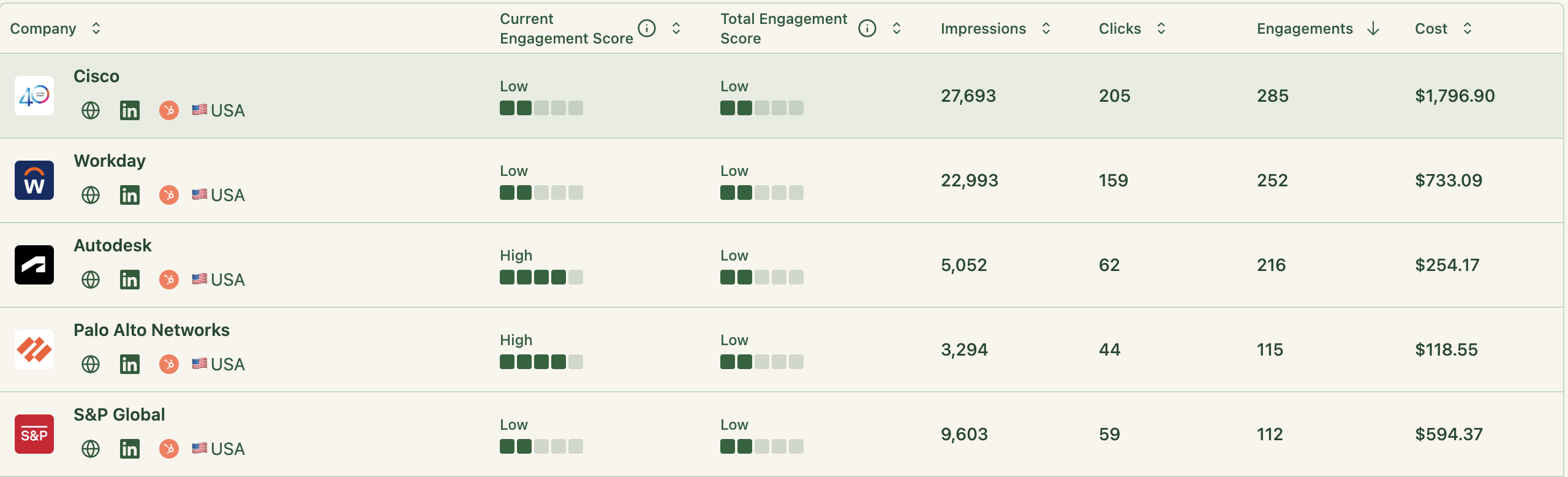
ZenABM continuously updates engagement scores from ad interactions. You can monitor recent trends (like the past week) or historical patterns to identify accounts heating up.
These scores help marketing and sales prioritize high-value accounts for follow-up.
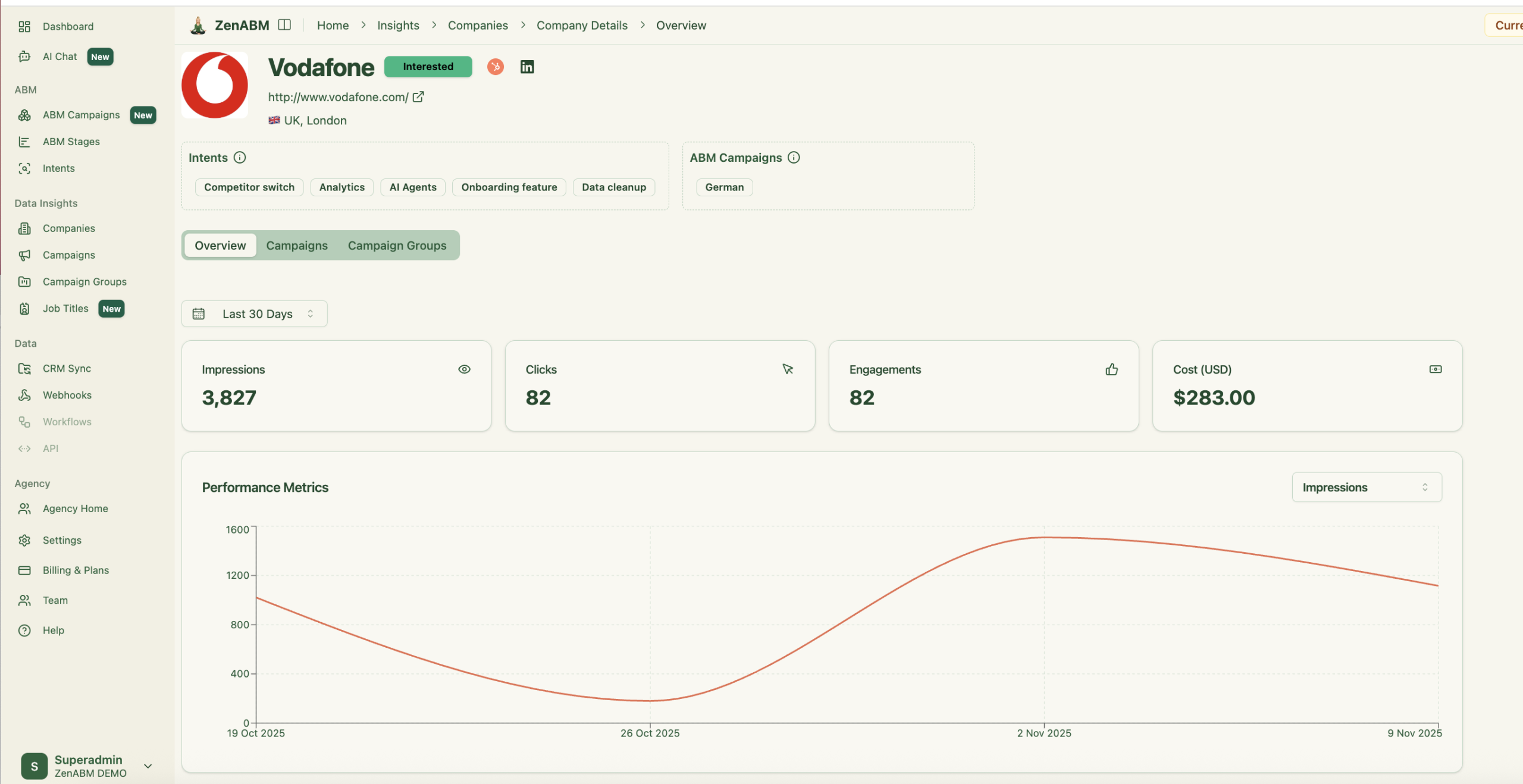
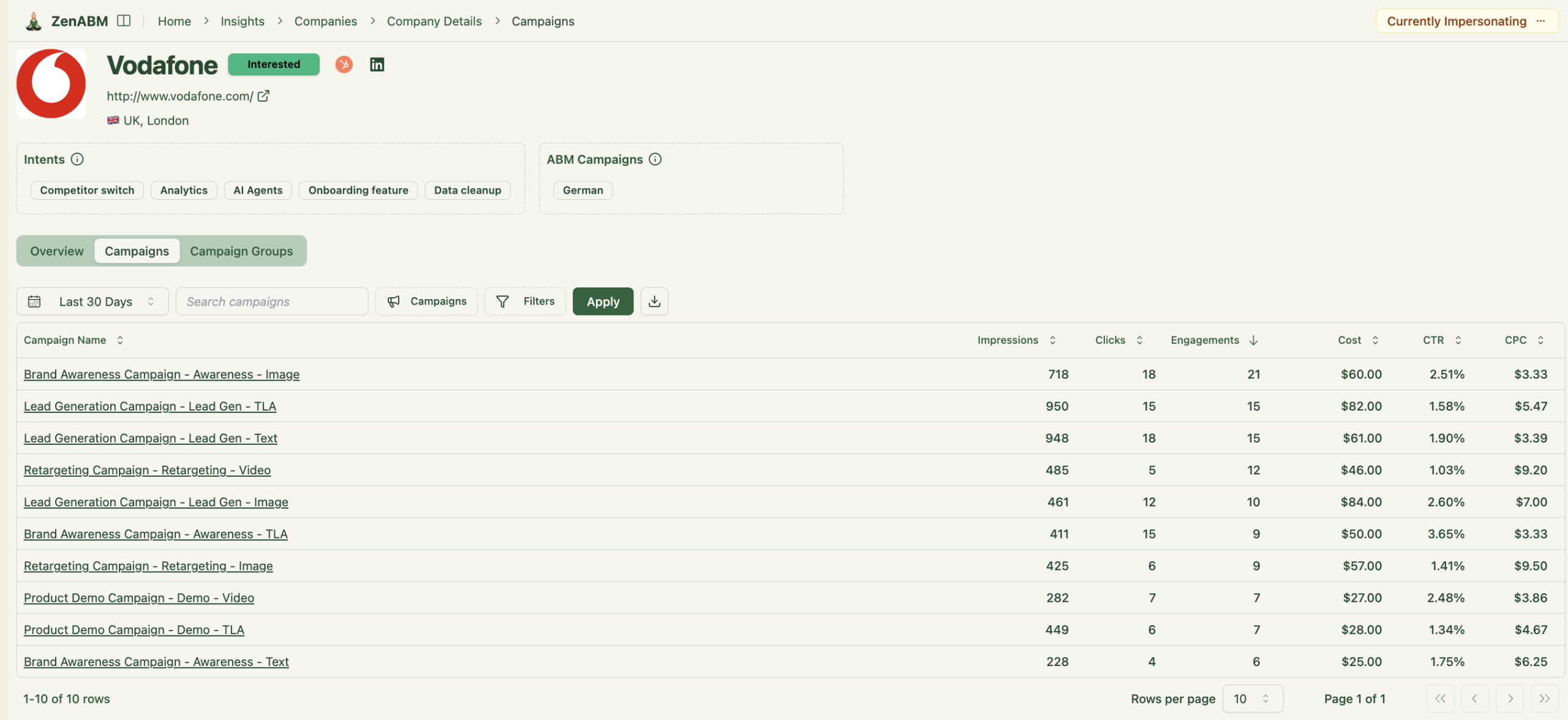
Plus, the tool displays the full touchpoint timeline of each account:
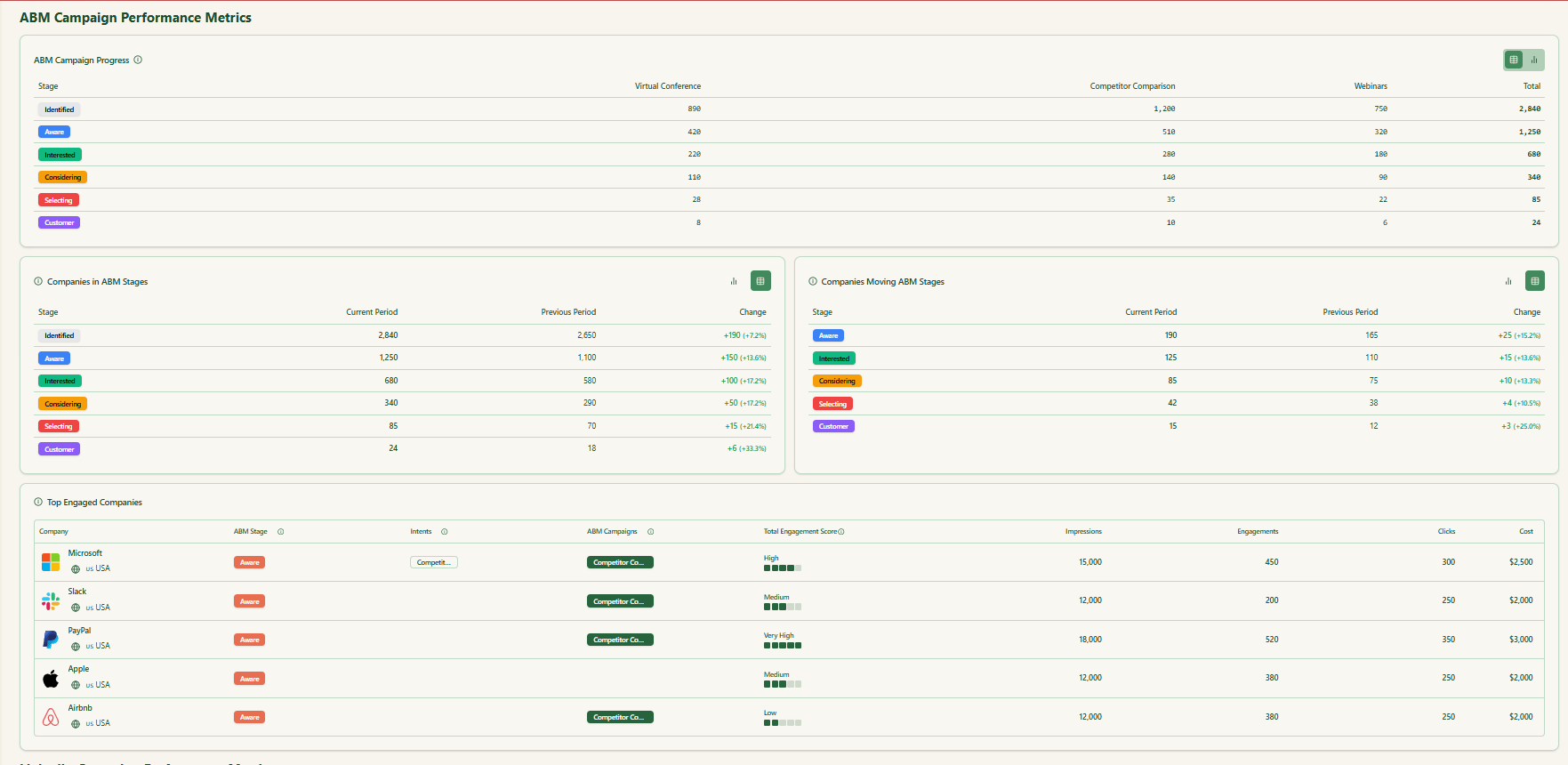
ZenABM enables you to define your ABM funnel stages (e.g., Identified → Aware → Engaged → Interested → Opportunity) and automatically classifies accounts using engagement and CRM information.
You can set your own thresholds for “Engaged” or “Interested,” and ZenABM will track stage transitions automatically.


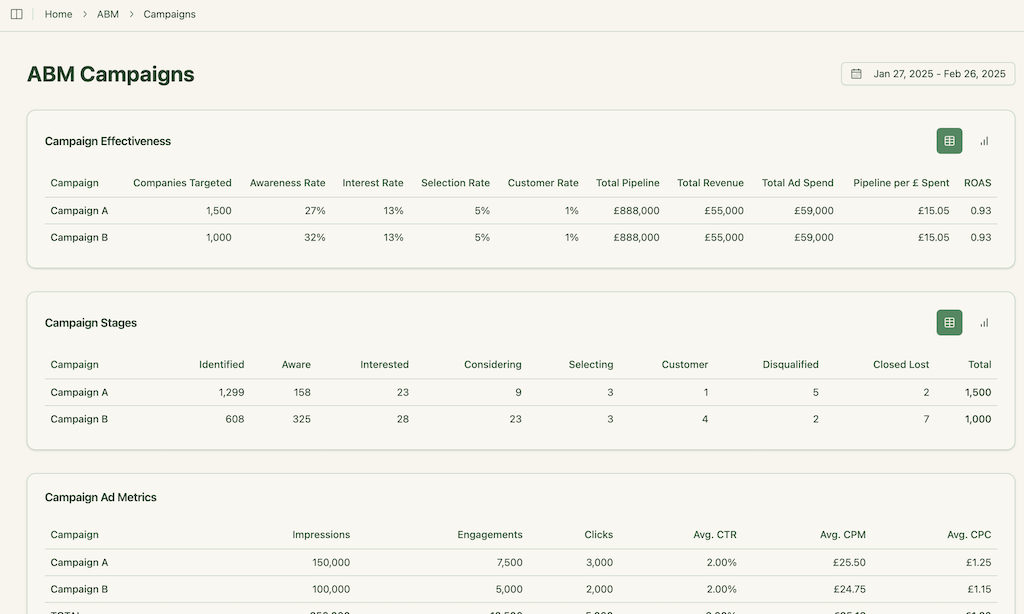
This delivers full-funnel visibility like enterprise ABM platforms, highlighting where accounts stall and where progress accelerates.
ZenABM integrates bidirectionally with CRMs such as HubSpot (Salesforce available on higher plans).
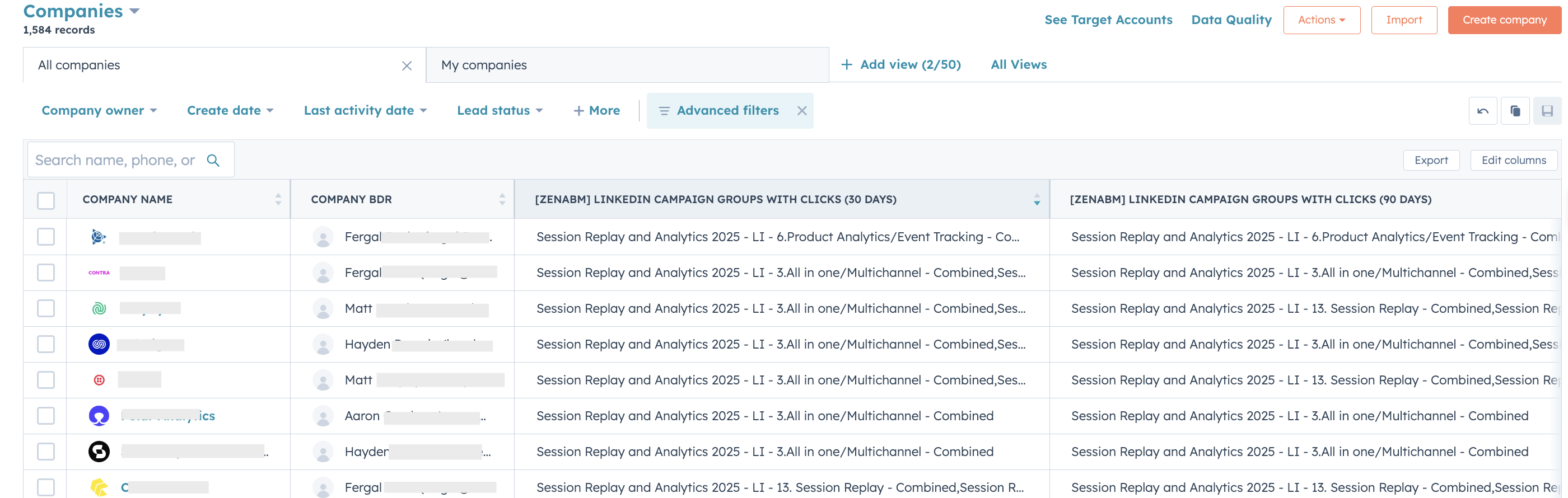
LinkedIn engagement data feeds directly into your CRM as company-level properties, keeping sales teams informed:

ZenABM can auto-update account stages to “Interested” when engagement passes a set threshold and assign accounts to specific BDRs for follow-up.
ZenABM allows you to tag campaigns by theme (like “Feature A” vs. “Feature B”) and shows which accounts engage with which themes, revealing their priorities.
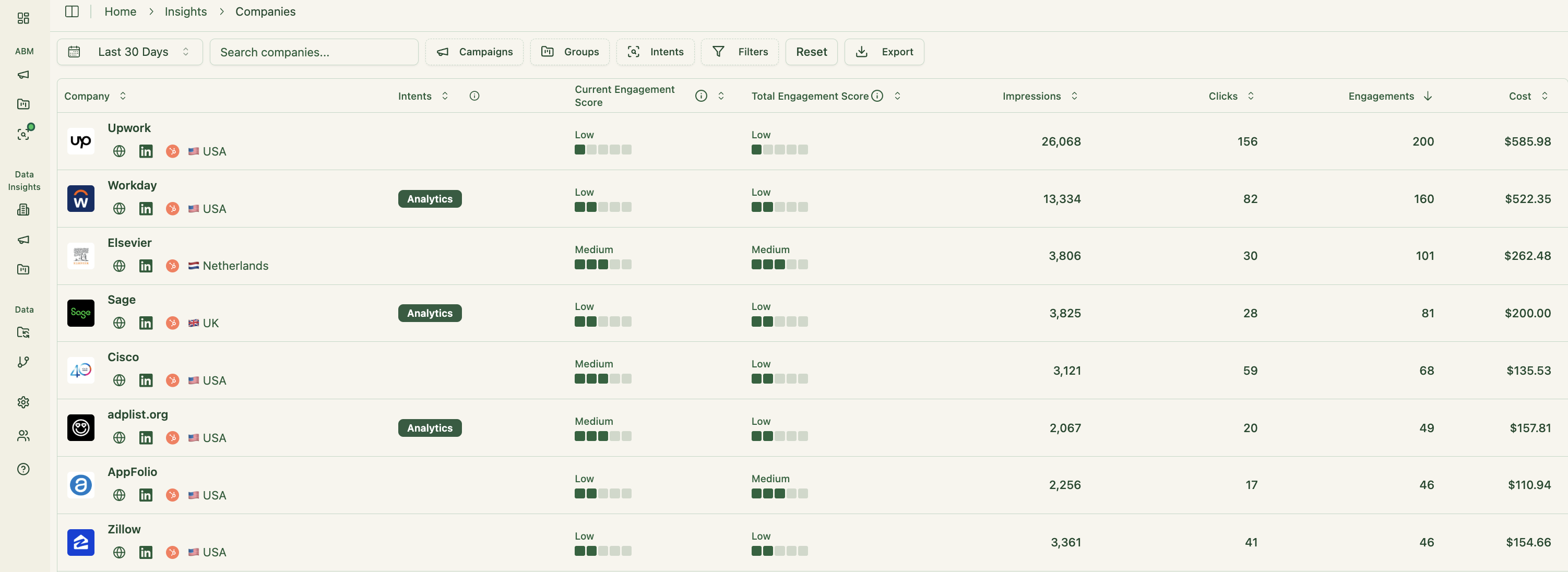
This is genuine first-party intent. Instead of paying for inferred keyword interest, you get direct proof like Account Z clicking “Feature A” ads, demonstrating actual buying interest.
These insights also sync to your CRM, supporting highly targeted outreach and relevant messaging.
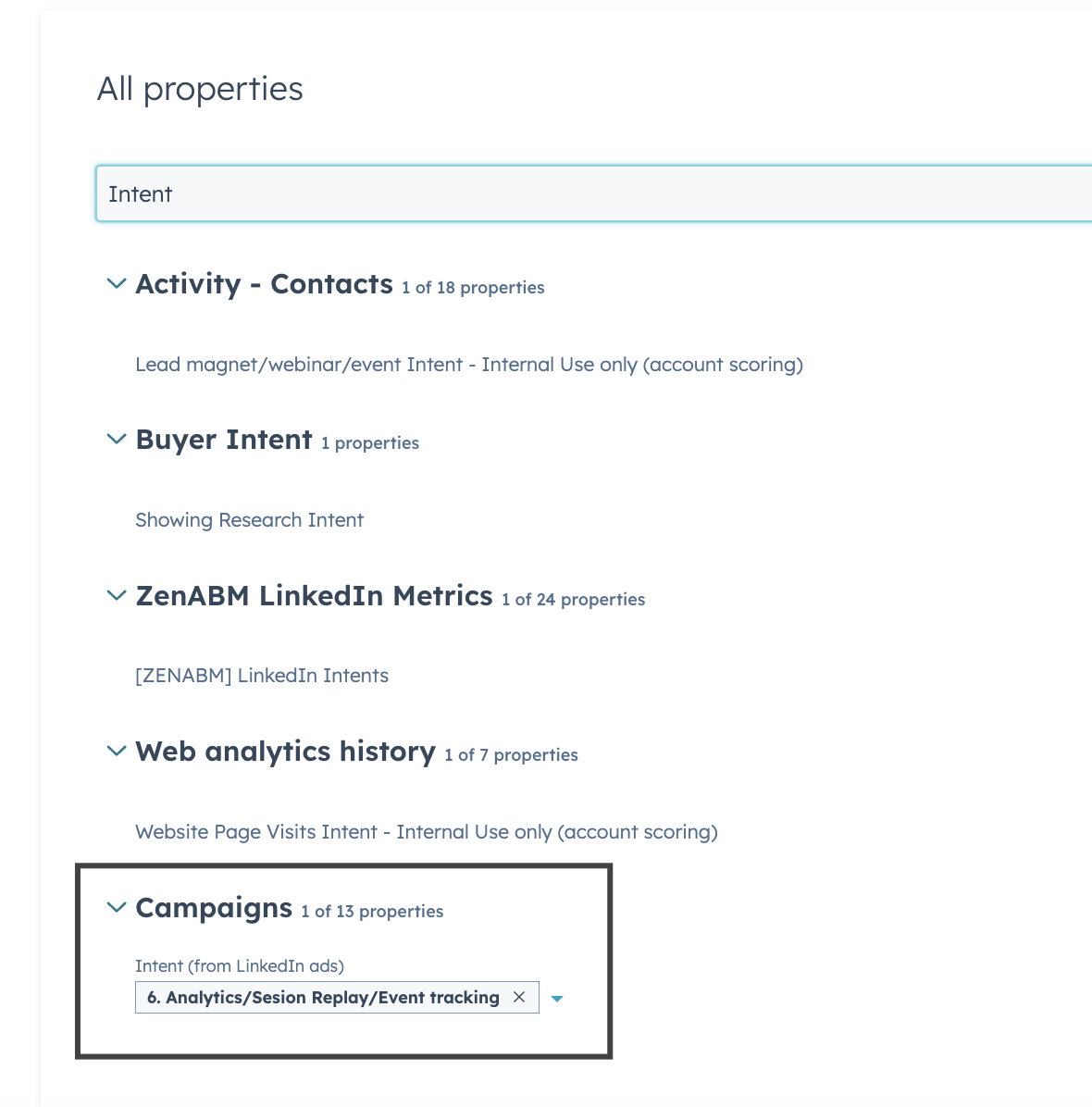
Your sales reps can instantly see which topics or pain points each account reacts to most.
This feature is fairly unique to ZenABM, making it a worthwhile add-on even if you already have an existing subscription to some other ABM tool.
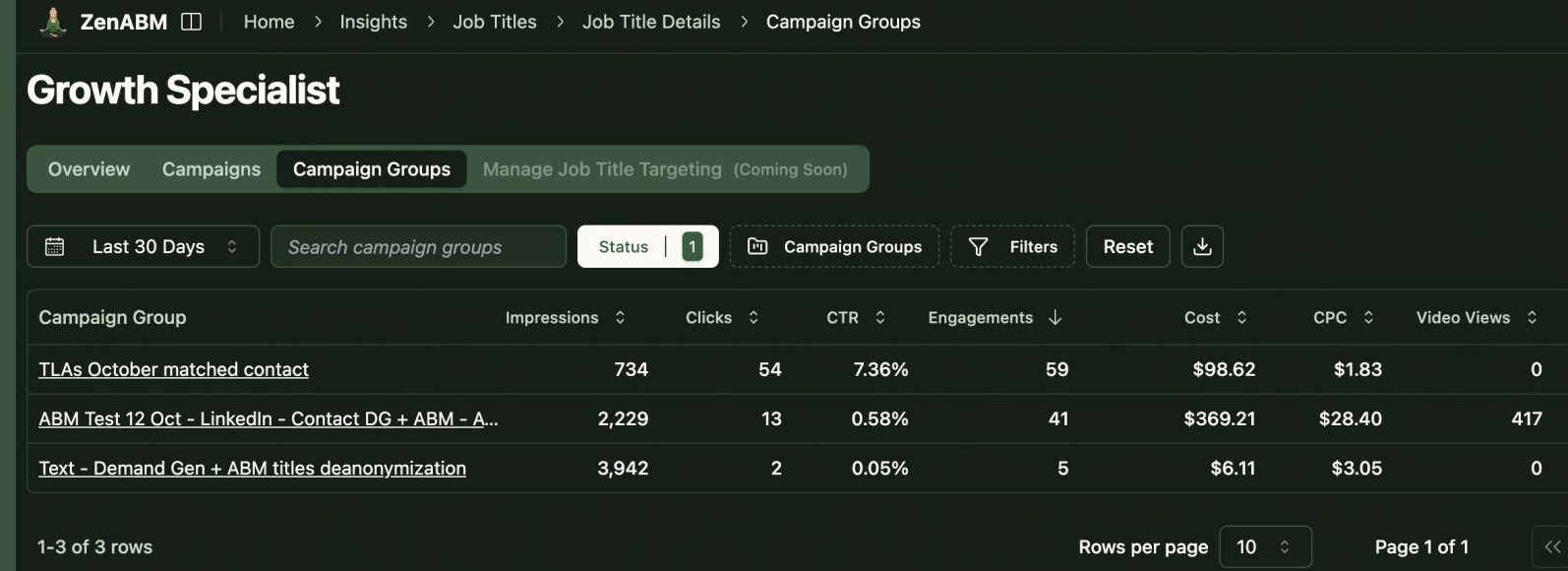
ZenABM also gives a breakdown of the specific job titles that interact with your ads.
Raw metrics, dwell time, full video funnel – all available out of the box.
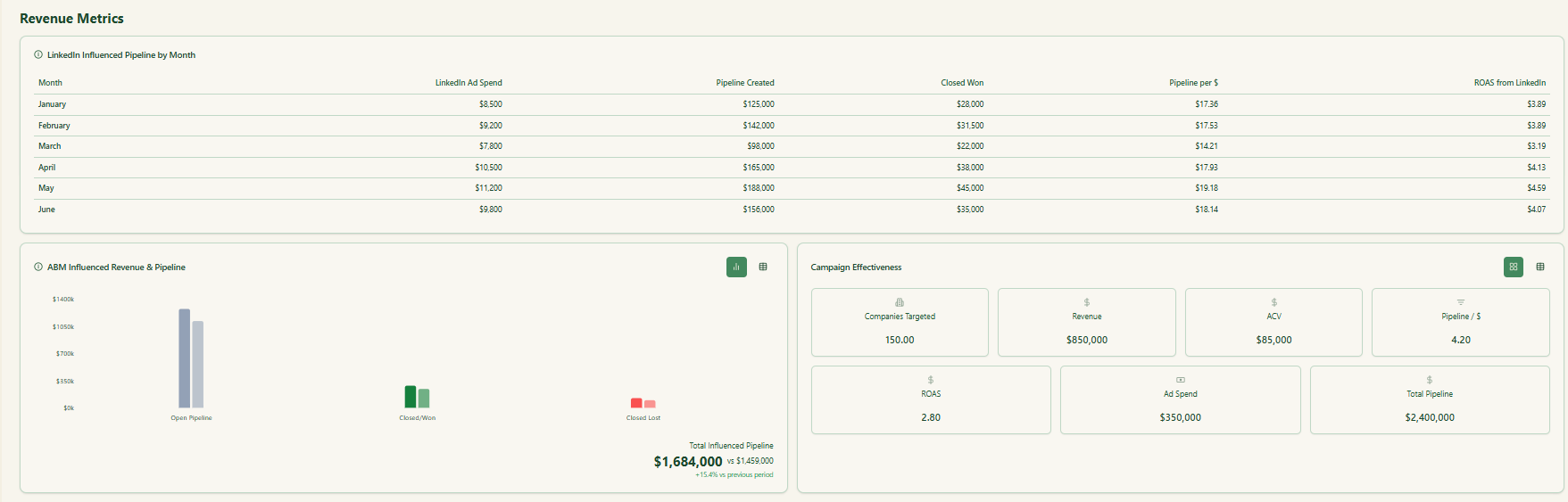
ZenABM includes pre-built ABM dashboards linking ad exposure, engagement, funnel stages, and pipeline metrics.
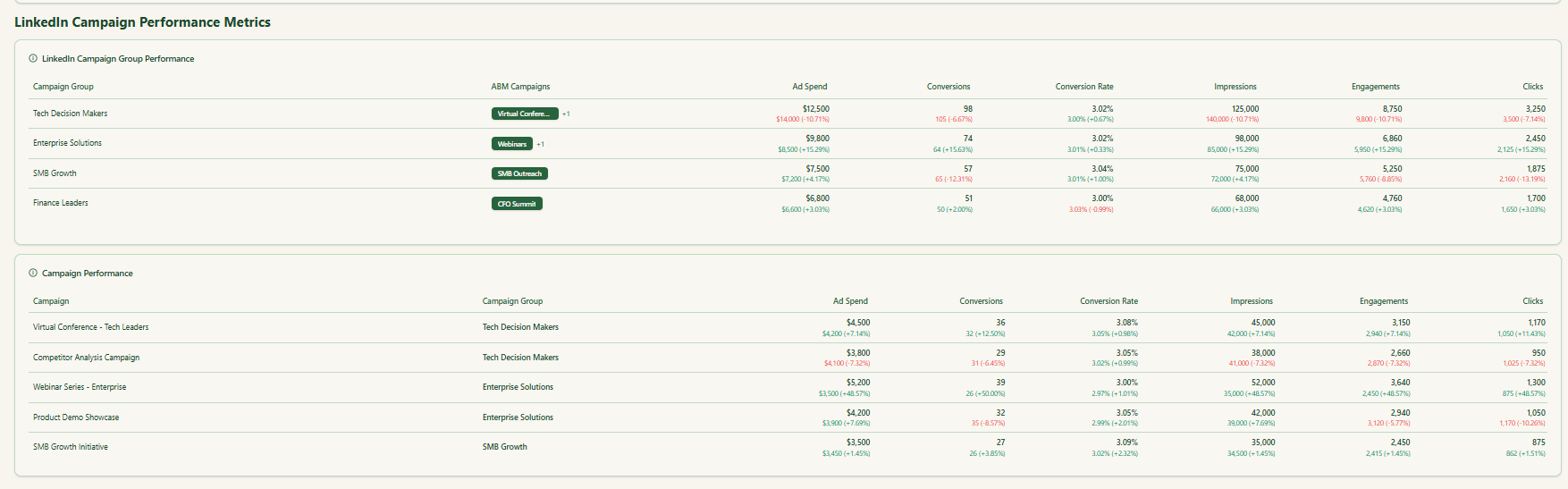
Unlike standard analytics tools that treat every LinkedIn campaign separately, ZenABM lets you combine multiple campaigns into one ABM campaign object.
This gives a unified view of performance across markets, persona variations, or creative groups.
You can see total influenced pipeline, account movement, spend, ROAS, and progression for the entire initiative instead of fragmented reports inside Campaign Manager.
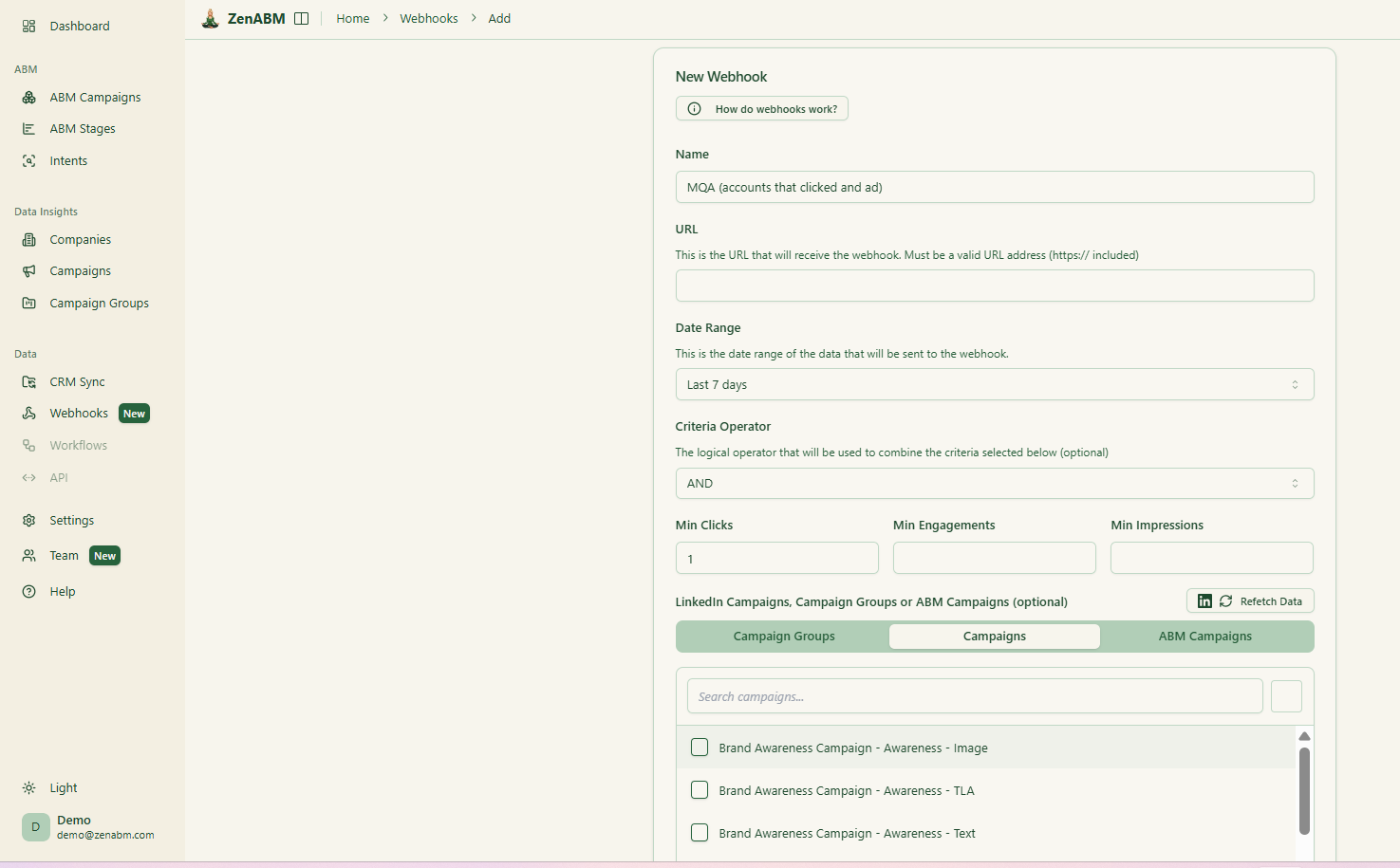
With the newly rolled out custom webhooks, ZenABM can fit into any of your workflows as needed.
ZenABM now includes an AI chatbot layered on top of your LinkedIn API data and processed ABM insights.
Instead of exporting CSVs or building Looker dashboards, you can literally ask questions like “Which accounts moved from Interested to Selecting last month” or “What is my pipeline per dollar across retargeting campaigns” in natural language.
The AI pulls from raw ad engagement, ABM stages, intent tags, campaign groups, and CRM properties to give instant, contextual answers.
ZenABM now supports agencies with a dedicated multi-client environment.
Agencies can manage unlimited ad accounts and clients in one place, with separate dashboards, ABM campaigns, and client-specific analytics.
This removes the headache of switching accounts in LinkedIn Campaign Manager.
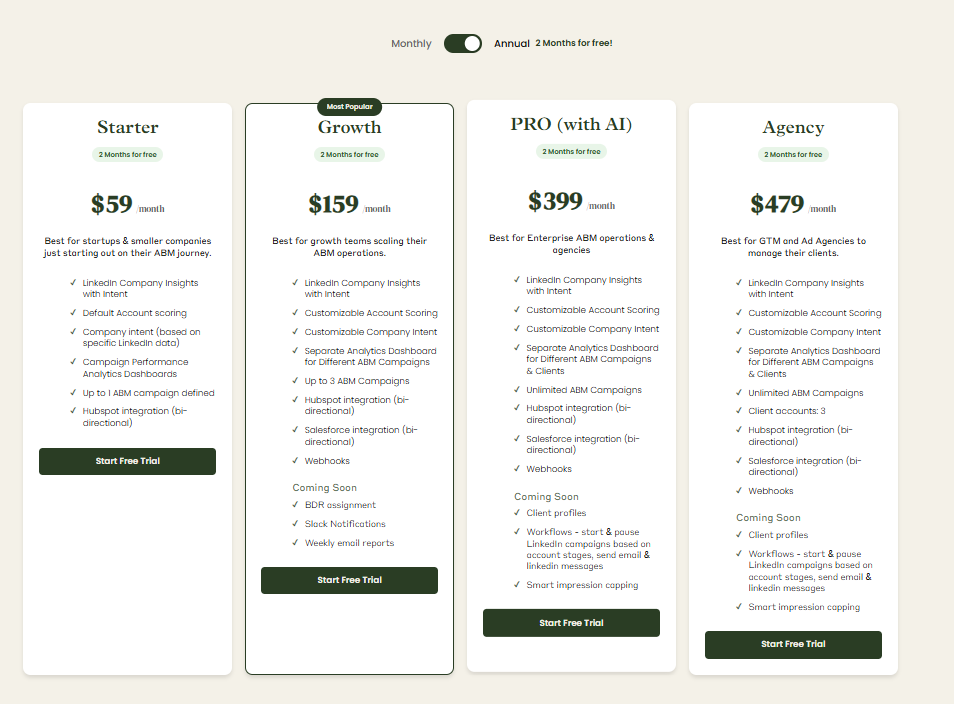
Plans start at $59/month for Starter, $159/month for Growth, $399/month for the Pro (AI) tier, and $479/month for the agency tier.
Even the highest tier costs under $6,000/year, far less than Dreamdata.
All plans cover essential LinkedIn ABM functions, with higher tiers mostly expanding limits or adding Salesforce integration.
Pricing is flexible (monthly or annual with two months free), and a 37-day free trial allows teams to try before buying.
Dreamdata is powerful, but it comes with enterprise weight, enterprise complexity, and enterprise pricing.
If you need multi-touch attribution across a sprawling go-to-market motion, it does the job, provided you have the patience and budget to match.
But if your growth engine leans heavily on LinkedIn and you care more about seeing which accounts are engaging, moving stages, showing intent, and generating pipeline right now, a leaner tool wins.
ZenABM gives you that focus with first-party account-level LinkedIn insights, a cleaner setup, predictable pricing, and fast visibility into what is working.
For many teams, it is the more practical choice, and for others, it is the perfect complement.
The 37-day free trial makes the decision pretty painless.
