


Person A saw your LinkedIn ad but didn’t click. Then Person B from the same company, who didn’t even see your ad, converted offline over a call.
That’s the worst-case scenario (a nightmare) for rev ops folks trying to track ROI from LinkedIn ads.
So, if a ‘way’ can track such a conversion and attribute it to LinkedIn ads, I’d call it a ‘best way’.
And in this article, I have explained 3 such best ways to track ROI from LinkedIn ads.
Buckle up!
Tracking ROI from LinkedIn ads is tricky, especially when someone sees your ad but doesn’t click, yet another person from their company converts offline. To tackle these complex sales routes, the article outlines three robust solutions:
ZenABM offers the easiest, most accurate ad-level ROI tracking.
Using ZenABM to track ROI from LinkedIn ads is the most convenient *best way* on the list.
You just have to connect your CRM and LinkedIn ad account to the tool and choose the minimum number of impressions for a deal to be considered ad-influenced:

Then, ZenABM will pull company-level impressions, clicks, engagements, and ad spend for each specific campaign from LinkedIn’s official ads API:

And will match the ad-engaged companies to the deals in your CRM and deduct the total ad spend on the company from the deal value to calculate the ROI from each LinkedIn ad.
You’ll see metrics like ROI/ROAS, pipeline generated per dollar spent and similar performance metrics for each campaign and all campaigns:

Note: Just don’t forget to upload offline conversions to your CRM 🙂
Also, to make company-level engagement tracking more convenient, ZenABM pushes each company’s impressions and clicks as company properties to your CRM automatically:

LinkedIn Business Manager’s Revenue Attribution Report (RAR) is lead-oriented and not account-oriented when it comes to ROI tracking.
So, the ops get tougher here, but you can still make it.
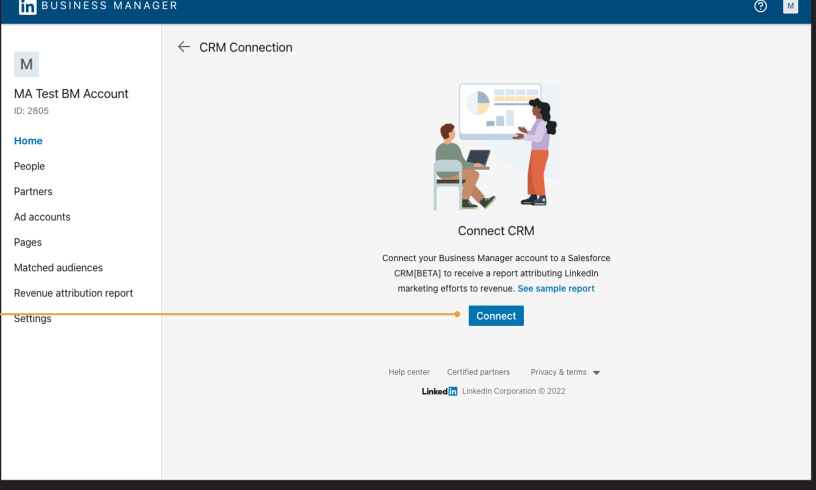
Connect your CRM to RAR:
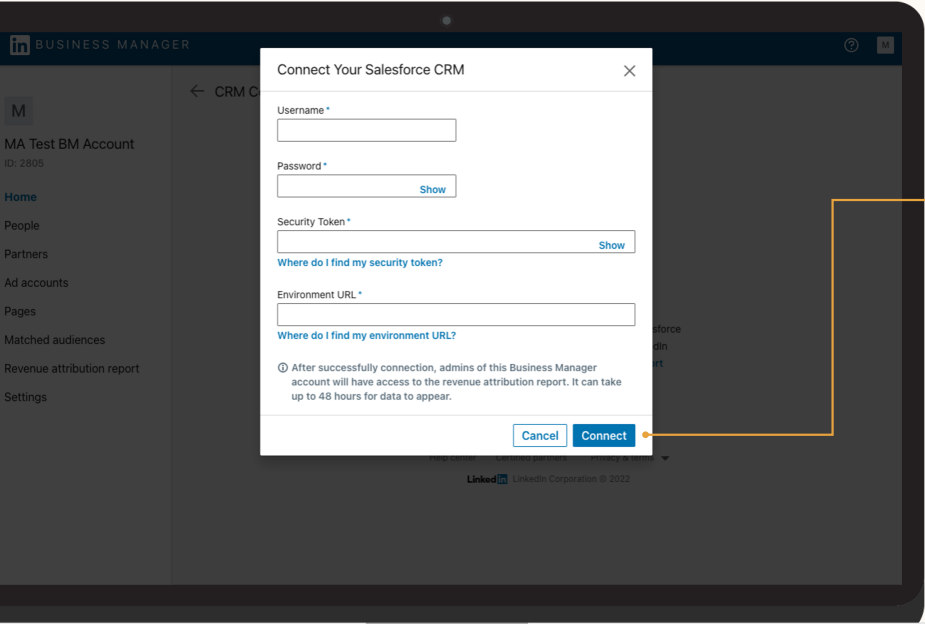
You’ll need to provide credentials for that, including Username, Password, Environment URL, and Security Token:
Once the connection is set up, it might take up to 72 hours for the data to be populated.
Also, to ensure accuracy, confirm which CRM opportunity field you use.
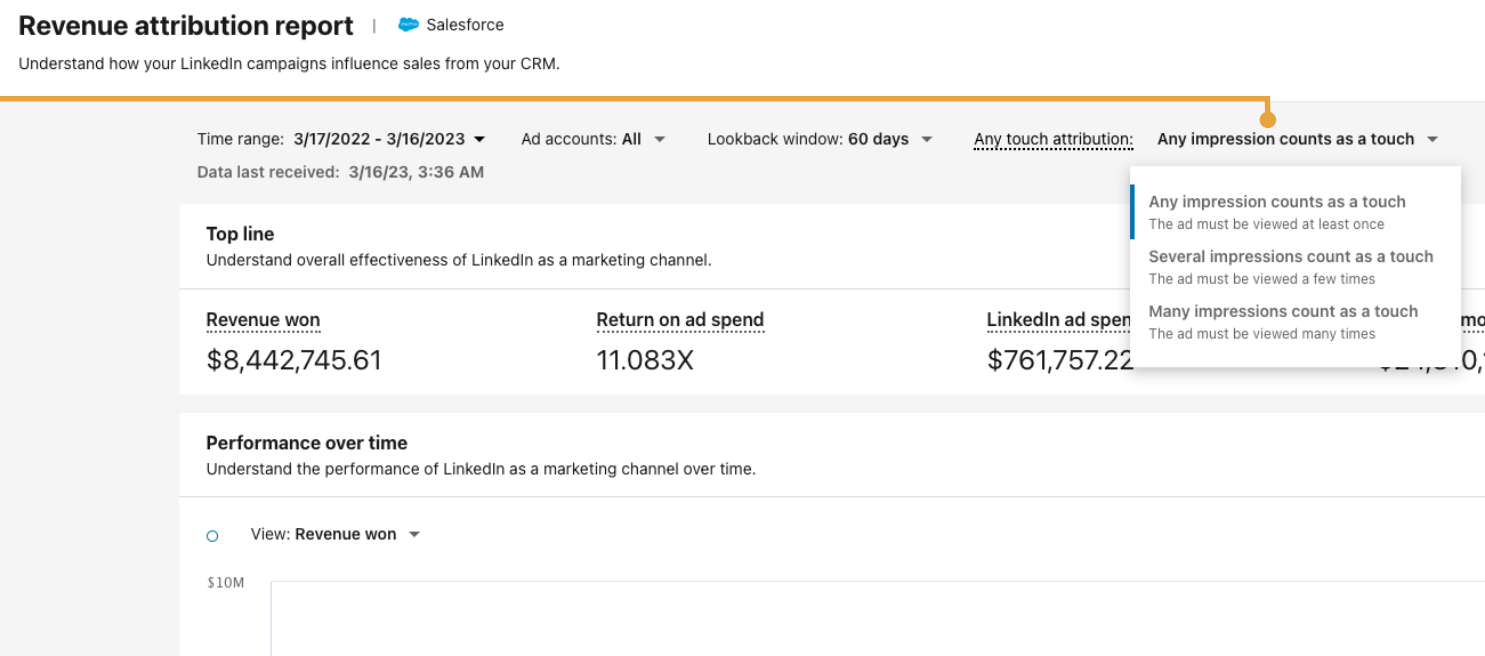
Now, choose the minimum attribution threshold:
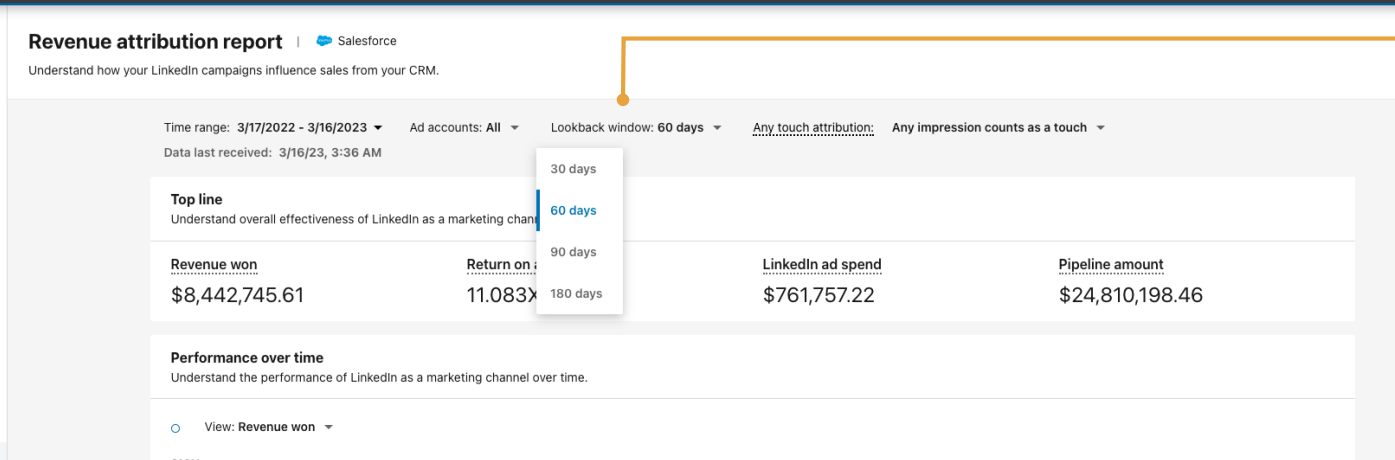
And select the lookback window:
Finally, select the time range:
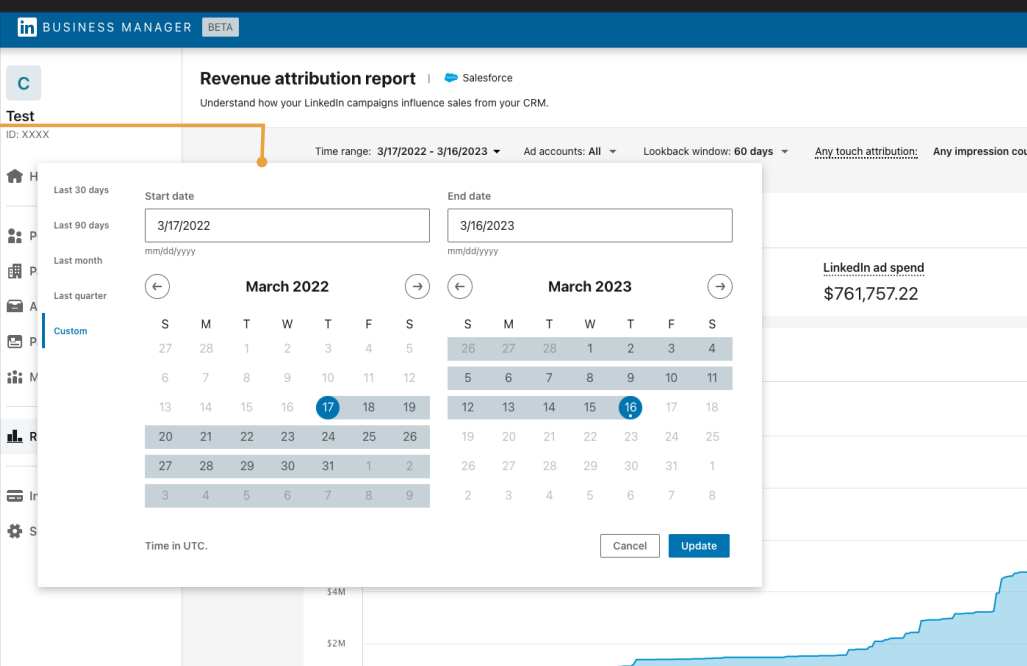
Note: If you have more than one ad account, filter by the ad account to see ROI for each, a combination of some or all of them.
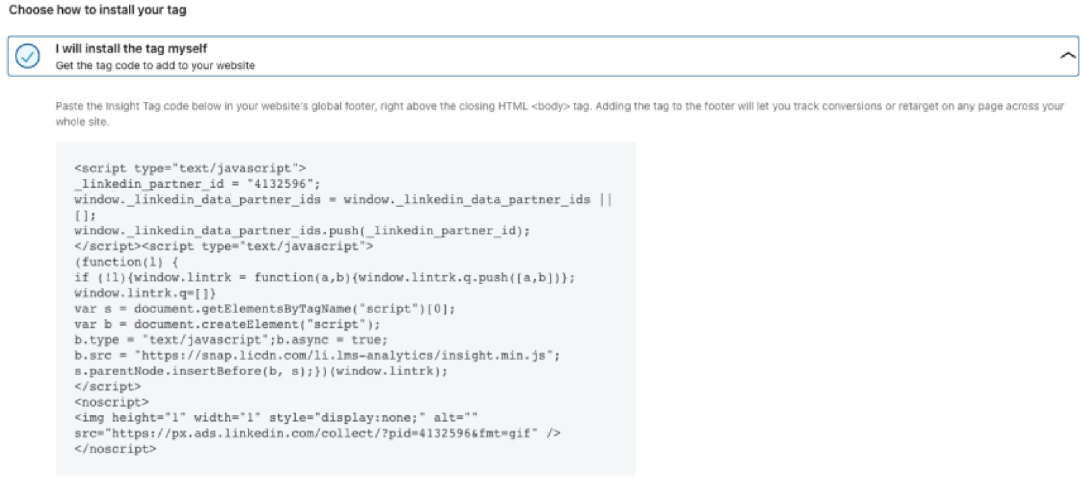
Then add the insight tag code to your site’s each page:
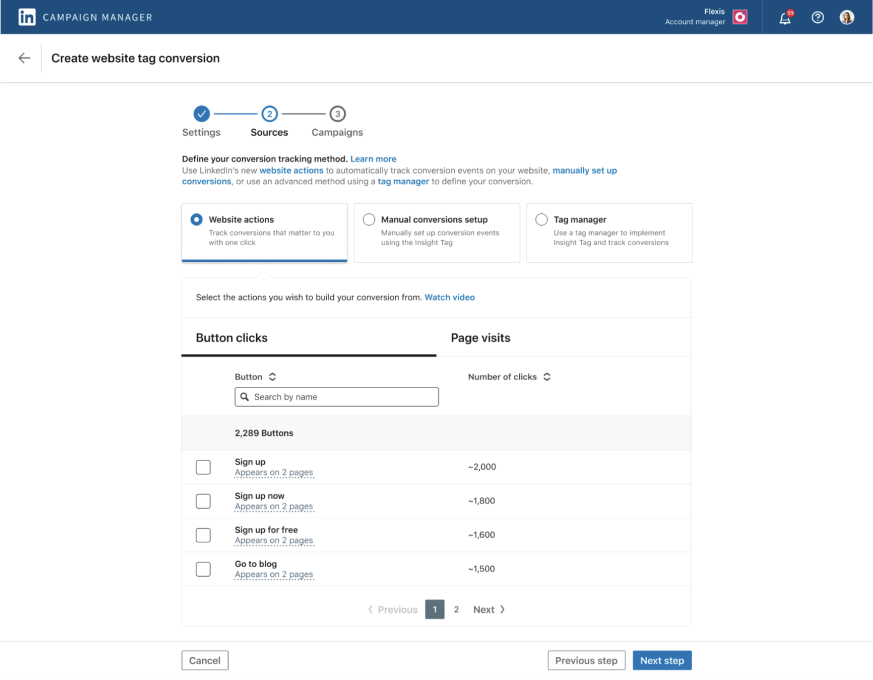
And set up the conversion rules in Campaign Manager’s Conversions Tab:
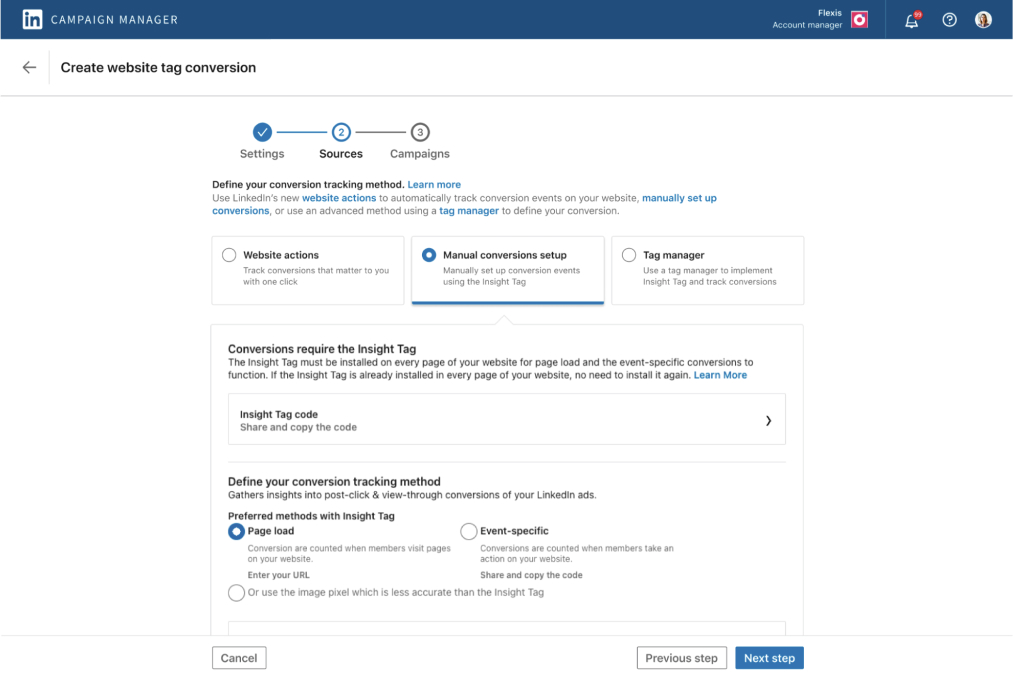
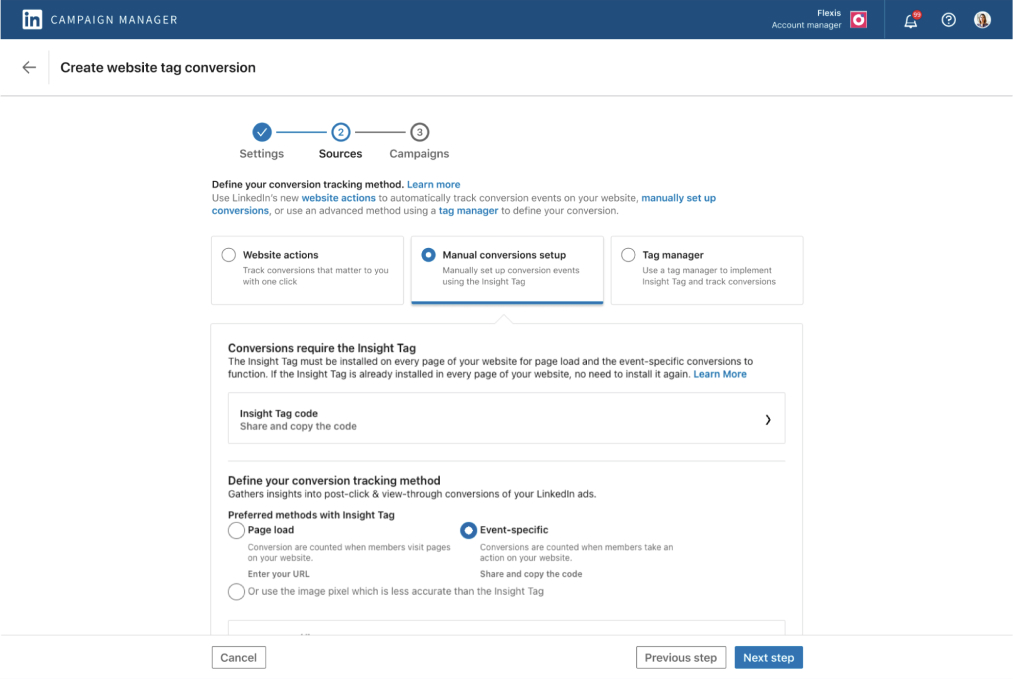
And set up the CAPI:
/conversionEvents, including the rule URN, timestamp, value, and user identifiers.At this point, RAR will be able to track all conversions where the cookies are intact, i.e. the person who has converted, has converted online, has viewed the ad, the device and browser were the same, and the cookie trail didn’t get lost.
To further improve tracking, you’ll have to upload all your conversions from your CRM to Business Manager with conversion timestamp, hashed emails, etc. You can also stream the same through the Conversions API. With this done, offline conversions and conversions with a lost cookie trail will also be tracked.
Now, only one scenario remains where RAR will fail to attribute a conversion to LinkedIn ads: The person who saw the ad and the one who converted are different people from the same company.
For this, you’ll have to enlist each conversion’s company and check in LinkedIn campaign manager whether the company had impressions, clicks, or engagements before the conversion took place. If yes, you’ll still be able to attribute that conversion to LinkedIn ads.
So, even the worst-case scenario has been tackled with native solutions here, but there’s one problem: Unlike in ZenABM, here you cannot know which exact ad was responsible for conversion.
Yes, you can use UTM parameters, but that won’t help with view-through attribution.
In the first way, we saw that ZenABM can pull LinkedIn ad impressions, clicks, and spend for each company and campaign from the LinkedIn Ads API and then match the engaged companies to the deals in your CRM to track ROI.
Now, Ben Brown (Founder at Session Media) has built something similar – a scrappy, rudimentary version of ZenABM.
If you are not looking for advanced features like built-in ABM Analytics and ROI dashboards, intent tagging, and ABM stage tracking, and only want to match the converted companies to engaged companies to see LinkedIn ads ROI once a month, you can build what he built.
Here’s how:

You can view LinkedIn ad impressions, clicks, and cost data per company in your LinkedIn ad account.

Use a tool like Data Slayer (or similar API connector tools like Supermetrics or Windsor) to pull LinkedIn ad impressions, clicks, and costs for each company into a Google Sheet.
Set up the API connector:
In your Google Sheet, you should have columns for:
Note: This setup isn’t totally free. Zaps aren’t unlimited in the free version, and Dataslayer’s API connector also requires at least $20/month if you want to track more than 1000 companies.
For more information, you can see this YouTube tutorial:
With this clever patchwork, you’ll be able to track the ROI of LinkedIn as an ad platform by looking weekly/monthly at the converted companies and checking if they had impressions or clicks in the near past (7 days window is recommended for view-through attribution, and 30 days window is recommended for click-through attribution).
But again, even here, you won’t be able to know the ROI of each ad separately.
That’s only possible with accuracy in the first method.
Enterprise-grade ($25,000+/year) ABM tools like Demandbase, 6Sense, Terminus, etc., also provide comprehensive ABM analytics and ROI dashboards where you can see the pipeline and revenue generated by each ad campaign.
But these tools bundle up a lot of very advanced enterprise-grade features like multi-channel ad tracking, ad asset management, and their own DSPs. Such features cannot be justified by most small to mid-sized businesses or even big businesses running ABM only on LinkedIn.
So, we just solved LinkedIn ROI tracking nightmares in the above 3 ways.
The only difference between these three methods is how tough the ops are and whether ad-level ROI tracking is available.
ZenABM offers the simplest, most elegant solution. Connect your CRM and ad account, and watch company-level conversions track automatically – zero attribution gaps. In fact, you can also see the exact ROI of each specific ad.
LinkedIn’s native stack (RAR, Insight Tag, CAPI, and Campaign Manager) works but requires quite a significant amount of manual intervention and won’t pinpoint specific ads’ ROI.
The DIY solution with CRM, Google Sheets, APIs, and Zapier works too, but demands constant maintenance.
Choose wisely. Ditch guesswork and try ZenABM now for free!
