



When you start running account-based marketing campaigns on LinkedIn, the number of ad formats available feels overwhelming.

And choosing the right format can make or break a campaign.
So, in this guide, I’ll break down LinkedIn’s ad formats and share tips from running LinkedIn ABM programs to help you pick the best ad types for awareness, engagement, lead generation, and account-based advertising.
In case you want a quick rundown:

Before discussing the strategic tips, first, let’s look at all the LinkedIn ad formats available:
Sponsored content (In-feed ads) are of the following types:

Single Image Ads are the classic LinkedIn format with one image, introductory text, and a headline.
They’re versatile and work well for awareness, retargeting, and simple offers.
Quick tips:

Video ads let you tell a richer story in the feed, great for product demos, customer testimonials, or thought leadership clips.
LinkedIn reports video as one of its fastest-growing ad formats.
Quick tips:

Carousel ads let users swipe through multiple images (up to 10 cards), each with its own headline and link.
Quick tips:

Document ads let you post a PDF ebook, one-pager, or case study directly into the feed as a swipeable preview. Users can read a few pages and optionally download the full document (you can gate downloads with a Lead Gen Form).
They work exceptionally well for lead generation content like reports, whitepapers, and checklists.
Design documents for mobile viewing with larger text and simple graphics.
Document Ads can have slightly lower CTR than single-image ads since some users read without clicking, but those who fill out the form are typically high-intent.

Event Ads promote LinkedIn Events with automatic RSVP tracking.
The ad unit pulls in the event’s name, date, and info with an “Attend” or “Register” CTA.
LinkedIn automatically shows if one of your connections is attending, adding social proof.
Event Ads work well for engagement and lead generation.
Quick tips:

Thought leader ads allow your company to sponsor a post made by an individual (your CEO, a customer, or an influencer) so it appears as an ad with a “Promoted by [Company]” label.
The post looks like it’s coming from that person, not your Company Page.
This format leverages the fact that people trust people more than brands.
I’ve seen much higher engagement on thought leader ads because the content feels organic.
They work well for upper-funnel trust building and mid-funnel engagement.
You need the person’s consent, and they must give permission through Campaign Manager.
You can’t edit their post or add custom CTAs.
It runs exactly as-is. The upside is strong engagement; the downside is less message control.
Sponsored messaging (Inbox ads) are of the following types:

Message ads (formerly Sponsored InMail) deliver a single targeted message to a user’s inbox.
Each message has a subject line (up to 60 characters) and message body (up to ~1500 characters, though shorter is usually better), plus one optional CTA button.
LinkedIn lets you include a clickable image banner at the top on desktop.
Message Ads typically have 30 to 50% open rates, but click-through rates are usually a few percent, making each click pricey.
Quick tips:

Conversation ads allow multiple choice buttons and branched messaging, creating an interactive chat experience.
Instead of a single message with one CTA, they let you offer several prompts (up to 5 buttons per message, with up to 5 levels of messaging depth).
This format creates a choose-your-own-path experience in the inbox.
LinkedIn benchmarks show Conversation Ads can get around 50% open rates and 10%+ click rates since multiple buttons provide multiple opportunities for engagement.
They’re excellent for lead generation and qualification because you can route people to different CTAs.
From an ABM perspective, Conversation Ads are highly effective for getting meetings with engaged accounts.
A well-timed conversational invite feels personal and often gets a response.
Setting these up requires more planning to map out the conversation tree, but the engagement payoff is significant.
Sidebar ads are of the following types:

Text ads are small sidebar ads (100×100 pixels) with a headline (25 characters) plus descriptive text (75 characters).
They only show on desktop and have very low CTR (0.02 to 0.04%), but the cost per click is low.
Quick tips:

Dynamic ads are personalized ad units appearing in the right sidebar on desktop.
LinkedIn automatically inserts the member’s name or profile photo to catch their eye.
Spotlight Ads have a 300×250 image and a small 100×100 company logo with text personalized to the viewer’s name.
They click through to your chosen landing page.
Spotlight Ads work well for mid-funnel offers or targeted promotions because personalization (“Hi John!”) can improve CTR.
Follower Ads invite members to follow your Company Page with text like “{Name}, don’t miss updates from [Your Company].”
The CTA is “Follow.”
Follower Ads are great for growing LinkedIn followers among a targeted audience, creating a longer-term nurture play.
Dynamic ads can have higher CTR than text ads because of personalization.
LinkedIn suggests they often get 0.5%+ CTR.
They only show on desktop and have limited inventory scale, but they’re effective awareness and engagement boosters in ABM to ensure target accounts see your brand frequently.
All these formats (except Text Ads) can use LinkedIn’s Lead Gen Forms as the call-to-action, which significantly boosts conversion rates by letting users submit info with one click.
Quick tip: I strongly recommend using Lead Gen Forms for campaigns where capturing leads is the goal. In our campaigns, forms typically improved conversion and lowered CPL, though watch for quality issues since forms make it too easy for some unqualified prospects.
Follow these specs to ensure your creative looks good across devices:
| Ad Format | Specs | Text Limits | Notes |
|---|---|---|---|
| Single Image Ads | 1200x627px (1.91:1) or 1080x1080px | Intro text up to 150 characters, headline up to 70 characters | Use standard CTA buttons or Lead Gen Forms |
| Video Ads | 16:9, 1:1, 4:5, or 9:16 ratio, 360p to 1080p, MP4 up to 500MB | 15 to 60 seconds recommended | Include captions since videos autoplay muted |
| Carousel Ads | Multiple 1080x1080px images, 2 to 10 cards | Intro text up to 255 characters, card headlines up to 45 characters each | Use multiple cards to tell a sequence |
| Document Ads | PDF, PPT, or DOC up to 100MB, max 300 pages | N/A | Design for mobile with large font and simple layout |
| Event Ads | Uses image from your LinkedIn Event page, 4:1 banner ideal | Intro text up to 600 characters | Pulls event image from LinkedIn Event page |
| Thought Leader Ads | Uses the member’s post content, image or video | N/A | Cannot edit text, uses the member’s post entirely |
| Message Ads | Optional 300x250px banner on desktop | Subject up to 60 characters, message body up to 1500 characters | One CTA button |
| Conversation Ads | Optional 300x250px banner | Up to 5 buttons per message | Up to 5 messaging levels total |
| Text Ads | 50x50px image | Headline 25 characters, description 75 characters | Compact sidebar-style format |
| Spotlight Ads | 300x250px background image and 100x100px company logo | Headline 50 characters, description 70 characters | Uses both background image and logo |
| Follower Ads | 100x100px company logo | Headline 50 characters, description 70 characters | Follower-focused ad format |
Universal guidelines:
Choose your format based on where your audience is in the B2B funnel.



Let’s look at some performance benchmarks for each format now:
LinkedIn ads average 0.44 to 0.65% CTR for sponsored content.
Single-image ads average ~0.56% CTR.
Carousel ads typically see 0.30 to 0.50% (lower, possibly because swiping counts as engagement without clicking through). Video ads range from 0.30% to 0.60% depending on content.
Document ads might show lower outbound CTR (~0.4%) since some people read without clicking. Event ads can do well (~0.5%) if the topic is compelling.
Dynamic ads (Spotlight/Follower) typically see 0.1 to 0.2% CTR, and official benchmarks aren’t widely published.
For Sponsored Messaging, open rates typically range from 30 to 50%, with small click-throughs afterwards. If 1000 messages are sent, roughly 400 open and 30 click, that’s about 3% click rate on sends.
Conversation Ads, by offering multiple options, often double or quadruple that engagement, averaging around 50% open rates and 12% click rates (overall 10 to 12% of sends).
LinkedIn is expensive. Average CPC for feed ads runs $6 to $9, but varies widely.
Very niche targeting (Fortune 500 CIOs) might hit $12 and up. Broader campaigns might run $4 to $5.
Text Ads sometimes get lower CPC ($3 to $5) because bidding is lower. CPM (cost per 1000 impressions) often lands around $30 to $60 for relevant audiences, with tech audiences averaging ~$38.
That’s much higher than Facebook, but it comes with territory: LinkedIn’s targeting is unique and impressions often reach people who could be worth six-figure deals.
Formats like text ads often have cheaper CPM, while video ads with conversion objectives cost more.
CPL varies widely by offer and audience.
We’ve had campaigns get $30 CPL (low-touch ebook download) and others at $300 CPL (high-value demo request).
Broad benchmarks range from $50 to $300 CPL, depending on industry and offer.
Using LinkedIn’s Lead Gen Forms typically lowers CPL by 20 to 30% compared to sending people to website forms.
For example, a report download campaign got ~$60 CPL with a Lead Gen Form versus ~$85 CPL sending to a landing page.
The tradeoff: form leads are slightly less responsive since they didn’t visit your site for context. LinkedIn Lead Form open-to-submit rates often reach 10%+ for good offers. If 100 people click your ad, having 10+ submit the form isn’t unusual. In contrast, sending 100 clicks to your website might only get 2 to 5 form submissions, explaining the higher CPL on landing pages.
Pointers to be taken away from the benchmark discussion:
Running account-based marketing on LinkedIn means coordinating ads as an orchestrated sequence and personalizing strategically.
Here are core tips:
For ABM, you typically have a list of target companies and specific job titles at those companies.
LinkedIn’s Matched Audiences let you upload company lists or individual contacts.
This ensures your ads (regardless of format) only show to people at target accounts.
For example, I uploaded 500 target companies and layered them with seniority and job function filters to reach decision-makers.
Every dollar spent then hit accounts we cared about. Use Audience Exclusions so overlapping campaigns don’t drive up costs or create fatigue.
Not all target accounts are at the same level of familiarity or interest.
Some are unaware, some are warming up, and some are in active discussions.
Use different ad formats for these scenarios simultaneously. Accounts in “aware” stage get Thought Leader Ads or light content.
Accounts showing high intent (clicked ads or visited pricing) get Conversation Ads or Message Ads inviting meetings.
The result: Ads feel more relevant. Highly engaged accounts see bottom-funnel offers, while cold accounts get educational content first.
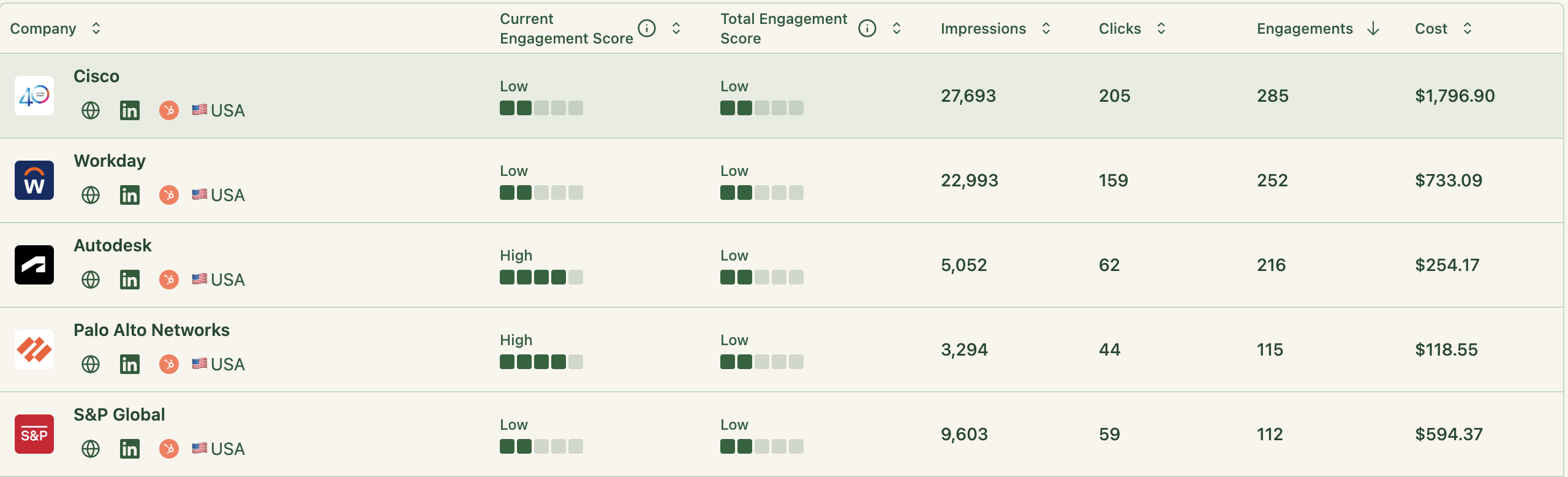
Tip: ZenABM automatically scores accounts and categorizes them into funnel stages, then pushes account lists with their engagement data into your CRM.



With ABM, you often know target industries or companies.
Personalize the creative to speak directly to them.
In one campaign, I created 3 versions of a single-image ad with different industry images and headlines (Fintech, Healthcare, SaaS), each referencing challenges that the industry faces.
These outperformed generic versions because the messages resonated more.
You can’t do one-to-one personalization easily in LinkedIn creative (except Dynamic Ads that insert {Company Name}), but one-to-few works well.
A Follower Ad saying “{Name}, [Your Company] invites you to follow us” is subtle, but seeing their name next to your logo reinforces your presence to target accounts.
ABM is about making a targeted group feel like you’re everywhere: feed, messages, sidebar.
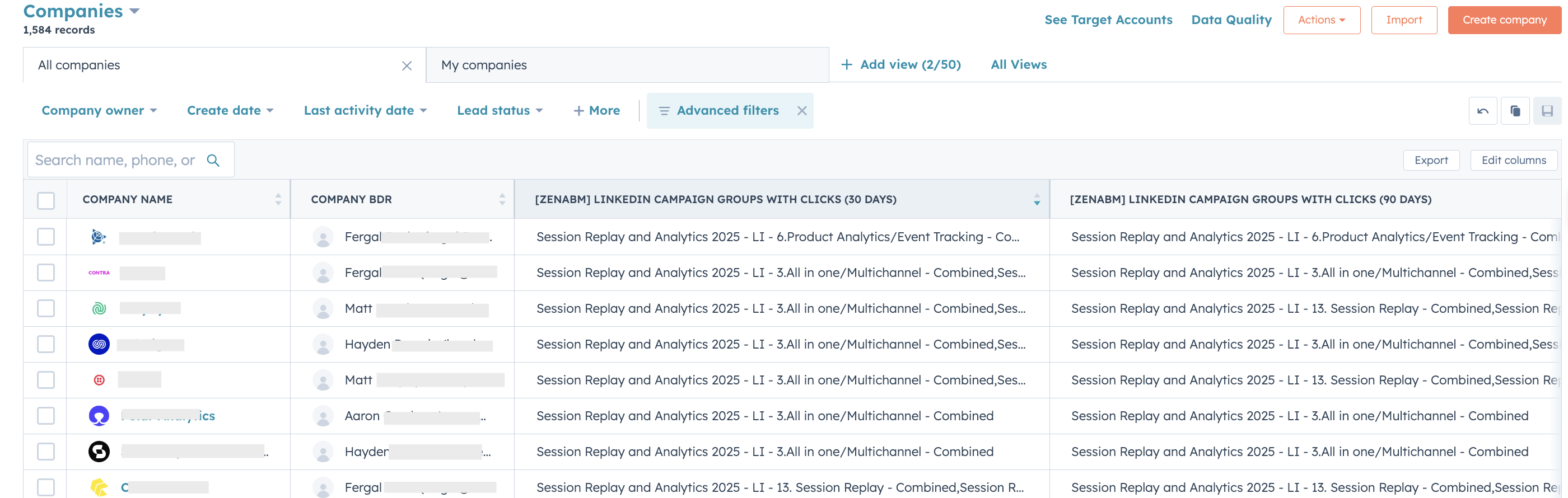
LinkedIn tells you overall campaign metrics, but not which target accounts clicked which ads. ZenABM fills that gap by de-anonymizing LinkedIn Ads at the account level.
You can see Acme Corp had 12 impressions and 2 clicks on your carousel ad, and a week later engaged with a Conversation Ad.
That tells you Acme is warming up.
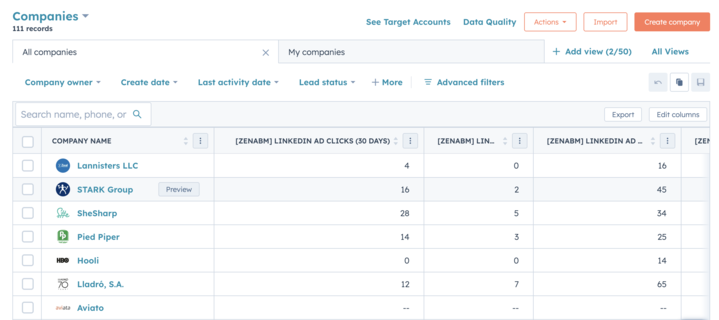
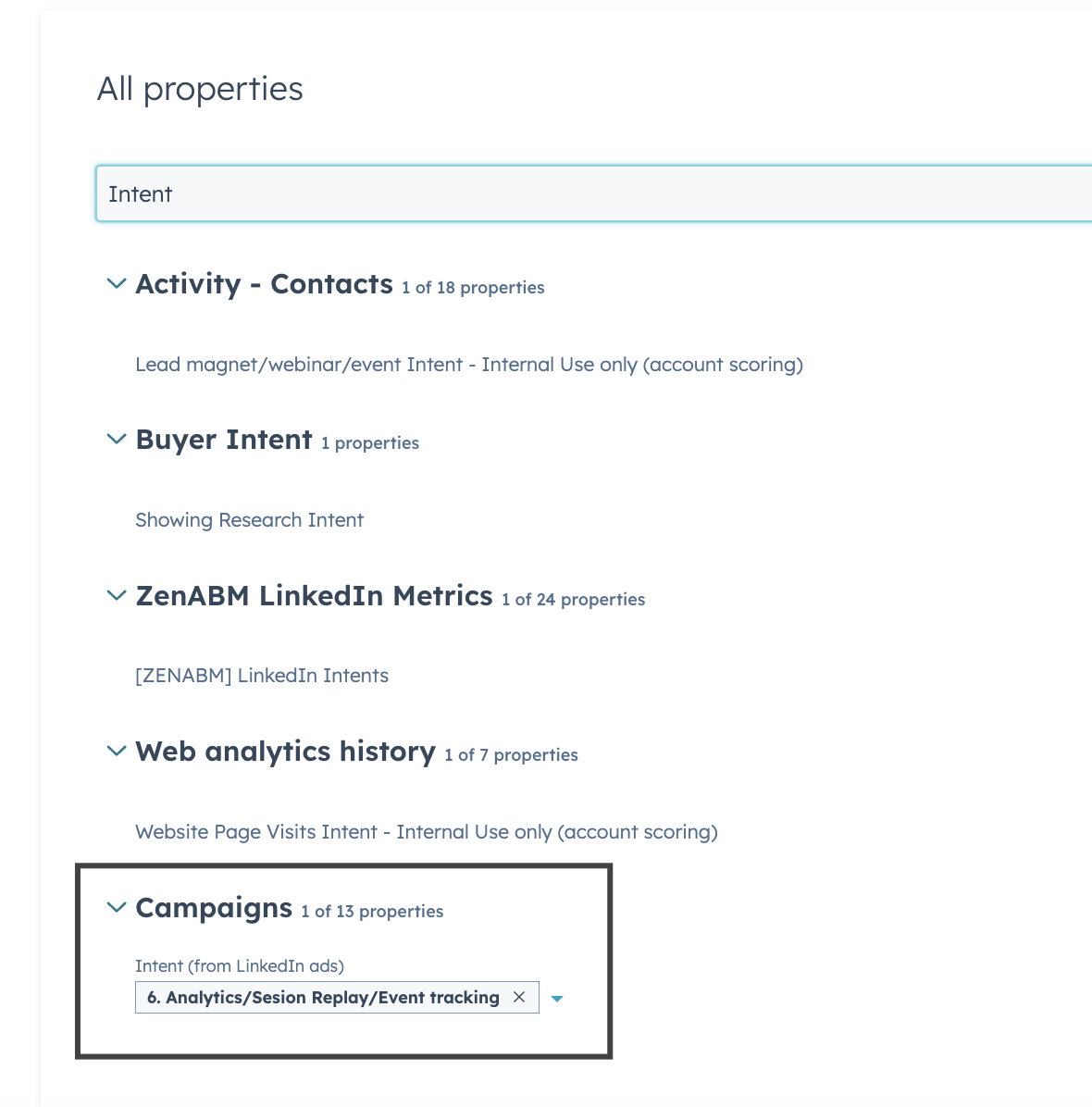
ZenABM scores that account’s engagement and pushes the data to your CRM so the sales rep can see “Acme Corp: Engagement Score 75, clicked LinkedIn Ad ‘ABM Playbook’ on Oct 10.”
This enables real sales-marketing alignment.
We discovered that Conversation Ads were our highest-performing format for generating meetings with target accounts (4x higher engagement), a pattern we’d never have spotted looking only at overall CPL.
Without account-level visibility, we might have underranked them.
An ad click from a target account is valuable only if you act on it quickly.
Through CRM integration, set up a workflow: when an account’s engagement score hits a threshold (they’ve clicked multiple ads or spent time on your site), tag it as “Highly Engaged” in HubSpot or Salesforce and assign it to a rep for follow-up.
The sales team gets an alert, and outreach can reference what the account saw (“I noticed you checked out our LinkedIn ABM guide”).
This timely, informed follow-up dramatically increases conversion from ad engagement to pipeline.
Ads warm them up; sales add the human touch at the right moment.
Even if you do this manually, keep an eye on engagement and have SDRs reach out to those accounts in a coordinated way.
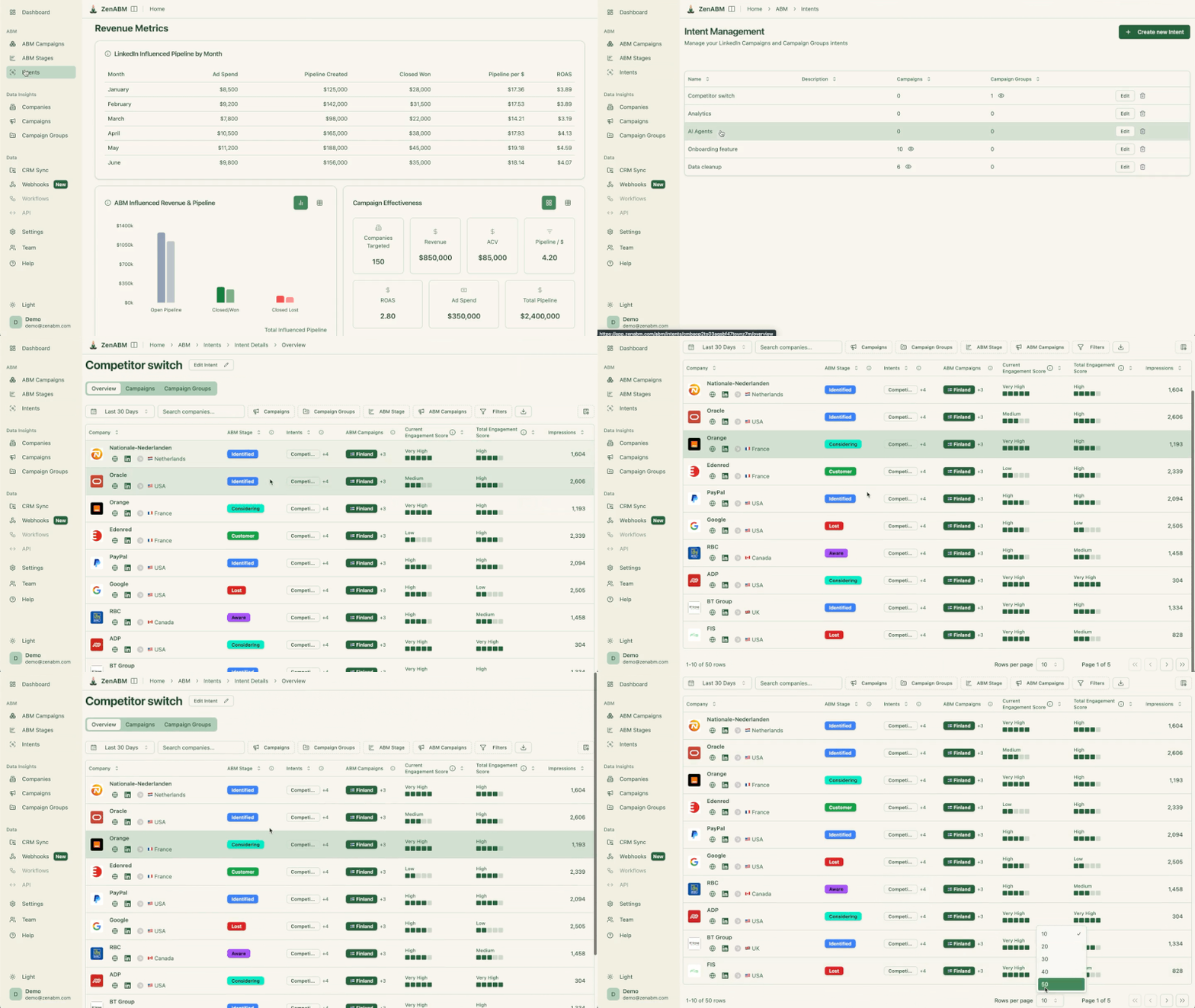
Btw, ZenABM provides such workflows out-of-the-box:
The best LinkedIn ad format is not one universal winner.
It depends on what you want the account to do next.
Thought Leader Ads and video can build awareness, carousel and document ads can deepen consideration, and Conversation Ads or single-image ads with Lead Gen Forms can push engaged accounts toward conversion.
The real advantage comes when you stop treating formats as isolated tactics and start sequencing them around account stage, intent, and buying readiness.
ZenABM helps make that practical by showing which target accounts engaged with which ads, scoring them based on current and total engagement, tracking stage progression, surfacing qualitative intent signals, and syncing that data into your CRM so sales can follow up at the right moment.
If you want LinkedIn ad formats to function like a real ABM system instead of a pile of disconnected campaigns, ZenABM is the layer that ties it together.
Try ZenABM for free (37-day free trial) or book a demo now to know more!
