

©2026 ZenABM - All Rights Reserved.

Setting up a LinkedIn ABM campaign correctly takes about 90 minutes the first time (like seriously!).
Most teams spend longer than that on the creative alone, then lose a significant portion of their budget in the first week to four default settings they never thought to change.
We launched a real campaign live on camera during Workshop 4 of the ZenABM ABM Bootcamp 2026.
This post covers all about it.
Note: You can watch the full live campaign launch recording on YouTube here. Then come back and follow the steps below.
In case you want a quick overview:
Following three things must be in place before you even touch LinkedIn Campaign Manager:
Before you hop on campaign manager, your target account list (TAL) must be ready and enriched with company names, LinkedIn company page URLs (essential for high match rates), and any contact data you will be using for audience uploads.
If you are using Clay for enrichment, this should already be done.
Remember: The LinkedIn Audience Hub requires at least 300 matched members to run ads. So, the list cannot be smaller.

Your LinkedIn pixel must absolutely be verified.
Steps:
You can watch this quick video to understand it better:
Note: Please do not launch without a confirmed, working pixel or you’ll lose retargeting data from day one that you cannot recover retroactively.
Obviously, your ad creatives must be ready, and by ready I mean agreed upon by everyone who has a say.
And how many?
Well, for perspective, a $10K/month budget supporting 10 ads will need:
Tip: Do not create 20 ads for a $10K budget. You cannot serve them all meaningfully and the data will be useless.
LinkedIn requires 24-48 hours to process uploaded audience lists, so upload at least 48 hours before your planned launch date.
Here’s how to upload:

Note: The match rate can be low if LinkedIn company page URL column of may companies contains the company’s main website URL rather than their LinkedIn page URL. Ensure it is not so, by checking the link format. LinkedIn company page URLs follow the format linkedin.com/company/[company-name]. These can be enriched via Clay using the LinkedIn Enrichment waterfall.

The campaign group is the top level of your campaign hierarchy.
In 2025-2026, LinkedIn renamed “Campaigns” to “Ad Sets,” so the hierarchy is now Campaign Group – Ad Set – Ads (yes, just like in Meta).
Here’s how you to create the campaign group:

Create separate ad sets (formerly called campaigns) for each main ad format type.
This gives you clean performance data by format and budget control per format type.
For a standard $10K/month ABM campaign, create three ad sets:
Details of ads set 1:
Details of ad set 2:
Details of ad set 3:
These four settings are on by default.
Turn them off every time, without exception:


Before creating ads, set ad rotation to “Rotate ads evenly” in the ad set settings.
LinkedIn’s default rotation optimizes for performance, meaning it will over-allocate to the early performer before you have enough data to make that decision.
Even rotation gives all your ads equal impressions for the first 2-3 weeks, which is when you need data, not optimization.
Now, steps to create TLAs:
And steps to create single image ads:
LinkedIn rolled out ad personalization macros in late 2025.
If your account has access (check with your LinkedIn account manager), these allow you to use variables like {{company_name}}, {{job_title}}, and {{first_name}} in your ad copy.
Live test data from Nihal’s client campaigns showed CTR increasing from 0.6% to 1.2% when company_name was added to the ad headline.
Company name macro outperforms first_name macro in most B2B contexts, perhaps because seeing your company name in an ad headline creates immediate relevance.
Requirements: minimum audience size of 300 matched members. Also, a fallback version of the copy must be specified for cases where LinkedIn cannot identify the variable value.
Now, that you have launched LinkedIn ads, you’ll also need to analyze their performance.
Connect your LinkedIn ads account to ZenABM for that.
Here’s how:


Once connected, you’ll be able to every performance metric that matters in ZenABM:

In fact, if you don’t like interpreting dashboards, you can also ask Zena (ZenABM’s AI agent) in natural langauge!

Launching a LinkedIn ABM campaign correctly is only half the job.
The real leverage comes from what you do after the ads go live: how you interpret engagement, how you prioritize accounts, and how fast you turn signals into action.
ZenABM is built specifically to operationalize account-based advertising on LinkedIn, beyond what Campaign Manager can show.


Once your LinkedIn ads are live, ZenABM connects to the official LinkedIn Ads API and captures engagement at the company level. Instead of optimizing based on aggregated CTRs and CPCs, you can see exactly which target accounts are seeing, clicking, and repeatedly engaging with your ads.
This is critical for ABM, because a 0.6% CTR from your Tier-1 accounts is far more valuable than a 1.2% CTR driven by irrelevant companies.
ZenABM lets you evaluate performance based on account quality, not just volume.
LinkedIn’s Performance tab often overstates engagement, especially for Thought Leader Ads.
ZenABM focuses on first-party engagement signals such as impressions, clicks, and repeat interactions at the account level, giving you a much clearer picture of which ads are actually resonating.
Instead of guessing whether TLAs or single image ads are “working,” you can directly compare how different formats drive engagement from the same accounts over the same time window.

Account-based advertising is effective only if it reaches the right people inside the account.
ZenABM shows which job titles engage with each ad and campaign, so you can validate whether your targeting is resonating with senior decision makers or skewing toward junior roles.
This insight is especially useful when testing dense, product-heavy creatives versus more abstract messaging.
You can see which personas respond to which creative style and adjust accordingly.


ZenABM scores engagement in real time and visualizes it on a company-level timeline.
This allows you to see when accounts are heating up, which campaigns contributed, and how engagement accumulates across formats such as TLAs, single image ads, and text ads.
Instead of reacting to daily CTR fluctuations, you can focus on sustained engagement patterns that indicate genuine buying interest.

ZenABM lets you define ABM stages such as Identified, Aware, Engaged, Interested, and Opportunity, then automatically moves accounts between stages based on engagement thresholds and CRM data.
Once an account reaches your “Interested” threshold, ZenABM can sync this signal into HubSpot or Salesforce and assign a BDR automatically, ensuring that high-intent accounts generated through LinkedIn ads are acted on quickly.


In LinkedIn ABM campaigns, a handful of large accounts can absorb a disproportionate share of impressions. ZenABM allows you to exclude companies that have crossed a defined impression threshold, helping you maintain balanced coverage across your entire target account list.
This ensures your advertising budget supports broad account penetration rather than repeatedly serving ads to the same few enterprises.
ZenABM’s built-in dashboards connect LinkedIn ad engagement to account progression and pipeline contribution, allowing you to evaluate account-based advertising the way it should be evaluated.


ZenABM integrates bi-directionally with CRMs like HubSpot and adds Salesforce sync on higher tiers.
LinkedIn engagement data flows into the CRM as company-level properties:

ZenABM lets you derive intent topics from LinkedIn campaigns by tagging campaigns by feature, use case, or offer.
ZenABM then shows which accounts engage with which themes.
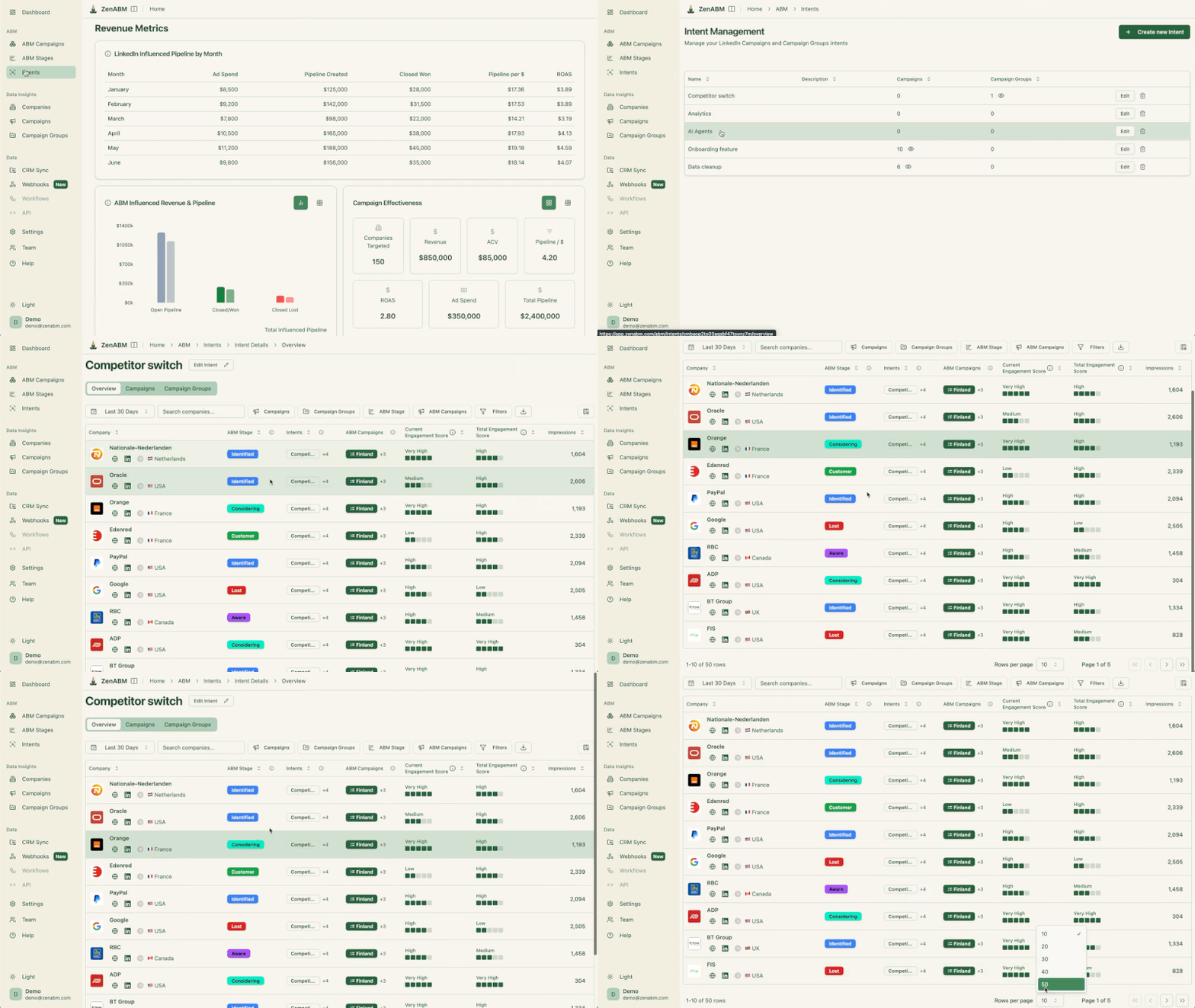
This is first-party intent from owned interactions.
You can push these topics into your CRM, so sales and marketing can tailor outreach to what each company has actually explored.

ZenABM provides its AI chatbot called Zena that answers analytics questions in natural language.
You can ask Zena open-ended questions like you would a smart analyst and get company-level answers about:
Under the hood, Zena combines OpenAI with a library of prompts and endpoints to join ad engagement, spend, and CRM deals so it can explain which campaigns drove pipeline, which accounts turned into opportunities, and where performance concentrates.
Instead of exporting spreadsheets and stitching pivot tables, you get plain language outputs that can be used in reviews, standups, or exec updates.

ZenABM’s custom webhooks let you push events into your stack, for example, Slack alerts, enrichment flows, or other ops automations.

Most tools treat each LinkedIn campaign separately. ZenABM lets you group several into one ABM campaign object so you can see performance across regions, personas, or creative clusters.
Instead of juggling fragmented reports in Campaign Manager, you see spend, pipeline, account movement, and ROAS for the entire initiative.
For agencies, ZenABM offers a multi-client workspace.
You can manage multiple ad accounts and clients in one environment, each with its own ABM strategy, dashboards, and reporting, instead of constantly switching accounts in Campaign Manager.

Plans start at $59/month for Starter, $159/month for Growth, $399/month for the Pro (AI) tier, and $479/month for the agency tier.
Even the highest tier costs under $6,000/year, far less than most enterprise attribution suites.
All plans cover essential LinkedIn ABM functions, with higher tiers mostly expanding limits or adding Salesforce integration.
Pricing is flexible (monthly or annual with two months free), and a 37-day free trial allows teams to try before buying.
LinkedIn ABM is not complicated, but it is precise. Most budget waste happens before the first optimization, through default settings, rushed decisions, and measuring the wrong signals.
If you follow the setup steps in this guide and give your campaigns enough data to mature, the real advantage comes after launch, when you can see which target accounts are actually engaging and act on those signals quickly.
That is where tools like ZenABM fit naturally, helping you move from aggregated ad metrics to account-level engagement, prioritization, and sales action without changing your LinkedIn setup.
Launch with control, measure what matters, and make sure engagement turns into pipeline.
Give ZenABM a try for free now or book a demo to know more!
Upload your company list 48 hours before launch. Create a campaign group with Budget Optimization off. Create ad sets for each format type (TLAs, single image, text ads) with Audience Expansion off, LAN off, and Manual Bidding enabled. Set ad rotation to “Rotate evenly.” Create your ads. Connect to ZenABM at campaign group level for company-level tracking. Check match rates and confirm LinkedIn pixel is firing before going live.
With your audience list and ad creative already prepared, the actual Campaign Manager setup takes 60-90 minutes for a standard three-ad-set structure. The bottlenecks are typically audience processing time (48 hours) and TLA approval time (24-48 hours). Plan for 4-5 days from “ready to start setup” to “campaign live.”
Start 30% below the recommended manual bid range for your target audience and objective. Monitor daily spend for 3-5 days. If spend consistently reaches 90-95%+ of daily budget, your bid is working. If spend is below 70% of daily budget, increase the bid by 10-15% and wait 2-3 days. Do not increase bids more than once every 2-3 days – give LinkedIn time to adjust delivery.
Website Conversions objective requires LinkedIn to optimize toward conversion events – which needs 30+ conversions per month to train the algorithm effectively. Most B2B ABM campaigns with long sales cycles do not generate that many conversions. Website Visits objective targets the most click-likely audience, which is a reliable proxy for the engagement you actually want. Website Conversions for B2B LinkedIn ABM is a more expensive version of Website Visits with less accurate optimization.
