



DemandSense is a LinkedIn-first platform that combines two things B2B teams usually juggle across multiple tools:
This article is a breakdown of DemandSense features, plus what you actually get on each plan, what public reviews say so far, and when a leaner LinkedIn-first tool like ZenABM is a better fit.
Let’s get started!


If you want the short version:
DemandSense positions itself as a LinkedIn-centric growth platform, but the product experience is easiest to understand as a set of modules.
Below are the core DemandSense features your team would actually use in a LinkedIn-first ABM motion.

One of the headline DemandSense features is its Website Visitor ID capability (often framed as “Reveal Intent” and “Web ID” style identification).
The goal is simple: turn anonymous traffic into identifiable companies (and in some cases, people-level contact data), then segment that traffic by intent so you can act before a form-fill ever happens.
On the activation side, those identified accounts can be turned into LinkedIn-ready audiences and routed into outreach or retargeting workflows.
One G2 reviewer specifically calls out the practical value of seeing companies behind visits before a conversion event happens:

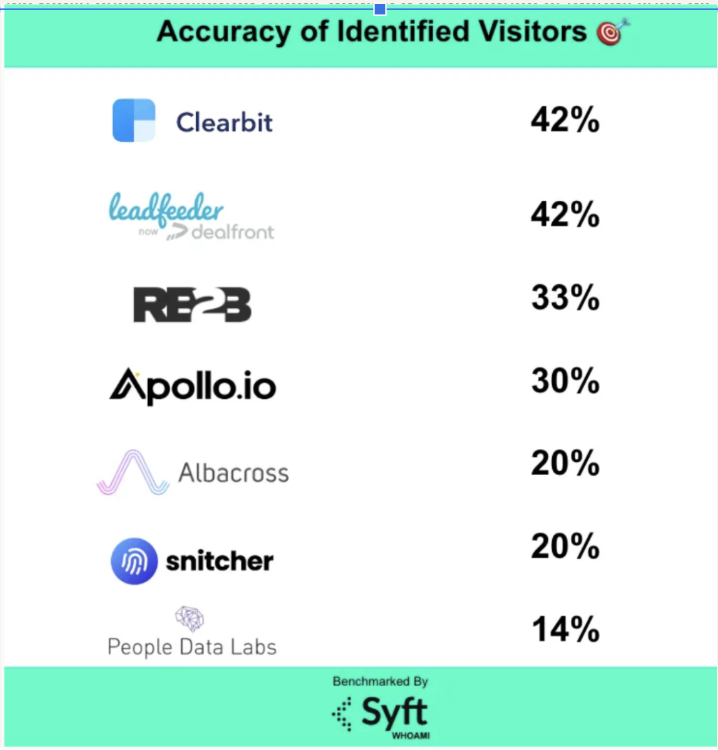
Note: Visitor identification is useful, but it is not a perfect measurement category. Identity resolution can be noisy (remote work, shared networks, privacy constraints, stale corp data). Benchmarking from independent sources suggests that “who is on my site” accuracy is often well under 100%, even for well-known tools, so validate match quality with your own traffic mix and ICP before building a downstream motion around it.
Once DemandSense is ingesting signals, the next feature layer is segmentation.
You can group accounts by intent and engagement level and create campaign audiences that reflect actual behavior (not just firmographics).
DemandSense supports building and refining audiences for LinkedIn retargeting, and also supports audience cleanup, like excluding poor-fit segments or removing wasteful targeting pockets.
The platform also supports control features such as limiting repeated exposure at the account level, which matters in ABM where fatigue and wasted impressions compound quickly.
DemandSense’s controls layer is built to sit “above” Campaign Manager, so you can manage common LinkedIn optimization tasks without doing everything manually.
In practice, the DemandSense features in this area revolve around timing, frequency, budget guardrails, and quick audience actions:


DemandSense is LinkedIn-first, but it also supports extending identified accounts and audiences into broader activation workflows.
In practical terms, this means using the same account lists or intent-based segments to retarget beyond LinkedIn, while maintaining one view of engagement and response.
If your ABM motion is already multi-channel, DemandSense is attempting to function as the “audience brain” that keeps targeting consistent across channels.

Another key DemandSense feature category is CRM and data connectivity.
The intent here is operational, not just reporting:

By the way, ZenABM also pushes account scores and engagement into CRM company records as company properties (starts @$59/month only!).


DemandSense provides time-sliced reporting that’s meant to support decisions like:

DemandSense publicly lists a low-friction entry price, but the real cost depends on how heavily you use identification and intent features.
At the time of writing, DemandSense presents pricing in two overlapping ways:
In other words, the “controls layer” is comparatively inexpensive, but the identity and intent layer is metered.
DemandSense’s listed monthly entry prices are low, but the moment you rely on visitor identification and contact discovery, your usable volume is constrained by credits or identified-visitor limits.
If you run meaningful traffic or want to operationalize “who is on our site” as a repeatable motion, those limits can become the main cost driver.
ZenABM is often the simpler alternative if your ABM motion is LinkedIn-first and you want first-party engagement signals, CRM-ready activation, and clear ad-to-pipeline reporting, starting at ~$59/month without a credit-based system.
Plus, you get all you need for LinkedIn ABM: account-level ad engagement tracking, account scoring, ABM stage tracking, assignment of hot accounts to BDRs, bi-directional CRM sync, custom webhooks, qualitative company buyer’s intent tracking, job-title-level ad engagement tracking, and plug-and-play ROI attribution dashboards.
In fact, ZenABM also provides you with unlimited website visitor identification for free. You just have to retarget website visitors with LinkedIn text ads, which are dirt-cheap, and ZenABM will list out the companies that were served impressions, essentially deanonymizing the website visitors.
Plus, you’ll also be creating awareness!

There still aren’t many public reviews for DemandSense.
On G2, DemandSense has a single public review and a 5-star rating at the time of writing:

The reviewer highlights ROI and practical utility, but also flags that the platform packs a lot into one interface, which can create a setup and learning curve if you do not allocate ownership.
One alternative to DemandSense is ZenABM.
It is specifically designed for LinkedIn ABM, so it can either be a complete, lean and affordable alternative to DemandSense for teams that mainly advertise on LinkedIn.
Even for teams running multi-channel ABM, ZenABM can be a complementary layer to DemandSense or whichever bigger ABM suite they are using because of ZenABM’s unique features.
Let’s look at those features:
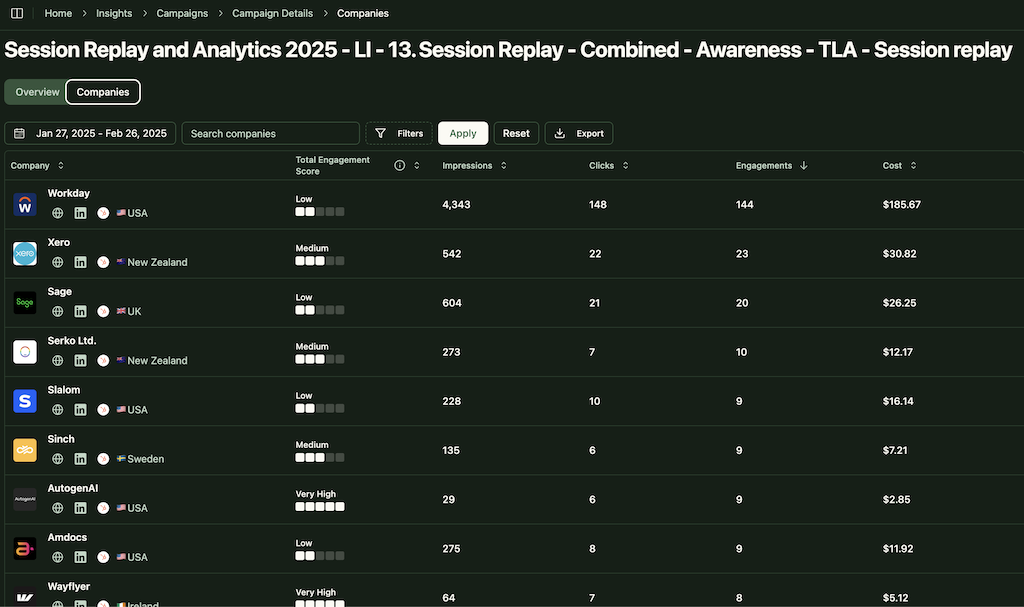
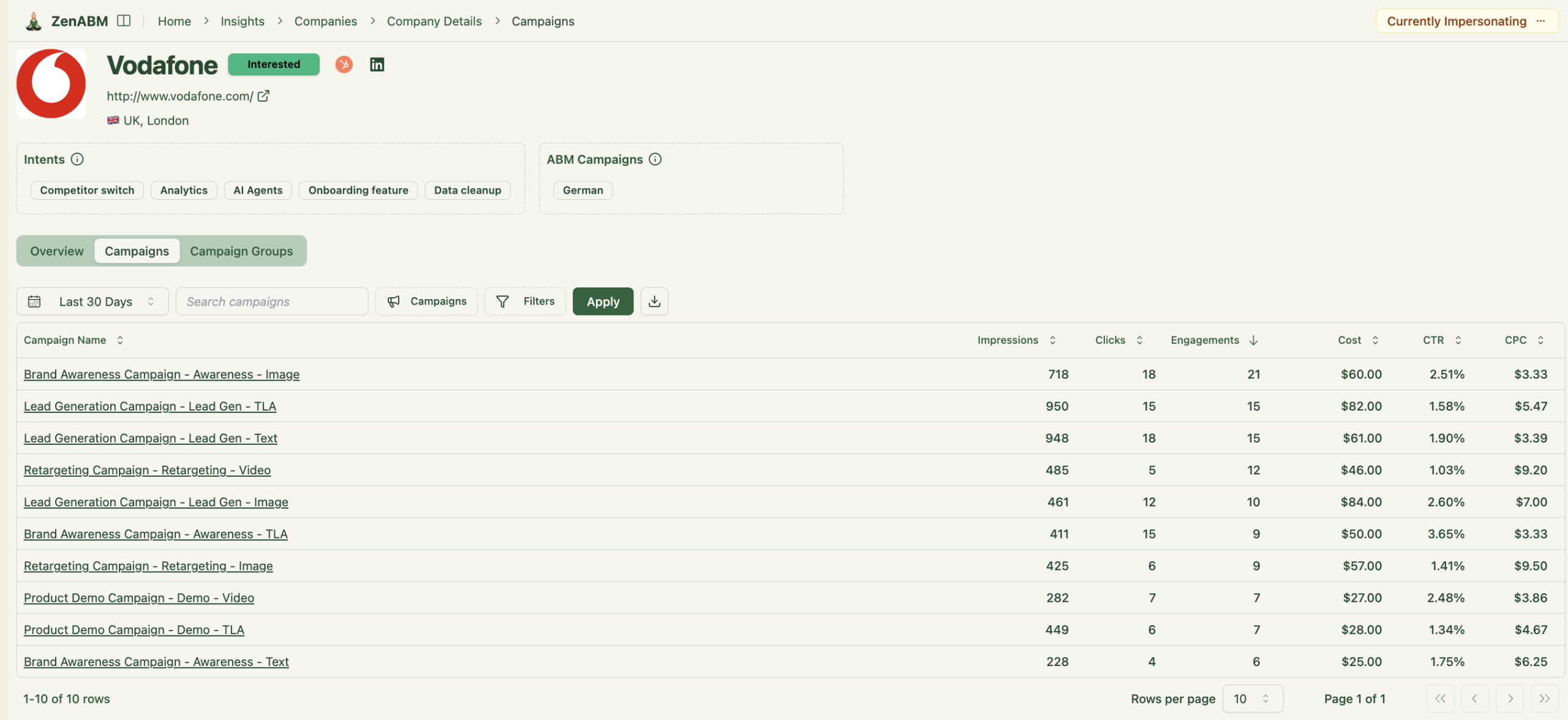
ZenABM connects to the official LinkedIn Ads API and captures account-level data for all campaigns so you can see which companies see, click, and engage with your ads.
Because this is first-party data from LinkedIn’s environment, it avoids the uncertainty that comes with probabilistic site deanonymization approaches.
A benchmarking study by Syft shows that de-anonymization coverage and precision can be mixed across providers, often below 50 percent depending on the dataset and vendor.
ZenABM treats LinkedIn ad engagement itself as first-party intent. When several people in one company keep engaging with your ads, that is a strong buying signal without rented intent feeds.
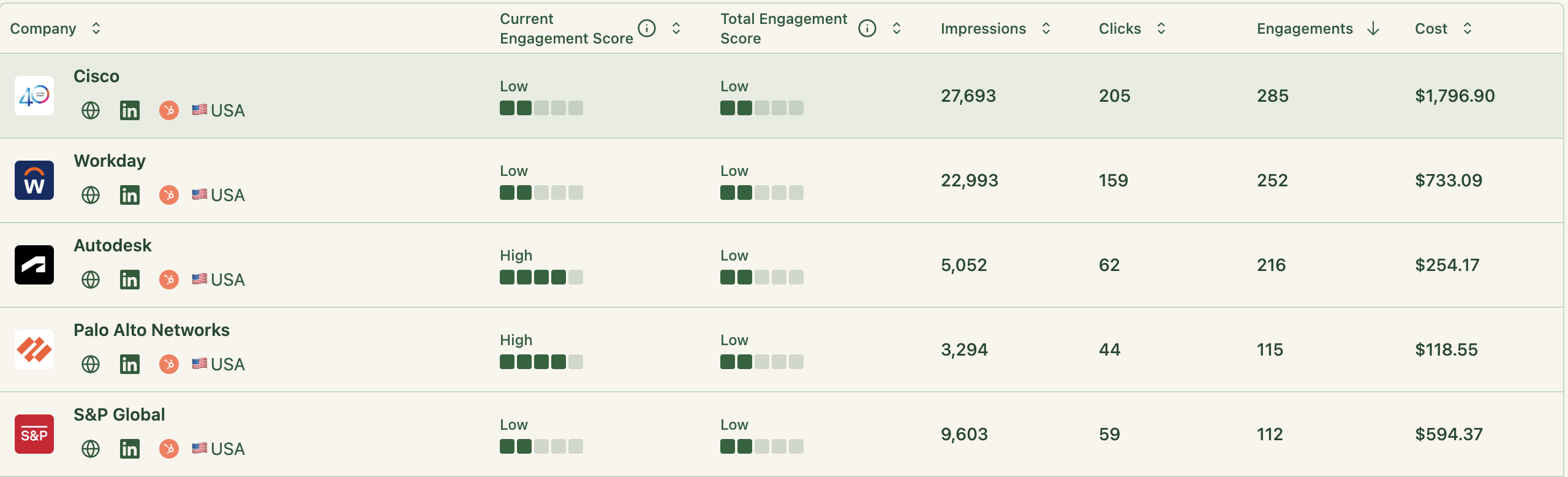
ZenABM updates engagement scores as accounts interact with your ads across campaigns, so you can see who is heating up over short or long windows and let marketing and sales prioritize accounts that show meaningful intent.
ZenABM also shows the full touchpoint timeline for each company:
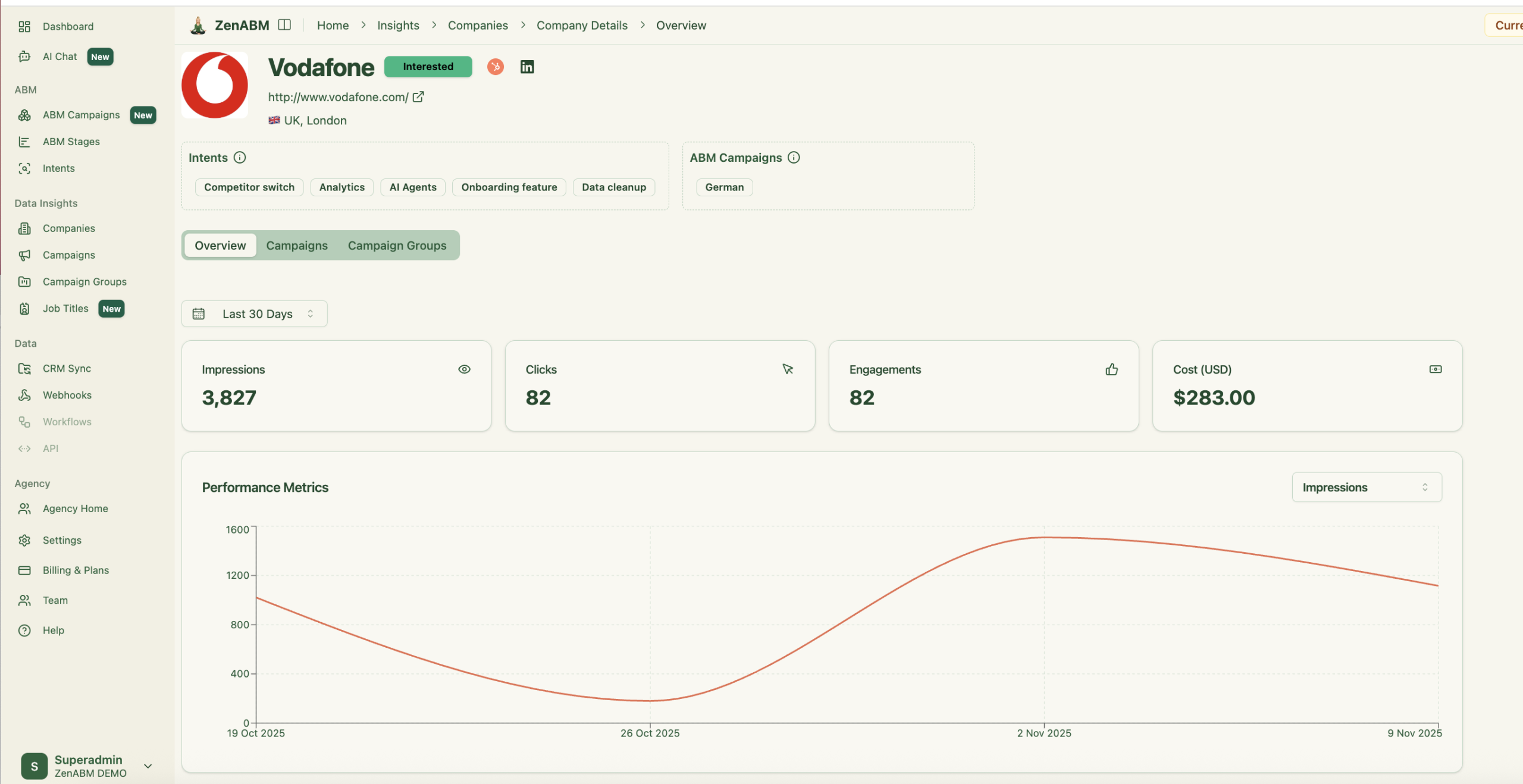
ZenABM lets you define stages such as Identified, Aware, Engaged, Interested, and Opportunity and automatically places accounts in the right stage using scores and CRM data.
You control thresholds, and ZenABM tracks movement over time.

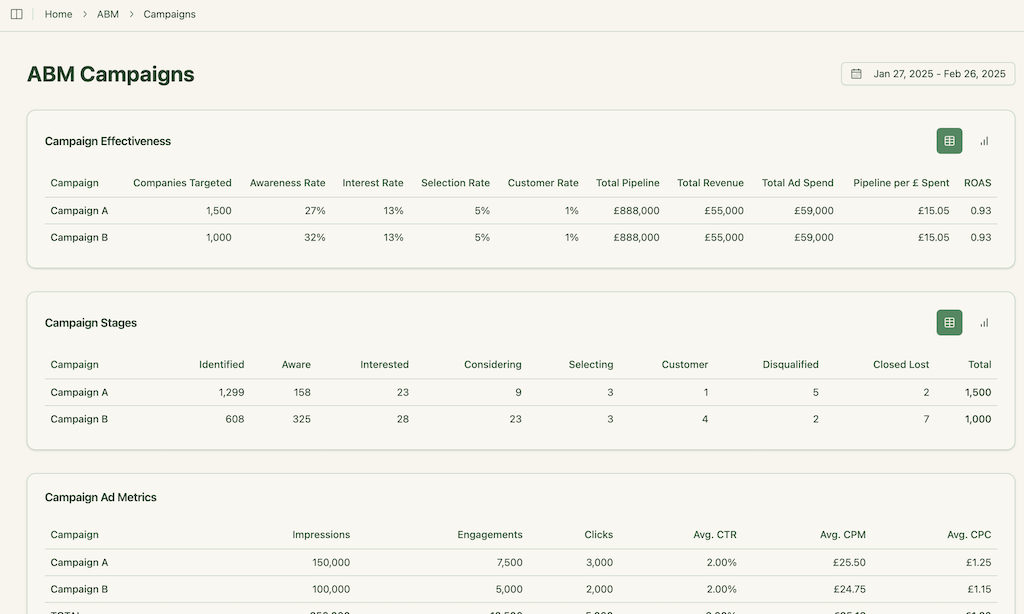
This gives you funnel visibility similar to larger suites, but powered by LinkedIn data.
ZenABM integrates bi-directionally with CRMs like HubSpot and adds Salesforce sync on higher tiers.
LinkedIn engagement data flows into the CRM as company-level properties:
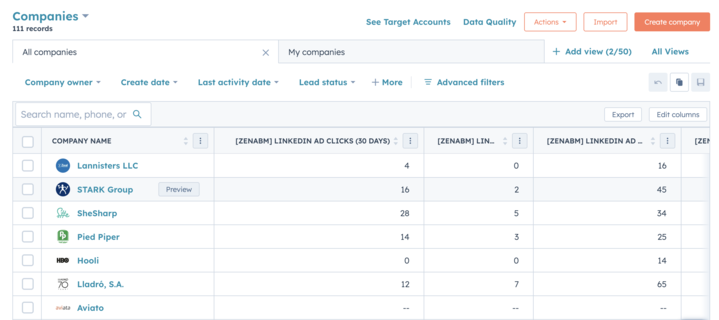
Once an account crosses your score threshold, ZenABM updates the stage to Interested and automatically assigns a BDR.
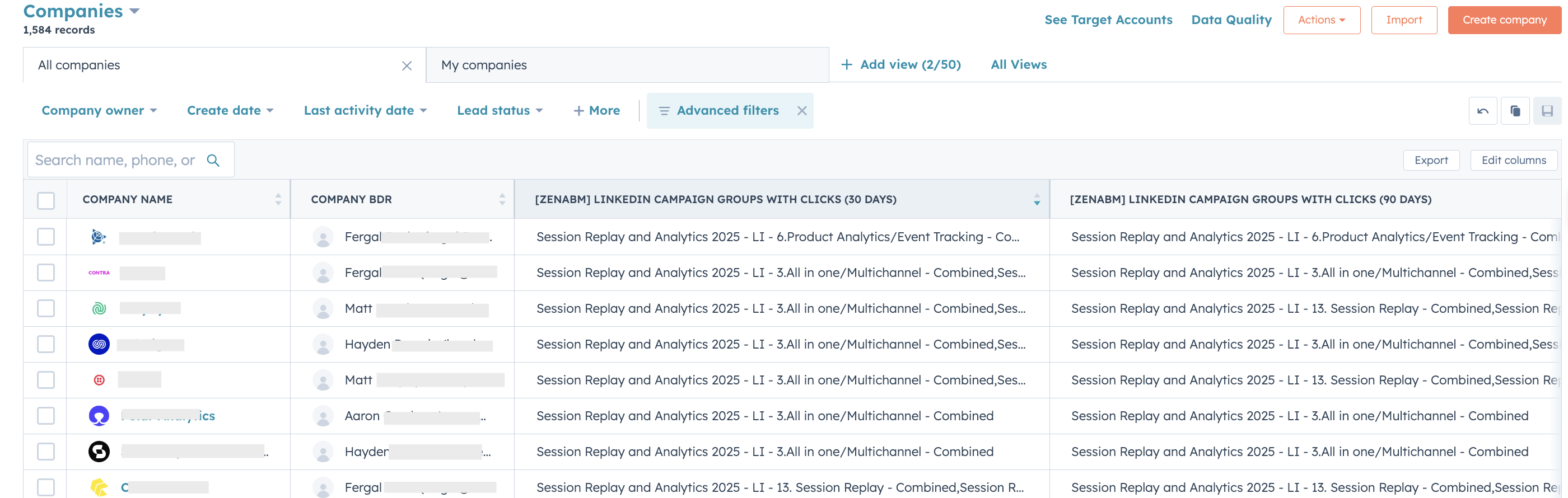
ZenABM lets you derive intent topics from LinkedIn campaigns by tagging campaigns by feature, use case, or offer.
ZenABM then shows which accounts engage with which themes.
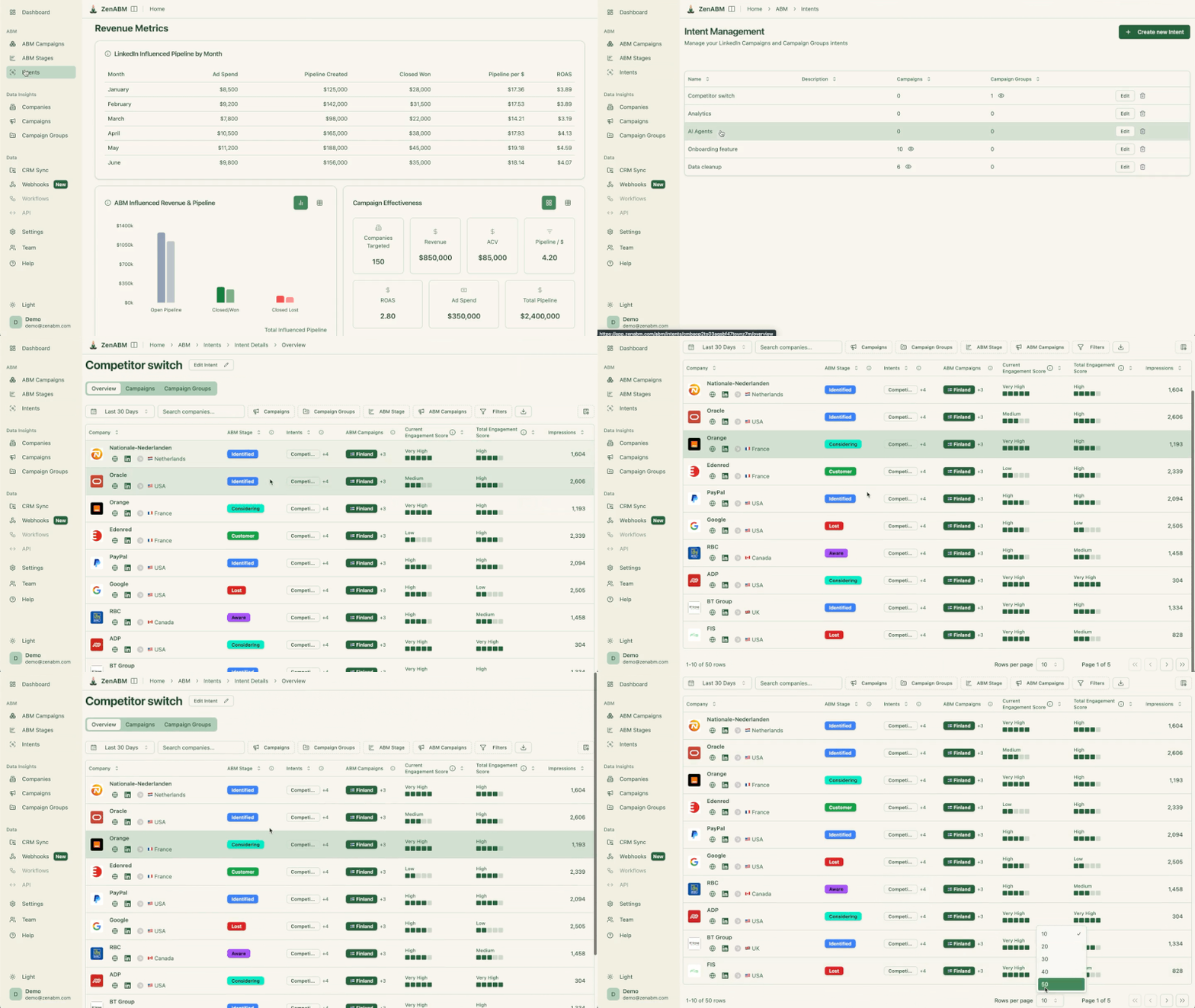
This is first-party intent from owned interactions.
You can push these topics into your CRM, so sales and marketing can tailor outreach to what each company has actually explored.
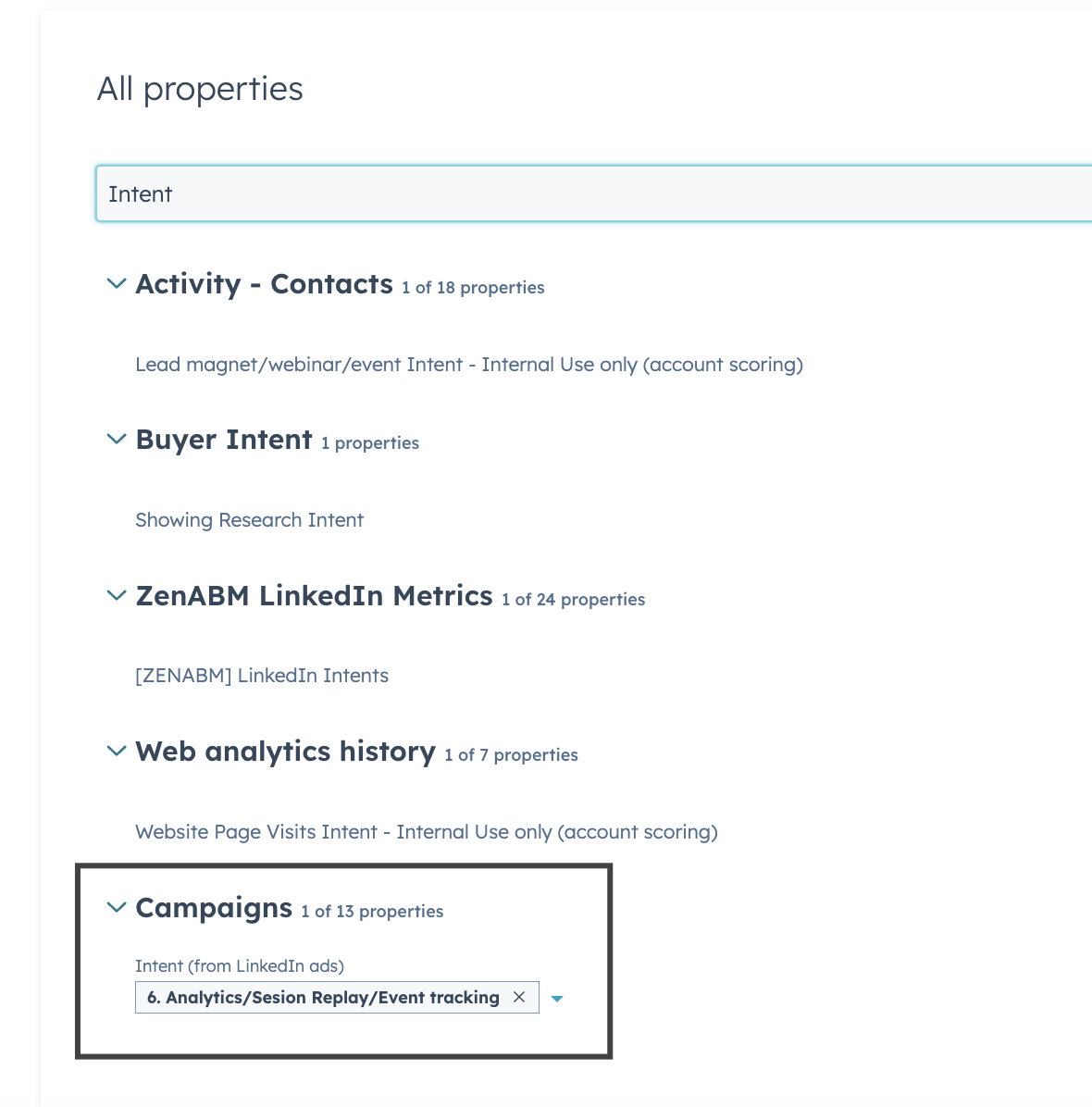
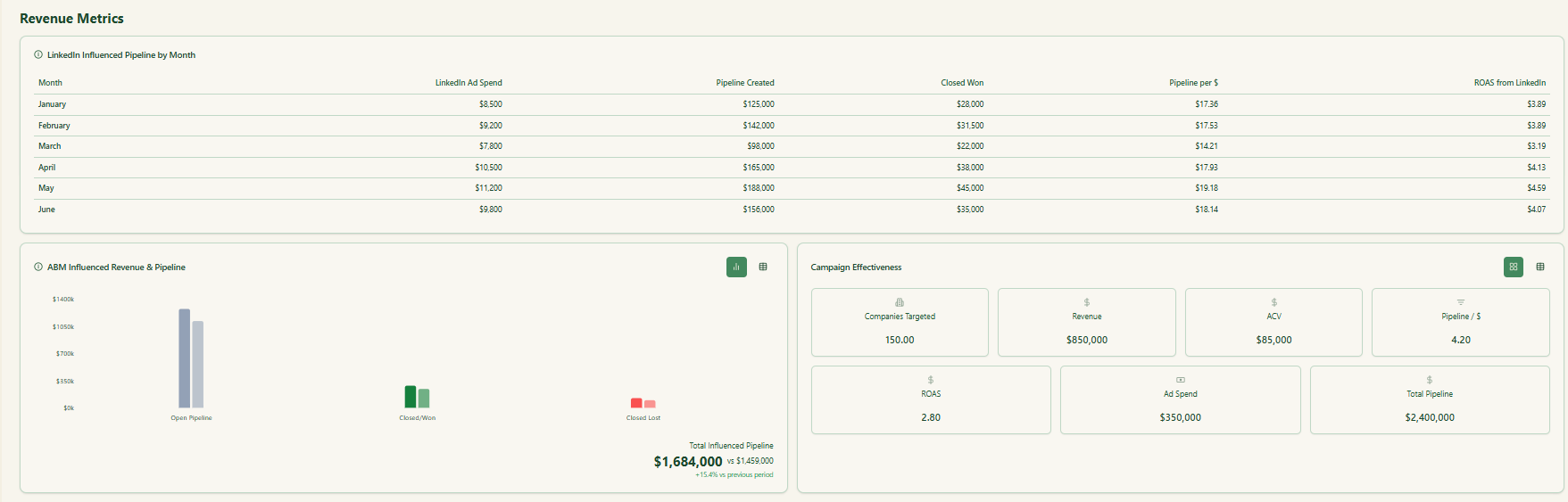
ZenABM ships with dashboards that connect LinkedIn ads to account engagement, stage movement, and revenue.
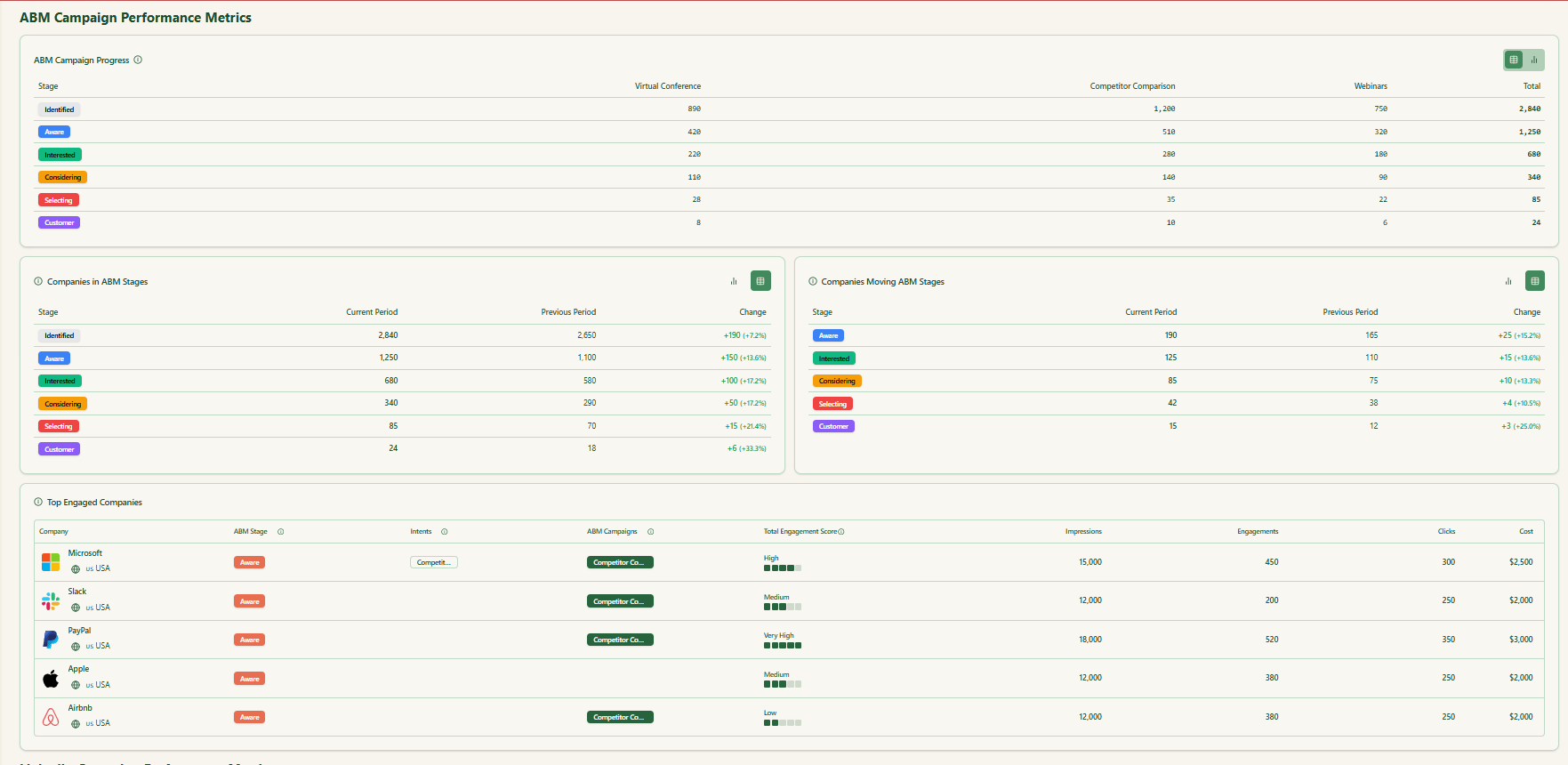
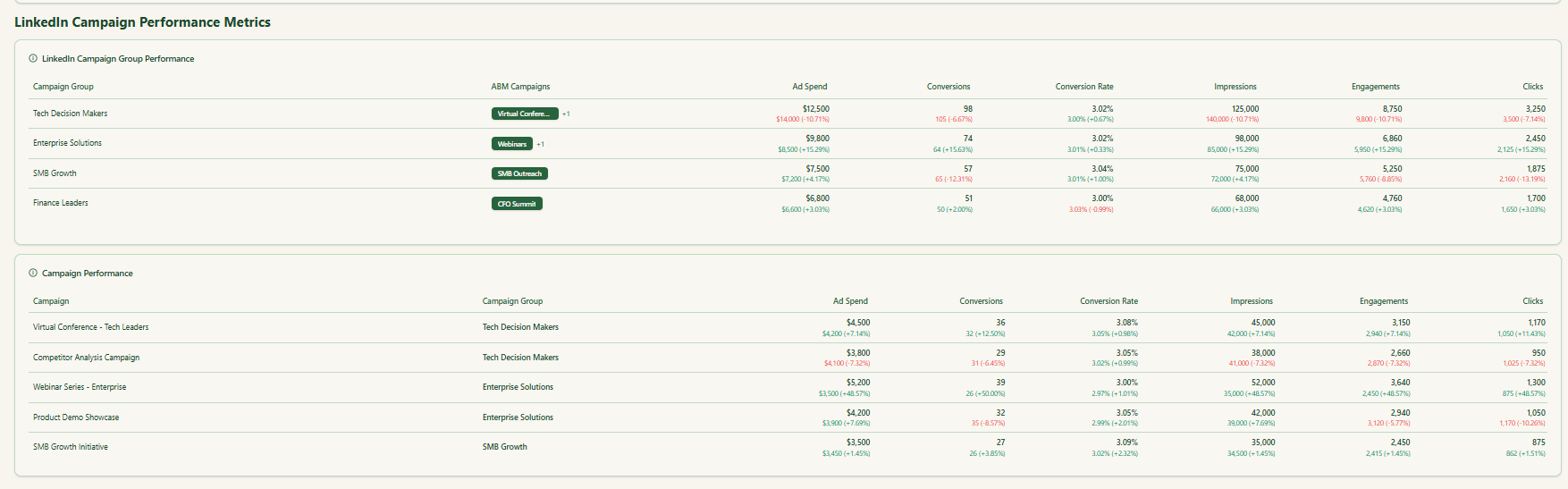
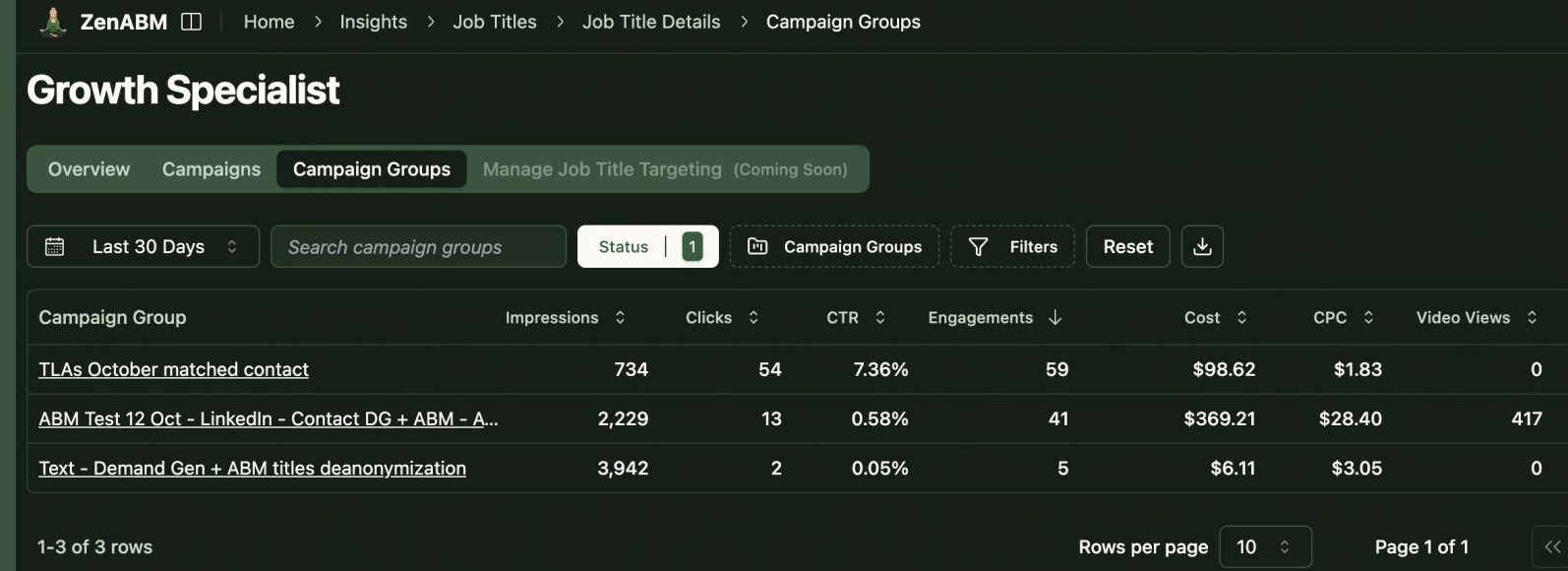
ZenABM shows which job titles engage with your creatives and gives dwell time and video funnel analytics.
ZenABM provides its AI chatbot called Zena that answers analytics questions in natural language.
You can ask Zena open-ended questions like you would a smart analyst and get company-level answers about:
Under the hood, Zena combines OpenAI with a library of prompts and endpoints to join ad engagement, spend, and CRM deals so it can explain which campaigns drove pipeline, which accounts turned into opportunities, and where performance concentrates.
Instead of exporting spreadsheets and stitching pivot tables, you get plain language outputs that can be used in reviews, standups, or exec updates.
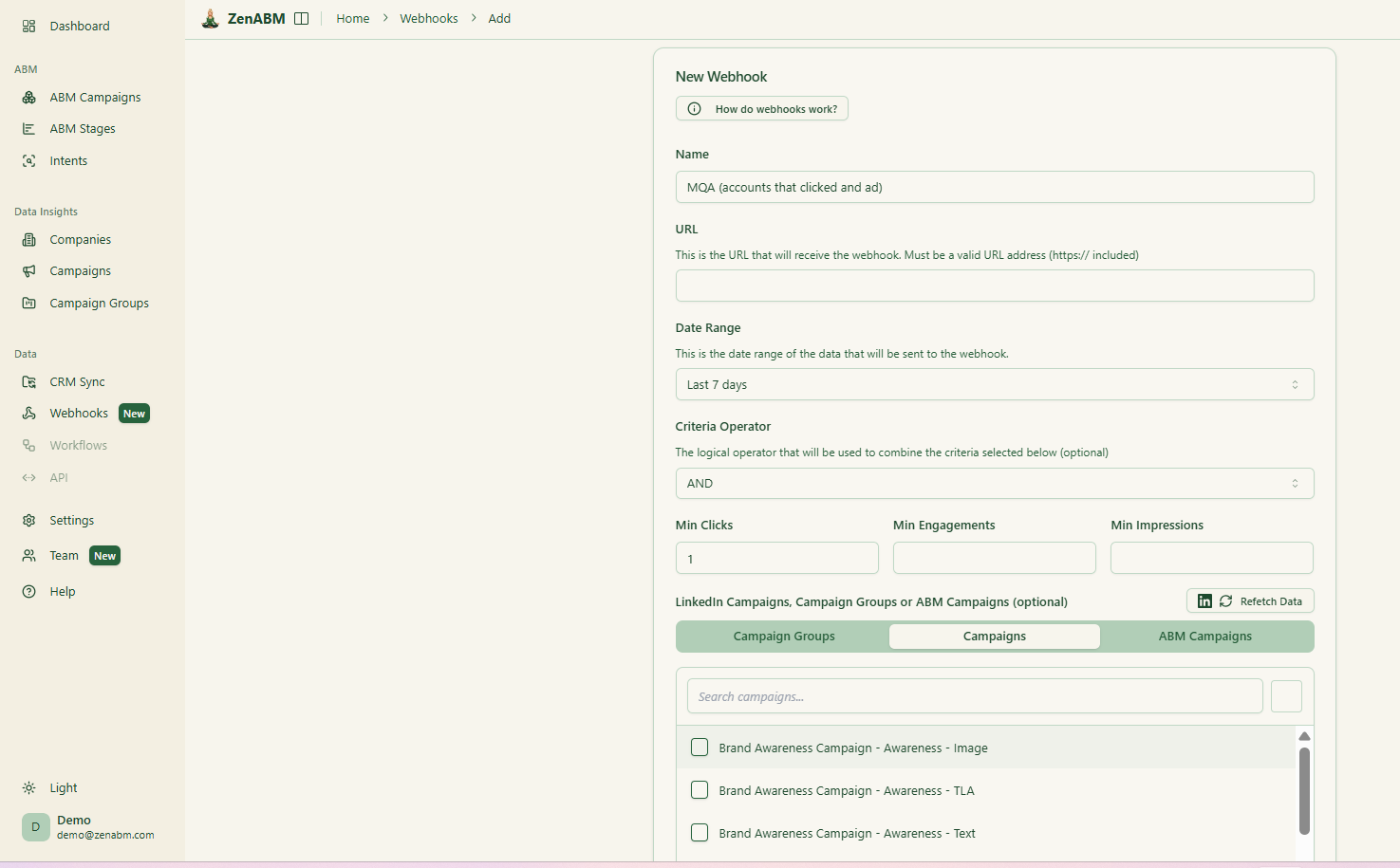
ZenABM’s custom webhooks let you push events into your stack, for example, Slack alerts, enrichment flows, or other ops automations.

Most tools treat each LinkedIn campaign separately. ZenABM lets you group several into one ABM campaign object so you can see performance across regions, personas, or creative clusters.
Instead of juggling fragmented reports in Campaign Manager, you see spend, pipeline, account movement, and ROAS for the entire initiative.
For agencies, ZenABM offers a multi-client workspace.
You can manage multiple ad accounts and clients in one environment, each with its own ABM strategy, dashboards, and reporting, instead of constantly switching accounts in Campaign Manager.
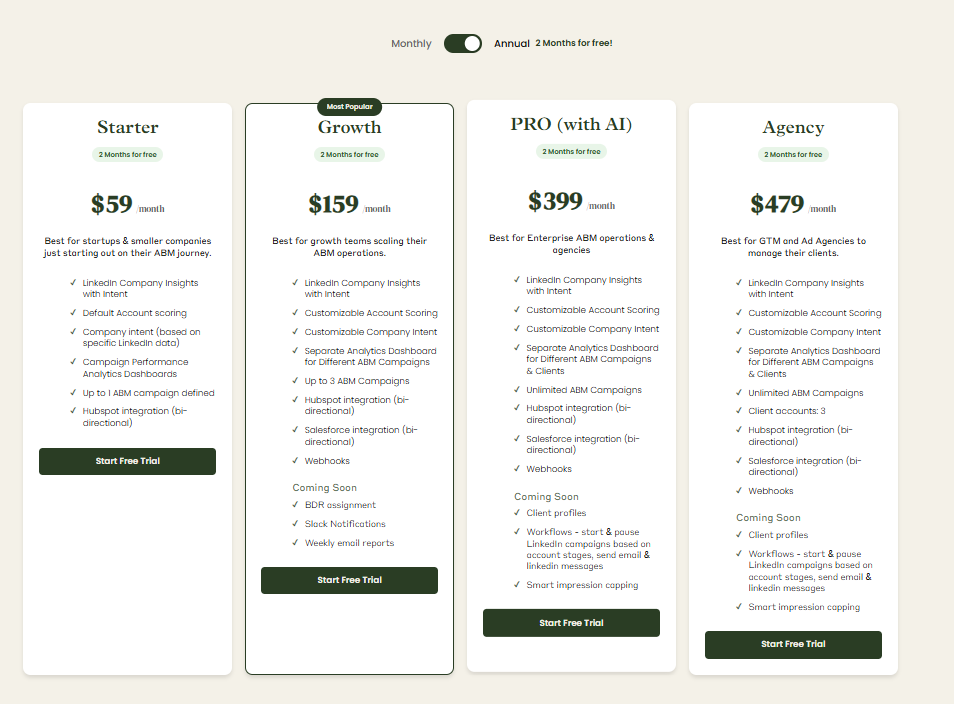
Plans start at $59/month for Starter, $159/month for Growth, $399/month for the Pro (AI) tier, and $479/month for the agency tier.
Even the highest tier costs under $6,000/year, far less than most enterprise attribution suites.
All plans cover essential LinkedIn ABM functions, with higher tiers mostly expanding limits or adding Salesforce integration.
Pricing is flexible (monthly or annual with two months free), and a 37-day free trial allows teams to try before buying.
DemandSense feature thesis is clear: provide a LinkedIn-first controls layer (timing, frequency, audience tuning, reporting) and pair it with visitor identification and intent so you can build and activate audiences faster.
It can be useful if you want optimization controls plus an identification workflow, and you have enough volume and ownership to justify credit-based or tiered usage.
If your priority is first-party LinkedIn engagement insight, CRM activation, and clean ad-to-pipeline visibility without metered identification, ZenABM is often the more straightforward fit.
Whether you’re evaluating DemandSense or comparing stacks, the best next step is still the same: run a trial against your real campaigns, validate match quality, and measure whether the workflows actually reduce waste and improve pipeline outcomes.
