

©2026 ZenABM - All Rights Reserved.

Before building a LinkedIn-first ABM engine, I tested more than a dozen ABM and LinkedIn ABM tools across analytics, attribution, intent, CRM sync, and campaign orchestration.
The biggest lesson was simple: most generic ABM platforms are either too broad, too expensive, or too focused on lead generation to support a true account-based marketing program on LinkedIn. For LinkedIn-first ABM, you need to know which target accounts saw, clicked, or engaged with your ads, which campaigns shaped their intent, and how that activity connects to the pipeline in your CRM.
This guide compares the best tools for LinkedIn ABM strategy in 2026, with a practical lens on the features that actually matter:
Short on time?
Here’s a quick tabulated comparison:
Tool | Two-Way CRM Integration | First-Party LinkedIn API Data | Pricing | Summary | |
|---|---|---|---|---|---|
✅ | ✅ Native, bi-directional | ✅ Via LinkedIn API | $59-$479/mo | Best fit for LinkedIn-centric multichannel ABM. Tracks company-level LinkedIn ad engagement by campaign and ad set, captures qualitative intent, scores accounts, syncs to HubSpot or Salesforce, supports webhooks, provides multichannel and multitouchpoint buyer journeys, and ties engagement to pipeline and revenue. | |
✅ | ⚠️ Strong CRM matching, but native property write-back is not the same as ZenABM-style CRM push | ✅ Via LinkedIn API | Free + custom / paid tiers | Strong for LinkedIn and Google ad optimization, AdPilot, account-level analytics, and audience control. Better for paid media optimization than full LinkedIn-first ABM operations. | |
✅ | ✅ Multi-CRM, bi-directional | ✅ Via LinkedIn API | Custom | Enterprise ABM suite with deep controls, intent, buying groups, advertising, and revenue reporting. Powerful, but priced and implemented like an enterprise platform. | |
⚠️ Mainly for Matched Audiences | ✅ Bi-directional | ⚠️ Limited to matched audience context | Custom | Good Salesforce fit and ABM advertising workflow, but less compelling if the main use case is granular LinkedIn impression analytics across all target accounts. | |
✅ | ⚠️ Strong pull-side attribution, extra work for push-side CRM workflows | ✅ Via LinkedIn API | Custom | Strong revenue analytics, journey reconstruction, and attribution depth. Best when you need broader GTM analytics, not just LinkedIn ABM activation. | |
❌ Cookie-dependent | ❌ Custom setup needed | ❌ | Custom | Omnichannel attribution engine, but weak for LinkedIn account-level impression analytics. Verify product availability before shortlisting, as current migration coverage reports a 2026 shutdown date. | |
❌ | ✅ | ❌ For account-level LinkedIn impression reporting | Custom | Excellent for predictive scoring, segmentation, display ads, and buyer-stage orchestration. Less useful when the job is proving LinkedIn view-through influence by account. | |
❌ | ✅ Internal CRM-native reporting | ⚠️ Click and lead-form oriented | Professional/Enterprise tiers | Great for CRM-native click and contact attribution. Not designed for impression-led LinkedIn ABM pipeline reporting. | |
❌ Tracks social/community engagement, not ad impressions | ✅ | ❌ Different LinkedIn signal model | From $1,700/mo starter | Strong for community, social, product, and buyer-intelligence signals. Not a substitute for LinkedIn ad impression and campaign-level ABM attribution. | |
❌ | ❌ Manual account grouping | ⚠️ Connector data, not ABM-native account analytics | Free to $598/mo monthly, custom enterprise | Excellent data connector and attribution modeling layer. Not a LinkedIn-first ABM strategy tool. |
As I’ve already mentioned – before you start shopping for a LinkedIn ABM tool, go to demos and trials with this checklist of must-have features and questions (I didn’t have one, and wasted a ton of time 🫠):
Now, let’s see the top contenders and how they stack up:

ZenABM is an account-based marketing software built for an ABM strategy that is multichannel with a strong focus on LinkedIn. You get company, native two-way CRM integration, plug-and-play ABM dashboards, and intent-based account scoring. With ZenABM’s webhooks, you can also very easily send your data anywhere (e.g. Clay, Apollo) for prospecting and execute personalized outreach campaigns for your key accounts, ensuring highly targeted and effective outreach based on LinkedIn ad signals:

ZenABM lets you see exactly which target accounts (companies) engaged with which of your LinkedIn ads and how those engagements translate into pipeline and revenue, by combining data from LinkedIn Ads API with your CRM data.
ZenABM also provides plug-and-play account scoring, intent signals, multichannel revenue attribution dashboards, company journey mapping, as well as an AI chatbot for chatting with your LinkedIn ads data directly.

It has a comprehensive ABM analytics dashboard, helping growth & demand gen teams quickly identify interested accounts and measure results without building custom dashboards or exporting spreadsheets and uploading them to ChatGPT.
Yes, ZenABM has been designed specifically with LinkedIn-focused multichannel ABM campaigns in mind – not just LinkedIn ads – and it shows.
ZenABM queries the LinkedIn API to give you data on each account that:


ZenABM maps LinkedIn engagement to open opportunities and closed-won inside your CRM. You also see per-deal values tied to specific ABM campaigns, which in turn – are tied to specific ad impressions.
So you can finally report:
No Excel gymnastics or custom CRM builds. ZenABM ships dashboards that compute ROAS, lift, pipeline per dollar, and more.
The ZenABM dashboards are split between the overall analytics dashboard from all ABM campaigns with key metrics like pipeline per $ spent and ROAs, and each ABM campaign dashboard:

These built-in dashboards make it easy to track ABM marketing campaigns and sales efforts (so your ABM strategy targets & nurtures only the accounts that are likely to convert).
Want to see it in action? Book a demo here.
ZenABM writes LinkedIn engagement into HubSpot as properties like “LinkedIn Ad Engagements – 7 days” and “LinkedIn Ad Clicks – 7 days.”
ZenABM offers a native, no-code, and bi-directional sync with your CRM (Hubspot/Salesforce) and creates the companies and company properties for ad engagements there automatically – so you don’t need to worry about the revops and can focus on building your ABM strategy.


LinkedIn ad data pushed to company lists in the HubSpot CRM using ZenABM
It also pulls properties from your CRM, so you can build out robust account scoring and ABM stages:

…that get pushed back to your CRM for e.g. alerting BDR which accounts are “interested” and building workflows to automate outreach.

By pushing engagement data into HubSpot, you can also easily identify upsell and retention opportunities with existing clients and existing customers, helping to drive growth and maximize revenue from your current accounts.
Automated account scoring and 1st party intent data.
ZenABM’s intent data:
ZenABM captures company intent signals from company-level ad engagements:

ZenABM’s intent signals work by tagging companies with intents based on their LinkedIn ad engagements.
ZenABM allows you to “define” which of your campaigns indicate which intents. Then, ZenABM monitors which specific LinkedIn campaigns, creatives, and themes each target account engages with and labels these accounts with the pre-defined “intent tags” (it will also be done automatically with AI soon!)

Instead of relying on third-party intent or vague keyword surges, like most ABM tools do, ZenABM uses first-party LinkedIn ad engagement – impressions, clicks, and interactions – to understand what each company is actively interested in right now.
The intents are fully customizable and take 1 minute to set up:

You can easily tag certain campaigns or severals campaign with an intent theme (e.g., “Analytics,” “Adoption,” “Security,” “AI Features”), and ZenABM automatically assigns those intents to companies when they engage with the corresponding ads:

This means if an account repeatedly clicks on analytics-focused ads, ZenABM labels them with an “Analytics intent”, and moves them to the appropriate ABM stage.
These intent signals are then pushed into your CRM as company properties, so BDRs can instantly tailor outreach (“I saw your team is exploring analytics challenges…”) and marketers can move accounts into more relevant retargeting or nurture campaigns – all based on which ad campaigns the target account is actually engaging with.
ZenABM calculates a rolling “Current Engagement Score” using impressions, clicks, and freshness.
Automated scoring helps identify potential customers by surfacing the most promising accounts and providing actionable data for personalized outreach.

ZenABM focuses exclusively on LinkedIn ABM, so it doesn’t support any display advertising (which is ok for LinkedIn ABM, aye?), or list building. It also doesn’t have organic engagement tracking nor contact level engagements (but these are either against LinkedIn terms and conditions, or plain guesswork).

ZenABM uses transparent monthly pricing instead of custom enterprise quoting. Current public plans include Starter at $59/month, Growth at $159/month, Pro at $399/month, and Agency at $479/month, with annual billing offering two months free. Every plan includes a 37-day free trial. See the pricing page for the latest plan details.
Bottom line: A focused LinkedIn-first multichannel ABM strategy tool that is lean, accurate, and affordable.

Factors.ai dashboard showing company-level impressions for specific LinkedIn ad campaigns along with a historic engagement score and more.
Factors.ai helps identify and target companies by leveraging predictive analytics tools, enabling marketers to focus on high-value accounts based on intent signals and engagement data.
Supports LinkedIn, Google, and Facebook. Adds automation, intent capture, deanonymization, scoring, and multi-touch reporting.
For core data and pipeline mapping, mostly yes. CRM write-back is the main gap.
Pulls impressions, clicks, and spend via the LinkedIn API at the campaign-group and campaign level, so you can tie exposure to pipeline movement.
Factors.ai also tracks website visitors and provides real time data, enabling you to optimize campaigns by identifying and engaging high-value accounts as they interact with your site.

Factors.ai helps you see the impact of your LinkedIn ad campaigns on your pipeline and deals.
Tracking campaign performance and customer satisfaction is essential for optimizing ABM outcomes, as it enables you to measure marketing effectiveness and ensure target account happiness and retention.
HubSpot and Salesforce integrations bring opportunity and revenue views.
Note: No native company-property write-back. You can create workflows to approximate it.

LinkedIn AdPilot by Factors.ai helps ABM experts control audiences and impression caps natively inside Factors.ai
AdPilot also enables programmatic ad campaigns, allowing marketers to reach target audiences more effectively with personalized and scalable account-based marketing strategies.

Optimising LinkedIn ad campaign audiences in Factors.ai using its LinkedIn CAPI integration
The audience builder in Factors.ai enables marketers to create highly targeted LinkedIn ad campaign audiences by leveraging CAPI signals for improved precision.
You can segment and filter your audience by job titles and job title, allowing for more effective outreach to key decision-makers and personalized campaign engagement.

Capping LinkedIn ad impressions so you avoid overspending your budget on the same companies.
Bottom line: Strong impression controls and account-level analytics. Pipeline write-back to CRM requires some DIY.

Factors.ai Pricing
Free offers basic visitor intel for up to 200 identified companies. Basic at 399 dollars adds LinkedIn intent and core CRM links. Growth at 999 dollars adds ABM analytics, G2, and workflows. Enterprise is custom.

Demandbase Advertisement Campaign Results Dashboard
Full-stack ABM with lists, delivery, analytics, and revenue reporting across channels. Demandbase is the brand, and Demandbase One is the platform. Demandbase One helps B2B marketers target key accounts using advanced account based marketing tools, making it easier to implement personalized strategies for high-value prospects.
Yes, across the board.
Certified LinkedIn partner with official API access. Account-level reporting is standard.
Bi-directional sync with HubSpot, Salesforce, Dynamics 365, Marketo, Pardot, and Eloqua. Two-way CRM integration is essential for aligning sales and marketing teams, ensuring both have access to real-time ABM insights and can coordinate efforts for greater pipeline impact. Measure pipeline and revenue, and write engagement into the CRM. A Capterra note. Sales teams often live in Salesforce, so plan change management.
Demandbase also includes several enterprise controls that matter when LinkedIn is only one part of a broader ABM motion. The value here is less about simple reporting and more about spend control, audience governance, intent-led prioritization, and campaign orchestration across a large GTM team.

Frequency capping at the account level

Upload your keyword set and prioritise accounts that show that intent on the open web
Bid optimization leverages predictive analytics tools to identify and prioritize high-value accounts, ensuring your campaigns focus on those most likely to convert based on intent signals.
Prioritise spend toward in-market accounts using intent data.
Price and complexity. You will need time to land value.
Bottom line: Excellent if you run multi-channel ABM with a budget and want deep control.
Not public. Book a demo.

Terminus Account Hub
Ad-first engagement platform. Its LinkedIn Marketing Solutions integration updates delivery and analytics quickly. Terminus also enables programmatic ad campaigns to reach targeted accounts, allowing marketers to deliver personalized advertising at scale and engage high-value clients more effectively.
Partly.
Terminus company impression views are limited to Matched Audiences or CRM lists
Strong for uploaded or CRM Matched Audiences, but it won’t cover every account outside those lists.

CRM integration and account stage management
Salesforce-centric funnel views and executive dashboards.

Terminus Executive Dashboard showing pipeline generated, accounts engaged, and deals won via ABM
Additional features of Terminus
In addition to its core ABM capabilities, Terminus offers a range of features designed to enhance campaign performance and streamline workflows.
These additional features also support collaboration between marketing teams and sales teams, enabling unified strategies, improved targeting, and better engagement with high-value accounts.

Multi-channel Advertising Performance Report
Multi-touch attribution is essential for understanding how different touchpoints contribute to your ABM success. By leveraging multi-touch attribution, you can engage target accounts across multiple channels, ensuring a comprehensive approach that maximizes reach and ROI.

Bottom line: Good LinkedIn analytics within curated lists. Not the cheapest if you are LinkedIn only.
Now part of DemandScience. Contact sales.

HockeyStack Dashboard Templates
B2B analytics platform that blends LinkedIn Ads, site analytics, and CRM touchpoints into account and person-level paths. HockeyStack also helps track website visitors, providing actionable data to identify, segment, and engage high-value accounts for more effective ABM strategies.
Almost.

Company-level LinkedIn ad impression tracking for attribution in HockeyStack

Impact of LinkedIn ads on deals and revenue in HockeyStack
Note: One-way CRM sync. You’ll need workflows to push back into CRM properties.
Multi-channel, multi-touch attribution across 17 sources


Person-level touchpoint mapping
Be cautious. Cookies and reverse IP affect identity fidelity. That’s fine as supporting evidence.

LinkedIn influenced funnel views
Attribution models are essential for understanding how different touchpoints contribute to conversions. By tracking and analyzing these interactions, marketers can identify which channels and campaigns drive the most value.
Attribution models also help map the buyer’s journey, allowing ABM teams to align content and targeting strategies with each stage—from awareness to decision-making—for optimized engagement and conversions.

“Golden Paths” highlight LinkedIn’s comparative lift
One-way CRM sync, identity reliance on cookies and IP, and some UI depth gaps (see G2).
Bottom line: Strong cross-channel analytics with account-level LinkedIn impressions. Expect a learning curve and extra CRM work.
Sales led – currently no public pricing available. See the pricing page.

LeadsRX Dashboard
Universal pixel plus offline ingestion for multi-touch attribution. LeadsRx enables B2B marketers to track marketing campaigns and sales efforts across channels, providing valuable insights for optimizing Account Based Marketing (ABM) strategies.
Partially. No LinkedIn API and cookie-centric. Company views depend on your CRM joins and forms. Lead Gen Forms need webhooks.

Multichannel conversion attribution
Excellent for mixed media such as radio, events, and podcasts alongside digital. Clean journey maps and ROAS views. Tracking campaign performance and customer satisfaction is essential for optimizing ABM outcomes, as it enables marketers to measure effectiveness, improve ROI, and ensure target account retention.

User journey mapping
ROAS dashboard
Bottom line: Great omnichannel lens. Weak for a view-through LinkedIn-first ABM strategy.
LeadsRx pricing is sales-led and not publicly listed. Before shortlisting it for a 2026 stack, verify product availability and roadmap directly with the vendor, because current migration coverage reports that LeadsRx is scheduled to shut down on October 30, 2026.

6Sense Account-Level Dashboard
Known for account ID, intent, and predictive scoring, with a tighter LinkedIn connection since 2023. 6Sense helps identify and target companies by leveraging predictive analytics tools, enabling marketers to focus on high-value accounts and personalize outreach based on intent signals.
No. LinkedIn remains aggregate and impression by account is not exposed. Click or visit is needed for attribution, which undercounts the view-through influence on the pipeline.
6sense is strongest when you need predictive account prioritization, intent-driven segmentation, and display advertising orchestration. It is not the best fit for LinkedIn impression-level proof, but it can still help larger teams decide which accounts deserve more spend and sales attention.

Segment builder options
Segmenting your audience is crucial for successful account-based marketing (ABM) campaigns. Advanced segment builders allow you to filter accounts based on firmographics, technographics, engagement data, and intent signals.
Additionally, segmenting by job titles and job title enables more effective targeting in ABM by ensuring your campaigns reach the right decision-makers and personalize outreach for higher engagement.
6sense can use intent topics and account segments to help prioritize where ads show and which accounts should receive more focused messaging. This is useful when your goal is market prioritization: finding accounts that appear to be researching a category, theme, or problem area.
However, contextual targeting is not the same as LinkedIn account-level impression analytics. It can help decide who to target, but it does not solve the reporting question this article is centered on: which named accounts saw which LinkedIn campaigns, how often, and whether that exposure influenced pipeline.

Persona coverage map
Bottom line: Great for display and targeting. Not built for impression-led LinkedIn-first ABM strategy.
Not public. Contact sales.

HubSpot Marketing Attribution Dashboard
Native ads tool and attribution module. Pulls clicks and lead form data from LinkedIn into reports. HubSpot also helps track marketing qualified leads (MQLs) within ABM strategies, making it easier to align marketing and sales teams around high-value accounts and ensure efficient lead conversion.
For click-based contact attribution, it’s straightforward. Connect clicks to contacts to revenue. Flip models such as First, Last, Linear, U or W, and Time Decay.
HubSpot also enables tracking of campaign performance for ABM, allowing marketers to measure the effectiveness of their campaigns and optimize strategies based on real-time analytics.
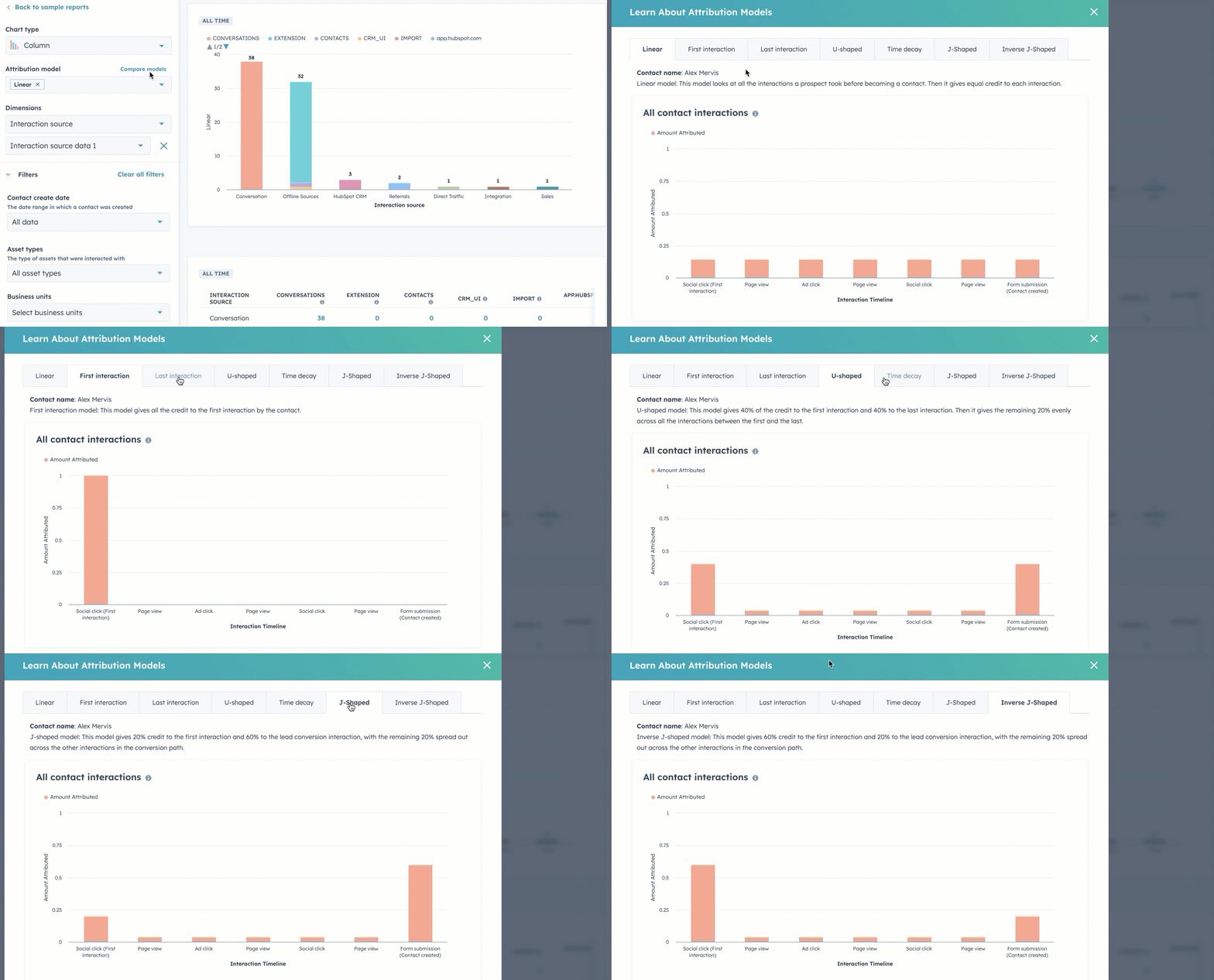
Source. HubSpot Knowledge Base
No custom weights and limited ad types via API. Practitioners note constraints, as many reviews indicate.
Bottom line: Excellent CRM and MAP. Not a great LinkedIn-first ABM strategy tool.

CommonRoom Contacts Dashboard
Community intelligence that pulls LinkedIn engagement, Slack, social, and product signals to surface warm accounts.
No. There is no account-level impression tracking, so the ABM pipeline read is incomplete.
CommonRoom is valuable when your ABM motion depends on community, social, product, and organic engagement signals rather than paid media alone. It helps teams surface warm accounts from many non-ad interactions, but it should be treated as a buyer-intelligence layer rather than a LinkedIn ads analytics tool.
Correlate community spikes with LinkedIn pushes and let RoomieAI surface patterns.
Turn raw signups into company profiles that map back to accounts.

CommonRoom Chrome Extension helps you add contacts to your CommonRoom account while browsing LinkedIn
Bottom line: Terrific for community-led growth. Not a substitute for impression-level pipeline reporting for a LinkedIn-first ABM strategy.

Common Room’s current public pricing lists Starter at $1,700/month, billed annually, with 35k contacts and 2 seats included. Team and Enterprise are custom-priced, with higher contact limits and more seats. That makes Common Room a serious buyer-intelligence platform, but not a low-cost replacement for LinkedIn ABM analytics.

Windsor.ai Dashboard
Data hub for attribution across more than 300 sources, with strong normalization and BI exports.
No. It needs clicks or lead forms for LinkedIn credit and leans on reverse IP for grouping. No impression-by-account analytics and manual grouping for ABM.

Windsor.ai Multi-Channel Attribution Report
Bottom line: Excellent model layer. Not a LinkedIn-first ABM strategy tool.

Windsor.ai Pricing
Free includes one source and 30-day history. Current public pricing lists Basic at $23/month ($19/month annually), Standard at $118/month ($99/month annually), Plus at $299/month ($249/month annually), Professional at $598/month ($499/month annually), and Enterprise custom.
If you’re wondering why not rely only on LinkedIn’s native stack for a LinkedIn-first ABM strategy, the short answer is that Campaign Manager can show campaign performance, conversions, and Revenue Attribution Report data, but it does not give you the complete company-level ABM operating layer most teams need.
It is useful for native reporting, but it breaks down when you need account-level rollups across campaigns, CRM-stage movement, intent labels, sales alerts, and multi-channel revenue context.
First, here’s how to set up the native reporting:
Connect your CRM to RAR:
Provide the requested credentials, including Username, Password, Environment URL, and Security Token:
Data can take up to 72 hours to appear. Confirm the CRM opportunity field that RAR should treat as the revenue source of truth.
Set your minimum impression threshold for influence:
Choose a lookback window:
Then set the reporting time frame:
If you run multiple ad accounts, filter by the account or combine them as needed.
Install the Insight Tag across your site:
In Campaign Manager, configure conversions:


Set up CAPI as well:
Now, with this setup done, RAR can attribute most online conversions that preserve cookies and device continuity. To capture more, upload offline conversions from your CRM into Business Manager or stream them via CAPI with timestamps and hashed emails.
Marketing automation can help streamline the tracking of marketing campaigns and the sales process, making it easier to measure performance and optimize your ABM efforts.
For true pipeline reporting of your ABM strategy , you need company-level capture of impressions, clicks, and engagement per campaign group, plus a clean push into the CRM with account stages and intent. That’s the gap the native stack does not fill on its own.
Now let’s look at tools that fully or partially provide a LinkedIn-first ABM strategy.
Demandbase, HockeyStack, Terminus, and Factors.ai are strong when you’re running larger programs with multi-channel scope and deep controls. LeadsRx does not use the LinkedIn API and leans on cookies. HubSpot Attribution remains click- and contact-centric. 6Sense focuses on targeting and visits more than impression-level reporting. CommonRoom surfaces community engagement, not impression logs. Windsor.ai is a stellar data layer, not an ABM-first choice.
If you want a cost-conscious tool that still nails pipeline reporting and campaign orchestration for a multichannel LinkedIn-first ABM strategy, start with ZenABM. It tracks company-level impressions, maps them to CRM opportunities, writes properties into HubSpot, and shows which campaigns moved which deals, even when nobody clicked.
Book a ZenABM demo to see how a LinkedIn-first ABM strategy tool should operate in practice, or start the 37-day free trial.
