

©2026 ZenABM - All Rights Reserved.
![7 Great ABM Tools for LinkedIn Advertising [2026]](/_next/image?url=https%3A%2F%2Fcdn.zenabm.com%2Fmedia%2F7-Great-ABM-Tools-for-LinkedIn-Advertising-1200x628.jpg&w=1920&q=75)
Choosing an ABM tool can feel harder than running ABM itself, especially if your priority is LinkedIn advertising.
So many marketers jump into shiny platforms without mapping needs to outcomes and end up with overkill, or something painfully underpowered.
To solve that for you, I’ve compared the 7 best ABM tools for LinkedIn advertising and mapped their fit for small, mid, and enterprise teams.
Read on and pick what actually matches your motion…
Direct API Integration | Real-Time Engagement | Multi-Channel Ads | Intent Data (3rd-party) | CRM Integration | AI Predictive Analytics | Community/Organic Tracking | Pricing (Entry-level) | Best for | ||
|---|---|---|---|---|---|---|---|---|---|---|
✅ | ✅ | ✅ | ✅ | ✅ | ✅ | ✅ | ❌ | High | AI-driven ABM | |
✅ | ✅ | ✅ | ❌ | ❌ | ✅ | ❌ | ❌ | Low | LinkedIn-centric ABM | |
✅ | ✅ | ✅ | ✅ | ✅ | ✅ | ✅ | ❌ | High | ||
✅ | ❌ | ✅ | ✅ | ✅ | ✅ | ❌ | ❌ | High | Sales & Marketing alignment | |
✅ | ❌ | ✅ | ✅ | ✅ | ✅ | ✅ | ❌ | Medium | Ad-focused ABM | |
❌ | ❌ | ✅ | ❌ | ❌ | ✅ | ✅ | ✅ | Medium | Community-led ABM | |
✅ | ❌ | ✅ | ❌ | ✅ | ✅ | ✅ | ❌ | Flexible | Analytics-focused ABM |

6sense is famous for **predictive intelligence** – AI that helps revenue teams decide who’s in market and what to do next.
In short, it answers:
It blends multi-channel execution with a strong AI core.
Here’s what stands out about 6sense:
6sense’s Company Graph (IP, cookies, device IDs) can reveal which company an unknown visitor likely belongs to.

Run ads across channels in-platform like B2B DSP for display/video/CTV plus native LinkedIn and Google integrations. Trigger personalized web and sales touches (e.g., Salesloft/Outreach) too.
6sense ingests:

It then predicts buying stages (Target → Decision) or assigns a 0-100 propensity score.
Sales gets “top 10 accounts this week” type alerts. no guesswork.
6sense unifies first-, second-, and third-party intent so you’re not blind to buyer research happening offsite.
Profiles include firmographics, technographics, key contacts + engagement, and sometimes psychographics, so you can segment surgically.


Surfaced decision-stage accounts, key contacts, and suggested actions help reps move faster.


See sourced vs. influenced pipeline, multi-touch attribution, forecasting, and time-in-stage analytics.
Highly regarded for intent and predictive accuracy. Brings anonymous + known signals together. For data-driven teams wanting one hub for ads + insights, it’s powerful and scales well for larger sales orgs.
Power comes with complexity and premium pricing, often on par with or above Demandbase. Steep learning curve. Garbage-in/garbage-out risk if CRM hygiene is poor. If you’re LinkedIn-only, 6sense may be overkill.
6sense is best for mid-to-large B2B orgs with long cycles, big TALs, and sales ready to act. If you already buy intent and run ads, 6sense unifies it and tells you where to focus.

Demandbase One is a full-stack, enterprise ABM platform.
It spans target account building, multi-channel campaign execution, web personalization, and end-to-end measurement inside one umbrella.
Here’s a quick tour of its features:

Demandbase helps assemble and refine Target Account Lists (TAL) using your data + theirs.
Upload your list, deanonymize web visitors, or lean on its firmographic/technographic + AI suggestions (even hiring signals).

Demandbase includes a native B2B DSP for programmatic (display, retargeting, native, CTV) plus integrations to manage LinkedIn, Google, and more, complete with account-level frequency caps and AI budget optimization.


Personalize your site for target accounts. Think industry-specific messages and micro-sites based on IP/cookie recognition and rules.
Demandbase blends first-party engagement with third-party intent (e.g., Bombora) to build deep account profiles: firmographics, technographics, trending topics, and engagement heatmaps.

Source: Demandbase Help Centre


Go beyond “account” to the actual buying committee: map personas, identify decision-makers, and target by role.

Dashboards track cross-channel engagement, funnel progression, and influenced pipeline. E.g., your Q1 LinkedIn campaign drove $2M in pipeline; AI adds a Pipeline Predict Score for “most likely to win.”

Demandbase connects to the usual GTM stack (Salesforce/MA tools, sales engagement, etc.) and has a sales module to surface insights where reps work.
See more in the Demandbase official docs.
Demandbase One is best for mature ABM teams that want everything in one place: ads, personalization, intent, analytics, and sales enablement. It’s powerful for large target account lists and multi-channel strategies, and it aligns big sales teams with real-time account insights. Post-Engagio merger momentum keeps it on the ABM leading edge.
Three biggies: steep learning curve, premium pricing, and a real chance it’s overkill for smaller programs.
Large B2B orgs with established ABM and real budgets. If you’ve got a dedicated ABM team, thousands of accounts, and multi-channel plays to unify, Demandbase earns its keep.
It’s also ideal for consolidating point tools. E.g., fold ads, intent, and web personalization into one platform.
ZenABM is a plug-and-play ABM analytics platform built for teams prioritizing LinkedIn advertising in their ABM mix.
From capturing LinkedIn ad engagement to tying it back to the pipeline, it covers end-to-end LinkedIn-first ABM execution.
Here’s what ZenABM offers:

ZenABM ingests first-party, company-level metrics for every LinkedIn campaign directly from the official API.
That’s rare. Many ABM suites still lean on cookies or shaky IP match.

The platform auto-scores each account’s LinkedIn engagement over your chosen window (e.g., last 7 days). This rolling “current engagement score” spotlights this week’s hottest accounts, not just historical activity.
Why it matters:
Your sales team can pounce the moment interest spikes. Think intent detection, but tuned to LinkedIn signals.
You also get an all-time score for context.
ZenABM combines its engagement score with CRM data to track each account’s ABM stage.
Best of all:
You control stage thresholds.

And because ZenABM tracks ABM stages, it visualizes how accounts move, so leaks and friction are obvious:


ZenABM syncs LinkedIn engagement straight into your CRM (HubSpot and Salesforce today; more via webhooks).
It writes a single company property with metrics like “LinkedIn Ad Engagements (last 7 days)” so reps get instant context.
It can also auto-assign a BDR once engagement crosses your threshold (e.g., enters “Interested”).

Goodbye, missed follow-ups and spreadsheet roulette.
Running multiple LinkedIn campaigns around different offers or features?
ZenABM lets you tag campaigns by intent and tracks which accounts engage with which narrative. It clusters companies by interest and syncs those intent signals back to CRM.
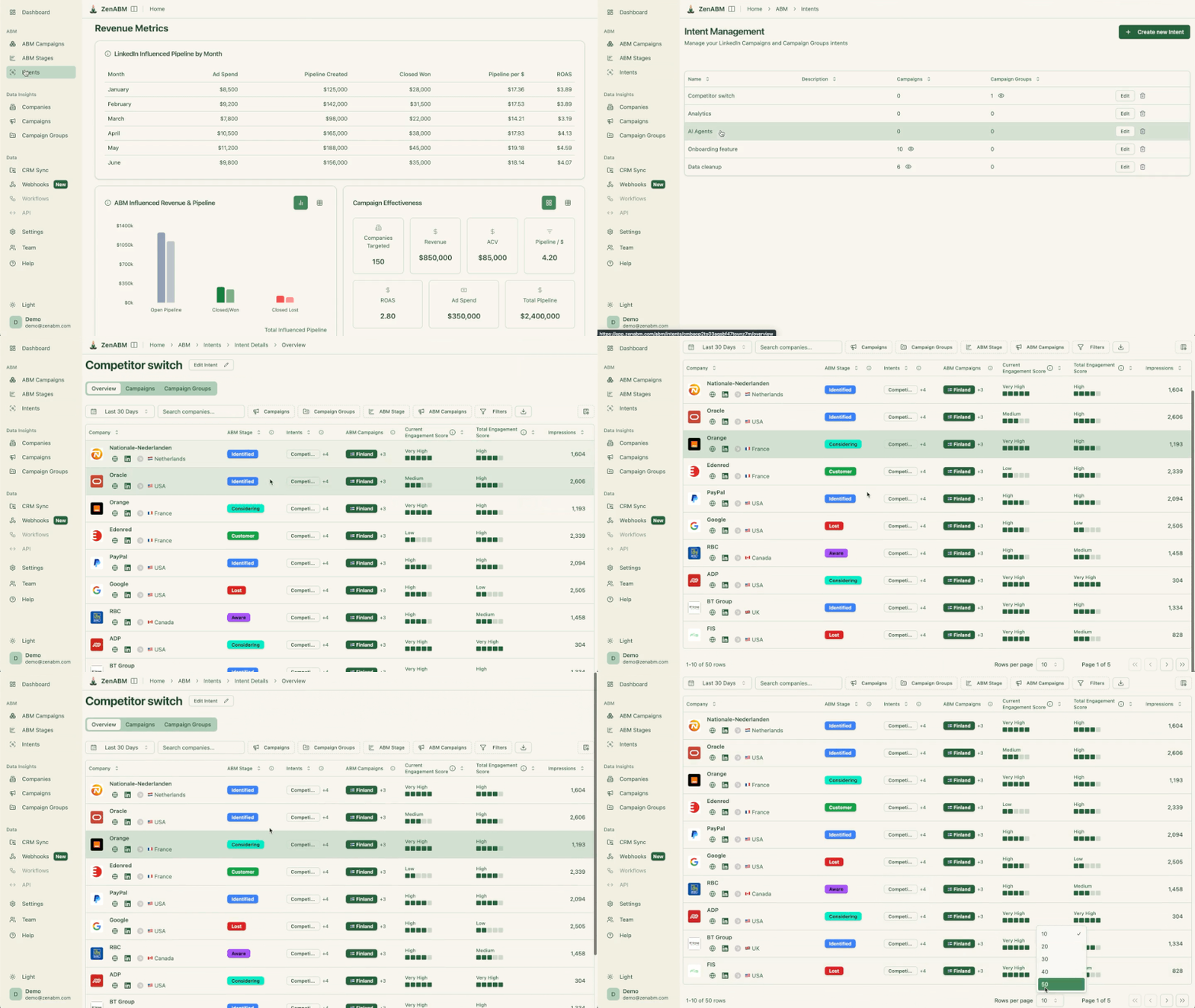

Now sales can lead with what the account is actually interested in: “XYZ keeps engaging with our cloud security ads; start there.”


Like the big suites, ZenABM ships with dashboards for performance and ROI. It auto-matches LinkedIn-engaged companies to CRM deals to calculate influenced pipeline, revenue, win-rate, and ROAS.
You can pipe ZenABM into the rest of your stack via custom webhooks:

Unlike enterprise ABM suites that run into tens of thousands yearly, ZenABM starts at $59/month for a full LinkedIn-first ABM setup.
You get LinkedIn tracking, scoring, CRM sync, and dashboards in that flat price.
Perfect for small and mid-market teams who want LinkedIn ABM without enterprise bloat.
By design, ZenABM specializes in LinkedIn.
It’s world-class at LinkedIn ad analytics + attribution, but it’s not trying to be your multi-channel control center.
Need display, deep web personalization, or sales sequence management? Run ZenABM alongside those tools.
If your ABM plan is LinkedIn-heavy, ZenABM is a layup.
You’ll get enterprise-grade visibility at a fraction of the cost, and value from week one (no marathon onboarding).

Terminus stands alongside 6sense/Demandbase, with a distinct orchestration bent.
It started in ads (like RollWorks) and expanded via acquisitions into email signature marketing, chat, and strong sales alignment.
Here are the notable capabilities of Terminus:

Launch account-targeted ads on Google, LinkedIn, and display. Not as many channels as Demandbase, but it nails the core B2B ones.
Turn every employee email footer into an ABM placement (Sigstr). Add chatbot/personalization so target accounts see relevant experiences.
Deep ties to Outreach/Salesloft trigger cadences/tasks when accounts heat up.
Connects to Salesforce/HubSpot/MS Dynamics, Marketo/Pardot/HubSpot Marketing, Bombora/G2 intent, enrichment, and Slack notifications.
Explore the catalog in the Terminus docs.
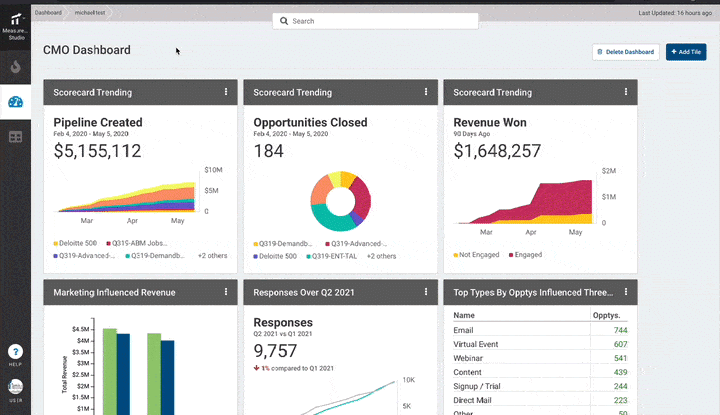

Out-of-the-box attribution and ROI views: revenue, new opps, open pipeline, and progression—plus customizable windows and AI pattern-finding.
A genuinely holistic toolkit (ads, email sigs, chat, analytics) in one UI. Great for syncing multi-channel plays and proving ROI. Flexible to start small and expand.
Premium pricing (sales-led). Extra costs for intent and some integrations. Review sites (Trustradius, Infotech.com, Software Finder) mention caps/limits and occasional sync hiccups. If your ABM is simple, it can feel like overkill.
Terminus suits teams serious about multi-channel ABM with budget and headcount. If you’ve got 5+ marketers and a comparable sales team, it’s great for coordinating digital and “non-standard” plays (direct mail, email signatures). Best for mature industries with larger ACVs; smaller teams may wait until they’re ready.

RollWorks is often the “entry” enterprise ABM platform.
It bundles advanced account scoring, intent, and a native ad network and is frequently more approachable (and sometimes more affordable) than the top-tier suites. Backed by NextRoll, RollWorks’ lane is digital advertising + audience management.
If your core ABM play is targeted ads (display/LinkedIn) to a TAL, RollWorks is built for you.
Let’s look at the key features of RollWorks:
Import TALs from your CRM/MA, or generate with RollWorks’ data + models. The ICP Fit grade (A–D) uses firmographics, tech, revenue, etc., and supports multiple ICPs.


Monitor “in-market” activity via web keyword/topic tracking and view “Journey Stages” to see where each account sits.

Run programmatic display/retargeting via RollWorks DSP, integrate LinkedIn through the Marketing API, and manage audiences centrally.

You’ll also find budget optimization and account-level frequency caps.


Two-way CRM sync, sales alerts, and a CRM widget keep GTM aligned; hooks to Outreach/Slack notify reps on hot accounts.
Connectors for HubSpot/Marketo, etc., for audiences and measurement; partner tools fill gaps RollWorks doesn’t cover.
Read more in this guide.
Strong for ads + account targeting without the intimidation tax. Handy UI, detailed account-level ad performance, and a sensible step-up from pure LinkedIn native.
Still requires meaningful budget: $2K–$5K/month in ads plus platform fees. Focused on digital + CRM outreach (no native direct mail or advanced web personalization). Less predictive than 6sense, and users cite limits on lists/ad volumes, integrations, and reporting.


Perfect for mid-market teams moving from manual ABM to scalable, ad-led plays.
Expand a pilot, saturate your TAL on LinkedIn + display, and measure deeply without adopting a complex AI suite.
Popular with SaaS and mid-size tech needing a dedicated ABM ads tool, not a full enterprise stack.

Paid ads aren’t the only way to ABM.
Common Room powers account growth from community and organic engagement: Slack, forums, GitHub, socials, product signals, and more.
Let’s look at the core features offered by CommonRoom:

Aggregate signals from Slack/Discord/Discourse, Twitter/LinkedIn, GitHub/Stack Overflow, HubSpot/Salesforce, CS tools, and your warehouse rolled to people and accounts (e.g., Jane stars GitHub + joins Slack + attends a webinar → one profile).

AI ranks the most engaged people/accounts; scoring is highly configurable.


Create alerting: VP from a target account joins Slack → ping owner; engagement jumps → open a task.
Enrich profiles with title/LinkedIn, push hot contacts to Outreach, and blend in product events (Segment/warehouse).
Track community growth, account engagement, and pipeline impact (for community, not ads). See which motions correlate with closes and where to double down.
Built for community-/product-led growth. If you’ve got inbound energy, it surfaces the most engaged accounts and people. Instead of hunting across Twitter/Slack/GitHub, you get one view (fully customizable). It gives you an early-funnel edge that ad-centric tools miss.

Not a traditional ABM suite: no full ad management, anonymous web tracking, or multi-touch revenue attribution. Most teams pair it with an ads/MA platform. Without a lively community, ROI is limited. Pricing starts ~$1K/mo and can reach tens of thousands; AI outreach can be hit-or-miss; setup/scoring has a learning curve.
Common Room is perfect for companies with active communities like developer tools (GitHub/Stack), SaaS with Slack groups, or PLG with heavy user chatter. It lets ABM tap advocates and early signals; CS can track ongoing engagement. Pair with a LinkedIn-focused tool like ZenABM to see both organic and paid activity.

Factors.ai focuses on connecting ABM activities to revenue, answering which channels and campaigns moved target accounts.
Unlike monolithic suites, it’s modular and usage-based (easy to start, but scale costs need watching).
Let me show you the core features of Factors.ai:


Pre-built ABM reports: stage movement, touchpoint paths, and pipeline influence like multi-touch attribution without DIY BI.


Identify some visiting companies via IP matching scripts and tie content touches to account journeys.

Transparent pricing: free tier (200 identified companies/3 users), then Basic ($399/mo ~3,000 companies/5 users) and Growth ($999/mo ~8,000/10 users).
Great for starting small but overages (extra accounts/users/segments/reports) can stack quickly if traffic or team size spikes.

“Interest Groups” (intent segmentation) and “LinkedIn AdPilot” add ABM power but at a premium (+$750/mo and +$1,000/mo, respectively).


Pulls deals from CRM (HubSpot/Salesforce) and ad/analytics data to connect impressions/visits with pipeline.
Analytics-first ABM without ripping and replacing your stack. Keep LinkedIn + your CRM; layer Factors.ai for insight. Clear entry pricing (e.g., $399/mo) and a free trial help teams get started fast.
Usage pricing can balloon as you scale. IP match rates (~42%) mean paying for lots of “unknowns.” Add-ons (intent/AdPilot) hike cost, sometimes rivaling big suites, yet execution still lives elsewhere. It’s primarily analytics, so you’ll need other tools to run campaigns.
Factors.ai suits teams with an ABM process already in place who want better insights and attribution without buying a full suite. Ops and analytics leaders can use it to prove ABM ROI, startups can test and learn before upgrading, and finance teams can stick to base plans for predictable costs. But if you plan to scale fast, a fixed-cost ABM platform may be the smarter long-term bet.
Don’t pick the biggest logo. Pick the tool that matches your stage, channels, and budget.
For enterprise scale, Demandbase or 6sense.
If community’s your growth engine, Common Room.
For LinkedIn-first ABM, ZenABM is the obvious winner.
Buy for your real GTM motion, not a deck.
That’s how you win ABM.
Anyways, you can try ZenABM for free now or book a demo here.
