

Emilia Korczynska is Head of Marketing and co-founder at ZenABM. Before that she was VP of Marketing at Userpilot for nearly 7 years, where she ran a large ABM program primarily on LinkedIn ads.

An ABM strategy is a plan for which accounts you target, in what order, with which messages and on which budget, built backwards from a revenue goal. Here are the 20 steps I would follow to implement it on LinkedIn ads, from the revenue target to the sales follow-up, using ZenABM's AI campaign builder where it does the step for you.
ZenABM is a LinkedIn-first ABM tool for B2B teams running LinkedIn ads. It shows which companies engage with your LinkedIn ads, straight from the official LinkedIn Ads API, with no form fills needed.
It covers the whole ABM cycle. You can plan and build campaigns with AI in the app, in Zena or in Claude through the MCP server. It also handles intent signals, ABM stages, audiences, exclusions, budget protection, dashboards, attribution and CRM sync.
When I was VP of Marketing at Userpilot, I struggled to run ABM on LinkedIn. My husband watched it up close and built ZenABM to fix it. I might be a bit biased as a co-founder, but I also know first-hand what it is like to struggle to find the right tool.
We probably burnt $100,000+ learning on the job 😅 This guide is the plan I wish I had had on day one.
/abm-strategy-planning skill and builds your campaigns, ad sets and ads. Budget Savers keeps Audience Expansion and Audience Network off, and ABM stages and CRM sync hand engaged accounts to sales. Starter is from $59/month billed annually.Here is the whole post in one picture:

You can plug the /abm-strategy-planning skill into Zena or into Claude through the ZenABM MCP server. It asks you the questions below and builds an ABM strategy from your answers. The skill is open source, so you can also install the LinkedIn ABM skills for Claude and run it yourself. Here is what it looks like when you type /abm in Zena:

Start with a revenue target, because it decides your budget and how many accounts you need to reach. Don't set "leads" as the ABM goal.
I learned this the hard way. When you take a budget as a fixed line item and then bend it to fit a revenue target, you end up with plans nobody can hit.
Here is the worked example from our 30 September 2026 webinar on planning your ABM strategy with AI. To drive $50,000 in closed-won revenue in three months, you need 13 deals, 50 demos, around 4,690 landing page clicks and about 14,100 companies reached.

Then set a handful of KPIs that follow from that goal:
Don't expect fast results. For our July deals, it took an average of 22 weeks of ads, 1,159 impressions per account and almost 8 different campaigns before an account converted (this is ZenABM's own account). Set that expectation with leadership before you launch.
LinkedIn ads win for cold B2B targeting because you can target by company list and job title, while Meta and Reddit are better for cheap retargeting.
Metadata's 2025 data across 153 B2B advertisers shows a Facebook lead cost $145, an Instagram lead $138 and a LinkedIn lead $202. On Facebook, retargeting was cheaper than prospecting ($120 vs $166 per lead). On LinkedIn the pattern flipped ($234 retargeting vs $194 prospecting), probably because the retargeting pools are small and already saturated. So I would prospect on LinkedIn and retarget on Meta or Reddit. Here is what each channel is good for in ABM, how it targets, what it costs and what you see:
LinkedIn ads | Meta ads | Reddit ads | LinkedIn ads with ZenABM | |
|---|---|---|---|---|
Best use in ABM | Cold prospecting of named accounts | Cheap retargeting | Cheap retargeting, technical buyers | Running and measuring the LinkedIn side |
Targeting | Company list, job title, seniority | Interests, lookalikes, custom audiences | Subreddit, interest, keyword | Same LinkedIn targeting, plus audiences built from engagement and ABM stages |
Cost | Cost per click $9.39 (Metadata) | Facebook cost per click $1.95 (Metadata) | — | From $59/month billed annually |
What you see | Ad metrics in Campaign Manager | Platform metrics | Platform metrics | Which companies engaged, their stage and intent, synced to your CRM |
The numbers above in one picture:

Choose by audience size and deal value: 1:many for a large list on a small budget, 1:few for clusters of accounts that share a challenge, and 1:1 only for a handful of accounts.
1:many | 1:few | 1:1 | |
|---|---|---|---|
Accounts | Hundreds to thousands | Clusters of accounts sharing a challenge or use case | A handful |
Personalization | Persona and angle level | Per cluster (industry or use case) | Per account |
Who runs it | Marketing, with ads | Marketing plus sales | Mostly sales outreach |
Audience check | Matched list of 300+ members | Each cluster must reach 300+ members | Too small for LinkedIn ads |
LinkedIn needs at least 300 matched members in an audience, so a 1:1 audience of one company usually can't run ads at all. For 1:1 I would use sales outreach and let the 1:many or 1:few ads create air cover around it. If you are on a small budget, start with 1:many. Our one-to-many ABM guide covers it in depth.
Scaling personalization works like a pyramid: the more accounts you have, the less you personalize each one.

Decide your ICP from data, not gut feeling, by looking at the customers you won, the ones you lost, and what they have in common.
Run a win-loss analysis. Look at which industries, company sizes and geos you consistently won or lost, which personas booked demos, which channels showed up in closed-won journeys, and which campaigns deserve more or less budget. Then shortlist 4 to 5 firmographic or technographic traits. In ZenABM, the deal attribution dashboard shows the ad touchpoints behind each deal, which feeds that analysis. The /abm-strategy-planning skill also reads your website to propose personas and use cases.

Work backwards from revenue to opportunities to accounts. The formula for opportunities is below.
Opportunities needed = Revenue ÷ (ACV × close rate)
With a $2M goal, a $50k ACV and a 25% close rate, that is $2,000,000 ÷ ($50,000 × 0.25) = 160 opportunities. Then walk back through your funnel. In our budget guide, $1M ARR with a $50k ACV is 20 deals, and dividing by a 25% close rate, 75% qualification, 18% considering, 32% interested and 55% aware gives 3,367 target accounts.
To sanity-check the funnel, here is what I learned after our own program:
Use your own numbers to fill in this list:
The ABM Budget Calculator does the maths once you enter your numbers. Here is what it shows:

One more check: if your persona is narrow, small accounts may have only 2 or 3 members who fit, so you need many companies to reach the 300-member minimum.
Build the list from warm sources first, because uploading your whole ICP wastes spend on accounts that can't buy now. Accounts locked into multi-year competitor contracts are a common example.
Good warm sources are:
A few tools help here. Clay is good for list building and enrichment, and Apollo for contacts. LinkedIn Sales Navigator handles account and lead search, and your CRM holds your lists. Here is a Clay table enriching accounts with tech-stack checks (screenshot from Clay):

An ICP list is not a target list. Signals decide which accounts you go after first.
Pick 4 to 5 campaign angles, meaning the aspects of your product you will promote, and repeat them across ad formats. ABM insights are the signals you get from which themed ads an account engages with.
Examples of angles are cost savings, versus a competitor, one platform instead of several, or a specific use case. It is easier to show people a menu of angles and see what they engage with than to guess. In ZenABM, each ad set carries a theme, and when a company engages, that theme becomes an intent signal on the account. It is synced to your CRM so sales knows what to talk about.

Judge formats on cost per landing page click, not CTR. CTR counts every click (likes, comments, "see more"), so Thought Leader Ads show a high CTR and a low CPC even when landing page traffic is not cheap.
Here are the medians per account from our 2026 data from 168 LinkedIn ad accounts (27 April to 25 October 2026):
Format | CPM | Cost per landing page click | CTR (all clicks) |
|---|---|---|---|
Thought Leader Ad | $83.59 | $28.73 | 3.374% |
Single image ad | $54.22 | $15.26 | 0.532% |
Carousel ad | $64.08 | $16.36 | 0.403% |
Video ad | $60.87 | $27.39 | 0.688% |
Document ad | $78.72 | $65.38 | 0.366% |
Single image and carousel give you the cheapest landing page clicks, Thought Leader Ads win on engagement, and document ads are expensive for traffic. Text ads are cheap awareness, with a median CPM of $0.39. Our Thought Leader Ads guide goes deeper on the best-performing format.
Here is what each format looks like in a real campaign.
Thought Leader Ad. This is a post from a real person's profile, promoted as an ad. Marc Woodland's post on why CEOs should post on LinkedIn reached a 10.4% CTR, far above the 3.374% median in the table. It also sent 436 clicks to the landing page:

Single image ad. This is one image, a short text and a button. FlowFuse opens with its buyer's problem as a question, "Tired of vendors holding your machine data hostage?", and repeats it in the image:

Carousel ad. People swipe through several cards. The Revenue Unlocker puts a bold, blunt line on the first card to stop the scroll, then explains on the next ones:

Video ad. This is a short clip that plays in the feed. Userpilot uses a funny office scene about a feature request stuck in the backlog, a problem its buyers know well:

Document ad. This is a PDF people can page through without leaving LinkedIn. Parcel Panel turned a customer case study into one and put the results on the first page:

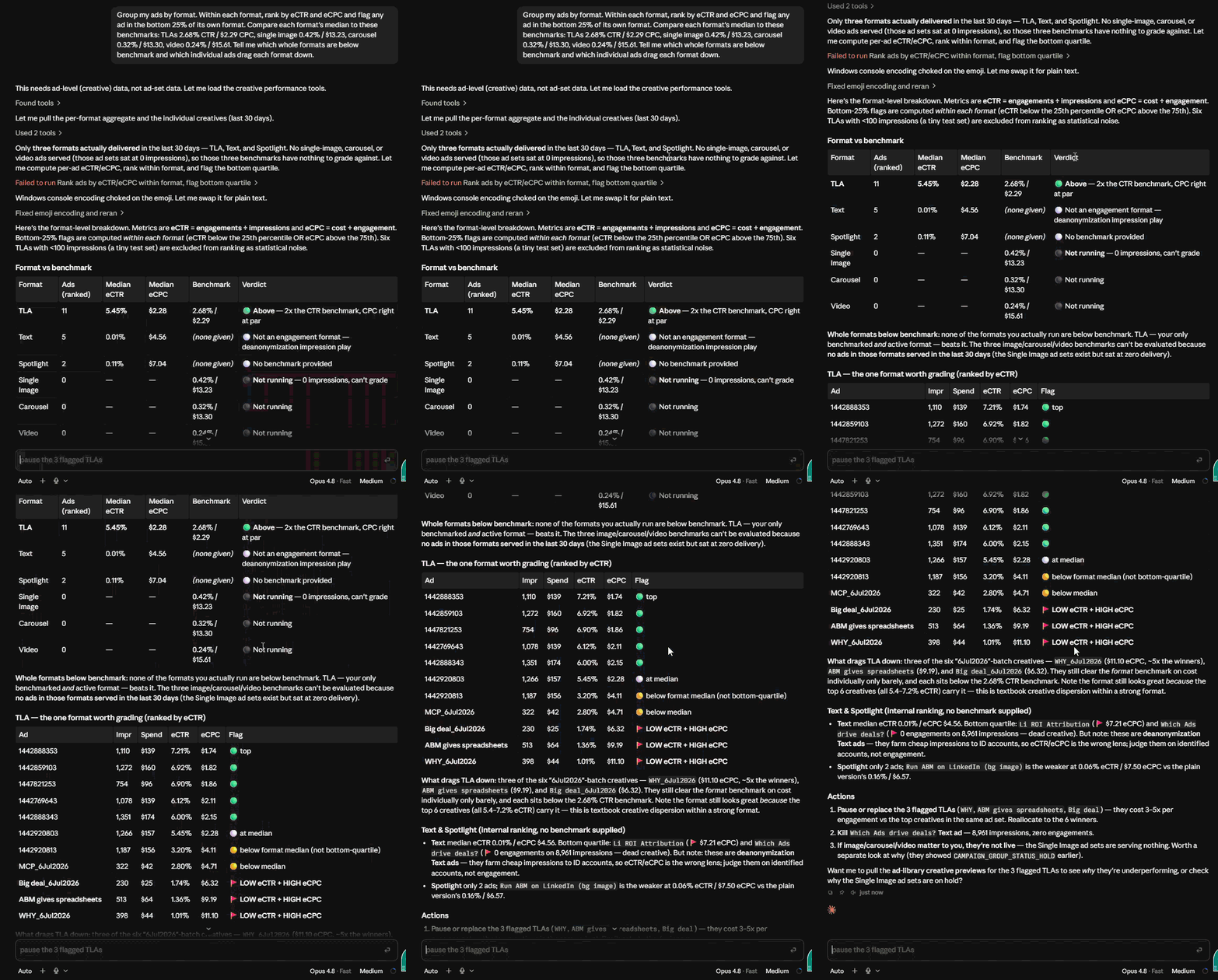
You can pull the format benchmarks above for your own account in one command:
Count your ads from your budget, because each ad needs about 3 to 4 clicks per day to deliver.
Ads you can afford = monthly budget ÷ days in the month ÷ (cost per click × 4 clicks per ad per day)
At an $8 CPC, one ad costs $24 to $32 per day. A $10,000 budget supports about 10 effective ads, and 5 is the minimum for single image or Thought Leader Ads to be effective. Spreading the budget across too many ads is one of the most common ABM mistakes, because the ads then don't get delivered.
Treat the plan as directional. No campaign follows it to the letter, because some people aren't active on LinkedIn or don't click. The LinkedIn Ads Count Calculator does this maths for you, and the ad count skill in Zena or the MCP server works it out from your budget in chat.

Split the budget by what each format is for:
Before you add more formats, check that each ad set gets enough budget for 3 to 4 clicks per ad per day.
The numbers above in one picture:

Match the bid strategy to the format and goal. LinkedIn offers maximum delivery, cost cap and manual bidding, depending on the objective and format.
The minimum daily budget is $10 and the minimum lifetime budget for a new campaign is $100. Our post on cheap LinkedIn ad formats on a small budget shows which formats stretch a small budget furthest. ZenABM's Bidding agent checks every bid change against LinkedIn's suggested bid and changes budgets in bulk.
Put each angle in 3 to 4 formats, so every angle shows up in every format and you can tell whether the angle or the format made the difference.
With 4 angles and 3 formats you have 12 ads. Check that number against step 9: if you can only afford 10, cut an angle rather than the budget per ad.

Run separate COLD and WARM campaigns, because mixing them makes it impossible to optimize either. A good monthly reach target is 30 to 50% of a cold audience and 70 to 90% of a warm one.
COLD campaigns educate, so I use Thought Leader Ads and carousels with educational content, and I never hit a cold list with "Book a demo". WARM campaigns give offers and proof, through single image and document ads with case studies and comparisons. I write the copy by temperature: hook and pain for cold, proof and objections for warm, offer and urgency for hot.
Don't structure strictly by funnel stage. Some accounts are already problem- or solution-aware, so serve content for every stage at once, and let ready accounts convert from inbound while the rest keep learning.
An example of a cold-style hook is HiBob's LinkedIn ad "Make your HR lovable again", opening with "Your team called. They're breaking up with your HR system." It comes from the Adfolio ad library. Here is the ad:

A warm-style ad uses proof instead. Conveyor's LinkedIn ad names customers right in the copy: "Security questionnaires suck. Or at least teams at Zapier and dbt Labs thought so until they used Conveyor to automate them." Here is the ad:

Here is how we run it at ZenABM in Q4. Cold signals come from two campaigns: Air Cover (very cheap impressions that generate awareness, intent signals and cheap clicks) and Meaningful Engagement (Docs plus Thought Leader Ads). Companies move into WARM slowly at first: none in the first two weeks, 90 in week five and 6,500 a week by week twelve.

Build one campaign (formerly campaign group), with ad sets (formerly campaigns) per format and temperature, and your mapped ads in each. Here is a build checklist:
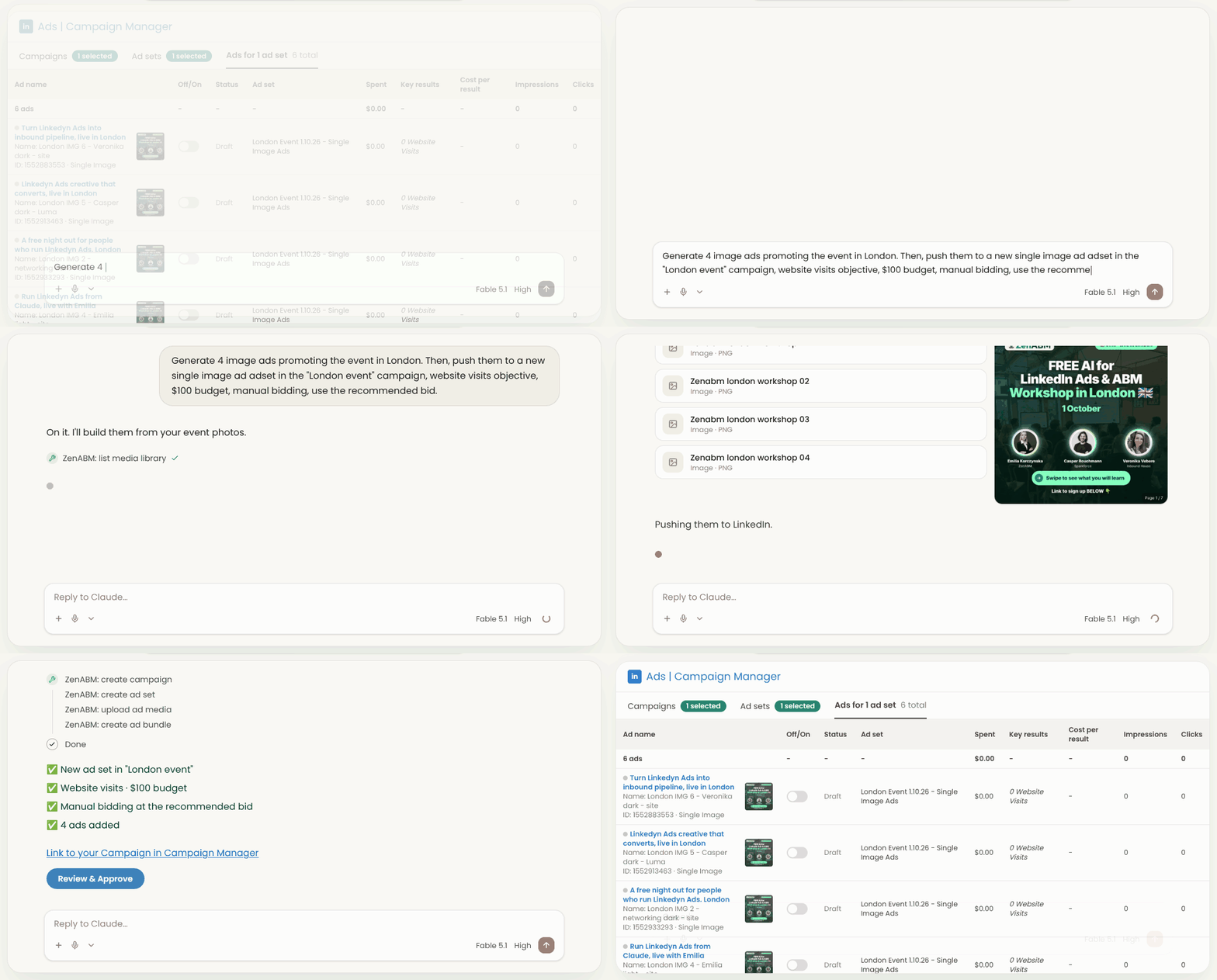
In ZenABM you can describe the campaign in chat, and Zena or Claude (through the MCP server) builds the campaign, ad sets, targeting and ads. It checks audience sizes first and confirms every change. Here is Claude creating LinkedIn ads end to end:
LinkedIn turns Audience Expansion on by default for available objectives, and Audience Network on for new single image, carousel, document and video campaigns. For ABM company lists, switch both off, because they spend budget outside your target accounts. ZenABM's Budget Savers keeps both off on every ad set, including ones created later. Here is the Budget Savers page:

Cap impressions per company so a few large accounts don't absorb impressions while others get none. LinkedIn's native frequency cap works per member and only on brand awareness ad sets, so it can't see a whole company.
In ZenABM, impression capping is done through audiences and exclusions:
See ZenABM's impression capping for how to set this up. Here is the exclusion form you use for it:

An ABM funnel moves accounts from COLD to WARM with stage rules: thresholds that decide which ads each account sees. You define the stages as rules over LinkedIn engagement and CRM conditions.
Stage | Rule (example thresholds) | What the account sees |
|---|---|---|
Identified | All targeted accounts | COLD ads |
Aware | 50+ ad impressions | COLD ads |
Interested | 5+ clicks or 10+ engagements | WARM ads |
Considering | Booked a demo or signed up for a trial | Proof and offer ads |
Selecting | Open deal | Sales-led |
Customer | Closed deal | Retention |
My current ZenABM rule for moving an account to WARM is 2+ clicks or 3+ engagements or 18+ impressions in Docs and TLAs, or website engagement, or a trial or demo. Here is the funnel with account scores:

ZenABM moves every account through the stages you define, from ad engagement and CRM data, and sends a stage to LinkedIn as an audience through HubSpot, so the list updates itself. One mistake to avoid: our interest-stage audience, built from CRM contacts, never reached LinkedIn's 300-member minimum, so accounts sat in limbo with no ads.
The ABM customer journey is the path one company takes from not knowing you to booking a demo, tracked at account level across touchpoints, not per contact. Contact-level attribution gives mostly false negatives, so I look at account-level actions.

Monitor performance per motion and watch accounts move from COLD to WARM at least weekly. Track the KPIs from step 1: accounts engaged, stage progression, meetings per account, pipeline and pipeline per dollar.
ZenABM's ABM campaign dashboards give each motion its own view of spend, ROAS and influenced pipeline, so a losing motion can't hide behind a winning one. Zena also monitors performance weekly, and you can ask her questions any time. ABM is never set and forget, so monitor resonance and decay, not just delivery.

Track pacing. An ad set that is behind budget means the bid is too low, so increase it, and one that is ahead of budget means the bid is too high, so decrease it. Also watch for ad decay, when CTR slides and frequency climbs.
ZenABM's Bidding agent flags ads whose CTR has been sliding and pauses them once you approve. Automated AI reports arrive weekly, monthly and quarterly with ranked action items.

ABM ends in sales follow-up, so sync company engagement, stage and intent to your CRM. ZenABM's CRM sync writes it onto your HubSpot, Salesforce or Attio company records, and webhooks (Growth plan and up) can push engaged accounts to Clay or your sales tools.
Give the rep the talking point from the intent signal. If an account engaged with your "versus a competitor" ads, that is the conversation to start.

/abm-strategy-planning skill in Zena or the MCP server asks for your revenue goal, deal size, budget and audience type, then works back to budget, target accounts and number of ads. The ABM Budget Calculator gives you the quick version.ZenABM suits in-house B2B teams, enterprise teams running the LinkedIn side next to a display suite, and agencies (Agency plan from $479/month billed annually, with the Agency MCP server). Plans start at Starter from $59/month billed annually, and you can see them all on the pricing page. On G2 it is rated 5.0/5 from 6 reviews, and one reviewer wrote "What I like best about ZenABM is that they understand ABM beyond theory." It is LinkedIn-first, so it does not buy display ads or personalize websites, and if display is your main channel you can pair it with a display suite.
Start with the revenue math, then launch one COLD and one WARM campaign and let account stages tell you what to do next. Pick your motion by audience size, cap your ads by budget, and measure stages and pipeline instead of MQLs.
What revenue number are you planning backwards from?
Implement an ABM strategy in this order: set a revenue goal, pick a channel and motion, define your ICP, size the audience, build a warm target list, choose angles and formats, set budget and bids, launch COLD and WARM campaigns, and sync results to sales. ZenABM's /abm-strategy-planning skill walks you through the planning steps.
Work backwards from revenue. With a $2M goal, $50k ACV and 25% close rate you need 160 opportunities, and our funnel example for $1M ARR at a $50k ACV gives 3,367 target accounts. Each LinkedIn audience also needs at least 300 members.
The ABM funnel stages are Identified, Aware, Interested, Considering, Selecting and Customer. ZenABM moves accounts through the stages you define from LinkedIn engagement and CRM data, so the stage is computed rather than updated by hand.
The ABM customer journey is the path one company takes from not knowing you to booking a demo, tracked at account level across all touchpoints. ZenABM shows it per company, including ad engagement and CRM data.
Track target accounts engaged, stage progression, meetings per account, pipeline generated, revenue won and pipeline per dollar. ZenABM's dashboards show spend next to influenced pipeline and ROAS out of the box.
About the author

