

©2026 ZenABM - All Rights Reserved.
![10 Best LinkedIn Ad Conversion Tracking Tools [2026]](/_next/image?url=https%3A%2F%2Fcdn.zenabm.com%2Fmedia%2F10-Best-LinkedIn-Ad-Conversion-Tracking-Tools-2025-1200x628.jpg&w=1920&q=75)
To track LinkedIn ads with confidence, you need conversion tracking that captures clicks, views, and server events, then maps them to your CRM and revenue. If you want to defend budget and tune delivery, you need a stack built for LinkedIn conversion tracking and ABM, not a generic analytics toy.
This guide ranks the best LinkedIn ad conversion tracking tools with a bias toward Insight Tag and CAPI coverage, offline and CRM events, and reliable attribution. These are the best LinkedIn ad conversion tracking tools if you care about truth over vanity metrics.
Read on…
Tool | Insight Tag Support | CAPI Support | Offline/CRM Conversions | Pricing | Summary |
|---|---|---|---|---|---|
✅ (works alongside native tag) | ✅ (server events reconciled with CRM) | ✅ (native write-back and deal matching) | $59 to $119/mo | Purpose-built for LinkedIn ABM. Adds company-level coverage and stitches Insight Tag, CAPI, and offline CRM events into clear conversions and revenue. | |
✅ | ✅ | ⚠️ (pulls to dashboards, limited native push) | $399 to Custom | Solid LinkedIn integrations and AdPilot. Lacks native property write-back for full-fidelity CRM conversion tracking. | |
✅ | ✅ | ✅ (multi-CRM, bi-directional) | Custom | Enterprise ABM suite with full-funnel conversion capture and revenue attribution. Powerful and priced like it. | |
✅ | ✅ | ✅ | Custom | Good Salesforce fit and account views. Conversion analytics lean on LinkedIn integrations and curated audiences. | |
✅ | ✅ | ⚠️ (one-way sync by default) | Custom | Rich journeys and account paths for conversions. One-way CRM sync means extra work to make CRM properties reflect ad conversions. | |
❌ (no official LinkedIn tag integration) | ❌ | ✅ (offline uploads and CRM joins) | Custom | Omni-channel attribution engine. No official LinkedIn conversion ingest, so LinkedIn coverage is weaker. | |
⚠️ (click and visit centric) | ❌ | ✅ | Custom | Excellent prediction and segmentation. Not built to unify Insight Tag and CAPI into account-level conversions. | |
✅ (via LinkedIn ads integration) | ⚠️ (relies on native sync, not direct) | ✅ | $800 to $3600/mo | Great for click and contact attribution inside HubSpot. Limited coverage for impression-led conversions and server-side nuance. | |
❌ | ❌ | ⚠️ (engagement to CRM, not conversions) | $999 to Custom | Community signals and LinkedIn engagement. Not a replacement for Insight Tag plus CAPI conversion tracking. | |
⚠️ (connector dependent) | ⚠️ (connector dependent) | ✅ | $19 to $499+ | Great data hub and model playground. Needs native LinkedIn conversion ingest for stronger coverage. |
Slick dashboards and long integration lists look fancy. For reliable attribution, three pillars matter. Miss one and your numbers wobble.
Most prospects never click. Sponsored Content CTR often hovers around 0.44%. The Insight Tag collects browser events that connect ad interactions to web activity. Use it for quick wins and pixel-based conversions, then validate against CRM.
Your tracking must post events from your servers so privacy tools and cookie loss do not break attribution. Mirror every critical conversion in Campaign Manager, then send /conversionEvents with rule URN, timestamp, value, and hashed identifiers. This adds resilience and reduces drop-off.
Sync form fills, meetings, opportunities, and revenue from your CRM. Kill CSVs where possible. Make it filterable by lists, views, and reports that sales actually uses.
Join CRM company records to LinkedIn conversions. When Company X hits your rule and opens an opportunity, attribute influence to the right campaigns and refresh totals in near real time. That is conversion tracking you can defend.
LinkedIn polices scraping and automation.

Deanonymization relies on cookies and IP ranges, which is fine for click paths but not for view-through conversions, and it misclassifies often.

DANs add bot noise and false positives. The punchline:
For LinkedIn conversion tracking, use first-party LinkedIn events via the official API, and reconcile in your CRM.
externalId or a server-side UUID so Tag and CAPI do not double-count.li_fat_id or parallel click identifiers in first-party cookies for 7 to 30 days.Okay, this article is about the tools you should use for conversion tracking. If you are wondering why not use only LinkedIn’s stack, here is why:
LinkedIn’s Revenue Attribution Report (RAR) is lead-centric, while ABM conversion tracking should be account-centric. You can stitch the native pieces together to see the influence on revenue from leads, but you will still miss critical company-level context.
First, how to set up the native tracking:
Connect your CRM to RAR:

Provide the requested credentials, including Username, Password, Environment URL, and Security Token:

Data may take up to 72 hours to appear. Confirm the CRM opportunity field that RAR should treat as the revenue source of truth.
Set your minimum impression threshold for influence:

Choose a lookback window:
Then set the reporting time frame:

If you run multiple ad accounts, filter by the account or combine them as needed.
Install the Insight Tag across your site:

In Campaign Manager, configure conversions:


Set up CAPI as well:
/conversionEvents with the rule URN, timestamp, value, and hashed identifiers.Now, with this setup done, RAR can attribute most online conversions that preserve cookies and device continuity. To capture more, upload offline conversions from your CRM into Business Manager or stream them via CAPI with timestamps and hashed emails.
See, for true conversion coverage, you need client-side tags, CAPI events, and offline CRM data, plus a clean push into the CRM with account stages and intent. That is the gap the native stack does not fill on its own.
Let’s look at some tools now that fully or partially provide LinkedIn ad conversion tracking.
ZenABM is built for LinkedIn conversion tracking at the account level. You get view-through coverage, native CRM write-back, plug-and-play dashboards, and intent-based scoring. The roadmap ships fast.
These are not nice to have. They are table stakes, and ZenABM leads with them.

ZenABM records each account that:
Example: Company X records a form submit via CAPI two weeks after 50 impressions and zero clicks. ZenABM shows which campaigns warmed the account and shares credit across all exposures. All via the official LinkedIn API and CRM.
Native, no-code, bi-directional sync, so conversion tracking is not a science project.
ZenABM maps LinkedIn engagement to open opportunities and closed-won inside your CRM.
You also see per-deal values tied to ad exposure and conversions.
So you can finally say:
ZenABM writes LinkedIn engagement and conversion counts into HubSpot as properties like “LinkedIn Conversions – 7 days” and “LinkedIn Ad Clicks – 7 days.”


Roll them up as “Cumulative LinkedIn Conversions” for long-view trendlines.


These are ZenABM’s additional ABM features:
ZenABM calculates a rolling “Current Engagement Score” using impressions, clicks, conversions, and freshness.
Qualified accounts are auto-assigned to reps in HubSpot.

Campaign tags feed buyer-intent insights.

No Excel gymnastics or custom CRM builds. ZenABM ships dashboards that compute ROAS, lift, conversions per dollar, and more.


Bottom line: A focused LinkedIn conversion tracking and attribution tool. Lean, accurate, affordable.

Three plans, minimal decision friction.
Starter ($59/mo, annual) fits small teams. Growth ($75/mo) adds configurable scoring and dashboards. Pro ($119/mo) suits larger teams and agencies.
Every plan has a free trial. See the pricing page.

Supports LinkedIn, Google, and Facebook. Adds automation, intent capture, scoring, and multi-touch conversion reporting.
For core conversion data and mapping, mostly yes. CRM write-back is the gap.

Ideal fit: Teams that want AdPilot controls and multi-channel context with LinkedIn in the mix.
Watchouts: No native company-property write-back. Plan for workflows.


These are its additional features:
MAP, CRM, and Slack hooks for ops teams.
Benchmark LinkedIn conversions alongside other paid and owned channels.
Bottom line: Strong conversion coverage and account analytics. CRM write-back requires DIY.

Free for basic intel. Basic from $399. Growth from $999. Enterprise custom.

Full-stack ABM with conversion tracking and revenue reporting across channels. Demandbase is the brand, Demandbase One is the platform.
Yes across the board.
Certified LinkedIn partner with official API access. Conversion and account reporting are standard.
Bi-directional sync with HubSpot, Salesforce, Dynamics 365, Marketo, Pardot, Eloqua. Measure pipeline and revenue, and write conversions into CRM. A Capterra note. Sales teams live in Salesforce, so plan change management.
Demandbase offers the following additional features for LinkedIn:


Ideal fit: Mature ABM teams with multi-channel programs and RevOps support.
Watchouts: Cost and time to value.
Price and complexity. You will need time to land value.
Bottom line: Excellent if you run multi-channel ABM with a budget and want deep conversion control.
Not public. Book a demo.

Ad-first engagement platform. Its LinkedIn Marketing Solutions integration updates delivery, conversion, and analytics quickly.
Partly.
Strong for uploaded or CRM Matched Audiences. Coverage can miss accounts outside those lists.

Salesforce-centric funnel views and exec dashboards.

Ideal fit: Paid social teams that want to run LinkedIn from one place with Salesforce in view.
Watchouts: Contract floors, less flexible for non-LinkedIn channels.


Bottom line: Good LinkedIn conversion analytics within curated lists. Not the cheapest if you are LinkedIn only.
Now part of DemandScience. Contact sales.

B2B analytics that blends LinkedIn Ads, site analytics, and CRM touchpoints into account and person-level paths.
Almost.


Ideal fit: Teams that want cross-channel analysis with LinkedIn as a key input.
Watchouts: One-way CRM sync. Plan for operational workflows.


One-way CRM sync, identity reliance on cookies and IP, and some UI depth gaps (see G2).
Bottom line: Strong cross-channel conversion analytics with account views. Expect a learning curve and extra CRM work.
Sales led. See the pricing page.

Universal pixel plus offline ingestion for multi-touch conversion attribution.
Partially. No LinkedIn API. Company views depend on your CRM joins and forms. Lead Gen Forms need webhooks.

Excellent for mixed media plus digital. Clean journey maps and ROAS views.


Ideal fit: Advertisers with offline touchpoints and complex media mixes.
Watchouts: Cookie dependence and no native LinkedIn ingest.
Bottom line: Great omnichannel lens. Weak for LinkedIn native conversion ingest.


Known for account ID, intent, and predictive scoring. Tighter LinkedIn connection since 2023.
No. LinkedIn remains aggregate. Tag and CAPI events are not unified into account-level conversions.
Here’s what’s great about 6sense:


Ideal fit: Targeting and media orchestration with intent signals.
Watchouts: Not a LinkedIn conversion tracker.
Bottom line: Great for display and targeting. Not a LinkedIn native conversion tracker.
Not public. Contact sales.

Native ads tool plus attribution module. Pulls clicks and lead form data from LinkedIn into reports.
For click-based contact attribution, it is simple. Connect clicks to contacts to revenue. Flip models (First, Last, Linear, U, W, Time Decay).
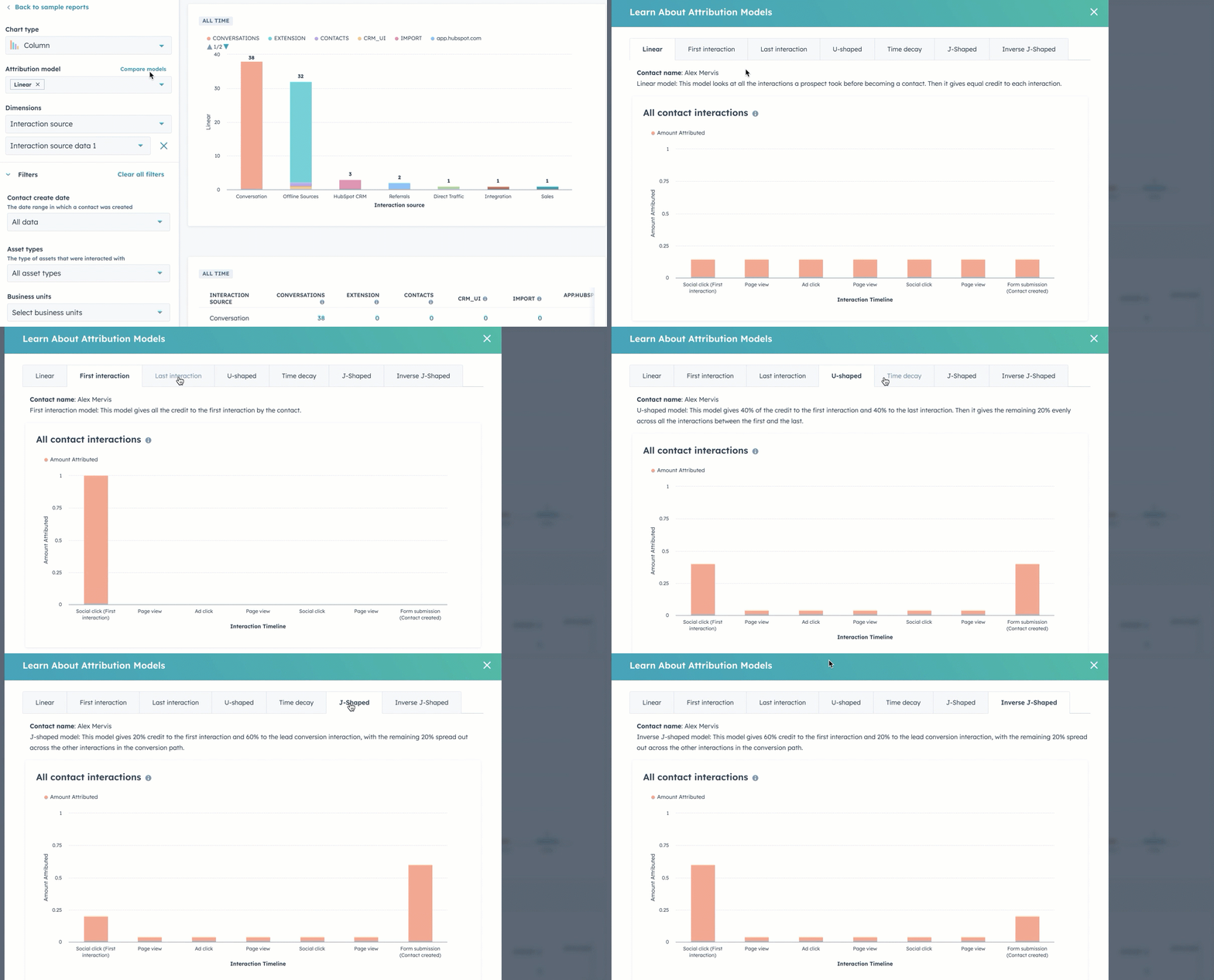
Ideal fit: HubSpot first teams that need quick reporting.
Watchouts: Limited model flexibility and API constraints.
No custom weights and limited ad types via API. Practitioners note constraints.

Bottom line: Excellent CRM and MAP. Not a complete LinkedIn conversion tracker.


Community intelligence. Pulls LinkedIn engagement, Slack, social, and product signals to surface warm accounts.
No. No account-level conversion tracking, so the picture is incomplete.
Here’s what’s great about CommonRoom:

Turn raw signups into company profiles that map back to accounts.

Ideal fit: Community-led growth programs that complement paid.
Watchouts: Not a conversion tracker.
Bottom line: Terrific for community-led growth. Not a LinkedIn conversion tracker.

Starter from $999/mo. Team from $1,999/mo. Enterprise custom.

Data hub for attribution across 300+ sources. Great normalisation and BI exports.
No. Needs native LinkedIn conversion ingest. Leans on reverse IP for grouping. Manual steps for ABM conversion truth.

Ideal fit: Analysts who want a flexible model layer.
Watchouts: Not ABM first for LinkedIn.
Bottom line: Excellent model layer. Not an ABM-first LinkedIn conversion tracker.

Free for 1 source and 30-day history. Basic $19. Standard $99. Plus $249. Professional $499. Enterprise custom.
Demandbase, HockeyStack, Terminus, and Factors.ai work well when you are running larger programs with multi-channel scope and deep controls. LeadsRx does not use the LinkedIn API. HubSpot Attribution is click and contact-centric. 6Sense focuses on targeting and visits over unified Tag and CAPI conversions. CommonRoom surfaces community engagement, not conversions. Windsor.ai is a stellar data layer, not an ABM first choice.
If you want a cost-conscious tool that still nails LinkedIn ad conversion tracking at the account level, start with ZenABM. It records company-level exposure, unifies Insight Tag and CAPI with offline CRM events, writes properties into HubSpot, and shows which campaigns drove which conversions, even when nobody clicked. Book a ZenABM demo to see how the best LinkedIn ad conversion tracking tools should operate in practice.
