

©2026 ZenABM - All Rights Reserved.

In this guide, I have compared Influ2 vs. LinkedScope on features, pricing and ABM fit so your marketing and sales teams can quickly see which platform aligns with their ABM motion.
I have also discussed how ZenABM can work as a lean LinkedIn-first alternative or serve as a complementary layer due to its unique features.
In case you want a quick Influ2 vs. LinkedScope comparison:
Category | Influ2 | LinkedScope |
|---|---|---|
Platform Type | Person based ABM advertising platform | LinkedIn first account level analytics and attribution tool |
Primary Focus | Individuals inside target accounts | Companies reached by LinkedIn ads |
Main Strength | Contact level visibility for sales | Company level LinkedIn ad transparency |
Core Use Case | Sales driven personalization | LinkedIn ABM measurement and attribution |
Intent Signals | Third party plus engagement | First party LinkedIn engagement only |
Advertising Channels | LinkedIn plus display networks | LinkedIn only |
CRM Integration | Yes | Yes |
Revenue Attribution | Influenced revenue | Deal matched LinkedIn attribution |
Pricing Transparency | Low | Not public |
Typical Cost Band | High | Mid to high |
A third option: ZenABM gives account-level LinkedIn ad engagement, pipeline dashboards, account scoring, ABM stages, CRM sync, first-party qualitative intent, automated BDR assignment, custom webhooks, an AI chatbot Zena that gives deep LinkedIn ABM analytics in natural language, and job title analytics starting at $59 per month.
Influ2 calls itself the first person-based ABM platform and focuses on getting ads in front of specific people inside your target accounts.
Influ2 is built around person-based advertising and giving sales contact-level insight.
Unlike many that operate at the account level, Influ2 shows ads to named individuals across major ad networks.
You can, for example, pick the CIO of Acme Corp and have them see ads on LinkedIn and later on news sites. The pitch is less waste on irrelevant employees.
Matching is not perfect, though. A Syft study found IP-based website visitor identification accuracy at roughly 42 percent.


Influ2 tracks impressions, clicks and visits per contact, so sales can see which people actually interacted and adjust outreach accordingly.

Influ2 also layers in third-party style signals, such as keyword searches and websites visited by those contacts.
Pro Tip: That kind of borrowed data is often noisy. Buying decisions are made at the account, not just from one person’s browsing. ZenABM focuses instead on first-party, company-level intent from your own LinkedIn ads. You see which companies engaged with which campaigns and how their interest shifts over time.

Influ2 lets you build simple journeys where ad sequences change as a contact clicks or ignores creatives, similar to automation workflows but focused on ads. In practice, the quality depends heavily on your logic and content library, and some users feel personalization could be more flexible.
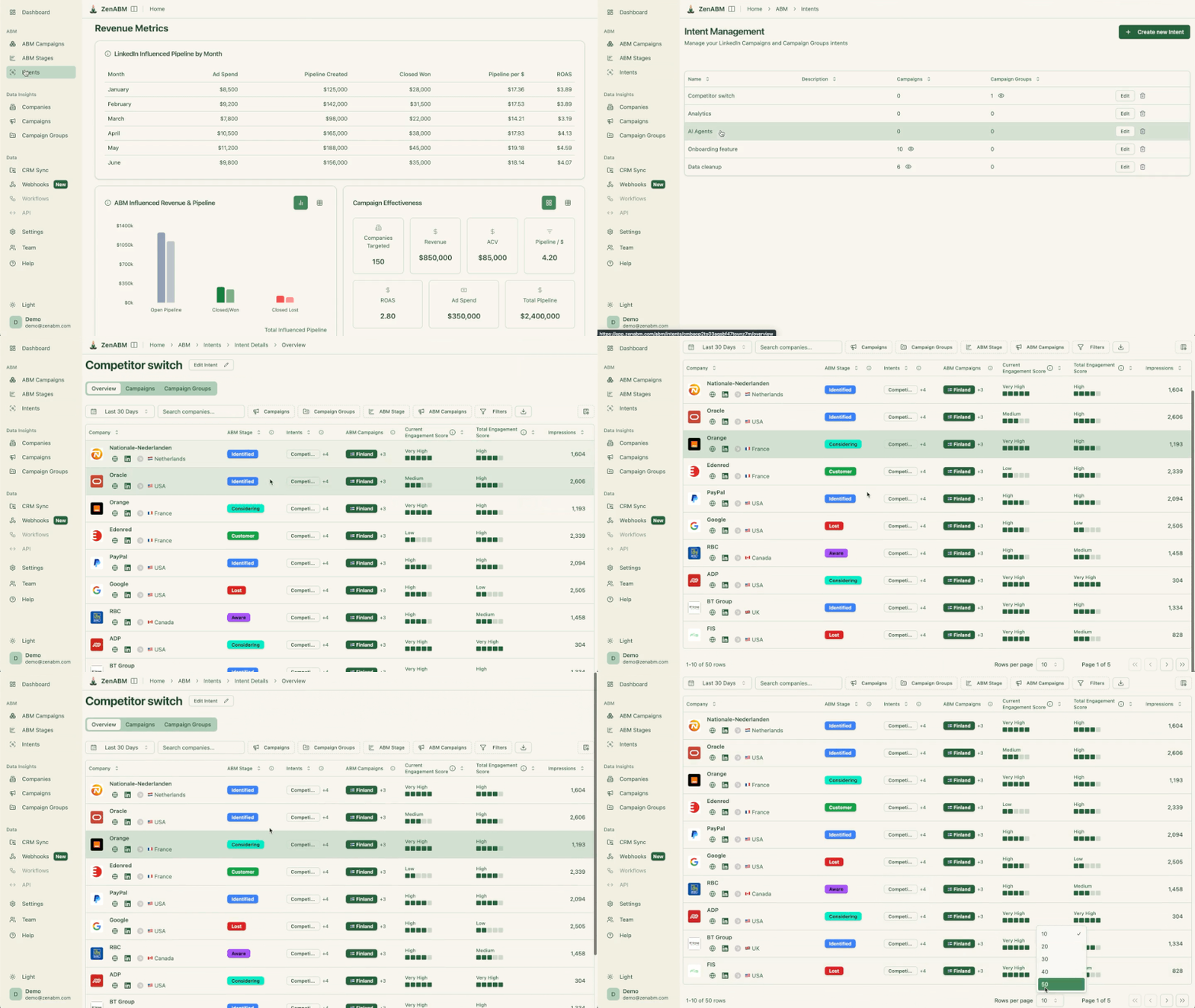
ZenABM also provides the LinkedIn ad engagement journey of each account:

Influ2 integrates with major CRMs and marketing platforms such as Salesforce, HubSpot, Marketo and Microsoft Dynamics, as well as sales tools like Outreach and Salesloft.
It can also feed alerts into Slack or Teams when a target account contact engages, and updates CRM records with ad engagement. For an ABM platform, typical implementation time of around a month is relatively quick.
ZenABM likewise pushes account scores and engagement into CRM company records as properties, starting at $59 per month.


Influ2 dashboards show how many buying groups were influenced, how many opportunities were opened or progressed and how much revenue is tied to people who saw or clicked ads, with revenue influence reports for leadership.
ZenABM, too, provides plug-and-play LinkedIn ABM analytics dashboards.
You can see everything from ad-influenced revenue and ROAS to top-engaged companies and campaign-level performance.

Moreover, ZenABM provides an AI chatbot called Zena that can answer all this nitty-gritty stuff in natural language!


Given the person-level targeting, privacy is front and center.
Influ2 promotes a privacy-first matching approach that is GDPR and CCPA compliant and is SOC 2 Type II certified, using hashed emails and first-party data instead of random third-party cookies.

Sales teams get a ranked list of hot accounts and the specific contacts inside them who are most engaged.
ZenABM also helps with sales enablement with its BDR routing feature: It tracks the ad engagement scores of accounts and assigns BDRs to hot ones in your CRM.


Influ2 pricing is hidden behind a “Contact us” form, but third-party chatter fills in some gaps:


For scrappy teams with a tight ad budget, the model is harder to justify.

Influ2 holds about 4.6 out of 5 on G2 across 150+ reviews.
Common positives:
Frequent drawbacks:
LinkedScope markets itself as a LinkedIn-centric account-based marketing attribution and optimization platform.
Let’s take a deeper look at its features and see its pricing and user reviews.
LinkedScope is essentially a LinkedIn Ads analytics layer + CRM connector with a sprinkling of intent scoring. I
It promises to tell you exactly which companies your LinkedIn ads reached, how they engaged, and whether they turned into pipeline or deals.
It even cooks up weekly prospect lists (accounts with high engagement metrics), so sales can pursue the most interested leads.
Let’s take a closer look at its core features:
It taps LinkedIn’s official API to pull all the company names and job titles exposed to your ads (no 25-title cap like Campaign Manager).

You can build target-account lists in LinkedScope and auto-sync them into LinkedIn campaigns in real time.

You also get dashboards for campaign reach, company penetration, and (via LinkedIn API) post-click engagement.

All data comes straight from your LinkedIn ad campaigns via the official API.
LinkedScope does not invent third-party insights.
Because of LinkedIn’s rules, it only shows you analytics that LinkedIn itself has, just presented more fully.
On top of raw stats, it computes a proprietary Intent Index: basically an engagement score (clicks, conversions, comments, etc.) to highlight “Spark Prospects.”
Sales reps supposedly get a prioritized list of accounts already warmed up by ads.
ZenABM, too, pulls company-level ad engagement data for each ad campaign and campaign group straight from LinkedIn’s official ads API:


LinkedScope matches the companies hit by your ads to deals in any CRM (HubSpot, Pipedrive, RD Station, Salesforce, etc.).
It does this by matching website domains or exact company names.
This lets you attribute revenue to LinkedIn Ads: e.g. “$8M in closed deals came from accounts we had advertised to,” as their case study graphic brags.
Essentially, LinkedScope shifts LinkedIn Ads analytics from top-of-funnel vanity into supposed bottom-line visibility.
It also pushes the LinkedIn reach/intent data into tools like Slack or Zapier via webhooks, so you can automate alerts or import lists of engaged accounts into other systems.
By the way, ZenABM also provides detailed plug-and-play account-based LinkedIn ad revenue attribution dashboards for a starting price of just $59/month.
It does that by matching ad-engaged companies to the deals in your CRM, just like LinkedScope.
But there’s a difference: ZenABM doesn’t just match website domains to exact company names, but uses advanced algorithms to ensure minor spelling differences, etc., don’t leave companies unmatched.

LinkedScope’s site doesn’t mention anything about LinkedScope pricing except the fact that the subscription is month-to-month with no contract, and you get a 15-day free trial with no credit card.
Since many enterprise ABM tools (Demandbase, 6sense, Terminus, etc.) run into the tens of thousands per year, it’s fair to wonder where LinkedScope sits on the spectrum.
My guess: it’s probably priced for mid-market marketers or agencies who spend heavily on LinkedIn. If it were dirt-cheap or free, I doubt they’d omit it so pointedly.
In lieu of official rates, I checked the usual place: G2.
No luck there either.
LinkedScope has zero reviews on G2 and no user-submitted pricing.
Reddit and TrustRadius turned up nothing either.
In short, there’s no independent word on what it costs or whether any budget-conscious marketer ever questioned the bill.
If you are looking for a leaner yet effective tool, I present ZenABM, starting at just $59/month.

ZenABM offers account-level LinkedIn ad engagement tracking, ad engagement-to-pipeline analytics with plug-and-play dashboards, account scoring, ABM stage tracking, CRM sync, first-party qualitative intent data, automated assignment of BDRs to high-priority accounts, custom webhooks, an AI chatbot, impression capping, ABM objects, and ad engagement tracking at the job title level.
Influ2 vs. LinkedScope differences are summarized here (along with ZenABM for perspective).
Dimension | Influ2 | LinkedScope | ZenABM |
|---|---|---|---|
Product Philosophy | Person based advertising | LinkedIn attribution layer | LinkedIn first execution ABM |
Primary ABM Unit | Individuals | Companies | Companies and buying groups |
Core Question Answered | Which person saw my ads | Which companies saw my ads | Which companies are moving toward revenue |
Intent Data Source | Mixed third and first party | Pure first party LinkedIn engagement | First party LinkedIn engagement with campaign intent |
Signal Quality | Inconsistent at scale | High but surface level | High and contextual |
Account Level Scoring | Derived from contacts | Basic engagement index | Native configurable scoring |
ABM Stage Tracking | No | No | Yes |
Sales Activation | Contact alerts | Company lists | Automatic BDR routing |
CRM Sync Depth | Engagement updates | Deal matching | Bi directional workflows |
Revenue Attribution | Influenced revenue only | LinkedIn sourced and influenced deals | Spend aware deal level attribution |
LinkedIn Specialization | Partial | Strong | Complete |
Analytics Depth | Executive summaries | Campaign and company views | Campaign to revenue dashboards |
AI Layer | Minimal | Light insights | Natural language analytics |
Implementation Effort | Medium | Low | Low |
Time to Value | Weeks | Days | Days |
Pricing Model | Per contact credit | Opaque subscription | Flat SaaS pricing |
Typical Annual Cost | Tens of thousands | Likely tens of thousands | Under six thousand |
Best Fit | Enterprise sales led ABM | LinkedIn attribution focused teams | LinkedIn first ABM teams |
After we have discussed Influ2 vs. LinkedScope for ABM, let’s visit the third option: ZenABM.
ZenABM is built for teams that rely on LinkedIn as the primary ABM channel and want first-party accuracy, automation, and revenue visibility without the price or complexity of multi-channel suites.
Let’s look at its core features:
ZenABM connects to the official LinkedIn Ads API and captures account-level data for all campaigns so you can see which companies see, click, and engage with your ads.
Because this is first-party data from LinkedIn’s environment, it is more reliable than IP or cookie-based visitor ID.
A Syft study puts IP-based identification at around 42 percent accuracy.
ZenABM treats LinkedIn ad engagement itself as first-party intent. When several people in one company keep engaging with your ads, that is a strong buying signal without rented intent feeds.

ZenABM updates engagement scores as accounts interact with your ads across campaigns, so you can see who is heating up over short or long windows and let marketing and sales prioritize accounts that show real intent.
ZenABM also shows the full touchpoint timeline for each company:


ZenABM lets you define stages such as Identified, Aware, Engaged, Interested, and Opportunity and automatically places accounts in the right stage using scores and CRM data.
You control thresholds, and ZenABM tracks movement over time.


This gives you funnel visibility similar to larger suites, but powered by LinkedIn data.
ZenABM integrates bi-directionally with CRMs like HubSpot and adds Salesforce sync on higher tiers.
LinkedIn engagement data flows into the CRM as company-level properties:

Once an account crosses your score threshold, ZenABM updates the stage to Interested and automatically assigns a BDR.
ZenABM lets you derive intent topics from LinkedIn campaigns by tagging campaigns by feature, use case, or offer.
ZenABM then shows which accounts engage with which themes.
This is clean, first-party intent from owned interactions.
You can push these topics into your CRM, so sales and marketing can tailor outreach to what each company has actually explored.

ZenABM ships with dashboards that connect LinkedIn ads to account engagement, stage movement, and revenue.


ZenABM shows which job titles engage with your creatives and gives dwell time and video funnel analytics.

ZenABM provides its AI chatbot called Zena that basically answers all you want from ZenABM in natural language.
You can ask Zena open-ended questions like you would a smart analyst and get company-level answers about:
Under the hood, Zena combines OpenAI with a library of carefully designed prompts and endpoints to join ad engagement, spend and CRM deals so it can explain which campaigns drove pipeline, which accounts turned into opportunities, which formats perform best and which companies are high intent but untouched by sales.
Instead of exporting spreadsheets and stitching pivot tables, you get plain language insights, ready to drop into strategy reviews, weekly sales standups or executive updates.

ZenABM’s custom webhooks let you push events into your stack, for example, Slack alerts, enrichment flows, or other ops automations.

Most tools treat each LinkedIn campaign separately. ZenABM lets you group several into one ABM campaign object so you can see performance across regions, personas, or creative clusters.
Instead of juggling fragmented reports in Campaign Manager, you see spend, pipeline, account movement, and ROAS for the entire initiative.
For agencies, ZenABM offers a multi-client workspace.
You can manage multiple ad accounts and clients in one environment, each with its own ABM strategy, dashboards, and reporting, instead of constantly switching accounts in Campaign Manager.

ZenABM pricing details:
hoose Influ2 if you believe buying decisions hinge on tracking named individuals and you can tolerate high cost and fuzzy identity resolution.
Choose LinkedScope if your biggest pain is proving LinkedIn Ads influenced pipeline and you are fine stopping at attribution.
Choose ZenABM if LinkedIn is your primary ABM channel and you need intent, scoring, sales activation, and revenue visibility in one system without enterprise pricing.
